



Explore More Possibilities for Your Business
Full-cycle scenario construction to meet your needs from App research, development, and release to operation.
Ready for your soaring growth
You change the Subtitle. You wait. Fourteen days later, rankings moved — but you still don't know if it was your edit, a competitor's update, or Apple's algorithm doing its own thing that week. If it didn't work, you're not just back to square one — you've burned two weeks a competitor didn't.
That's the actual cost of the old ASO workflow: not that it fails, but that it fails slowly, and you never learn why.
FoxData’s newly upgraded Keyword Optimization feature exists to remove that two-week blind spot. You see the projected impact of a metadata change before it ever touches your live listing — so a bad idea dies in a simulator, not in your rankings.
🔓 Free to use: FoxData offers free access to the Keyword Optimization, letting you explore all keyword possibilities before updating your App Store metadata.
|
Role |
Sound familiar? |
Start With |
|
You don't have paid budget to fall back on if a metadata change goes wrong — every character has to earn its place |
Goal: Increase Ranked Keywords |
|
|
ASO manager |
You've been asked "how do you know this will work?" before you were allowed to ship a change |
Metadata Simulator + Keyword Analysis |
|
Growth marketer |
Conversion rate looks fine on the dashboard, but ranked keyword count hasn't moved in a month |
Goal: Target New Audience/Category |
|
Brand / IP owner |
You've searched your own app name and seen a competitor's ad above your listing |
Goal: Brand Protect |
If any of those hit close to home, the next four steps are built around exactly that situation.
Apple and Google now weight relevance to user intent, balanced keyword distribution, conversion performance, and competitive positioning — not raw keyword density.
Stuffing keywords into a Subtitle doesn't just fail to help anymore; it actively dilutes the fields that could be working harder for you. Testing before you publish isn't a nice-to-have— it's the difference between a change that moves rankings and one that just moves words around while your competitor's listing keeps climbing.
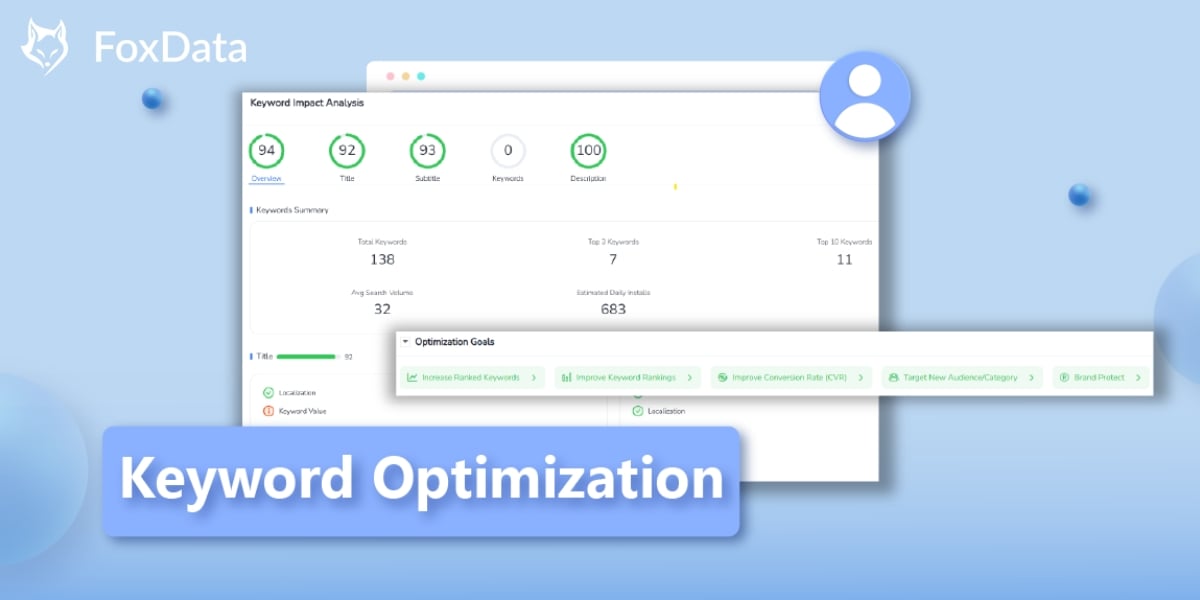
Before you touch a single field, decide what you're actually trying to move— this choice shapes every suggestion FoxData generates from here on, so it's worth 30 seconds of honesty about what's actually stuck:
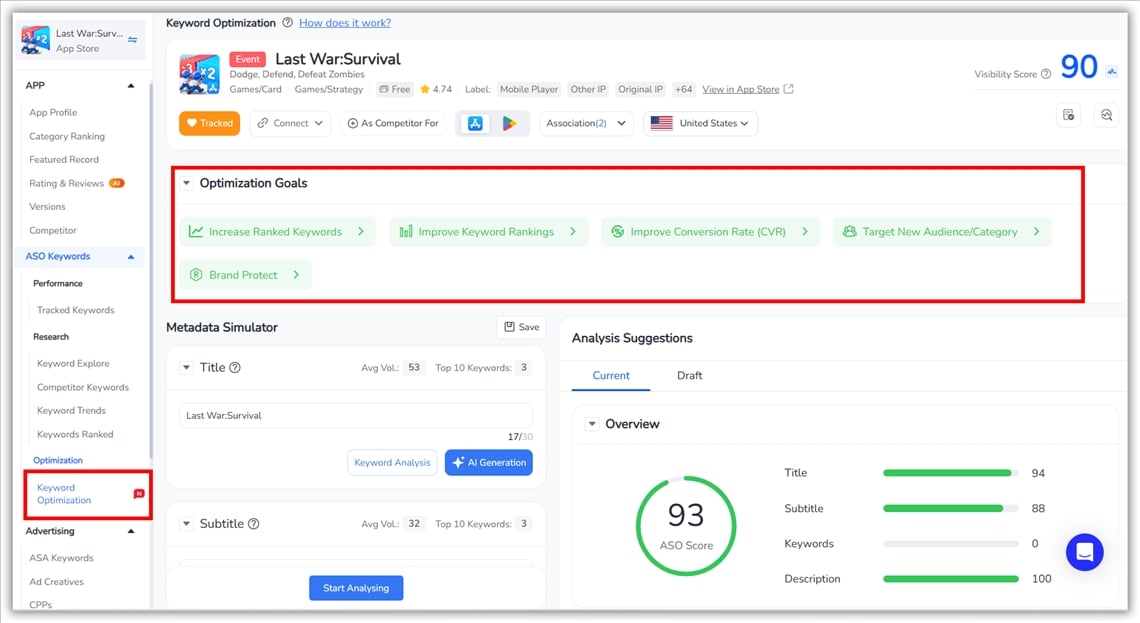
✅ Increase Ranked Keywords – Expand the total number of keywords your app ranks for.
✅ Improve Keyword Rankings – Boost rankings for keywords your app already covers.
✅ Improve Conversion Rate (CVR) – Align metadata with user intent to increase installs.
✅ Target New Audience/Category – Find keywords that unlock new user segments.
✅ Brand Protect – Secure branded keywords and minimize competitor traffic.
Not sure which one? If your install count is fine but growth has flattened, it's usually "Increase Ranked Keywords." If installs are the problem but traffic looks healthy, it's "Improve Conversion Rate." FoxData's AI generates metadata suggestions tailored to whichever goal you pick — this isn't generic keyword editing, it's ASO strategy simulation with a specific outcome in mind.
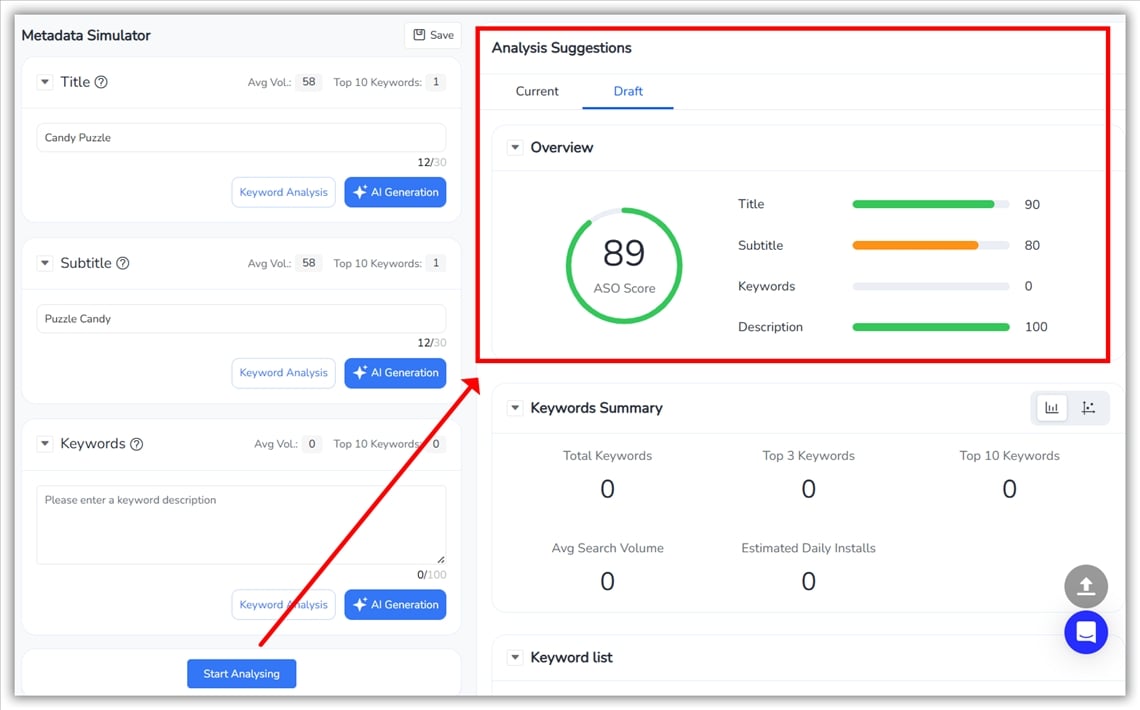
The Simulator loads your app's live Title, Subtitle, Description, and Keywords, so every test starts from your real listing, not a blank template. Above each field you'll see covered keywords, average search volume, and Top 10 keyword count — a fast read on which field is underperforming.
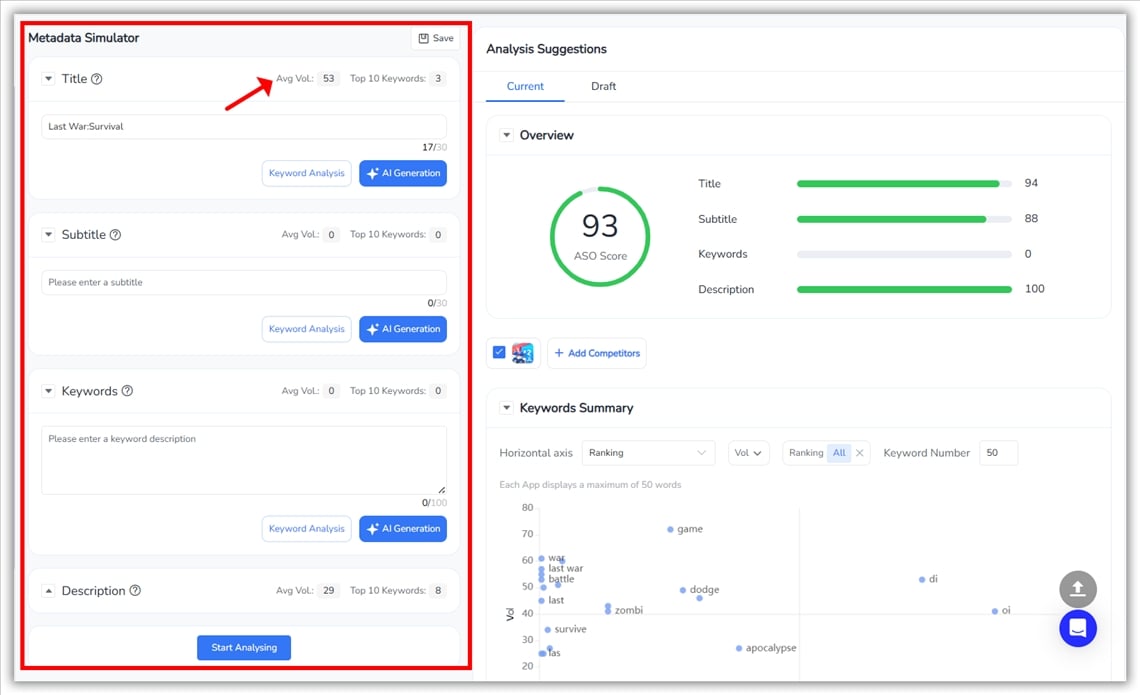
Two core tools turn data into actionable optimization insights:
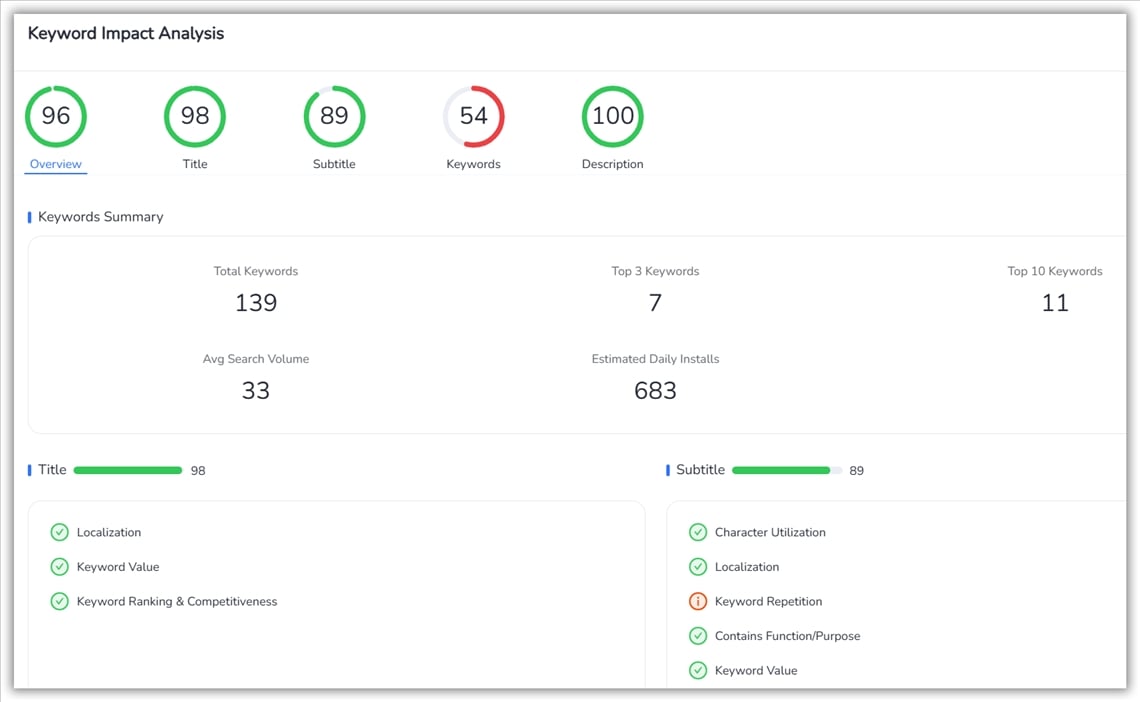
Keyword Analysis opens a detailed scorecard: an ASO Score for the overall listing plus individual scores for Title, Subtitle, Keywords, and Description, keyword count in Top 3 and Top 10, average search volume, and estimated installs driven by your current keyword set. Each field is broken down further by character utilization, localization quality, keyword repetition rate, functional coverage, and keyword value.
Read it like this: if one field's score is dragging down the overall ASO Score, that's your starting point — not the field you personally think needs work, but the one the data says does
AI Generation drafts optimized copy for a specific field based on your chosen goal, current performance, keyword demand and competition, and relevance. Every suggestion is fully editable — it speeds up iteration, it doesn't replace your judgment.
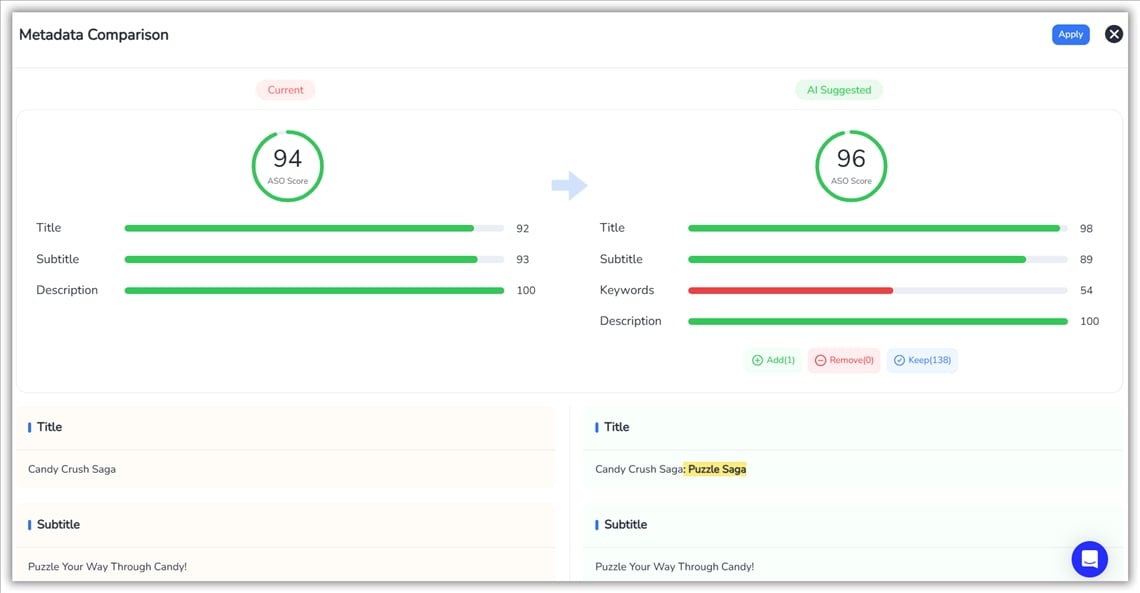
Every suggestion is fully editable. This tool accelerates iteration, it doesn’t replace your strategy.
Click Start Analysing once you've refined a field or two. FoxData recalculates your ASO Score and Visibility Score so you can see, in numbers, whether the draft actually beats what's currently live — before it goes anywhere near the App Store.
This is the step that replaces "hope." If the score doesn't move, you've lost nothing — you edit again. Compare that to finding out two weeks from now.
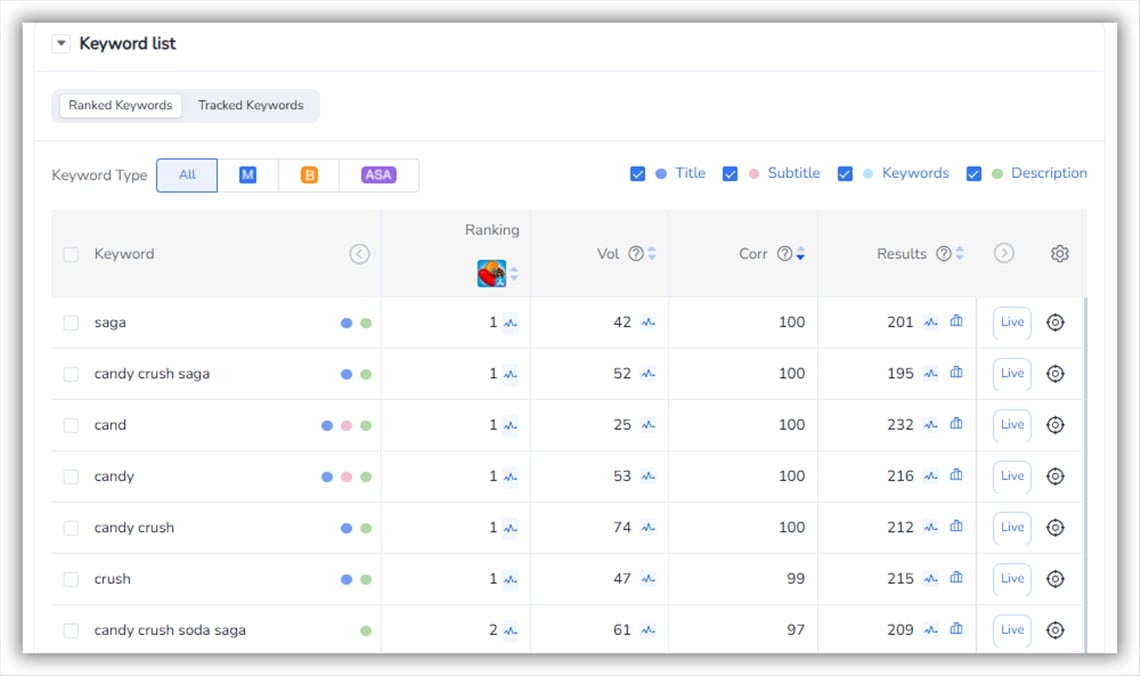
A complete table of every metadata keyword — ranking, search volume, result count, and how often the term appears across your own metadata — so you can spot missing high-value terms, catch overused ones, and balance coverage against competition without stuffing.
👉 Explore the All-New FoxData ASO/ ASA Module — Smarter ASO, Smoother Workflow
A mid-size utility app had been stuck around position 15–20 for its core category term for over a month. The team's first guess was the Description — it was the field they'd touched least recently, so it felt like the obvious suspect. One AI Generation pass on the Description barely moved the projected ASO Score.
Running Keyword Analysis on the whole listing showed the real problem was somewhere else: the Subtitle was repeating a term already saturating the Title, while a mid-volume synonym competitors were ranking for had zero coverage anywhere. A second AI Generation pass, this time on the Subtitle and targeting the "Improve Keyword Rankings" goal, added the missing synonym and cut the repeated term. The Simulator's before/after comparison showed the ASO Score move up before the change ever touched the live listing — the team shipped it with a number behind the decision instead of a hunch, and without burning another two-week cycle chasing the wrong field first.
That's the actual mechanism behind "predictable": not that any one AI suggestion is guaranteed to work, but that a wrong guess costs you a minute in the simulator instead of two weeks on your live listing.
Keyword Optimization and the Metadata Simulator are free on every plan — run them on your app right now with no commitment.
What scales with plan tier is depth and volume, and it's worth knowing where the free tier stops before you hit the wall mid-project: Standard ($59/mo) covers keyword tracking for up to 500 keywords across 10 apps; Growth ($159/mo) raises that ceiling and adds cross-market performance tracking so the same optimization workflow runs across every country you operate in; Pro ($399/mo) layers in ASA keyword intelligence, so the keywords you just optimized organically can be cross-checked against what you — and your competitors — are bidding on in paid search. See the full plan breakdown.
A: Yes—smaller apps benefit most, since every keyword placement matters. You can simulate improvements before investing in paid traffic.
A: No — it connects research to execution. Use Keywords Research to find candidate terms, then bring them into Keyword Optimization to test them against your live metadata.
A: Yes—you can test metadata changes, compare ASO Scores, and check projected visibility before publishing, reducing ranking risk.
A: Run a full pass after any store update or metadata change, and a lighter monthly check even when nothing's changed — rankings and competitor metadata shift underneath you even when your own listing doesn't.
A: Yes, FoxData provides detailed tutorials and guides in the FoxData blogs or Help Center to help you make the most of this feature.
Somewhere right now, a competitor is testing a metadata change against your ranking position. The only question is whether they're guessing or simulating first.
© 2020-2026 FoxData. All Rights Reserved.