


Explore More Possibilities for Your Business
Full-cycle scenario construction to meet your needs from App research, development, and release to operation.
Ready for your soaring growth
It's Monday morning and someone asks why your app slipped for the one keyword everyone cares about. Your honest answer is "I'd have to check." So you open three tabs, dig out last quarter's spreadsheet, and twenty minutes later you still can't say what changed, or what your closest competitor did differently.
Most FoxData accounts are created in a burst of optimism and then abandoned somewhere around the third tab. Not because the data isn't there. Because nobody hands you five quiet minutes on a Tuesday and says "here's where to click first."
This post is those five minutes.
No feature tour. No 40-screen walkthrough. Just the shortest path from I have an account to oh, that's interesting — the handful of clicks that show you something real about your app instead of a dashboard you'll feel guilty about ignoring.
By minute five you'll have three things you can use on Monday: a baseline to measure every future change against, three keywords where one metadata tweak could move you onto page one, and three gaps your strongest rival is exploiting. That's it. That's the whole onboarding.
The short version: sign up free, add your app by name or store ID, open its App Profile to see downloads, ratings and ranked keywords, scan Keywords Ranked for quick wins, compare one competitor in Competitor Keywords, then track the keywords you care about. Five minutes, free to start, no sales call.
The steps are the same for everyone. What you'll do with the result is not:
Not sure you need a paid tool at all? Fair question. The free ASO tools cover a one-off check. Paying starts to make sense when you look at rankings every week, which is what the 7-day trial plan further down is built to test.
Create your free FoxData account first (it takes about a minute), then log in and search for your app by name — or paste its App Store ID if the name is common (searching "Budget" is nobody's idea of fun).
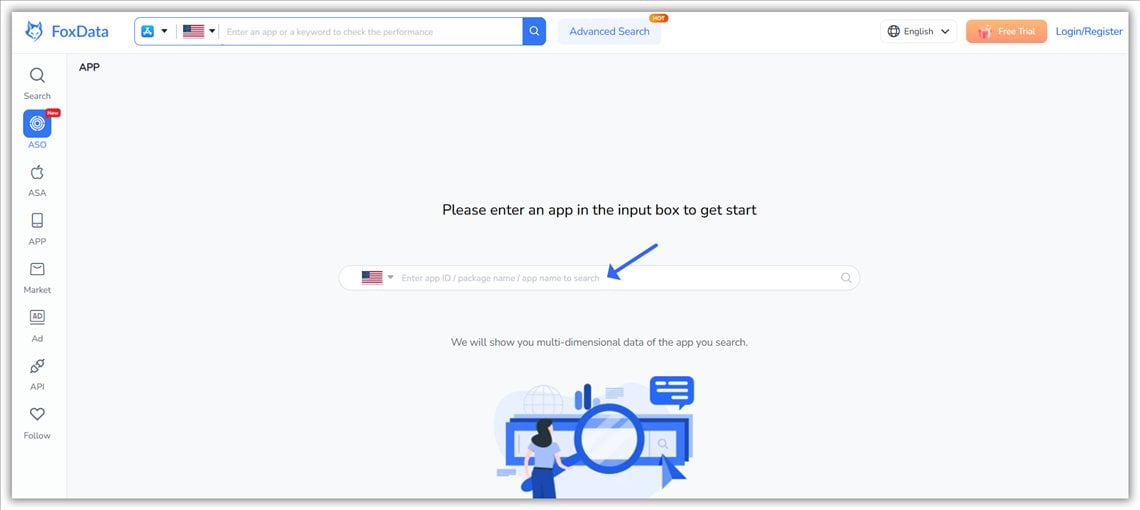
FoxData search box: enter an app name, package name or App Store ID
Any public app works here, and that's deliberate. Trying FoxData on a competitor's app before you commit to your own is a completely legitimate move. In fact, that's how I'd demo it to a skeptical friend: pull up a famous app and poke around.
Let's use Duolingo (App Store ID 570060128, US store). Its profile loads in moments: 4.7 stars across 5.5 million ratings, last updated October 21, 2026, live in 160+ storefronts. Everything on that page is exactly what a store visitor sees — plus the estimates they don't.
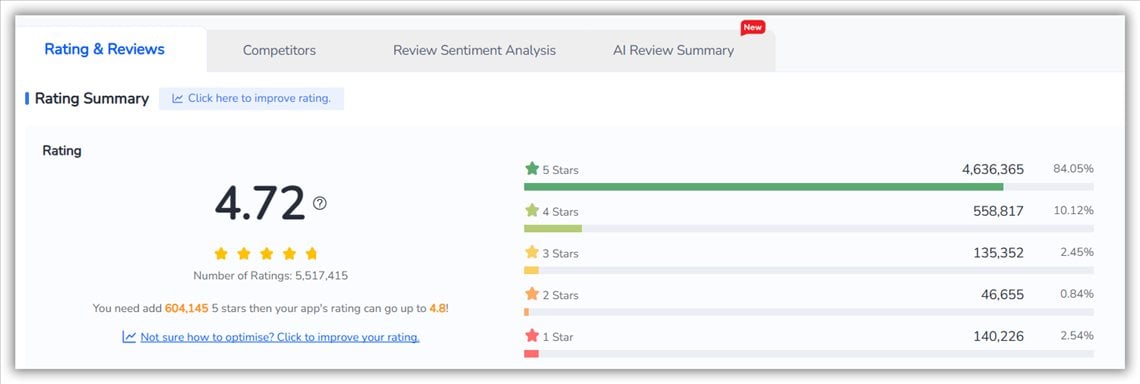
FoxData Rating & Reviews: Duolingo's rating summart on the US App Store
Those estimates are the point: downloads, ranking history, how your rating moved after each release, and the keywords driving it all.
Picture a solo developer who shipped a budgeting app on Friday and spends Monday wondering why nobody finds it. Adding the app takes seconds, and the profile answers the first honest question (is my metadata working at all?) before they've touched a single setting.
That's minute one. Your app is in the system, and everything downstream now has something to chew on.
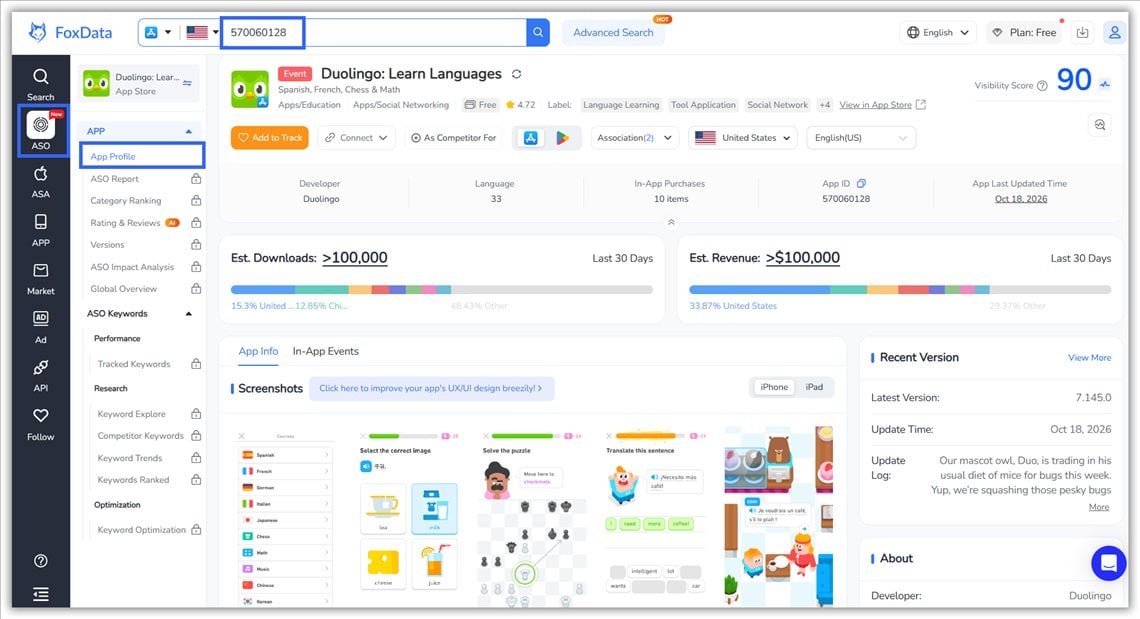
FoxData app search showing an app profile after adding it by App Store ID
🚀 See your own app's keyword profile in under a minute
Add your app and pull its live keyword profile on FoxData — free for 7 days. No sales call.
Add your app and see its ranked keywords →
The App Profile page is your app's medical chart: downloads and revenue estimates, rating trend, category ranking history, version history, the works.
You don't need to read all of it today. Two numbers matter in your first session:
Write both down, or screenshot them. In a week, they're the before-photo.
Why bother with a baseline? ASO is a feedback loop: measure, change one thing, measure again. Skip the first step and every later "improvement" is a guess, because you can't tell a real gain from ordinary ranking noise.
What to do with it: if rating velocity is negative, open Version Breakdown. It shows which release moved your rating, so you know whether a bug fix or a review prompt should come before any keyword work.
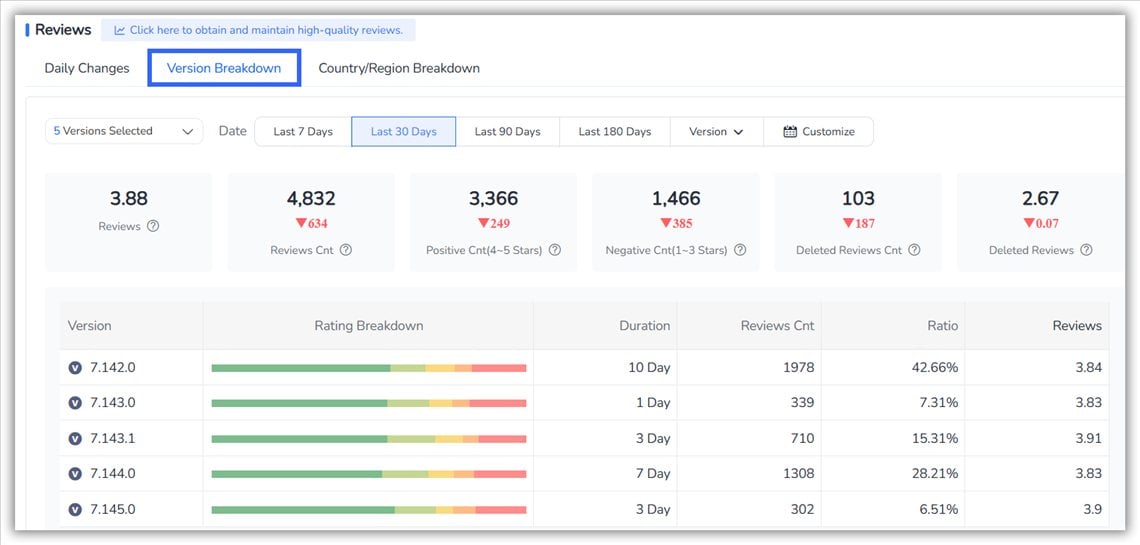
FoxData Version Breakdown: average rating and review volume for each recent release
Now the interesting part. Open Keywords Ranked from your app's profile and look at the list of terms you rank for.
Fair warning: it's a mess. Duolingo's list runs from obvious ones ("play duolingo", "english lessons", "learn portuguese free") to long-tail oddities in a dozen languages. Yours will look the same, and that mess is the point — buried in it are the five or ten terms actually worth fighting for.
FoxData scores each keyword so you can sort the gold from the gravel:
|
Metric |
What it tells you |
|
Search Volume |
How often the term gets searched |
|
Difficulty |
How hard it is to rank highly (1–100) |
|
Chance |
How easy the keyword is to rank in the top 10 (100 = easiest) |
|
Correlation |
How relevant the term is to your app (1–100) |
|
Max. Reach |
Estimated impressions if you ranked #1 (last 30 days) |
|
Installs |
Estimated organic installs the keyword brings your app |
|
Popularity |
How heavily advertisers bid on the term in Apple Search Ads (useful if you run ASA too) |
Why these filters? Every keyword is a bet on three things: demand (Search Volume), feasibility (Chance and Difficulty) and fit (Correlation). A high-volume term you have no chance of ranking for is vanity. A perfectly relevant term nobody searches is a rounding error. Quick wins sit where all three are decent.
The first-session shortcut: sort by Chance, filter for terms where you already rank 5–20, and where Difficulty is under about 40. Those are your quick wins — phrases where a subtitle tweak or a metadata refresh can move you onto page one within weeks. Note down three of them.
Stop at three. A short list gets shipped; a list of forty becomes a spreadsheet nobody opens. And resist the classic first-session mistake of sorting by Search Volume and chasing the biggest number. Win a few winnable terms first, then go after volume.
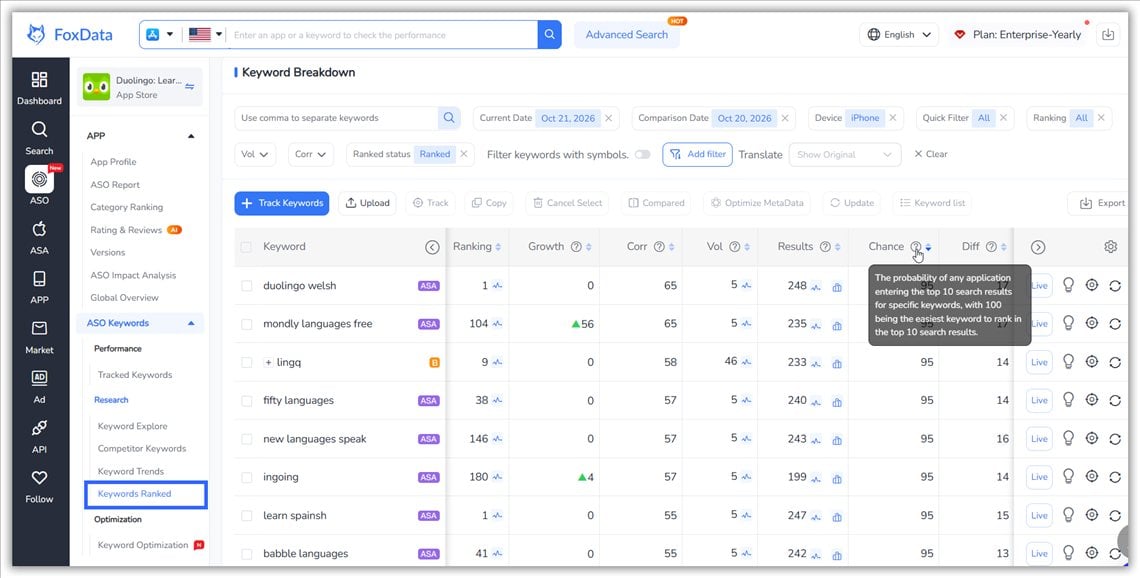
FoxData Keywords Ranked list sorted by Chance to find quick-win keywords
Not sure what a good list looks like? Add Duolingo as in Minute 1 and scroll its Keywords Ranked tab. It's exactly what your own report will look like, and it takes under a minute to try.
Keyword lists get fun when you compare them. Open Competitor Keywords, add a rival, and look at the overlap: terms they rank for that you don't — ideally filtered to the ones with real volume.
Choose the app a user would realistically install instead of yours, usually one or two places above you in your category, not the category giant. Beating a giant is a five-year plan; beating the app one rung up is a sprint.
Here's the scale of what that comparison can reveal: Duolingo ranks for 15.1K keywords on the US App Store. LingoDeer, a smaller language-learning rival, ranks for 3.3K. That is more than four times the keyword footprint, and about 13.9K of Duolingo's terms are ones LingoDeer doesn't rank for at all.
You don't need to close a gap that size. You need to find the three keywords your strongest rival owns that you should own instead, and put them on next sprint's metadata list.
Say you run a meditation app and your closest rival ranks for "sleep sounds" and "bedtime stories" while you don't. That's no longer a mystery. It's a metadata task for next sprint, with a number attached.
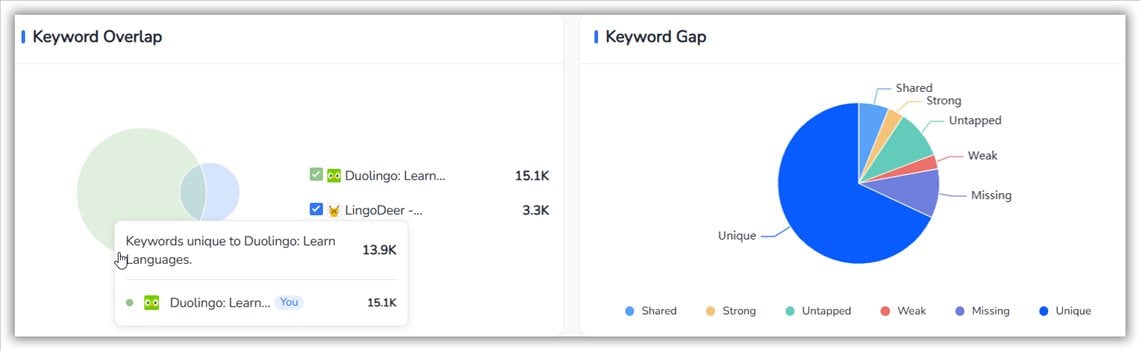
FoxData Competitor Keywords view showing shared and unique keywords between two apps
🔍 Find the keywords your closest rival owns
Compare your app with any rival in FoxData — free for 7 days. No sales call.
Compare your app with a competitor →
Last minute. Take the keywords you flagged — your quick wins plus your competitor's three — and add them to your tracked list in Tracked Keywords. FoxData keeps your ranking history from here on, so next Tuesday you can see what moved, not guess.
Next Tuesday, instead of "I think we moved up," you'll see which keywords moved, by how much, and on which day. If you shipped a metadata update in between, ASO Impact Analysis lines that change up against the ranking movement, so you learn what worked, not just that something did.
One optional extra before you edit your subtitle: paste the new metadata into Keyword Optimization and test the expected performance first. It's cheaper to find out a title idea is weak before it ships than two weeks after.
That's the full loop: app in → baseline read → quick wins found → rival benchmarked → tracking on. For most people this takes about five minutes, and it converts the platform from "a tool I should use" into "a numbers feed I actually check."
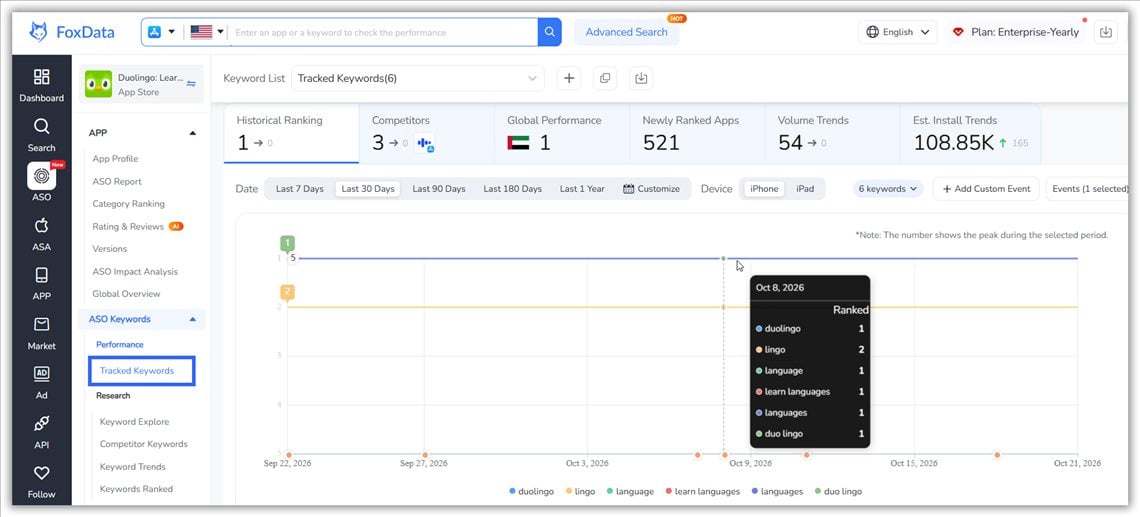
FoxData Tracked Keywords showing ranking history for saved keywords

A trial only tells you something if you use it on purpose. Here's a plan that fits around a normal workweek:
|
Day |
Do this |
You'll know |
|
Day 1 |
The five minutes above: add your app, read the baseline, flag three quick wins, benchmark one rival, track the keywords. |
Where you stand today, and what to fix first. |
|
Day 3 |
Draft a metadata change and test it in Keyword Optimization. Run an ASO Report on your listing for a full-picture check. |
Whether your subtitle idea is worth shipping. |
|
Day 5 |
Open Tracked Keywords and look for early movement. Add a second rival or another country. Running Apple Search Ads? Check Popularity and Bidding Apps on your tracked terms. |
Whether the data changes day to day, and who else is bidding on your terms. |
|
Day 7 |
Decide, using the rule below. |
Whether FoxData earns a place in your weekly routine. |
A simple decision rule for day 7. Subscribe if you opened FoxData more than once without being reminded, found at least one keyword you'd actually change your metadata for, and would miss the ranking history if it disappeared. If not, the free ASO tools still cover one-off checks, and that's a perfectly good outcome.
|
Plan |
Best for |
Price |
|
Solo developers validating an ASO workflow (1 seat, up to 3 apps, 90 tracked keywords) |
From $9.90/month |
|
|
Teams running a weekly ASO review across a few apps or markets |
$59/month |
|
|
Larger teams and agencies managing several apps, markets and clients |
$159/month |
Plans can be billed monthly, quarterly (5% off) or yearly (15% off). Pick the plan that covers what you actually did in your five minutes (one app, one rival, a short tracked list) and let real usage tell you when to move up. Full details are on the pricing page.
The first five minutes get you oriented. When you come back:
1. Run the ASO audit on your store listing. It checks the metadata basics — title, subtitle, keyword field — against current best practice. Takes about a minute and is part of the free ASO tools once you're signed in.Starting is free, but you do need an account. Create a free account and you can use the free ASO tools (keyword research, Top Charts, market data), add app profiles and set up tracking. The full platform runs on a 7-day free trial, with paid plans from $9.90/month and public pricing — no "contact sales" wall. Quarterly billing is 5% off and yearly billing 15% off.
Not for the free ASO tools: a free account is enough there. The 7-day trial of the full platform dows ask for payment details when you start it. You won't be charged until the trial ends, and you can cancel before then.
Yes — keyword rankings, download and revenue estimates, and competitor data across both stores, up to 152 countries. (It also tracks Steam and PlayStation charts, if your app lives beyond mobile.)
Yes. The App Store Data API exposes rankings, keywords, and app metadata for teams that want the data inside their own products or dashboards instead of checking a web UI.
Honestly? Same core job, different packaging: both stores in one dashboard, pricing published openly starting at $9.90/month, and a free-tools tier you can use before deciding anything. If a 5-minute test with your real data answers your question, that beats a 30-minute demo call.
Yes, and arguably more so. A low ranked-keywords count is a baseline, not a verdict. Use Keyword Explore and Competitor Keywords to find the terms worth targeting first, then track them from day one so every improvement is visible.
Yes. Popularity shows how heavily advertisers bid on a keyword, and Bidding Apps shows who is bidding on it. There is also a dedicated section for Apple Search Ads data analytics.
Match it to what you did in your five minutes: a small setup (up to 3 apps, 90 tracked keywords) points to Starter; a weekly team review across several apps or markets points to Standard or Growth. The plan table above has the details.
🚀 Ready for your first five minutes?
Five minutes now gives you a baseline, three quick wins and one rival to watch, plus a "before" to compare against next Tuesday.
Or start with the free ASO tools — create a free account to begin.
🔗 Further Reading:
© 2020-2026 FoxData. All Rights Reserved.