

Explore More Possibilities for Your Business
Full-cycle scenario construction to meet your needs from App research, development, and release to operation.
Ready for your soaring growth
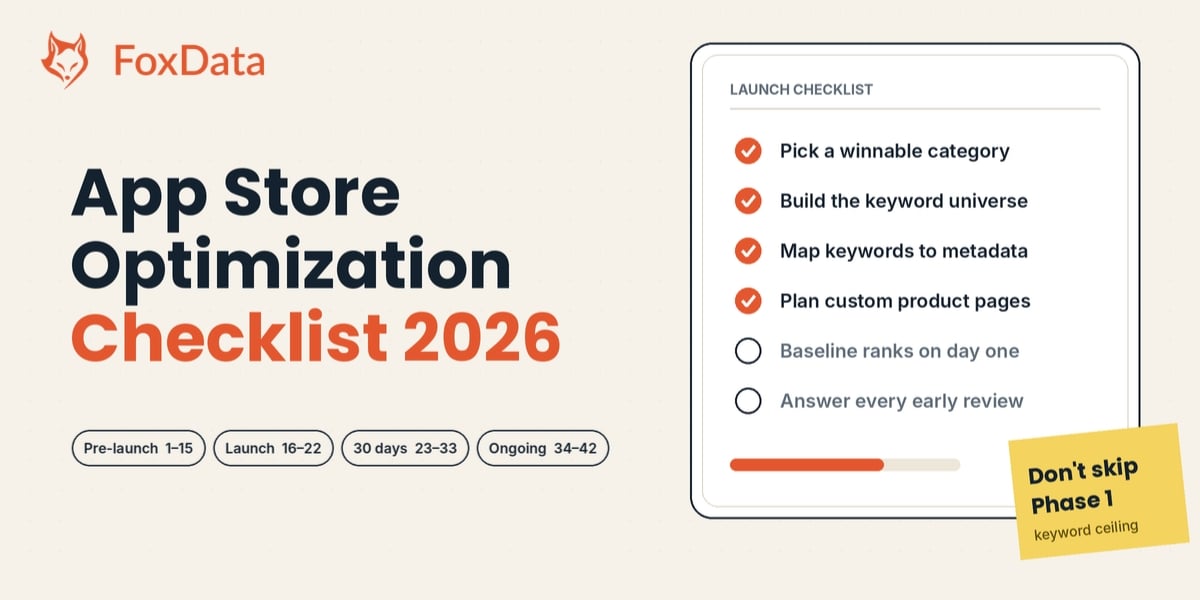
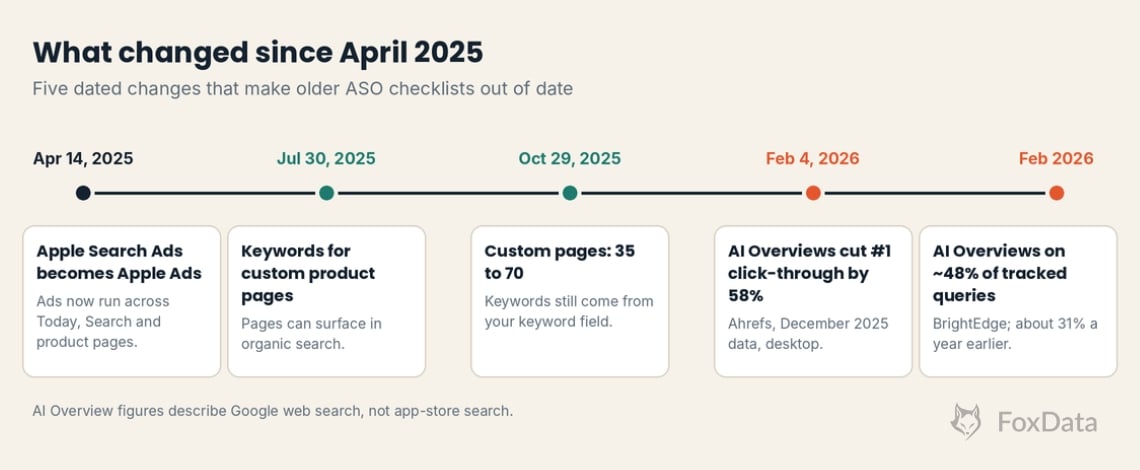
If your ASO checklist still starts and ends with the 100-character keyword field, it was written for an App Store that has moved on. Since October 29, 2025, Apple has let you publish up to 70 custom product pages per app (the old limit was 35), and since July 30, 2025 each page can carry its own assigned keywords. Google Play now says outright that crash and ANR rates above set thresholds can cut your visibility. And a lot of "which app should I use for…" questions never reach a store at all: BrightEdge measured Google AI Overviews on about 48% of the queries it tracked in February 2026.
This checklist has 42 steps in four phases: pre-launch, launch week, the first 30 days, and the ongoing loop. Every store limit in it was checked against Apple's and Google's documentation in November 2026, and each step that FoxData can do for you names the exact feature. Work through it top to bottom, or jump to the phase you're in. Just don't skip Phase 1, because that is where most of your keyword ceiling gets set.
An app store optimization (ASO) checklist is a phase-by-phase list of the work that decides where an app ranks in store search and how many visitors install it: keyword research, metadata, creatives, ratings and rank monitoring. In 2026 it also covers custom product pages, Google Play's stability thresholds and how AI assistants describe your app. The version below has 42 steps.
Black Friday note: FoxData's Black Friday 2026 offer opens on Thursday, November 19. The dates, the discounts and a price table are in the "Black Friday 2026 at FoxData" section near the end of this guide.
Four shifts matter this year. If your checklist predates them, it's optimizing for 2023.
🔎 Check what your own app ranks for before you read on
Add your app to FoxData, open Keywords Ranked and note how many keywords it ranks for and where. That number is your Phase 1 baseline, and you'll want it by step 15. It takes about five minutes. A free account is needed first; the full platform runs on a 7-day free trial, and no sales call is involved.
Add your app and see its ranked keywords →
|
Phase |
When |
Goal |
Where FoxData helps |
|
1. Pre-launch |
6–1 weeks before release |
Find demand you can win |
Top Charts, Keyword Explore, Competitor Keywords |
|
2. Launch week |
Days −3 to +7 |
Get indexed correctly, and reviewed well |
Tracked Keywords, Rating & Reviews |
|
3. First 30 days |
Weeks 1–4 |
Convert, iterate, compound |
Keyword Optimization, CPPs, Rating & Reviews |
|
4. Ongoing loop |
Monthly & quarterly |
Defend rankings, expand markets |
Keyword Trends, ASO Impact Analysis, Email Alerts, App Store Data API |
Plan note: Starter tracks up to 3 apps and 90 keywords. The dashboard, review sentiment, Email Alerts and data export start on Standard ($59/month). Keyword Trends, ASO Impact Analysis, and download and revenue estimates are on Growth ($159/month). The App Store Data API is not part of the 7-day trial. Limits change, so check the Pricing page for the current list.
Now the steps. Forty-two of them.
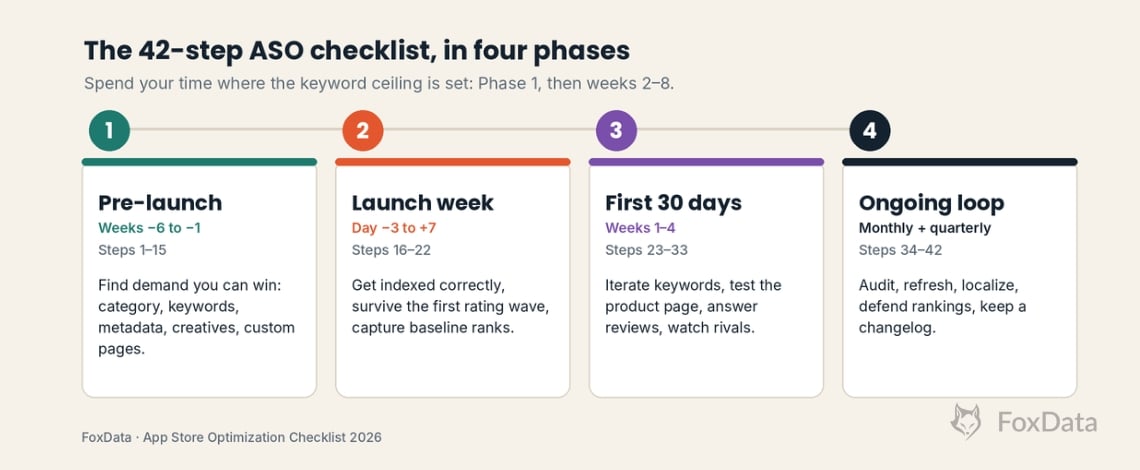
Pre-launch is where you decide which fights are winnable. Everything here happens before you submit a build.
☐ 1. Pick the category you can actually win. Pull download and revenue rankings for your category across 5–10 countries and look for the gap between "big" and "dominated." A top-20 plan in a mid-size category beats a top-200 plan in a crowded one. Tool: FoxData Top Charts (download and revenue rankings by category and country).
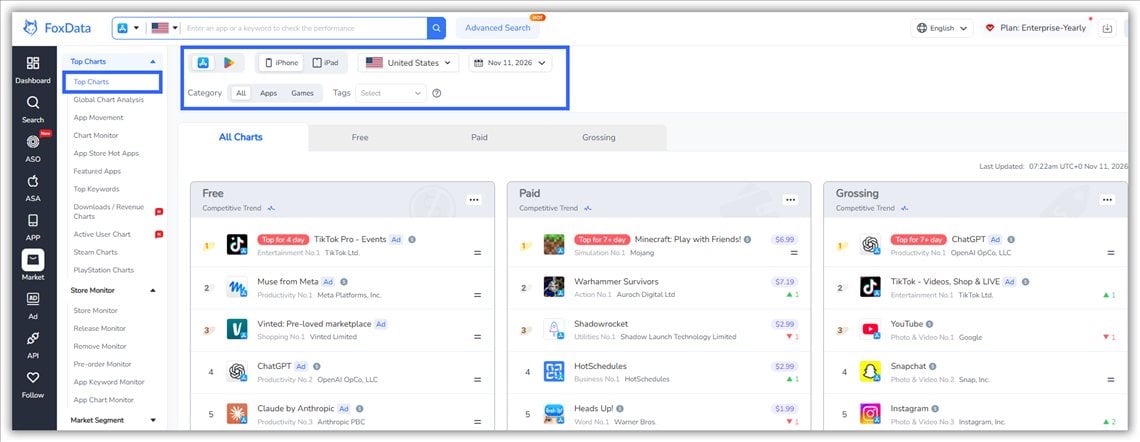
☐ 2. Study the top 20 charts in your category and sub-genre. Note who's climbing without paid UA; those apps found an organic angle worth studying. Open any riser's App Profile to see its ranked keywords, rating trend and version history.
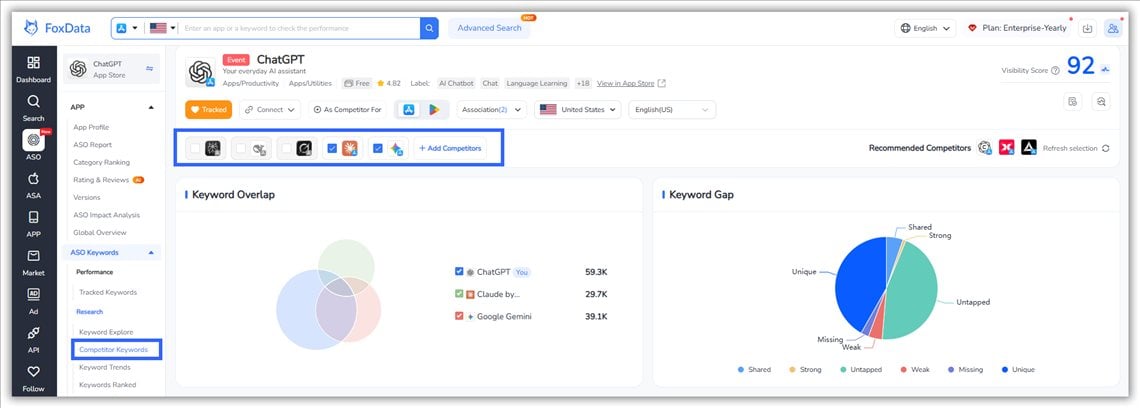
☐ 3. Shortlist five direct competitors, similar size, overlapping audience. Not the category giants; the apps you'll actually trade ranks with. Tool: FoxData Competitor Keywords. Add a rival and look at the keyword overlap; the apps that share the most terms with yours are your real competitors.
☐ 4. Build your keyword universe. Seed terms, feature words, and the question-style phrases people type ("app that tracks…"). Long-tails give a new app the best chance of ranking early. Tool: FoxData Keyword Explore, with search volume by country. The keyword list has tabs for AI Keywords, Long-Tail Keywords and Store Suggested terms.
☐ 5. Score every keyword on demand, difficulty and relevance. Relevance first: a popular keyword that doesn't match your app brings visitors who don't install. FoxData scores each term on Search Volume, Difficulty (1–100), Chance (how easy a top-10 spot is) and Correlation (relevance). A first-session shortcut: sort by Chance and keep terms where you already rank 5–20 with Difficulty under about 40. Those are the quick wins.
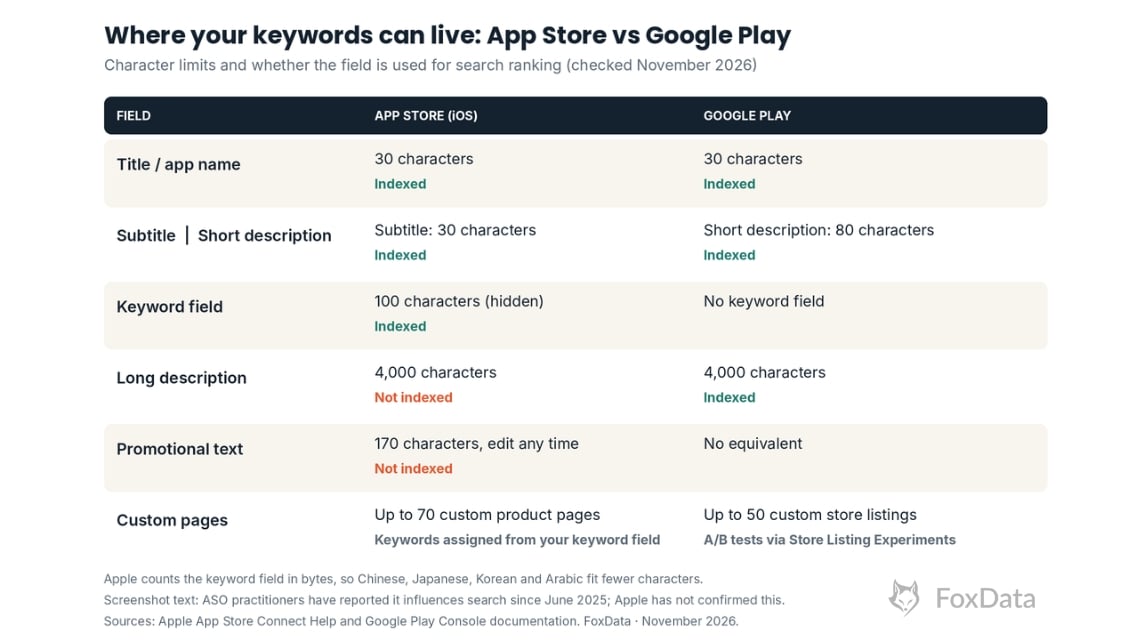
☐ 6. Map keywords to metadata slots. iOS: the title (30 characters), subtitle (30) and keyword field (100) are indexed. The 170-character promotional text and the 4,000-character description are not, so use them to convert, not to rank. Google Play: the title (30), short description (80) and long description (4,000) are all indexed. Don't repeat a word across iOS fields; Apple combines words from the title, subtitle and keyword field into search phrases, so a repeat only burns characters.
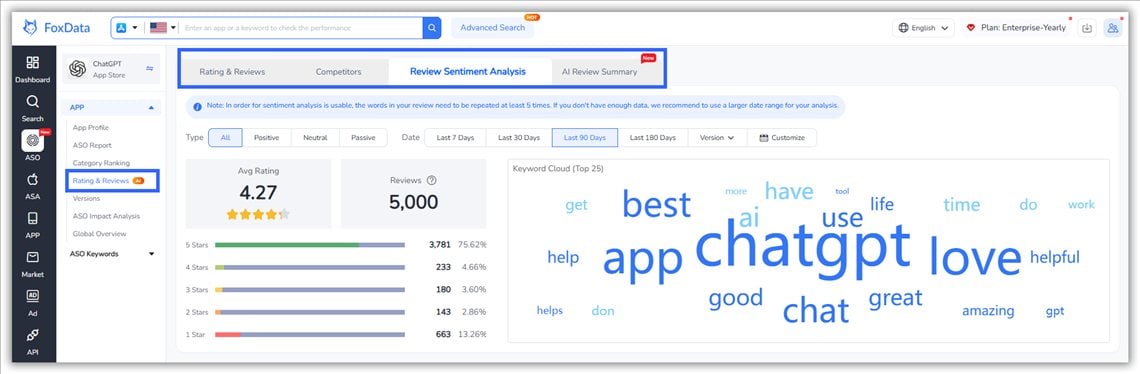
☐ 7. Mine competitor reviews for unmet demand. One-star reviews are free positioning research: "love it BUT…" is your feature list. Tool: FoxData Rating & Reviews, with sentiment analysis and AI Review Summary (Standard and above).
☐ 8. Write the Play long description for indexing and for people. Google's metadata policy rules out keyword stuffing, so mention each target phrase naturally and put the value proposition in the opening lines, which show before "Read more." A fixed keyword density target is folklore, not a documented rule.
☐ 9. Design the icon against the category's top 30, viewed at 60 pixels. If it looks like everything else, it converts like everything else.
☐ 10. Storyboard screenshots so the first two carry the whole value proposition. Many visitors never swipe to screenshot five. Write captions as real search phrases in plain, high-contrast text. ASO practitioners have reported since June 2025 that Apple reads screenshot text for search; Apple hasn't confirmed it, so treat it as a free extra, not a plan.
☐ 11. Plan a 15–30 second portrait video. Autoplay, muted, first frame = product in action, not a logo.
☐ 12. Plan custom product pages (iOS, up to 70) and custom store listings (Play, up to 50) around audiences and keyword clusters. Start with three to five pages; 70 is a ceiling, not a target. Remember each keyword combination can sit on only one iOS page. Say your budgeting app serves students and freelancers: that is two pages, two screenshot sets, two keyword clusters. Tool: FoxData CPPs. Background: Apple doubles the custom product page limit.
☐ 13. Localize metadata for your first wave of markets. Translating keywords, not just screenshots, is one of the highest-ROI moves in ASO, especially where global apps lazy-localize. Start with the title, subtitle and keyword field.
☐ 14. Wire up pre-registration (Google Play) or pre-order (iOS) so day one starts with a queue, not zero. Apple lets pre-orders open up to 180 days before launch.
☐ 15. Instrument your baselines: keyword ranks, listing conversion rate, D1/D7/D30 retention. You can't prove ASO ROI later without a "before." Tool: FoxData Tracked Keywords keeps ranking history from the day you add a keyword.
In FoxData's own 5-minute walkthrough (October 21, 2026), Duolingo ranked for about 15.1K keywords on the US App Store. LingoDeer, a smaller language-learning app, ranked for 3.3K, and roughly 13.9K of Duolingo's terms were ones LingoDeer didn't rank for at all. Nobody closes a gap like that. The useful move is to pick the three terms with decent volume and a Difficulty you can live with, and put them on next sprint's metadata list. Say you run a meditation app and your closest rival ranks for "sleep sounds" and "bedtime stories" while you rank for neither. That stops being a mystery and becomes a task for the next release.
🔍 Find the keywords your closest rival owns
Add your app and one rival in Competitor Keywords, filter for terms with real volume, and pick three for your next metadata update. A free account is needed first; the full platform runs on a 7-day free trial, and no sales call is involved.
Compare your app with a competitor →
Before you submit a build, you should have: three quick-win keywords chosen, a baseline recorded (ranked-keyword count and, for a live app, listing conversion rate), one custom page concept per audience, and your first-wave market list.
Launch week has one job: get indexed correctly and survive the first rating wave.
☐ 16. Submit early in the week. Reviews take time, rejections happen, and you want buffer before any launch-date commitments.
☐ 17. Verify indexing within 72 hours. Search your brand name and your primary keyword in each store. If you don't rank for your own brand, something is broken.
☐ 18. Fire the first ratings wave. Prompt for a review right after the "aha moment" (finished first workout, saved first file), never on open. Apple limits the system review prompt to three appearances per app in any 365 days, so don't spend them on day one. A new listing has almost nothing else to show, so early reviews carry a lot of weight with visitors.
☐ 19. Point external traffic at the listing. Press, socials, creator links, email. Practitioners report that concentrated early download velocity helps chart placement more than a slow dribble; neither store publishes the weighting.
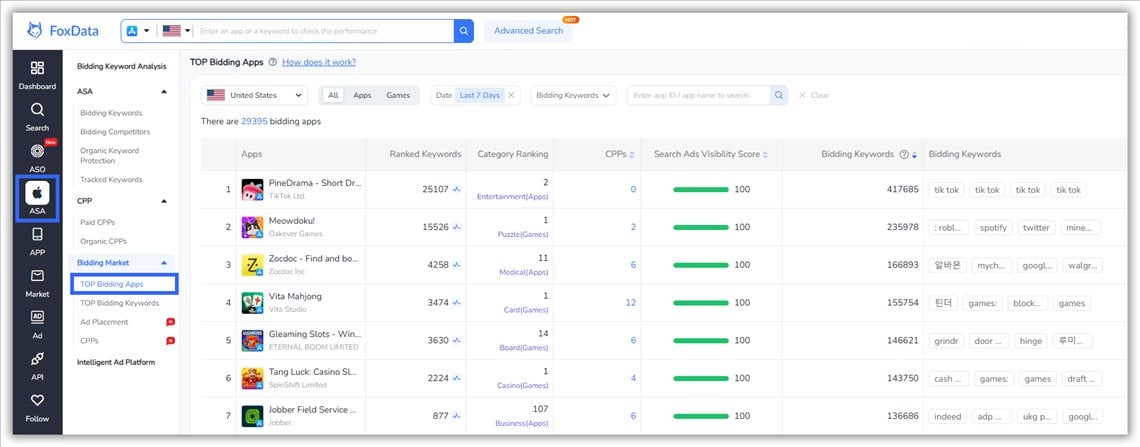
☐ 20. Run a small brand-keyword Apple Ads (called Apple Search Ads until April 14, 2025) and Google Ads campaign so competitors can't buy your name on day two. It also feeds impression data while organic rank matures. Tool: FoxData TOP Bidding Apps shows which apps bid most heavily on Apple Ads and which keywords they bid on.
☐ 21. Watch crashes and ANRs hourly and hotfix fast. Early one-star reviews from crashes haunt your average for months. On Google Play, stay under the Android vitals thresholds: 1.09% user-perceived crash rate and 0.47% ANR rate overall, 8% on any one phone model.
☐ 22. Capture baseline ranks for every target keyword the day you go live. This is your control group for everything in Phase 3. Tool: FoxData Tracked Keywords.
The first month is a keyword iteration loop plus a conversion lab. Weekly cadence.
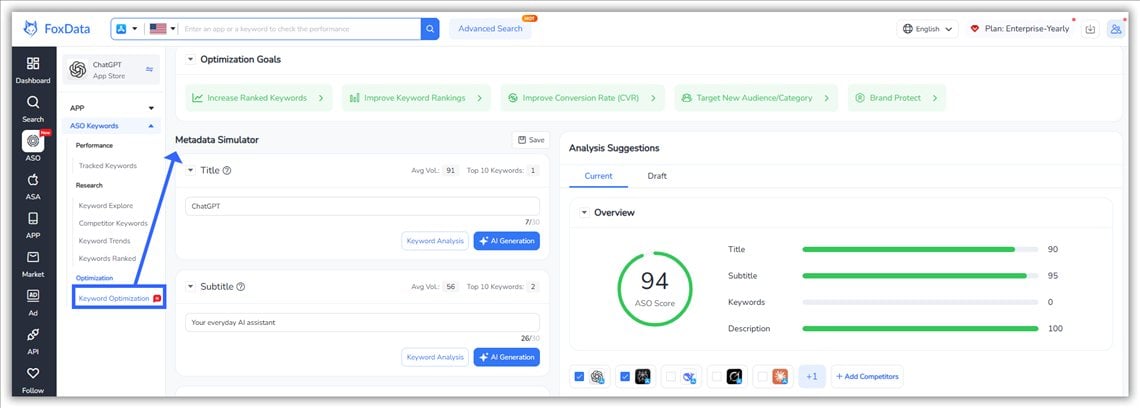
☐ 23. Refresh the iOS keyword field with real launch data. Drop terms that never moved, add long-tails your reviews and search suggestions reveal. Tool: FoxData Keyword Optimization. Paste the new metadata and preview the expected performance before you publish.
☐ 24. Retire keywords that haven't moved after two releases. They waste character budget, the scarcest resource in iOS ASO.
☐ 25. Launch your first product page A/B test. One variable at a time: icon, first screenshot, or video poster. Apple's Product Page Optimization tests up to three treatments against your original, and Google Play's Store Listing Experiments do the same job on Play. Where you can, judge winners on revenue or paying-subscriber conversion, because the page that wins on installs can lose on subscribers.
☐ 26. Build custom pages for your top campaigns and assign keywords to each. Start with three to five; check per-page conversion in App Store Connect's acquisition reports before adding more.
☐ 27. Answer every review in the early weeks, with a 24–48 hour SLA. Responses convert skeptics, users can update their rating after a reply, and they're indexed text that tells both the stores and AI engines what your app does.
☐ 28. Mine reviews weekly for feature words and feed them back into your metadata. Your users literally write your keyword list for you.
☐ 29. Track rating velocity, not just average. A 4.6 that gets 30 fresh reviews a week is easier to defend than a stale 4.8; both stores show recent ratings prominently. Tool: FoxData Rating & Reviews: sentiment, topics and a rating trend per version. AI Review Summary is included from Standard (2 a month; 15 on Growth).
☐ 30. Segment conversion rate by traffic source and country. "Average CVR" hides the market where your screenshots confuse everyone.
☐ 31. Fix the biggest D1 retention leak. Neither store documents retention as a ranking factor, but weak retention shows up in reviews and ratings within weeks, and those do feed visibility. Treat D1 as an ASO metric.
☐ 32. Pitch editorial featuring once the app is stable (crash-free, rating ≥ 4.5). On Apple, use Featuring Nominations in App Store Connect: Apple asks for at least two to three weeks' notice and recommends up to three months for wider consideration. Pitch the story, not the app.
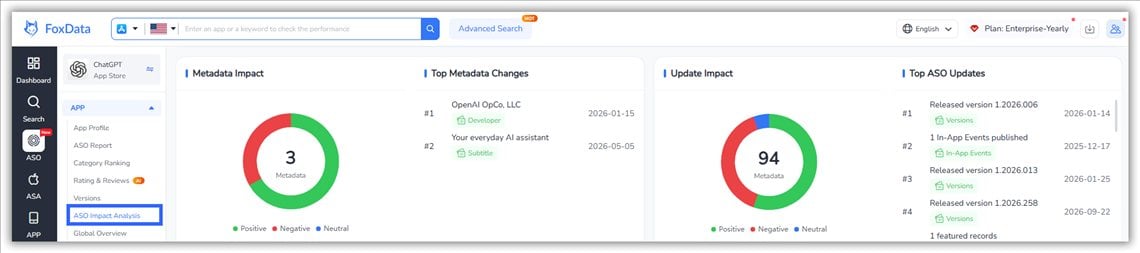
☐ 33. Watch your competitors: version ships, rating drops, sudden keyword gains. Their moves are your experiment ideas. Tool: FoxData Email Alerts (Standard and above) for big ranking changes; ASO Impact Analysis (Growth) lines up app updates, and competitor changes, against ranking movement.
Your reviews are a keyword goldmine: read a rival's reviews in FoxData's Rating & Reviews and see which features users praise, what they complain about, and what they say is missing. See how Rating & Reviews works →
ASO isn't a launch activity. It's a maintenance rhythm, and the apps that rank in 2026 treat it like one.
☐ 34. Monthly: run a rank and visibility audit. Top-10 keyword count, impression share vs. your competitor set, per country. Tool: FoxData Tracked Keywords.
☐ 35. Monthly: review sentiment trend check. A new complaint cluster is a churn warning before your retention dashboard shows it.
☐ 36. Quarterly: refresh metadata with seasonal keywords: Black Friday, New Year fitness, tax season, summer travel. Demand rotates; your keyword field should too. Timing matters: iOS keyword changes ship with a new app version, so for a seasonal peak you plan weeks ahead. If you're reading this in November, use what doesn't need a build: promotional text, custom product pages (they're reviewed separately from app updates) and in-app events.
☐ 37. Quarterly: creative refresh. Re-test the icon and screenshots every quarter. A listing that converted well against last year's top 30 may not against this year's.
☐ 38. Quarterly: localize into the next country tier, chosen by download and revenue potential, not by gut feel. Tool: FoxData Global Market Research and estimated download and revenue data (Growth).
☐ 39. Scan category trends monthly for new sub-genres and rising keywords. Early movers on a rising term buy it at pre-inflation prices. Tool: FoxData Keyword Trends (Growth) and Top Charts.
☐ 40. Re-bid your Apple Ads portfolios against organic overlap. Don't pay for keywords you already own organically; do defend the ones you don't. Tool: FoxData ASA Data Analytics.
☐ 41. Audit the web funnel quarterly. For most apps in 2026, a large share of "store" discovery starts on the open web and in AI answers. Keep your site's pricing, features and reviews crawlable, dated and structured, with Article, FAQPage or SoftwareApplication schema where it fits. A "last updated" date and a named author help too.
☐ 42. Keep an ASO changelog. Every metadata change, date, and observed effect. Compounding only works if you remember what compounded. Tool: FoxData ASO Impact Analysis (Growth) keeps the log next to your rankings; a spreadsheet works if you don't have it.
|
Dimension |
Pre-launch |
Post-launch |
|
Primary goal |
Find demand you can win |
Convert it, then compound it |
|
Keyword work |
Research, scoring, mapping |
Weekly iteration and defense |
|
Creative |
Built on competitor research |
Tested on real traffic |
|
Ratings |
Engineered prompt timing |
Answered, mined, tracked for velocity |
|
Biggest mistake |
Targeting head terms you can't rank for |
Going quiet after week 4 |
|
Cadence |
One deep pass before submission |
Weekly loop, quarterly refresh |
Neither store publishes a timeline, so these are practitioner rules of thumb. On Google Play, long-tail movement can show within days of a metadata update because the listing text is indexed directly. On the App Store, keyword changes ship with an app version, so allow a couple of weeks after approval before judging them. Conversion wins from creative tests show up as soon as the test has traffic; any visibility gain from better engagement builds over months. If nothing has moved in six weeks, check keyword difficulty and your conversion rate before you blame the algorithm.
A trial only tells you something if you use it on purpose. Here is a plan built around the steps above. The click-by-click version is in How to Get Started with FoxData in 5 Minutes.
|
Day |
Checklist steps |
What to do in FoxData |
You'll know |
|
Day 1 |
3, 4, 15 |
Add your app (or a rival's), read Keywords Ranked, add one rival in Competitor Keywords, and track the keywords you flagged in Tracked Keywords. |
Your baseline and a first list of quick wins. |
|
Days 2–3 |
5, 6, 7, 23 |
Sort keywords by Chance, draft a new title and subtitle, test the draft in Keyword Optimization, read a rival's review themes. |
Whether your metadata idea is worth shipping. |
|
Day 5 |
22, 33 |
Check Tracked Keywords for early movement, set up Email Alerts, add a second rival or country. |
Whether the data moves from day to day. |
|
Day 7 |
— |
Decide with the rule below. |
Whether FoxData earns a place in your weekly routine. |
A simple day-7 rule: subscribe if you opened FoxData more than once without a reminder, found at least one keyword you'd change your metadata for, and would miss the ranking history if it disappeared. If not, the free ASO tools still cover one-off checks, and that is a perfectly good outcome. Already know you'll need it every week? You can also go straight to a plan on the Pricing page.
What happens when you click "start": you create a free account, add your first app by name or store ID, and see its keyword profile. The 7-day trial of the full platform asks for payment details when you start it. You aren't charged until the trial ends, you can cancel before then, and each account gets one trial.
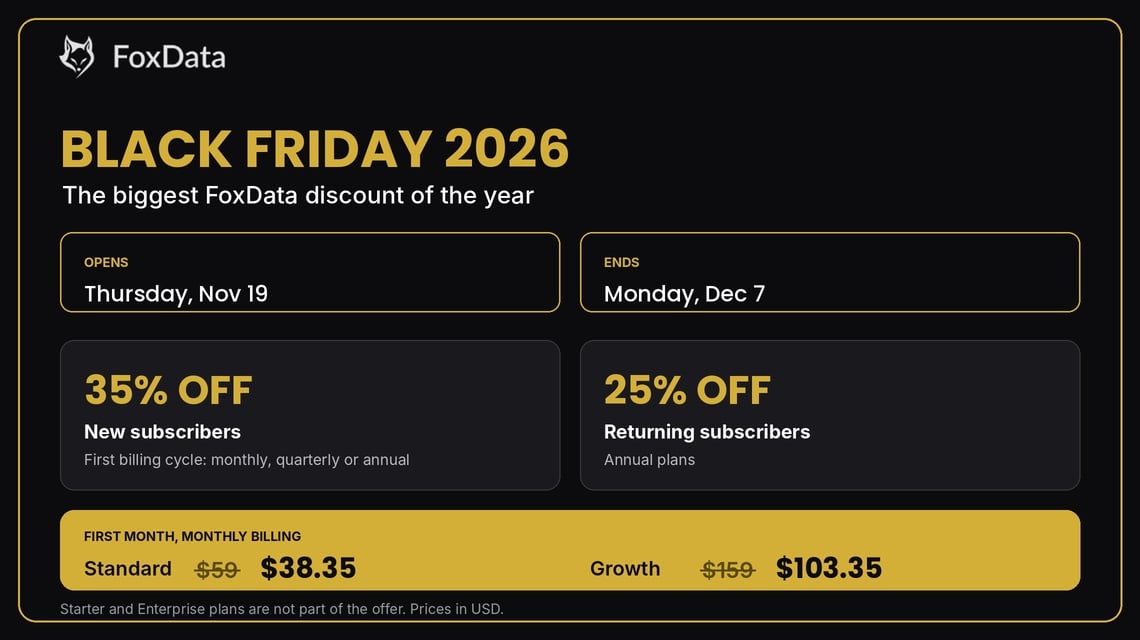
FoxData's Black Friday offer opens on Thursday, November 19 and ends on Monday, December 7. That is 18 days, and it covers Black Friday (November 27) and Cyber Monday (November 30). It is the biggest discount FoxData is running this year.
What's in it:
|
Plan |
Built for |
What you get |
Price now |
Black Friday, first month (new subscribers) |
|
Solo developers validating an ASO workflow |
1 seat, 3 apps, 90 keywords, 10 competitors |
$9.90/month |
Not part of the offer |
|
|
Teams running a weekly ASO review |
10 apps, 500 keywords, 50 competitors, dashboard, review sentiment, Email Alerts |
$59/month |
$38.35 |
|
|
Larger teams and agencies, several markets |
20 apps, 1,500 keywords, 200 competitors, 3 seats, Keyword Trends, ASO Impact Analysis, estimated downloads and revenue |
$159/month |
$103.35 |
|
|
Enterprise |
Custom needs |
Custom |
Talk to sales |
Not part of the offer |
Prices are in USD and use monthly billing; the 35% applies to the first billing cycle on any billing period. Quarterly billing is normally 5% off and yearly billing 15% off. On annual billing the first billing cycle is the whole first year, so that is where the discount is worth the most. Exact totals appear on the Pricing page when the offer opens.
Why it's worth putting in your calendar:
🏷️ See the plans before the prices drop
Open the Pricing page, compare Standard and Growth against your own checklist, and note which plan fits. On November 19 the Black Friday prices will show there. A free account is needed first, and no sales call is involved.
See current plans and prices →
What is an ASO checklist?
A sequenced list of every app store optimization task, from market sizing and keyword research to metadata, creatives, ratings and rank monitoring, grouped by launch phase so nothing ships unoptimized. The 2026 version above has 42 steps across four phases and also covers custom product pages, Google Play stability thresholds and AI-assistant visibility.
What are the App Store ranking factors in 2026?
Apple describes search as a mix of text relevance (matches in your app name, subtitle and keyword field) and user-behavior signals such as downloads, ratings and reviews. The description and promotional text are not indexed. Custom product pages can now rank for the keywords you assign to them. On Google Play, the title, short description and long description are indexed, and crash or ANR rates above the Android vitals thresholds can reduce visibility. Neither store publishes a weight for retention.
How many keywords should an app target?
The iOS keyword field holds 100 characters, comma-separated, with no spaces and no words you already used in the title or subtitle. That usually works out to 10–20 short terms, fewer in languages that count more bytes per character. Track more than you can fit: 50–200 keywords is a sensible launch range (FoxData Starter tracks 90, Standard 500, Growth 1,500). On Google Play the long description is indexed, so think in phrases and topics rather than a fixed quota.
Do app store keywords still matter now that people use AI assistants?
Yes. Store search is still how people find a specific kind of app inside a store, and listing text is still what assistants read when they describe your app. The 2026 move is doing both: keyword-optimize for the store, and keep your public facts structured, dated and current for the AI layer.
How often should I update my ASO metadata?
Review rankings monthly, refresh metadata quarterly with seasonal terms, and revisit the iOS keyword field with every meaningful release. Promotional text and custom product pages can change without a new build (custom pages go through their own review), so use them for tests between releases.
Is ASO different for Google Play vs. the App Store?
In mechanics, yes. Apple indexes the app name, subtitle and the 100-character keyword field, and doesn't index the description. Google Play indexes the title, short description and long description. Apple offers up to 70 custom product pages with assignable keywords; Play offers up to 50 custom store listings with built-in experiments. Strategy transfers; tactics don't.
How much does FoxData cost, and what does the free trial include?
Plans start at $9.90/month (Starter), then $59/month (Standard) and $159/month (Growth); Enterprise is custom. Every paid plan starts with a 7-day free trial, one per account. FoxData can't be used without an account, and that includes the free ASO tools. The trial asks for payment details when you start it, you aren't charged until it ends, and you can cancel before then. The App Store Data API isn't available during the trial.
🔍 FoxData New Pricing Plans (2026): ASO Intelligence, Ad Intelligence & API Solutions Explained
Ship the checklist, not just the app. Pick keywords you can win, design the product page to convert, build a ratings engine, then iterate weekly and audit monthly. Keep your public data clean enough that both the stores and the AI assistants describing your app get the story right.
🚀 Put the checklist to work on your own app today
Start your 7-day free trial, add your app, and run Day 1 of the plan above. You'll have a baseline, three quick wins and one rival to watch by the end of your first session, free for 7 days. No sales call.
Start your 7-day free trial → · Add your app free first →
© 2020-2026 FoxData. All Rights Reserved.