



Explore More Possibilities for Your Business
Full-cycle scenario construction to meet your needs from App research, development, and release to operation.
Ready for your soaring growth
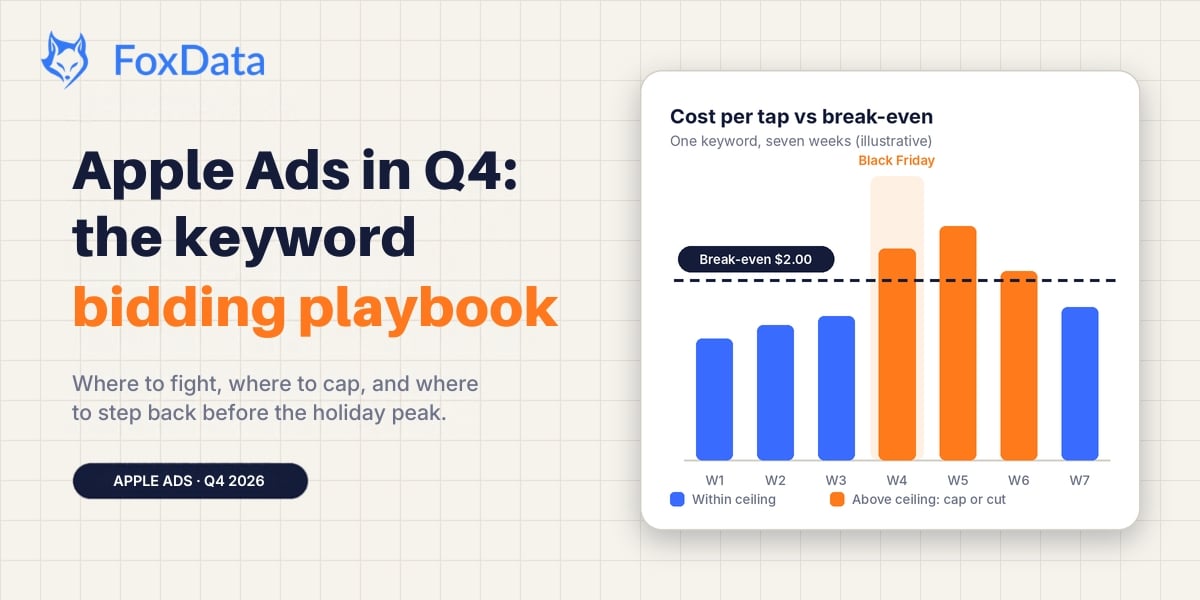
It is the Saturday after Black Friday. Your cost per tap is up, your daily budget is gone by lunch, and a keyword that carried October now costs more than an install is worth. You can raise every bid and hope, or you can decide, keyword by keyword, where to fight and where to step back.
This playbook is for the second option. It covers how Apple Ads works this holiday season, a three-lane keyword structure, how to set each bid from break-even instead of habit, a Q4 operating calendar, and how to use competitor data to decide where to defend. It is written for UA managers, Apple Ads specialists and agency media buyers who already run campaigns and want a plan for the next five weeks. Platform details are checked against Apple's 2026 changes as of late November 2026.
Run three lanes: exact-match brand and proven keywords on manual bids, competitor and generic keywords with capped bids, and a Maximize Conversions discovery campaign with a target CPA. Set every max CPT from break-even (the cost per install you can afford multiplied by your tap-to-install rate), review search terms weekly, and use competitor data to choose where to defend or pull back.
Key takeaways
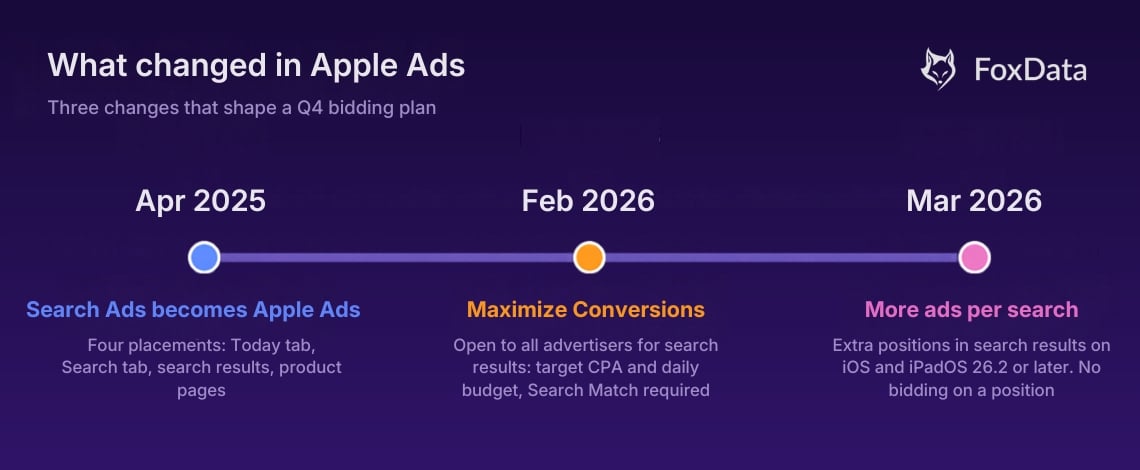
Timeline of Apple Ads changes: renamed from Apple Search Ads in April 2025, Maximize Conversions opened to all advertisers in February 2026, additional search results ad positions from March 2026
Four changes matter for a Q4 bidding plan.
Apple has also said close to two-thirds of App Store downloads start with a search, which is why the keyword lane is still where most holiday budget goes.
🎯 See what competitors bid on in your category before you set holiday caps.
FoxData's ASA tools show bidding keywords, competitor traffic and CPP creative for any app, so your Q4 bids start from what the market is doing, not from last month's guesses. Free for 7 days. No sales call.
Explore FoxData's Apple Ads data tools →
Different teams hit different problems this week. Start with the row that sounds like you.
|
You are |
What is hurting right now |
Your first move |
|
UA manager at a mid-size app |
Budget runs out early and CPA drifts up |
Re-set max CPT from break-even per keyword, then cap the loosest terms |
|
Solo marketer or small team |
You have one search results campaign mixing brand, generic and competitor terms |
Split it into lanes so one weak term cannot drain the whole budget |
|
Agency media buyer |
Several clients, one Q4 deadline |
Build the lane template once, then clone it per client |
|
A team that just switched on Maximize Conversions |
Spend is rising and you cannot see which queries pay |
Add negatives for your exact keywords and promote winners weekly |
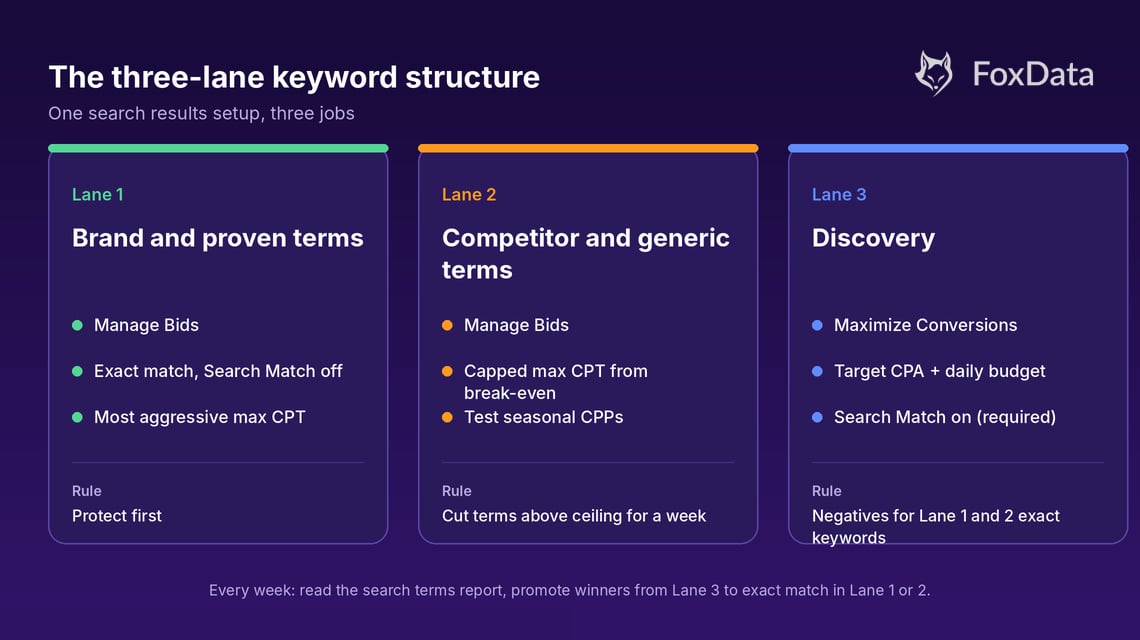
Three-lane Apple Ads keyword structure for Q4: Manage Bids for brand and proven terms, capped bids for competitor and generic terms, Maximize Conversions for discovery
Lane 1: Brand and proven terms (Manage Bids, exact match). Your own name and the keywords that already convert at a profit. Keep Search Match off here and give these terms your most aggressive bids, because a lost tap on a term you know converts is the most expensive loss. With more ads per query, brand terms can now attract more than one advertiser, so check your impression share on them during the peak.
Lane 2: Competitor and generic terms (Manage Bids, capped). Terms with real volume but lower or uncertain conversion. Set a hard max CPT from break-even, test seasonal Custom Product Pages (you can create up to 70 per app) and review them weekly. If a term stays above its ceiling for a week, cut it instead of chasing it.
Lane 3: Discovery (Maximize Conversions). One campaign with a target CPA slightly above your blended CPA from current campaigns and a daily budget you can afford to lose while it learns. Search Match is required here, so add your Lane 1 and Lane 2 exact keywords as negatives to keep the lanes from bidding against each other. Read the search terms report weekly, and promote proven queries to exact match in Lane 1 or 2.
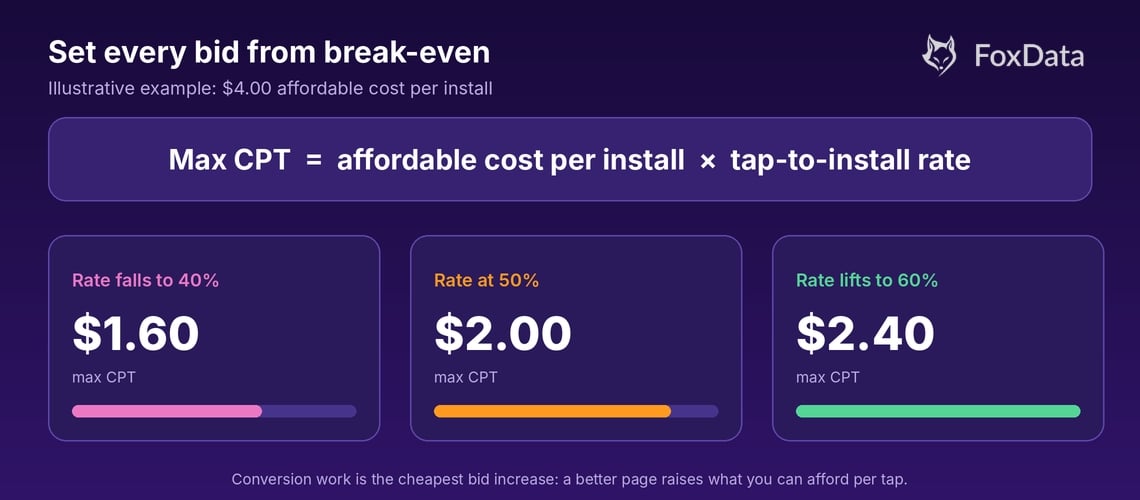
Break-even max CPT for Apple Ads: affordable cost per install x tap-to-install rate, example $4.00 x 50% = $2.00
Cost per install equals cost per tap divided by tap-to-install rate. Rearranged, the most you can pay per tap is:
Max CPT = affordable cost per install x tap-to-install rate
An illustrative example: if you can afford $4.00 per install and 50% of taps become installs, your ceiling is $2.00 per tap. If a holiday page lifts that rate to 60%, the same $4.00 allows $2.40. If crowded auctions push it down to 40%, the ceiling drops to $1.60. That is why conversion work is the cheapest bid increase you have.
Use your own numbers: affordable cost per install comes from your revenue or trial-to-paid value per install and your target return. Do this per keyword group, not per account.
How much should you add for Q4? Benchmark datasets disagree on the size of the Q4 rise in cost per tap (some show low single digits, others far more), and some show September as the year's peak. So do not hard-code a seasonal percentage. Look at your own CPT history for the same keywords, add headroom only where break-even supports it, and cut where it does not.
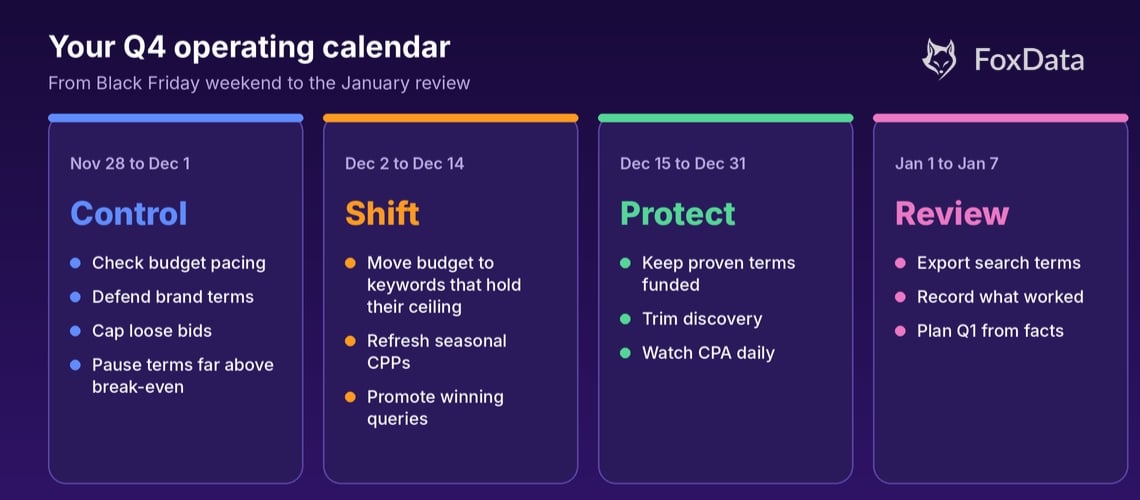
Apple Ads Q4 operating calendar from Black Friday weekend to early January
|
Window |
Focus |
What to do |
|
Nov 28 to Dec 1 (Black Friday weekend to Cyber Monday) |
Control |
Check daily budget pacing, defend brand terms, cap loose competitor and generic bids, pause terms far above break-even |
|
Dec 2 to Dec 14 |
Shift |
Move budget toward keywords and placements that hold their ceiling, refresh Custom Product Pages, promote winning discovery queries |
|
Dec 15 to Dec 31 |
Protect |
Keep proven terms funded, trim discovery, watch CPA daily, hold back on new tests |
|
Jan 1 to Jan 7 |
Review |
Export search terms and keyword results, record what worked, plan Q1 from facts |
Apple's own holiday guidance points the same way: check CPT bids, raise daily caps only where it makes sense, and monitor spend while the season runs.
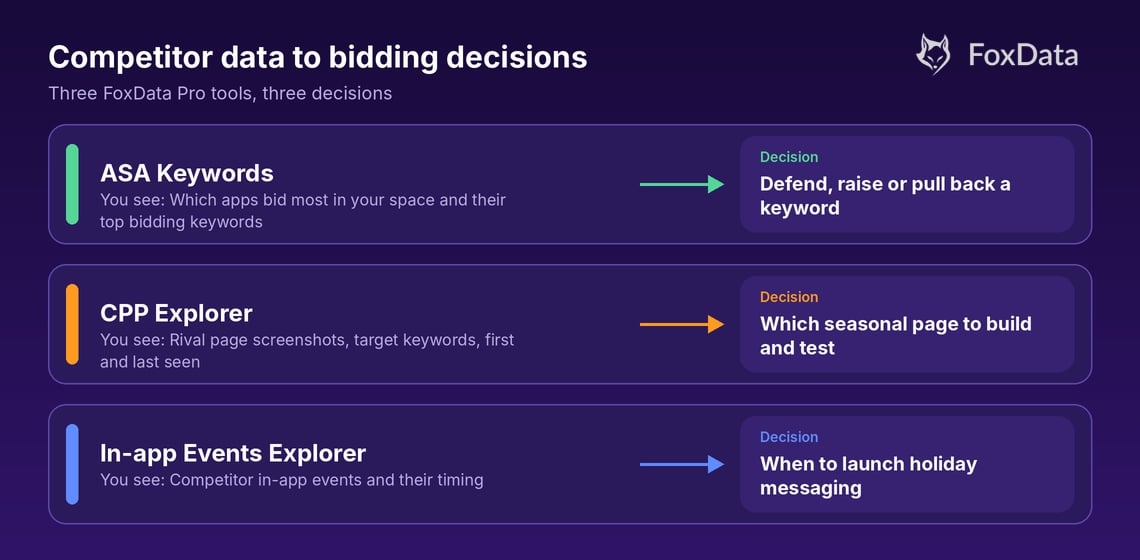
How ASA Keywords, CPP Explorer and In-app Events Explorer inform Apple Ads keyword decisions
Bid math tells you what you can afford. Competitor data tells you where the fight is. Here is a workflow with three FoxData Pro tools.
A scenario you may recognize: a competitor starts bidding on your brand name on Monday. Open its keyword list to confirm, check which CPP it shows on your brand terms, and compare its page with yours. If its page is weaker, defend with an exact-match brand bid at your Lane 1 ceiling. If it is stronger, the fix is your own page, not a higher bid.
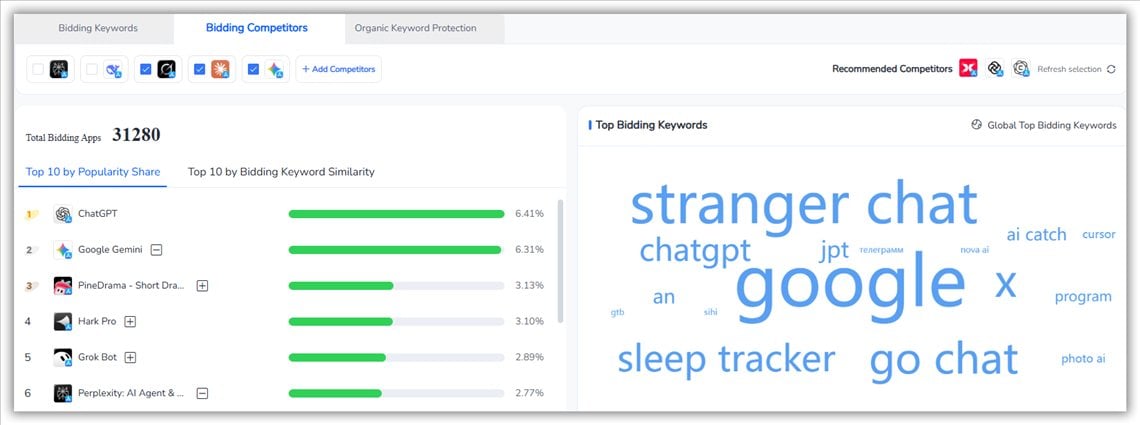
📊 Check a competitor's CPPs and keywords before your next bid change.
Open CPP Explorer and ASA Keywords for a rival app, see which pages and terms it runs, and use that to set Lane 2 caps and your holiday page. Start a 7-day free trial. Free for 7 days. No sales call.
Pro ($399 a month) is FoxData's Ad Intelligence plan. It includes ASA keyword research and Advanced Search, Custom Product Pages Explorer, In-app Events Explorer, and Creative Trends and Ad Copy Trends for Meta and Google. It comes with 5 seats, 20 apps, 1,500 keywords, 200 competitors and 12 months of history, and FoxData's plan guide also lists its ASO tools as part of the plan. See the Pro vs Enterprise plan guide for the full table.
Pro is a research and intelligence plan: you still build and run campaigns in Apple Ads. Campaign management, automated bidding and budget allocation are Enterprise features. If you are choosing between plans, the FoxData plan chooser walks through the options.
The offer runs until December 7, 2026 at 07:00 UTC (15:00 UTC+8).
|
Pro |
Price |
|
Monthly list price |
$399 |
|
New subscribers, first month (35% off) |
$259.4 |
|
New subscribers, yearly billing, first paid period (35% off) |
$3,112.2 |
|
Returning subscribers |
25% off annual Pro |
Accounts that have never purchased a subscription count as new; accounts that have purchased before count as returning. Signed-out visitors see the new-subscriber offer by default, so sign in to see the price for your account, and the checkout page has the final say. The discount covers the first paid period, and renewals return to the regular price. A 7-day trial started by Sunday, November 29 ends before the offer does. The full rules are in the Black Friday 2026 offer guide.
How should I bid on Apple Ads keywords in Q4?
Split keywords into lanes: exact-match brand and proven terms on Manage Bids, capped bids on competitor and generic terms, and a Maximize Conversions discovery campaign. Set each max CPT from break-even, which is your affordable cost per install multiplied by your tap-to-install rate.
Do Apple Ads costs rise in Q4?
Often yes, but benchmark datasets disagree on how much, and some show the annual peak in September. Use your own CPT history by keyword and add headroom only where break-even supports it.
Should I use Manage Bids or Maximize Conversions?
Use both. Manage Bids gives keyword-level control for brand and proven terms. Maximize Conversions is a discovery lane: it needs Search Match, takes a target CPA and a daily budget, and does not let you set keyword bids.
Can I bid for a specific position now that more ads appear in search results?
No. Existing search results campaigns qualify for the additional positions automatically, and Apple decides placement with relevance and bid together.
How do I calculate my max CPT?
Max CPT = affordable cost per install x tap-to-install rate. With $4.00 affordable per install and a 50% rate, the ceiling is $2.00 per tap.
Should I keep Search Match on during the holidays?
Keep it off in your exact-match brand and proven lanes. Use it inside the Maximize Conversions discovery campaign, where it is required, and add your exact keywords as negatives there.
How many Custom Product Pages can I use?
Up to 70 per app. A seasonal page matched to a keyword group can lift your tap-to-install rate and, with it, your break-even bid.
Can FoxData run my Apple Ads campaigns?
FoxData Pro is an intelligence plan: ASA Keywords, CPP Explorer, In-app Events Explorer and creative trends. Campaign management, automated bidding and budget allocation are Enterprise features.
Is there a free trial?
Yes. FoxData offers a 7-day free trial. A free account is needed to start, payment details are entered when the trial starts, nothing is charged until the 7 days end, and you can cancel anytime.
Do I need ASO as well as Apple Ads?
They work best together. Organic rankings show which keywords you may not need to outbid, and paid data shows which keywords convert well enough to optimize for in your listing.
✅ Set your holiday bids from data, then test the tools for 7 days.
Pick one competitor, open its ASA Keywords and CPPs, and set your Lane 1 and Lane 2 ceilings from break-even. Free for 7 days. No sales call.
Start your free 7-day trial → or compare Pro and other plans →
📣 Don't Miss These:
© 2020-2026 FoxData. All Rights Reserved.