



Explore More Possibilities for Your Business
Full-cycle scenario construction to meet your needs from App research, development, and release to operation.
Ready for your soaring growth
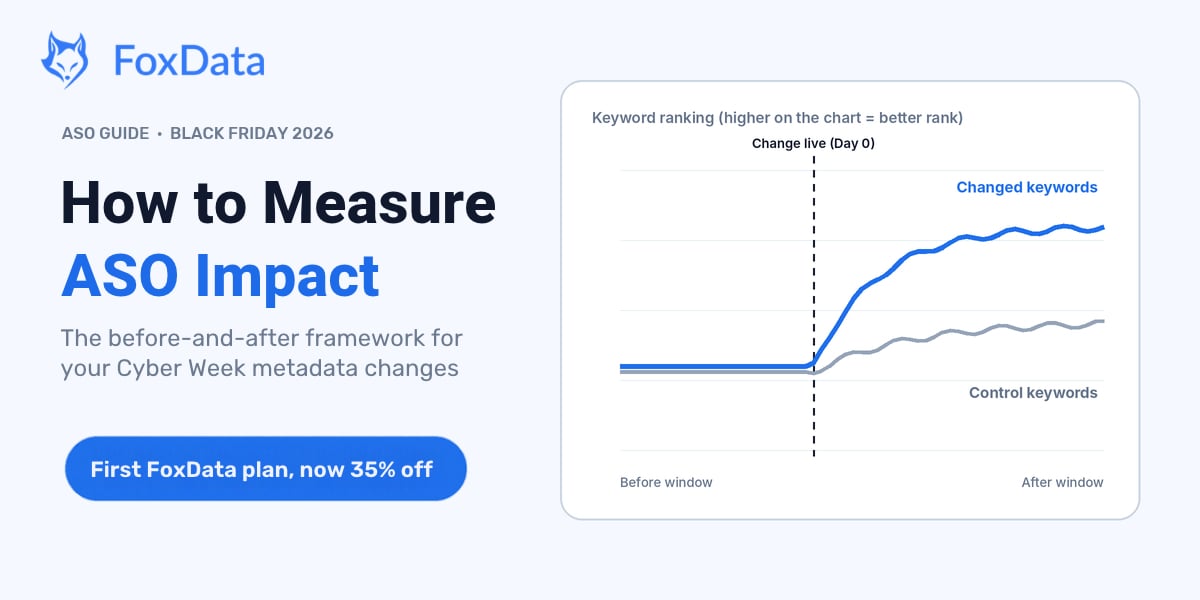
📢 Black Friday 2026: 35% off your first billing period on Standard, Growth and Pro. The offer runs from November 19 to December 7. It's a good week to put numbers on your ASO changes instead of guessing at them.
Short answer: You measure ASO impact by comparing a defined before-window against a defined after-window for the keywords and pages you changed — with keywords you didn't touch as a control group, and with confounders (seasonality, paid campaigns, competitor moves) written down before results arrive. Rankings often settle within days of a metadata update; meaningful download impact usually takes a few weeks. The output isn't a feeling that "rankings went up" — it's a dated, defensible line between your change and everything else that moved in November.
What is ASO impact measurement? It is the practice of tying one specific store-listing change (a subtitle, the keyword field, a screenshot set or a Custom Product Page) to the movement in rankings, conversion and installs that follows, after you have separated out seasonality and everything else that changed at the same time.
If you shipped a Cyber Week update this month, it most likely cleared Apple review and went live between November 14 and 20, ahead of the November 27 peak. (If yours slipped past that, nothing below breaks: take your own live date and add 7, 28 and 90 days.) That means the clock on your December report has already started. The difference between "our downloads went up in Q4" (nobody's credibility) and "the subtitle change we shipped on the 18th moved keyword X from position 14 to 6 and organic installs followed within two weeks" (budget conversation won) is measurement discipline. This guide is that discipline. Picture the room on December 16: someone asks what the subtitle change actually did, and "it went up" is not an answer. This is written for whoever has to give a better one, whether you are an indie developer, an ASO manager or an agency lead working on the App Store (Google Play notes are in the FAQ). You will need your live dates, 20 to 40 tracked keywords and access to App Store Connect.
Four reasons this discipline pays more than it used to.
Apple Ads added extra ad placements to App Store search results: they started on March 3, 2026 in the UK and Japan and reached the rest of the Apple Ads markets by the end of March, on iOS and iPadOS 26.2 and later. Search ads used to occupy a single slot at the top; now a second ad can also appear further down the results. More of the page belongs to paid, so a ranking gain may turn into fewer impressions than it used to — which makes it more important, not less, to know precisely which of your keywords moved and why. Existing search campaigns are eligible for the new positions automatically and advertisers can't bid on a specific slot, so you can't isolate or opt out of the extra paid exposure. Log any Apple Ads budget or bid change that falls inside your window.
Since July 30, 2025, keywords from your keyword field can be assigned to Custom Product Pages (CPPs), and the matching CPP can appear in organic search instead of your default page for those searches. Apple raised the limit to 70 CPPs per app in October 2025. One caveat: keywords already in your title or subtitle can't be assigned to a CPP. So a single change can now alter what organic searchers see, not just what paid tappers see, and unmeasured, a page that converts well on paid traffic can quietly drag organic conversion down. Two practical consequences: a keyword's rank can now point to two different pages, and each keyword-to-CPP assignment is a change worth logging as its own event.
ChatGPT, Perplexity and Google's AI answers recommend apps based on clear, specific, well-structured information. Measured, documented changes are how teams learn what AI systems and store algorithms both respond to — instead of re-guessing every quarter.
In late March 2026, App Store Connect Analytics received its biggest update since launch: more than 100 new metrics, cohort analysis and peer-group benchmarks. For your own app, that's first-party data, so you can finally check whether your conversion rate sits above or below similar apps. Apple tells you what happened on your page; a keyword and ranking tool tells you which terms and competitors were moving around it. You need both halves to explain a result.
🔎 See where your keywords stand before you change anything
Look up what searchers see for any keyword with Keyword Live Search, one of FoxData's free ASO tools. It's the fastest way to pick your control keywords honestly. A free FoxData account is needed first.
Run a free Keyword Live Search →
Before/after measurement fails in predictable ways, so the design matters more than the tools. Five decisions to make before you look at any result.
Every measurement starts with a line in the sand: the date your update went live (not the date you submitted — the date it was live in the store). Write down the mechanism you expect: "new subtitle adds 'budget tracker with friends', so we expect rank movement on that phrase within 3–7 days." If you can't state the mechanism, you can't tell signal from noise later.
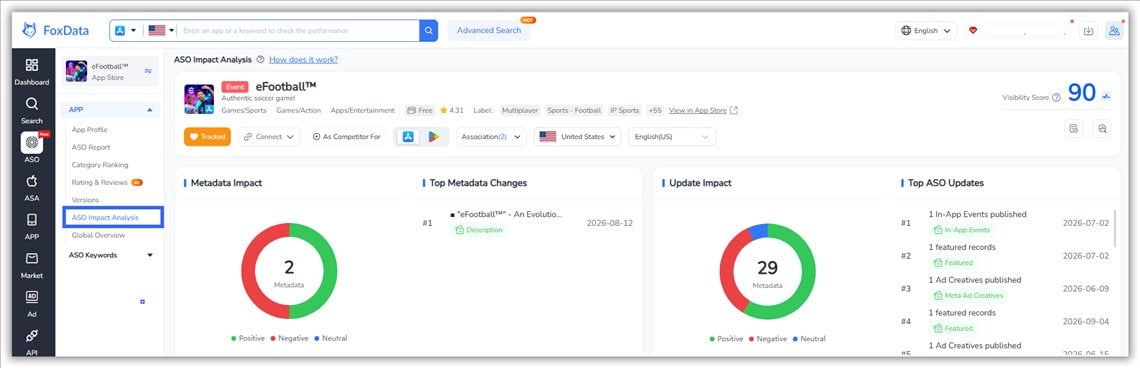
In FoxData, ASO Impact Analysis (Growth plan) puts that date on a timeline for you. It picks up changes to your text metadata and app version automatically, shows each one as a marker on the ranking and download charts, and lets you add Custom Events for anything it can't see on its own: a paid budget change, a Cyber Week push, a featuring. The marker is what separates your timeline from a random one.
Use the last 14–28 days before the change as your baseline. Shorter windows inherit last week's noise (a competitor's screenshot test, a paid push); longer windows dilute your current seasonality. For Cyber Week changes, this matters double: your pre-window is mid-October through mid-November — a relatively quiet period — while your post-window is a demand peak. Write that asymmetry down before interpreting anything. Also scan the pre-window for your own changes: if you shipped a version or ran a promotion inside it, shift the window or flag it.
Absolute numbers lie in November. The fix is a control group: the keywords you didn't change, that live in your app's same category and markets. If your changed keywords moved +7 positions while untouched control keywords moved +6, your change contributed roughly one position — the tide did the rest. If changed keywords moved +7 while controls sat flat, that's a real effect.
Practical setup: from your tracked keyword list, take the 10–20 terms most similar to the ones you edited (same storefronts, adjacent popularity) but left untouched in the metadata. They become your seasonality adjustment.
Here is what that looks like with real arithmetic. The numbers below are illustrative, for a made-up budgeting app, not FoxData customer data.
|
Keyword |
Group |
Popularity (index) |
Avg. rank before |
Avg. rank at Day 28 |
Positions gained |
|
budget tracker with friends |
Changed |
38 |
14 |
6 |
+8 |
|
shared expenses |
Changed |
52 |
22 |
15 |
+7 |
|
expense splitter |
Control |
45 |
18 |
15 |
+3 |
|
money app |
Control |
61 |
30 |
27 |
+3 |
Changed keywords gained 7.5 positions on average; the untouched controls gained 3. The seasonal tide explains the 3, so the change can claim about 4.5 positions. Then weight that by popularity: 4.5 positions on a 52-popularity term matters more than 8 positions on a term nobody searches.
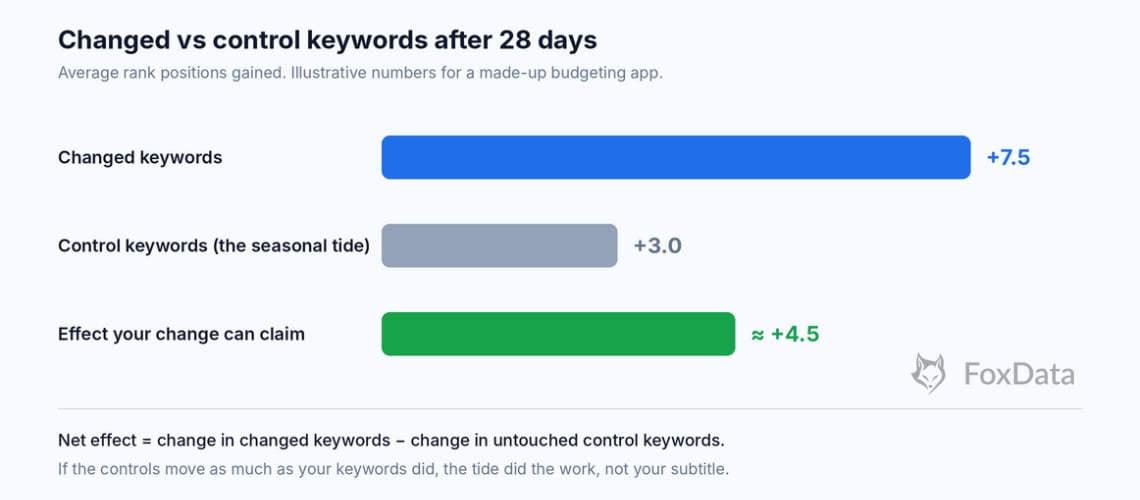
Bar chart comparing average rank positions gained by changed keywords (+7.5), control keywords (+3.0) and the net effect of the change (about +4.5), illustrative numbers
In FoxData, add both groups to Tracked Keywords before launch day so the baseline and the follow-up come from the same source.
Rankings often settle within days of a metadata update, while meaningful download impact takes a few weeks. Read your change three times, for three different questions:
|
Reading |
Window |
Question it answers |
Beware |
|
Quick read |
Day 0–7 |
Did rankings move at all? Direction? |
Too early for install impact; keywords still settling |
|
Full read |
Day 0–28 |
Did rank movement turn into impressions and installs? Compare with control keywords |
Competitor changes inside the window muddle attribution |
|
Strategic read |
Day 0–90 |
Did the change hold, or was it a December blip? What's the compounding effect? |
Many more confounders; use share-of-category framing |
If your change went live on November 18, those three readings land on November 25, December 16 and February 16.
List every other thing that changed the week your metadata did: paid campaign budget shifts, a competitor's re-design, a version release, an Apple feature placement (if you got one — congratulations, but note it), and the seasonality calendar itself (Black Friday November 27, Cyber Monday November 30). Attribution discipline is mostly a note-taking habit: the teams with clean reports aren't luckier, they wrote things down on day zero.
|
KPI |
What it tells you |
How to read it |
|
Keyword rank movement (weighted by popularity) |
Whether the algorithm re-matched your fields |
Position 10 on a 5,000-search term beats position 1 on a 50-search term — always weight by popularity per country |
|
Conversion rate (impressions to downloads) |
Conversion efficiency of the changed listing |
Compare it with the peer-group benchmark in App Store Connect Analytics (added in March 2026). If impressions rise but installs don't, the ranking moved but the listing didn't convert — a creative problem wearing an ASO costume |
|
Organic install share |
Installs from store discovery vs paid |
Rising share after a change = organic compounding. Falling share during Cyber Week may just mean paid scaled faster — check before panicking |
|
Download and revenue trends against your event marker |
The number stakeholders ask about |
Use App Store Connect for your own app's actual downloads. Use FoxData's download estimates (Growth plan) to put your trend next to your competitors' and your category's, so a ranking change connects to install volume. |
|
Review velocity and rating |
Whether the new promise matches the product |
A metadata change that over-promises shows up here in weeks |
One more measurement worth adding for Cyber Week specifically: CPP performance by traffic source. If you assigned keywords to Custom Product Pages (live since July 30, 2025), compare how the page converts organic visitors versus paid taps. A divergence tells you which channel's intent the page actually serves — and whether you need two variants.
Assume your Cyber Week changes went live November 18. Swap in your own date; the arithmetic is Day 7, Day 14, Day 28 and Day 90. Here's the reading plan that turns them into a report.
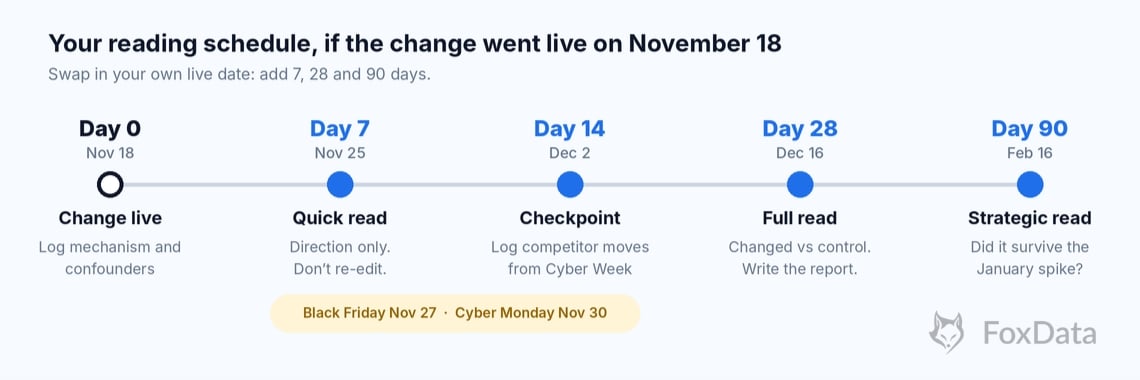
Timeline of the ASO reading schedule
Week 1 (Nov 25 – Dec 1): the quick read.
Pull rank movement for changed keywords versus control keywords at Day 7. Note demand inflation explicitly: your category's popularity is peaking. Day 7 lands two days before Black Friday, so read it, log it and leave the metadata alone. If you're reading this before Black Friday — don't react mid-sale. Resist re-editing metadata while the season's algorithm shifts are still settling; log observations, save edits for the full read.
Dec 2: the checkpoint (Day 14).
Not a verdict. Check rank and conversion once, and write down what competitors did during Cyber Week. Their moves belong on your confounder list.
Dec 16: the full read (Day 28).
Pull: rank movement with popularity weights, conversion rate from App Store Connect, your download trend against your category baseline, and your written confounder list. Answer two questions only: did the change work? and would you repeat it? A subtitle that moved three keywords but stalled conversion taught you the listing converts worse than it ranks — that's a finding, not a failure.
Dec 17–23: the December report.
Structure it in three lines your CFO and your ASO team can both read:
Mid-February (the strategic read, Day 90 = Feb 16):
Day 90 lands after the whole January usage spike, which is exactly why it's worth waiting for. That's the season when fitness, finance and productivity categories get their own wave. Keywords that held through both peaks are your evergreen metadata; keywords that only peaked with the sale are seasonal assets to rebuild (and re-time) next November. Put a 20-minute check in mid-January so February holds no surprises.
Everything above works with a spreadsheet and App Store Connect. FoxData just removes the stitching: ranks, competitors, keyword trends and your event timeline live in one place. Here is a first week that follows the framework step by step.
|
Day |
What to do |
Where in FoxData |
What you'll know |
|
1 |
Add your app, then your 10–20 changed keywords and 10–20 control keywords |
Tracked Keywords |
Your baseline rank for both groups |
|
2 |
Check that your November 17–20 update shows up as an event; add Custom Events for paid budget changes and campaigns |
ASO Impact Analysis (Growth) |
One dated timeline |
|
3 |
Add 2–3 competitors and note any metadata they changed this month |
Your confounder list |
|
|
4 |
Check whether your changed keywords gained popularity on their own this month |
Keyword Trends (Growth) |
How much of the move is seasonal |
|
5 |
Search your top changed keywords live and note what searchers see |
Keyword Live Search (free tools) |
What your listing is up against right now |
|
6 |
Line up your download trend against category and competitor trends |
Download estimates (Growth) |
Whether you gained share or just rode the tide |
|
7 |
Read your first week: changed vs control, event marker in view |
Tracked Keywords + ASO Impact Analysis |
Whether to hold, scale or revert, and which plan you need |
One timing detail: if your change went live November 18 and you start your trial today, trial day 7 is November 25, which is the day of your Day-7 quick read. You'll choose a plan with your own data on screen.
Which plan fits your job?
📈 Put your own changes on a timeline
Start the 7-day trial, add your app and mark this month's changes. A free FoxData account is needed first. Free for 7 days. No sales call.
Today (Nov 19): List every change shipped since November 14 — metadata, creatives, CPP assignments, paid budget changes — with live dates.
Friday, Nov 20: Define control keywords: 10–20 untouched terms in the same category and storefronts.
This weekend: Put each change on one timeline (in ASO Impact Analysis, check the metadata changes it picked up and add Custom Events for the rest) so Day-7, Day-28 and Day-90 readings line up.
Wednesday, Nov 25 (Day 7 if you went live on the 18th): Pull the quick read: changed vs control keyword movement, popularity-weighted. Write the mechanism notes now, while memory is fresh. Log it; don't re-edit.
December 16 and mid-February: Block 90 minutes for each — the full read and the strategic read — the meetings where next year's Cyber Week plan gets written from evidence instead of vibes.
Want the timeline set up before the 25th? Start the 7-day free trial → and your Day-7 read will already have its event marker in place.
Here's the offer in plain terms. New FoxData subscribers get 35% off their first billing cycle on Standard, Growth and Pro, on monthly, quarterly or annual billing.
Returning subscribers get 25% off annual Growth and Pro plans. Starter and Enterprise aren't part of the offer, and it runs from November 19 to December 7.
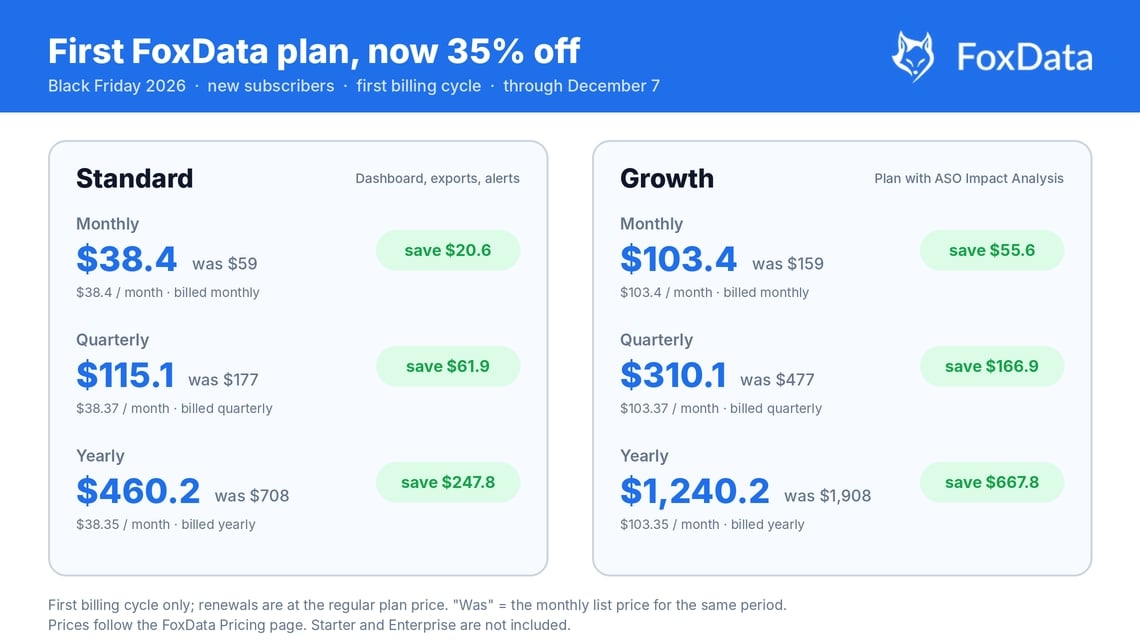
What 35% off the first billing cycle saves on FoxData Standard and Growth plans, monthly, quarterly and annual, Black Friday 2026
|
Plan |
Billing |
List price |
First cycle at 35% off |
You save |
| Standard |
Monthly |
$59 |
$38.4 |
$20.6 |
|
Quarterly |
$168 |
$109.2 |
$58.8 |
|
|
Yearly |
$602 |
$391.3 |
$210.7 |
|
| Growth |
Monthly |
$159 |
$103.4 |
$55.6 |
|
Quarterly |
$453 |
$294.5 |
$158.5 |
|
|
Yearly |
$1,622 |
$1,054.3 |
$567.7 |
|
| Pro (Ad Intelligence) |
Monthly |
$399 |
$259.4 |
$139.7 |
|
Quarterly |
about $1,137 |
about $739 |
about $398 |
|
|
Yearly |
about $4,070 |
about $2,645 |
about $1,424 |
The discount applies to your first billing cycle only; renewals are at the regular plan price. List prices as of November 2026. Discounts can't be combined with other coupons, and Pro's quarterly and yearly amounts are FoxData's rounded figures, so checkout shows the exact price. A free trial doesn't change your new-subscriber status as long as you've never paid.
Why this one is worth catching.
Compare plans and Black Friday prices →
Rankings often settle within days of a metadata update, while meaningful download impact usually takes a few weeks. Competitive categories take longer; low-competition long-tail keywords move fastest. That's why the reading schedule is 7 days for direction, 28 days for impact.
Compare changed keywords against control keywords you didn't touch, and frame results as share of category rather than absolute installs. If your changed terms outperformed untouched lookalikes, the change contributed something beyond the seasonal tide.
Control keywords are keywords you did not change that sit in the same category and storefronts as the ones you did. They show how much of a ranking movement came from the season or the market rather than from your edit. Take 10–20 of them with popularity close to your changed terms.
A FoxData feature (Growth plan) that connects app events to the ranking and download movement afterwards. It picks up changes to your text metadata and app version automatically, lets you add Custom Events, and shows each one as a marker on the timeline. Events are grouped as gain, loss or stable based on download behavior, which is the difference between "the line went up" and "the line went up after we shipped."
Yes, but the metrics differ: screenshots and icons move conversion, not rankings. Read conversion rate and CPP conversion for creative changes; read rank movement for metadata changes. Shipping both at once on the same keywords makes attribution ambiguous.
You can't before/after what has no "before." Start with keyword coverage and conversion benchmarks from your category (App Store Connect Analytics now includes peer-group benchmarks), run your first structured change after 2–3 weeks of stable tracking, and treat the first measured cycle as baseline-building.
Every meaningful change — but batch small ones. A weekly metadata tweak creates measurement noise; a fortnightly or monthly change cycle with a marked event per batch keeps the timeline readable.
Yes — if paid budget changed during your window, your download numbers mix channels. Either hold paid constant during the measurement window, or use organic install share as the primary metric, since it's designed to separate the two. Since March 2026 a second search ad can also appear lower in the results, so log any Apple Ads budget or bid change as a Custom Event.
New subscribers get 35% off their first billing cycle on Standard and Growth (monthly, quarterly or annual). Returning subscribers get 25% off annual plans. Starter and Enterprise aren't included, and the offer runs through December 7.
Yes. Create a free FoxData account and start the 7-day free trial. Start by November 30 to use all seven days before the offer closes on December 7.
The changes are live; the evidence is a marked timeline away. FoxData's ASO Impact Analysis, Tracked Keywords and download estimates put your December report on one screen. Impact Analysis and download estimates are on Growth ($159/month), and new subscribers get 35% off their first billing cycle through December 7.
Start your 7-day free trial → · Check your keywords first (free tools) →
Free for 7 days. No sales call.
Running ASO for several clients or a large portfolio? Book a demo →
© 2020-2026 FoxData. All Rights Reserved.