


Explore More Possibilities for Your Business
Full-cycle scenario construction to meet your needs from App research, development, and release to operation.
Ready for your soaring growth
Quick answer: App Store ratings and reviews are your most visible trust signal, and in 2026 both stores turn them into AI-written summaries that shoppers read first. Ratings are scoped by country (and by device on Google Play), so one global average misleads. Track each market separately, reply to low-star reviews first, and watch your competitors too.
Open your own listing in two different countries and compare the star ratings. If the gap is bigger than you expected, nothing is broken. That is simply how both stores work, and it is the first thing most teams get wrong about ratings.
Ratings are the only part of your store listing you don't fully write yourself. That's exactly why they carry so much weight: a star average is a crowd-sourced verdict, and both Apple and Google have spent the last two years turning that verdict into structured, AI-digested content. If your review strategy is still "bake a rating prompt into the onboarding flow and hope," this page is for you.
This guide is written for three kinds of readers: indie developers who ship one or two apps and answer reviews themselves, growth and ASO managers who watch many markets at once, and agencies or data teams who need ratings data in their own dashboards. Where the advice differs, we say so.
Here is the version worth memorizing:
That last point is the quiet revolution. A review summary is machine-selected social proof. You can't write it, but you can influence it: the themes your users mention in reviews are the raw material the model draws from. (More on that in the playbook.)
🔎 Check your worst storefront first
Open your app's ratings by country in FoxData and see which market is pulling your average down. For most teams, that single view is the fastest win of the first session. See your ratings by country
Start with a free account, then take the 7-day trial: free for 7 days. No sales call.
Google's system differs in the details that matter:
One more Play nuance: users can update or delete their reviews, and your public developer reply sits under the review on the listing. Every reply is a small piece of permanent landing-page copy.
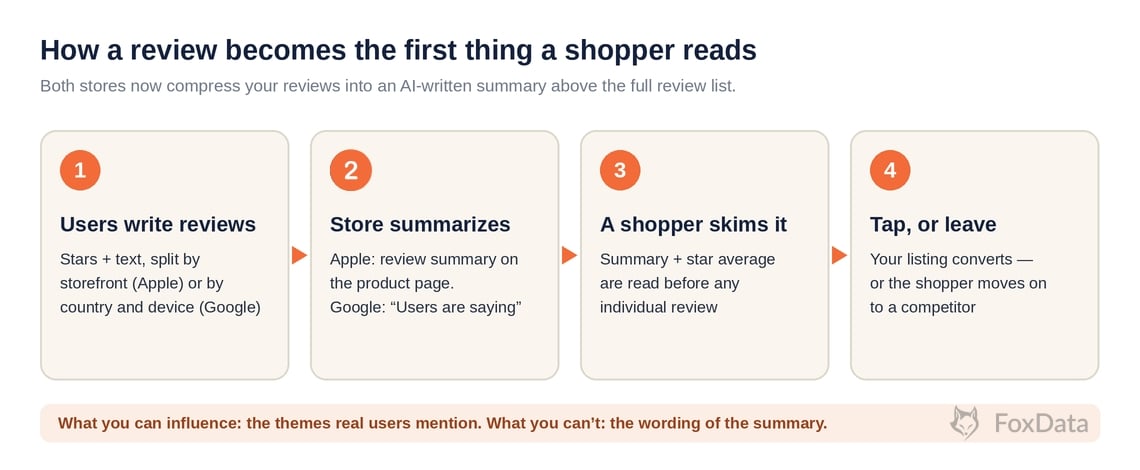
Flow showing how user reviews become an AI-written summary on Apple and Google Play before a shopper decides to install
The structured version, for skimmers (and for AI engines that extract tables):
|
Dimension |
Apple App Store |
Google Play |
|
Rating scope |
Per territory (storefront) |
Per country and device type |
|
How the average works |
Summary rating per territory; can be reset with a new version (reviews persist) |
Weighted toward recent ratings; no reset option |
|
Native prompt |
StoreKit request, max 3 prompts per user per 365 days (AppStore.requestReview(in:)) |
In-App Review API; quota-based, no feedback on whether a review was left |
|
AI review summaries |
Yes: LLM summaries on the product page (US plus 8 English storefronts) |
Yes: "Users are saying" with topic chips, gradual rollout since late 2025 |
|
Developer replies |
All reviews, any age, via App Store Connect; reviewer notified and can update rating |
Public reply on the listing; user can update their review |
|
Incentivized reviews |
Prohibited |
Prohibited (enforced) |
The takeaway: both stores now run a "ratings, then AI summary, then conversion" pipeline, and both segment ratings geographically. Any ratings strategy that treats your app as having one global number is out of date.
Here is the arithmetic with illustrative numbers (not a real app), because it is easier to see once you do the sum:
|
Storefront |
Rating |
Number of ratings |
|
United States |
4.7 |
180,000 |
|
Japan |
4.2 |
6,000 |
|
Brazil |
3.9 |
14,000 |
|
Weighted global average |
4.6 |
200,000 |
A dashboard that shows 4.6 looks healthy. In Brazil, 14,000 people rate you 3.9, and every shopper there sees that number on your product page, next to an AI summary built only from Brazilian reviews. The same logic applies on Google Play across phone and tablet. The fix is not complicated: set a target per market, compare each market with its own history and with local competitors, and look at the worst one first.
None of these are clever. All of them require seeing the data regularly, across storefronts, including competitors'. That is the actual bottleneck.
You ship one or two apps and answer reviews yourself. Your problem is speed. After a release, you want to know within a day whether a version is hurting you, and in which country. In FoxData's Ratings & Reviews you can switch between daily, version and country views, so a spike of one-stars after v2.3 in Brazil shows up as exactly that, rather than as a vague dip in the global number. Then reply to those reviews, or connect your App Store Connect or Google Play Console account and reply from FoxData.
You run growth or ASO across many markets. Your problem is comparison. The useful question is not "what is our rating" but "which market is below its own trend, and below the competitors there". Ratings Comparison and Reviews Comparison put your app next to the competitors you added, on the same dimensions, so one market that is off stands out.
You are an agency or a data team. Your problem is plumbing. Pulling ratings by hand does not scale past a few clients. FoxData's API exposes ratings and reviews alongside app profile and ranking data, so the numbers can feed your own dashboards and reports.
FoxData needs a free account before you can use anything, including the free tools. Once you're in:
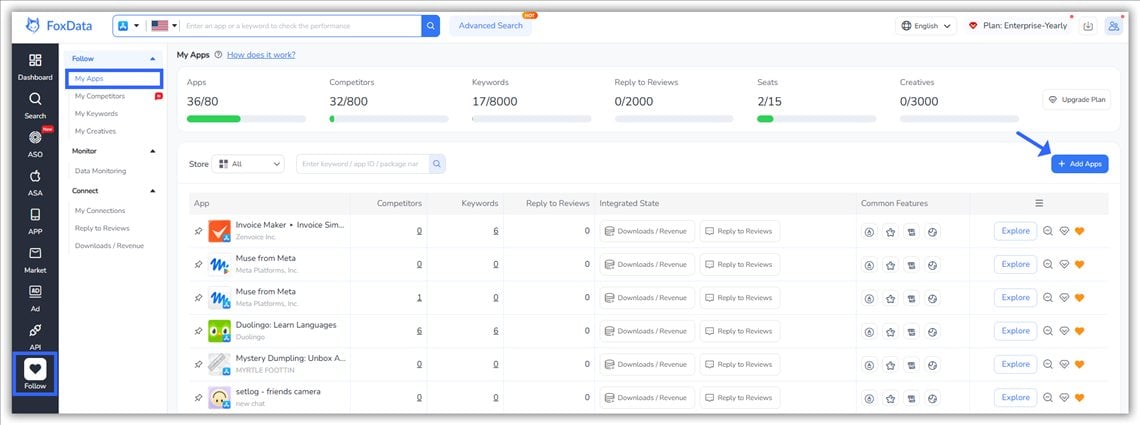
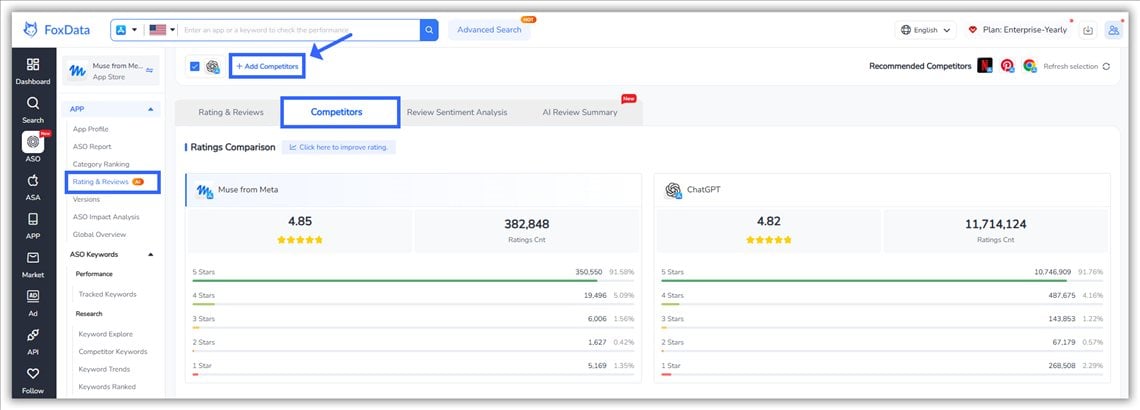
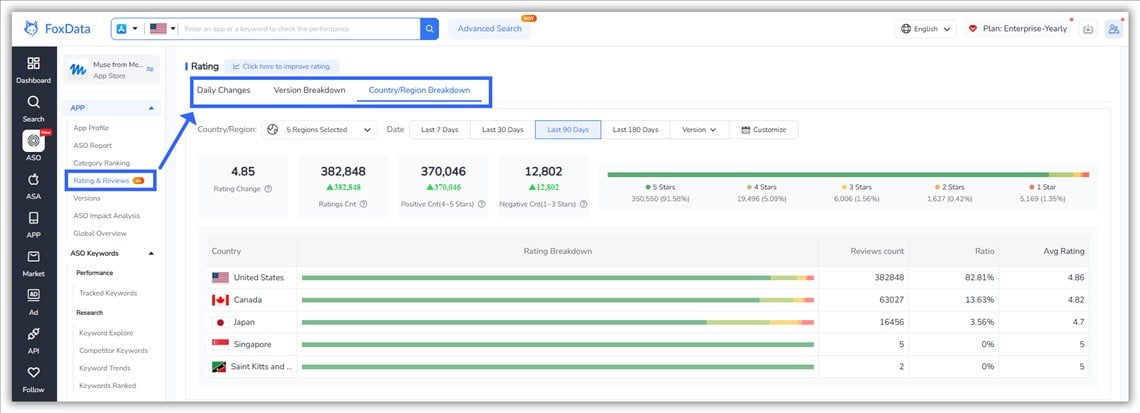
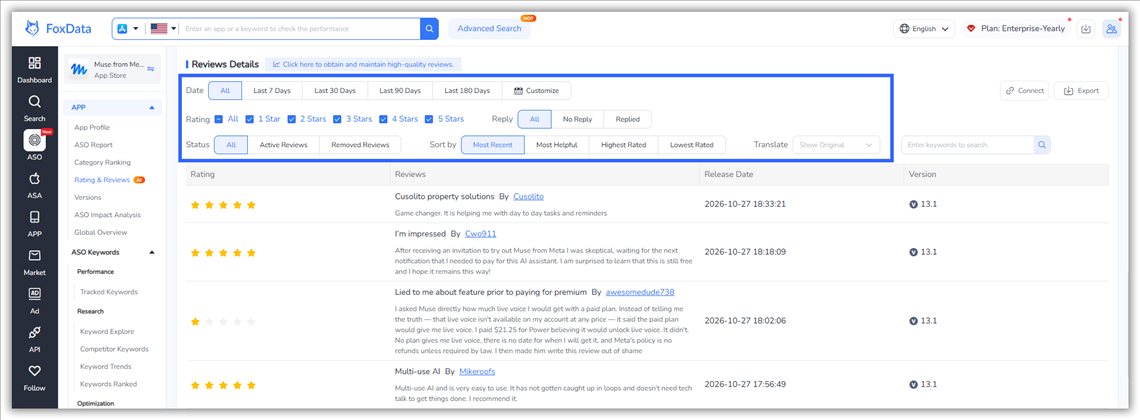
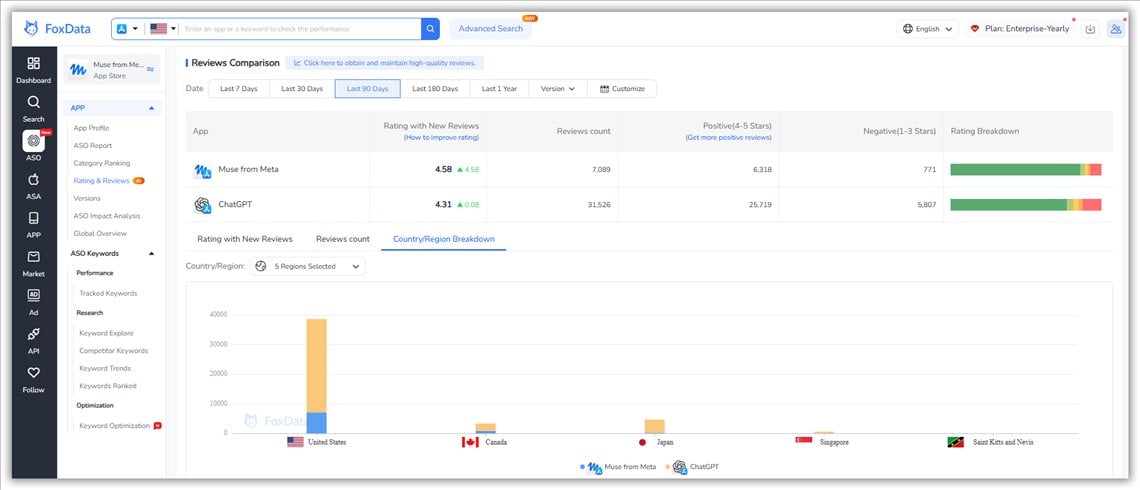
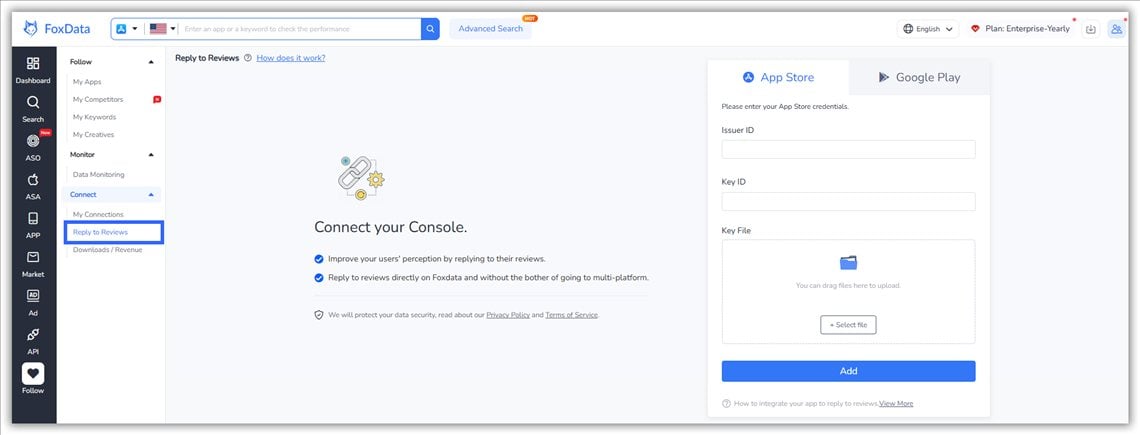
After a week of this, the change is simple: you stop finding out about rating problems from a customer or a stakeholder and start finding them yourself, with the country and the version attached.
We looked at the trial users in a recent week of FoxData sign-ups (October 19–25, 2026). It is a small group (19 trial users), so treat this as a signal rather than a statistic. Two things stood out.
First, ratings tools get used early. Among those 19 trial users, keyword search was the most-used feature (84%), but Ratings & Reviews came second at 74%, ahead of coverage (63%) and the global overview (37%).
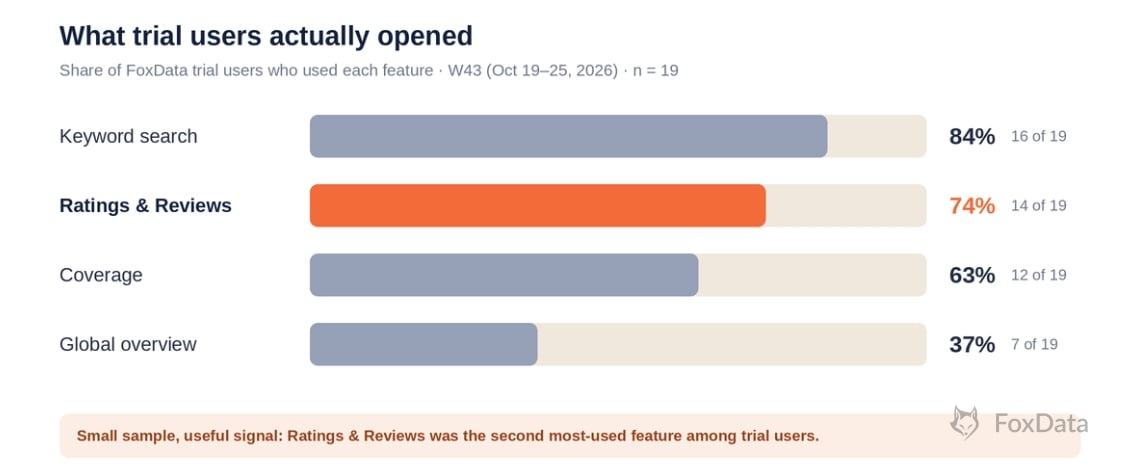
Bar chart of FoxData features used by 19 trial users in October 2026: keyword search 84%, Ratings & Reviews 74%, coverage 63%, global overview 37%
Second, breadth showed up in the one paid conversion. That week, one team tracked 11 apps, spent most of its time in the global overview and in ratings and reviews, and paid within five days of signing up. One team proves nothing on its own, but it is why the routine above starts with breadth: your app, plus the competitors you actually lose users to.
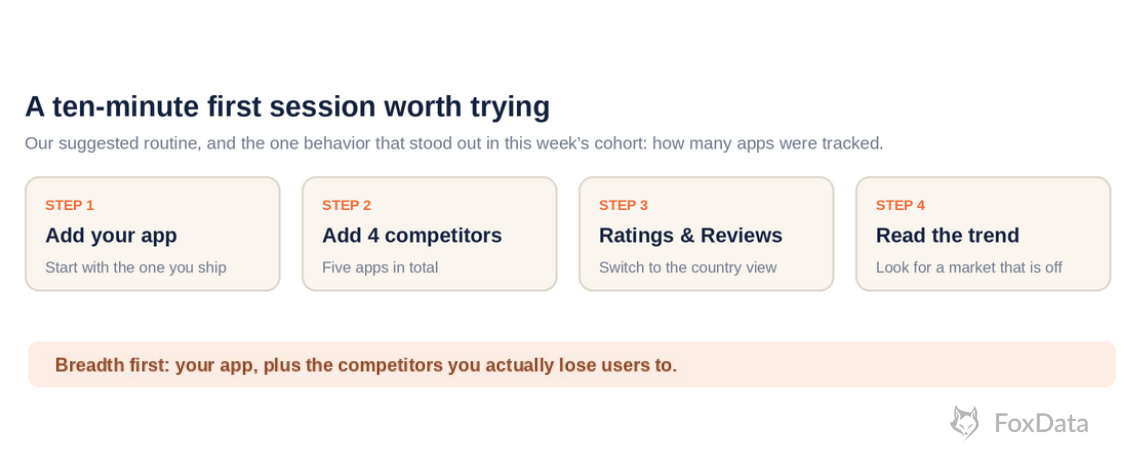
Suggested ten-minute first session: add your app, add four competitors, open Ratings & Reviews, read the trend
The pattern is the same behavior loop we recommend to you: monitor continuously, react fast, benchmark against peers. A ratings workflow that lives in a spreadsheet tends to die in a spreadsheet.
📈 Track five apps this week
Add your app and four competitors, open the country view, and write down the one market that looks off. It is the habit that stood out in our one paying team: breadth first. Read how the Ratings & Reviews feature works
Free account first, then a 7-day trial: free for 7 days. No sales call.
Yes, directly and indirectly. Apple shows your summary rating on the product page and in search results, which shapes tap-through. Google has said ratings are taken into consideration for featuring and placement on Google Play. Neither store publishes the exact weight, so treat ratings as a conversion lever with ranking side effects.
No. Apple computes ratings per storefront, and Google Play shows ratings by country and device type. Track each market separately: a 4.6 global average can hide a 3.9 in a launch market.
No. Google weights the rating it displays toward more recent ratings, so a recent release can move it faster than the lifetime total suggests.
Up to three times per user in a 365-day period through StoreKit, using the current AppStore.requestReview(in:) API on iOS 16 and later. Android's In-App Review API has no published fixed limit but is quota-throttled. Prompt after success moments, never in response to a button tap.
No. Resetting the summary rating when you release a new version restarts the displayed average but keeps written reviews on the product page. Use resets sparingly, since a low-volume average can hurt conversion.
They are AI-written paragraphs that condense common themes from user reviews. Apple's launched with iOS 18.4 in spring 2025 and now covers the US plus eight English-language storefronts; Google's "Users are saying" block began a gradual rollout on Play in late 2025. You can't edit either, but you can influence them through the themes real users mention, and Apple lets you report a summary concern in App Store Connect.
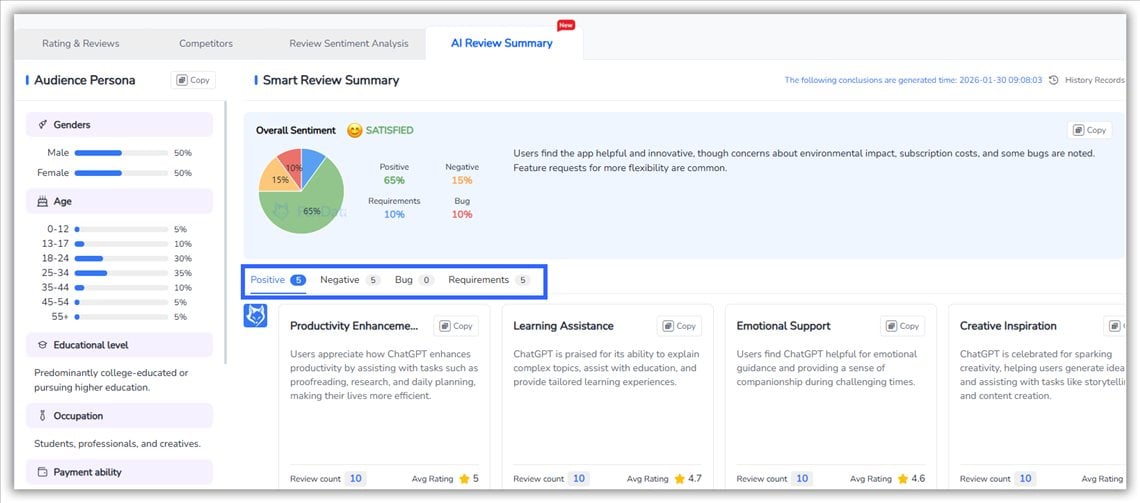
Group the reviews by theme. FoxData's AI Review Summary sorts reviews into positive points, negative points, bugs and feature requests. Review Sentiment Analysis adds a sentiment view, and you can filter by app version to find the release behind a spike. Apple's and Google's own summaries are public and not editable, so a private view of the same themes is the way to prepare for them.
Fast, specific and without defensiveness. Acknowledge the issue, say what you are doing about it, and follow up when it's fixed, because reviewers are notified and can update their rating. Start with reviews that mention crashes or current-version bugs.
No. Both Apple and Google prohibit incentivized, fake or manipulated reviews. Build prompts into moments of real satisfaction instead.
Use a tool that tracks ratings by country, version and day for your app and your competitors. Doing it by hand across every App Store storefront and Google Play does not scale. FoxData's Ratings & Reviews feature covers this, and the FoxData API carries the same data into your own dashboards on paid plans.
🚀 Start your 7-day trial with your own apps in it
Set up the ten-minute routine above, compare your markets with your competitors, and decide on real data whether FoxData earns a place in your weekly workflow. Create a free account, then start the trial: free for 7 days. No sales call. Compare plans and start the trial
Building your own dashboards? See the FoxData API
© 2020-2026 FoxData. All Rights Reserved.