

Explore More Possibilities for Your Business
Full-cycle scenario construction to meet your needs from App research, development, and release to operation.
Ready for your soaring growth
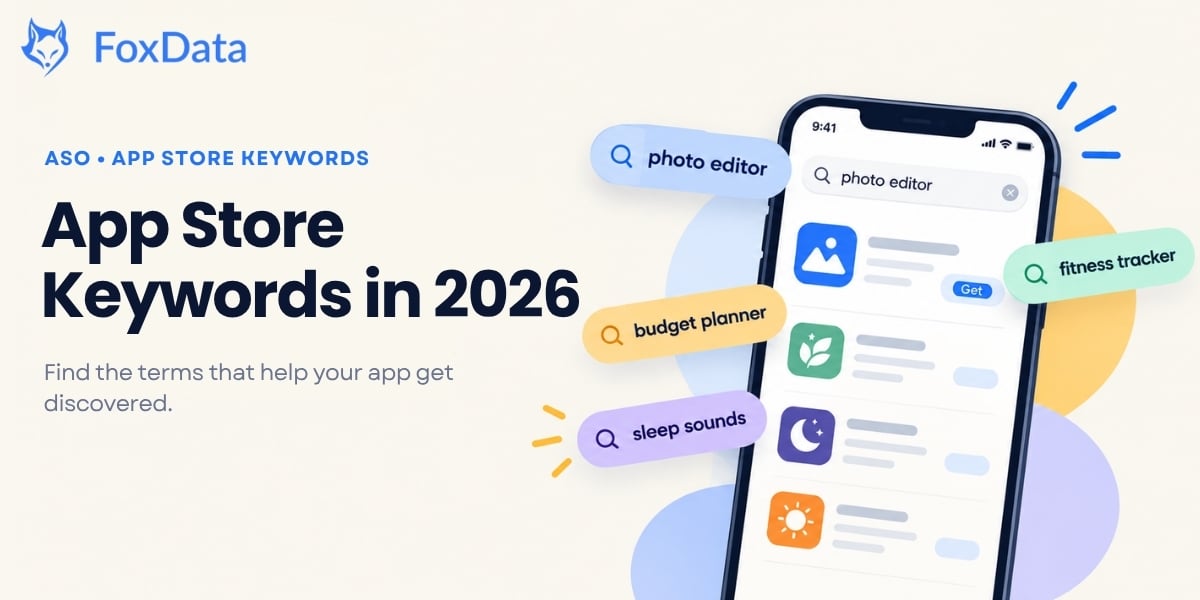
You rewrite your keyword field on a Monday, submit the build, and wait. Two weeks later your rankings look exactly the same. If that sounds familiar, the problem is rarely effort. It's that the keyword playbook most teams still follow was written before App Store search changed.
Search is still where the App Store is won. Apple says 70% of App Store visitors use search to find apps, and almost 65% of downloads happen directly after a search. In the twelve months since October 2025, Apple has let each custom product page claim its own keywords and doubled the page limit to 70, added a second ad position to search results, put personalized recommendations on the Search tab, and, on October 5, switched on header and search-result creative assets for iOS 27. A few of those changes are easy to misread. Custom product page keywords most of all, and we've spelled out exactly how they work below.
This guide explains how App Store keywords work in 2026: what gets indexed, what popularity and difficulty scores really tell you, and a classification framework you can apply to your next metadata update. Everything here reflects the store as it stands on October 27, 2026, and the popularity table was pulled from our keyword database the same day.
App Store keywords are the search terms Apple's algorithm matches against user queries. On iOS, a small set of text fields feeds the search index: the app title (30 characters), subtitle (30 characters), the hidden keyword field (100 characters), in-app purchase names, and in-app event names and short descriptions. Since July 2025, keywords you assign to a custom product page also decide which page appears when your app ranks for them.
Notice what's not on the list: your description.
The 4,000-character description matters for conversion, because it's the copy a user reads before tapping Install. But Apple's algorithm does not scan it for keyword matching. Google Play indexes long descriptions; the App Store doesn't. We still meet experienced teams who spend an afternoon polishing description paragraphs for search and then wonder why nothing moved. Write the description to persuade. Index with the fields that count.
The custom product page trap. CPPs are the most misunderstood part of 2026 keyword strategy. When you assign keywords to a CPP, you pick them from the keywords already in your keyword field. You can't type new ones, and each keyword can be linked to only one page. When your app ranks for an assigned keyword, Apple can show that page instead of your default one. So CPPs don't give you more places to rank. They give you the chance to show a more relevant page once you do. Get the keyword field right first.
A few rules that make the indexed fields work harder:
🔍 Find out what your keyword field is really worth
Paste your current title, subtitle and keywords into Keyword Explore and see popularity, difficulty, Chance and Correlation for every term. In ten minutes you'll know which keywords are carrying weight and which are dead characters. Score my keywords in Keyword Explore → Free for 7 days. No sales call.
If your keyword playbook predates late 2025, these are the updates that rewrote it:
|
When |
What changed |
Why it matters for your keywords |
|
Jul 2025 |
Apple let you assign keywords to custom product pages, so a CPP can appear in organic search |
Your keyword field now decides which page appears, not only whether you rank |
|
Oct 29, 2025 |
Apple doubled the CPP limit from 35 to 70 |
More themed pages to match to the keywords you already target. Keyword combinations must stay unique per page |
|
Mar 3, 2026 |
Apple Ads began rolling out additional ad positions in search results (UK and Japan first, all markets by the end of March; requires iOS/iPadOS 26.2 or later) |
Organic results now start lower on the page for many queries, so choosing keywords you can win matters more |
|
Jun 8, 2026 |
At WWDC26, Apple announced Personalized Collections and App Notes (recommendation cards on the Apps, Games and Search tabs, rolling out first in US English) and previewed new creative assets |
Discovery is becoming relevance-and-engagement-driven rather than purely rank-driven |
|
Sep 14, 2026 |
iOS 27 is released with the next generation of Apple Intelligence and Siri AI |
More of the discovery journey runs through AI surfaces that reward clear, factual product information |
|
Oct 5, 2026 |
Creative assets (a product page header and a search results asset), the Asset Library and a preview tool went live in App Store Connect; they show on iOS 27 and iPadOS 27 or later, and can be tested with product page optimization |
They don't change what gets indexed. They change what a searcher sees once you rank, which makes the keywords you rank for more valuable |
|
Oct 16, 2026 |
App Review Guidelines revised, including new guideline 2.3.14 on creative assets |
Keep metadata and creative assets compliant before your next submission |
The short version: Apple added more ways to be shown for a keyword (CPPs, creative assets), more competition near the top of the results page (extra ad slots), and more personalization deciding what a given user sees at all. None of it adds characters to your keyword field. Volume and difficulty analysis is how you decide where to spend a limited indexing budget.
Apple doesn't publish search volume for the App Store, so no tool can show you an exact query count. What ASO platforms measure instead is a Search Popularity index: a 0–100 score of relative search demand within each storefront. Popularity isn't installs, but the two track closely enough for prioritization. Apple Ads exposes its own keyword popularity signal, which makes it a useful cross-check.
Here's a live readout from FoxData's keyword database for the US iPhone storefront on October 27, 2026, including how each score moved over the prior week:
|
Keyword |
Search Popularity (0–100) |
7-day range |
How to read it |
|
photo editor |
70 |
70–70 |
Very high demand, and matching very high competition |
|
language learning |
59 |
58–59 |
Strong, stable demand; the anchor term for a whole education vertical |
|
budget planner |
50 |
30–51 |
Healthy mid-tier term, and a live lesson in volatility (more below) |
|
sleep sounds |
50 |
50–51 |
Stable mid-demand term; wellness apps' reliable workhorse |
|
fitness tracker |
48 |
48–48 |
Mid demand, often better harvested through variants like "workout tracker" |
Source: FoxData Keyword Research, US iPhone storefront, October 27, 2026.
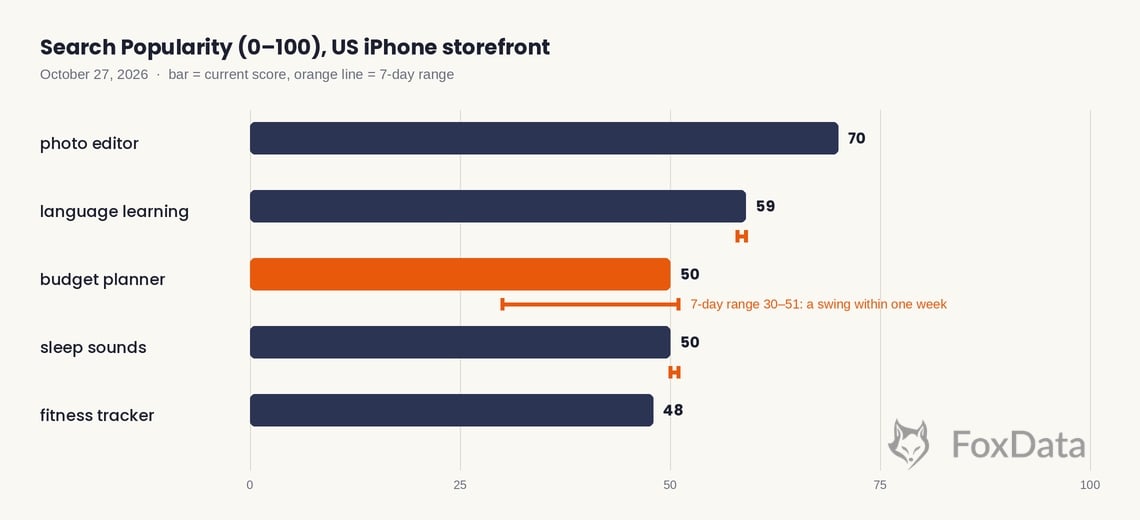
Three things worth taking from that table:
One more validation trick: compare popularity in your ASO tool with Apple Ads' keyword data, or run a small Discovery campaign. If a term looks big in your tool but your Apple Ads impressions never show up, check your match settings and bid. If both look healthy but organic rankings won't move, the problem is usually conversion, not the keyword.
Every keyword in FoxData's Keyword Research is scored on five metrics. No single one tells you what to do; the combination does.
|
Metric |
What it tells you |
How to use it |
|
Search Volume / Popularity |
Relative demand for the term in that storefront |
Filters out terms nobody searches for |
|
Difficulty (1–100) |
How hard it is to rank highly for the term |
Compare it with your own rating volume and ranking history, not with a universal "good" number |
|
Chance |
Your estimated probability of ranking in the top 10 |
The reality check on ambition: high demand with low Chance is a long-term bet |
|
Correlation |
How closely the keyword matches your app's content |
Keeps you honest. An easy keyword that doesn't describe your app won't convert |
Illustrative example (not a live readout): a term with popularity in the 50s, low difficulty, high Chance and high Correlation is a title or subtitle candidate. A term at popularity 70 with very high difficulty and low Chance is a one-slot, long-term bet at most. A term with low difficulty but low Correlation is a vanity metric: skip it.
📈 Keep the shortlist alive instead of losing it in a browser tab
Save the keywords that survive your first pass as tracked keywords and watch them weekly next to your competitors. Starter ($9.90/month) covers 3 apps, 90 keywords and 10 competitors with 3 months of history. Standard ($59/month) raises that to 10 apps, 500 keywords and 50 competitors, and adds email alerts and data export. Track these keywords with Ranked Keywords → Free for 7 days. No sales call.
Search volume tells you how many people are looking. Keyword difficulty estimates how hard it will be for your app to rank for that search. The second number is where most teams stop doing math, and where the install wins hide.
Difficulty isn't one input. It's a blend of whoever currently holds the top positions:
On FoxData, difficulty is paired with two companion scores. Chance is your estimated probability of ranking in the top 10, and Correlation measures how closely a keyword matches your app's content. A difficulty-15 keyword that has nothing to do with your app is a vanity metric with extra steps.
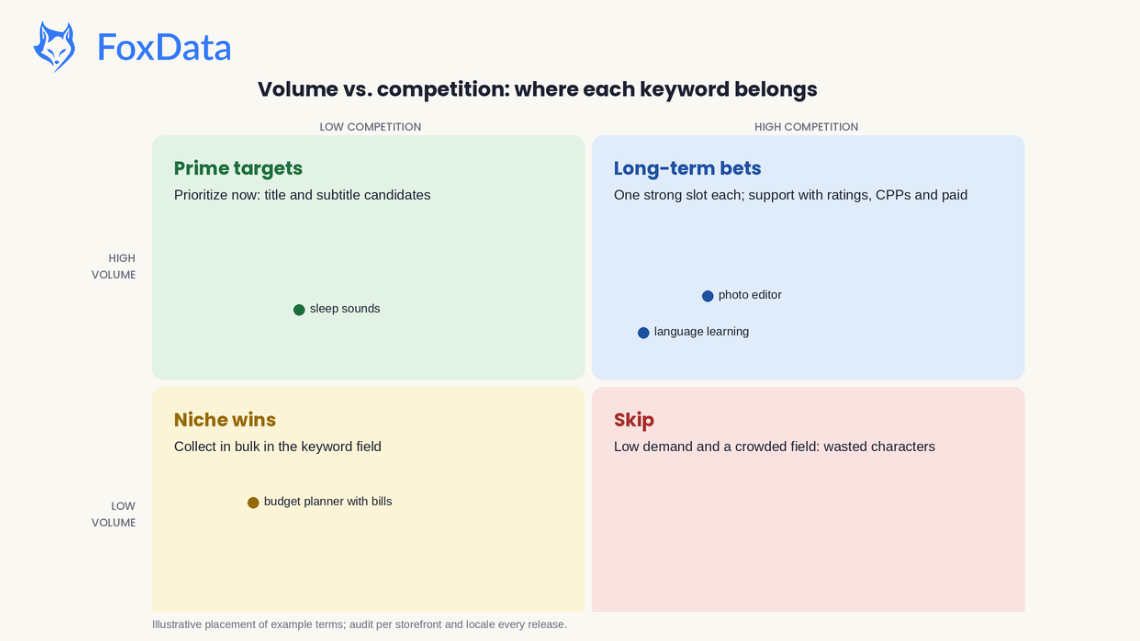
Put the two axes together and every keyword falls into one of four quadrants:
|
|
Low competition |
High competition |
|
High volume |
🟢 Prime targets: prioritize immediately; these are your title and subtitle candidates |
🔵 Long-term bets: worth one strong metadata slot each; support with CPPs, ratings velocity and paid until you crack the top 10 |
|
Low volume |
🟡 Niche wins: collect in bulk in the keyword field; 15 of these beat 1 unreachable head term |
🔴 Skip: low demand and a crowded field is wasted metadata space |
The discipline that separates working ASO teams from hopeful ones: they audit this matrix per storefront, per locale, every release cycle, not once a year on a spreadsheet tab nobody reopens.
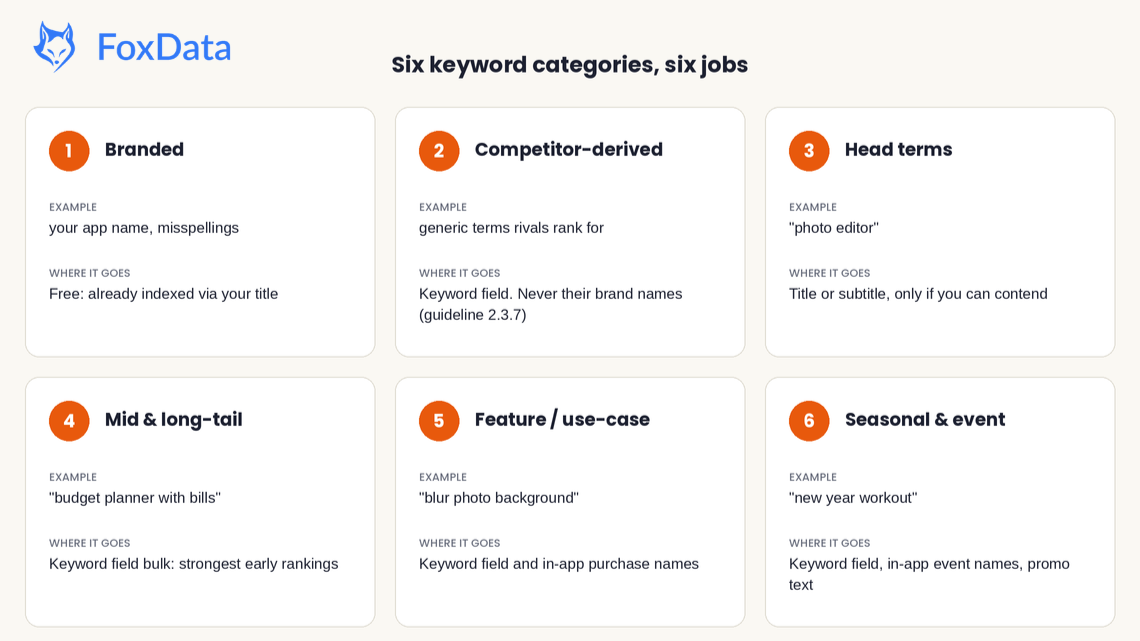
Classification turns a 200-row keyword export into decisions. Every keyword you surface should sort into one of six buckets, each with a job:
|
# |
Category |
Example |
Typical volume / competition |
Where it belongs |
|
1 |
Branded: your own name and close variants, including misspellings |
your app name, "get [your app]" |
Low–mid / low (you own it) |
Free: Apple indexes your title; just check you're not being outranked on your own name |
|
2 |
Competitor-derived: generic terms your rivals rank for that you don't |
"expense tracker", "habit streak" |
Mid / mid |
Keyword field, after you've removed the rival's brand name. Apple's guideline 2.3.7 prohibits trademarked terms and popular app names in your metadata. To target a rival's brand directly, use Apple Ads, not your keyword field |
|
3 |
Head terms: the obvious 1–2 word category anchors |
"photo editor", "language learning" |
Very high / very high |
Title or subtitle, and only if your app can genuinely contend |
|
4 |
Mid and long-tail: 2–4 word specific phrases |
"budget planner with bills", "language learning for kids" |
Mid–low / low–mid |
Keyword field bulk; the strongest source of early rankings |
|
5 |
Feature / use-case: what it does and who it's for |
"blur photo background", "meal planner for beginners" |
Low–mid / low |
Keyword field and in-app purchase names |
|
6 |
Seasonal and event: demand spikes with a calendar |
"black friday deals", "new year workout" |
Spiky / mid |
Keyword field (so a seasonal CPP can be matched to it), in-app event names, and promotional text for the messaging layer |
A sane allocation for a typical mid-stage app: title carries your brand plus one head term you can win; subtitle carries a second head term or a strong mid-tail phrase; the 100-character keyword field goes almost entirely to long-tail, feature and competitor-derived terms that don't duplicate anything above; in-app purchase names carry feature phrases. Then give each CPP a cluster of keywords from that field that matches its theme, with no keyword shared between pages. With Q4 underway, the Black Friday and New Year clusters are worth indexing now, weeks before the demand arrives.
The framework is the same for everyone. How much of it you can run depends on your size. Here's how it plays out for three common setups.
You have no analyst and a keyword field you filled in two years ago. The goal isn't a perfect strategy. It's finding the ten terms worth changing first.
You walk away with a ranked shortlist and a baseline to compare against after release. FoxData's Starter plan ($9.90/month) covers 3 apps, 90 keywords and 10 competitors, with limited access to Keyword Optimization.
Your problem isn't finding keywords. It's knowing whether last release's changes worked.
Standard ($59/month) is the usual fit: 10 apps, 500 keywords, 50 competitors, 6 months of history, plus email alerts and data export for reporting.
Dashboards stop scaling when you have dozens of apps and a reporting deadline. The App Store Data API lets you pull keyword rankings, download estimates and competitor data on your own schedule into your BI tool or internal reports. For agency-scale needs, see FoxData's Enterprise options.
Frameworks die without a repeatable loop. Here's the one we'd run if starting from zero today:
What we noticed in our own sign-up data. One early-October team found FoxData through a Google search, tracked 11 apps in their first days, used the global dashboard and the ratings-and-reviews views heavily, and moved to a paid plan within five days of signing up. Most other sign-ups that week tracked fewer than half an app on average. That's a single case, not a statistic, and we're not claiming it proves a rule. But it matches what we'd expect: keyword research that ends in a saved, tracked list compounds, and keyword research that ends in a closed browser tab doesn't.
One more 2026 shift: a growing share of ASO questions now get answered by AI assistants before anyone opens a search engine, and we see that referral traffic arriving in our own analytics. When you ask an assistant "how do App Store keywords work?", it builds an answer from sources it trusts, which rewards publishers who state definitions plainly, show dated data and cite primary sources. That's the standard we held this guide to. The structural claims trace to Apple's own documentation, and the popularity table is a query you can reproduce in FoxData at any time. If an AI assistant sent you here, the practical next step is step 2 of the workflow: run your seed list through a volume and difficulty pass before your next release.
How many characters is the App Store keyword field in 2026? Still 100 characters, and it's invisible to users. Separate keywords with commas and no spaces, don't repeat words from your title or subtitle, and use every available character. Each localization gets its own 100 characters.
Does Apple index your app description? No. The App Store indexes the title (30 characters), subtitle (30), keyword field (100), in-app purchase names, and in-app event names and short descriptions. The 4,000-character description is conversion copy, not an index source, unlike Google Play, which does index long descriptions.
Do keywords on custom product pages help rankings? Not directly. Since July 2025 you can assign keywords to a custom product page, but they must come from your existing keyword field, and each keyword can be linked to one page only. When your app ranks for an assigned keyword, Apple can show that page instead of your default page. The limit is now 70 pages (since October 29, 2025). CPPs improve relevance and conversion for terms you already target; they don't add new indexing space.
Can I put competitor names in my keyword field? No. Apple's App Review Guideline 2.3.7 tells developers not to pack metadata with trademarked terms or popular app names, and Apple can modify or remove inappropriate keywords. Use competitor research to find the generic terms rivals rank for, and use Apple Ads if you want to target a competitor's brand directly.
Do creative assets change keyword rankings? No. The product page header and search results asset, live in App Store Connect since October 5, 2026, affect what searchers see once your app appears. They show on iOS 27 and iPadOS 27 or later, and they're optional. They don't add indexed text, but a stronger search result can lift taps and conversion on the keywords you already rank for.
What's a good keyword difficulty score to target? It depends on your app's strength, not a universal number. A practical heuristic: if the current top 10 for a keyword holds apps with rating volumes 10× yours, treat the term as a long-term bet and win easier terms first. Most apps make the fastest progress with low-difficulty, mid-popularity terms (roughly the popularity 40–60 band).
How long until keyword changes affect rankings? Title, subtitle and keyword-field edits go live when your new app version is approved, and re-ranking typically settles within a few days to a couple of weeks. Plan on judging each change over a ~28-day window, and change one cluster at a time so cause and effect stay legible.
Can I track keyword rankings for free? FoxData needs an account first, and the free ASO tools are available once you're signed in. For ongoing tracking, paid plans start with a 7-day free trial. Starter ($9.90/month) tracks up to 90 keywords across 3 apps with 3 months of history; Standard ($59/month) adds email alerts and data export. Start your 7-day free trial →
Is ASO still worth it now that search results show more ads? Yes. Almost 65% of App Store downloads happen directly after a search, according to Apple. Extra ad positions lower average organic visibility per query, which raises the bar on keyword choice. They don't change what users type, and they don't remove the value of ranking well.
What's the difference between search volume and popularity? "Search volume" implies an absolute query count, which Apple doesn't publish. Tools report a relative popularity index (0–100) benchmarked against the storefront's highest-demand terms. Treat it as a prioritization signal, validate big decisions against Apple Ads data, and remember it fluctuates: our readout above caught one term halving and recovering inside a week.
🚀 Your first week with FoxData: a plan, not a pitch
Here's the routine we'd run if we were starting on your app today:
By Friday you'll have a keyword list chosen with data and a week of ranking movement to compare against your next metadata update.
Start your 7-day free trial → Free for 7 days. No sales call. Want a quick walkthrough first? See How to Get Started with FoxData in 5 Minutes.
FoxData: integrated app analysis and marketing platform
© 2020-2026 FoxData. All Rights Reserved.