




Explore More Possibilities for Your Business
Full-cycle scenario construction to meet your needs from App research, development, and release to operation.
Ready for your soaring growth

In the ever-intensifying global mobile market, we know that every improvement in data insight and analysis experience translates directly into faster, sharper decision-making.
Today, the Global Dashboard has been fully upgraded — introducing the brand-new “My Competitors” module, along with an enhanced top TAB navigation for a more streamlined, intuitive, and efficient analysis experience across products and regions.
New “My Competitors” Module:
Add and manage your core competitors in one click. Easily compare app performance across global markets and stay ahead by spotting competitive trends in real time.
Enhanced Top Navigation:
The new structure offers clearer functional grouping and smoother switching between modules. Whether you’re tracking ranking trends or analyzing ASO keywords, information retrieval is faster and analytical flow more coherent.
As we always say —
“Only by seeing the competition ahead of time can you lead the change.”
Explore the all-new Global Dashboard today, experience “My Competitors”, and gain your unique global competitive perspective.
App Store Optimization (ASO) is a core strategy for increasing app visibility and conversion rates on the App Store and Google Play, aiming to drive more organic downloads.
The foundation of ASO lies in three key pillars: keyword optimization, creative optimization, and conversion rate improvement.
Keyword optimization should consider search volume, relevance, and competition. Regular updates are necessary—set-and-forget doesn’t work.
Visual assets (title, icon, screenshots, videos) directly impact user impressions and install likelihood. A/B testing is recommended for ongoing improvement.
Localization is essential for global growth—adapt your content and visuals to align with local languages and cultural preferences.
Ratings and reviews significantly influence ranking and editorial exposure. Maintain a 4.0+ rating and respond promptly to user feedback.
Leverage In-App Events (on iOS) to boost retention and re-engage existing users.
Consistently monitor keyword rankings, downloads, conversion rates, and user sentiment to build a data-driven ASO growth loop.
ASO is not a one-time task—it’s a continuous, iterative optimization process. Tools like FoxData enable smarter, insight-led decision-making.
🔍 Use FoxData now to build your own high-performance ASO strategy!
Start a free trial to discover keyword potential, understand competitor trends, and comprehensively improve download conversion rates.
App Store Optimization (ASO) is a key strategy for improving the visibility and appeal of an app on platforms like the App Store or Google Play, with the goal of increasing organic downloads. ASO focuses on three core pillars:
- Keyword Optimization: By carefully selecting and optimizing relevant keywords, you can elevate your app’s ranking in search results. This makes your app more likely to be discovered when users search for similar apps.
- Visibility Enhancement: Boost your app’s exposure by participating in featured listings, running in-app events, or leveraging promotional content to attract attention from wider user segments.
- Conversion Rate Optimization: Refine the content and visuals on your app store product page — including your app icon, screenshots, preview videos, and app description — to increase the likelihood that users will install your app.
By mastering these elements, ASO enables your app to stand out in saturated markets and reach a broader audience.
Since the introduction of the App Store, ASO has evolved from simple keyword placement in app titles and descriptions to a more comprehensive strategy. Today, it covers creative optimization, localization, user engagement tactics, and competitor benchmarking.
Modern ASO is no longer just about visibility — it’s increasingly interaction-focused. App stores now showcase personalized app content via features like “Suggested Collections” to push contextually relevant apps directly to users, improving both engagement and retention.
App store algorithms play a crucial role in determining an app's ranking and visibility in search results. To succeed on the App Store or Google Play, it’s essential to understand the two primary factors that influence rankings: Keyword Relevance and Ranking Strength. Below is a breakdown of how these factors work differently across platforms.
Keyword relevance measures how well your app metadata aligns with user search queries. The placement and context of these keywords significantly impact how your app is indexed and ranked.
Once keyword relevance is evaluated, app stores move on to performance and authority signals to determine which relevant apps deserve the top spots.
Click here for the full guide to mastering Google Play optimization.
App Store Optimization (ASO) is an ongoing, dynamic process intended to improve your app’s visibility, ranking, and appeal in both the App Store and Google Play. Successful ASO bridges user intent, metadata optimization, creative execution, and data-driven iteration. Below you’ll find a practical, step-by-step guide on how ASO works in practice.
Understanding your competitors is the first and most critical step in ASO. Identify apps that target similar keywords or address the same user needs. Analyze their app page structure, metadata, screenshots, and copy to discover effective strategies and opportunities for differentiation.
With tools like FoxData’s ASO Timeline, you can track real-time and historical changes in competitors’ metadata, benchmark performance across categories, and fine-tune your decisions accordingly.
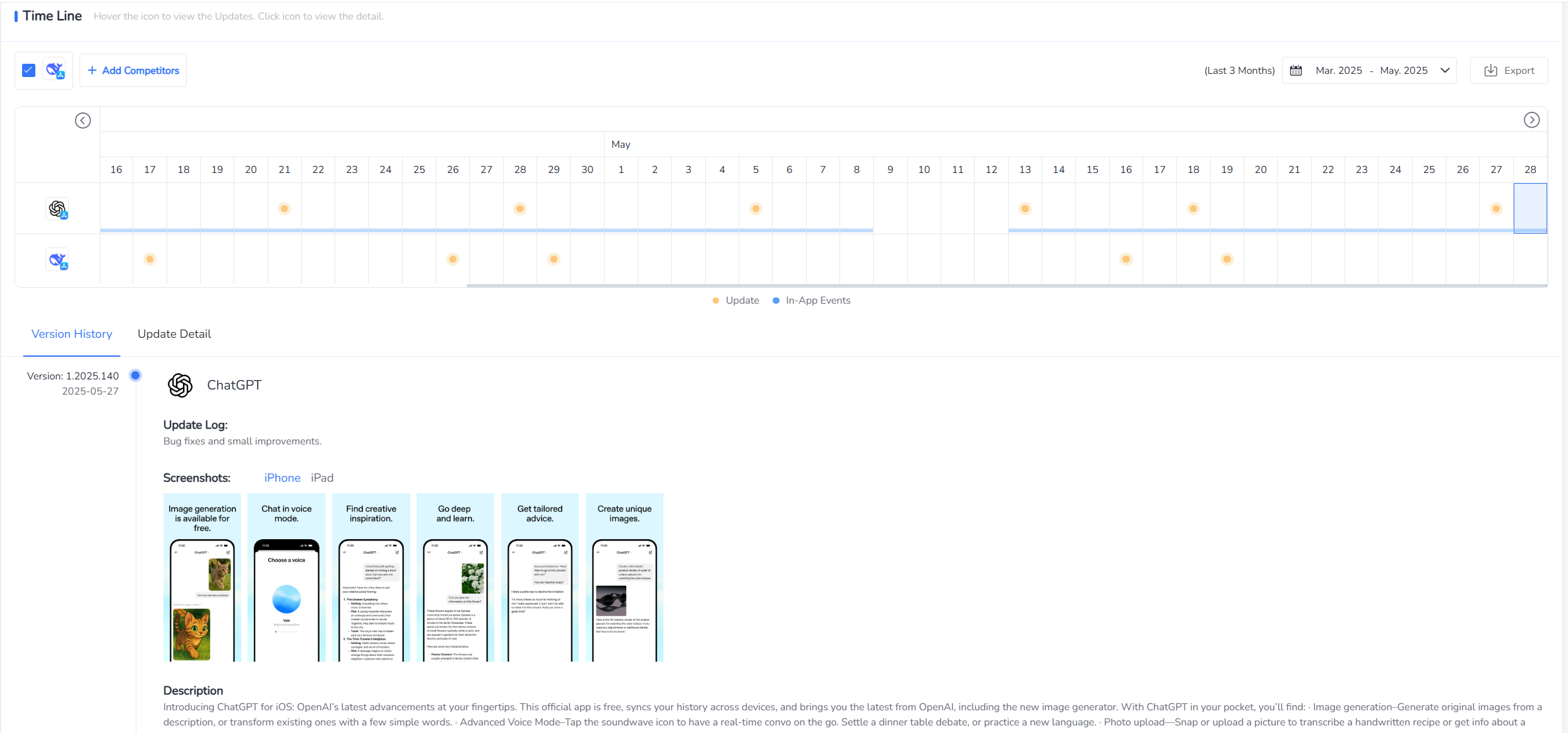
Navigate: [APP] → [Versions] → [Time Line]
📊 FoxData’s timeline shows metadata updates across versions for any competing app.
Before making updates, evaluate which of your current keywords, icons, or creatives are performing well. Which keywords are ranking? Which ones are actually driving downloads? Keep what’s working and plan to improve or replace underperforming elements.
Use FoxData’s Keyword Intelligence module to import your existing keyword list and assess:
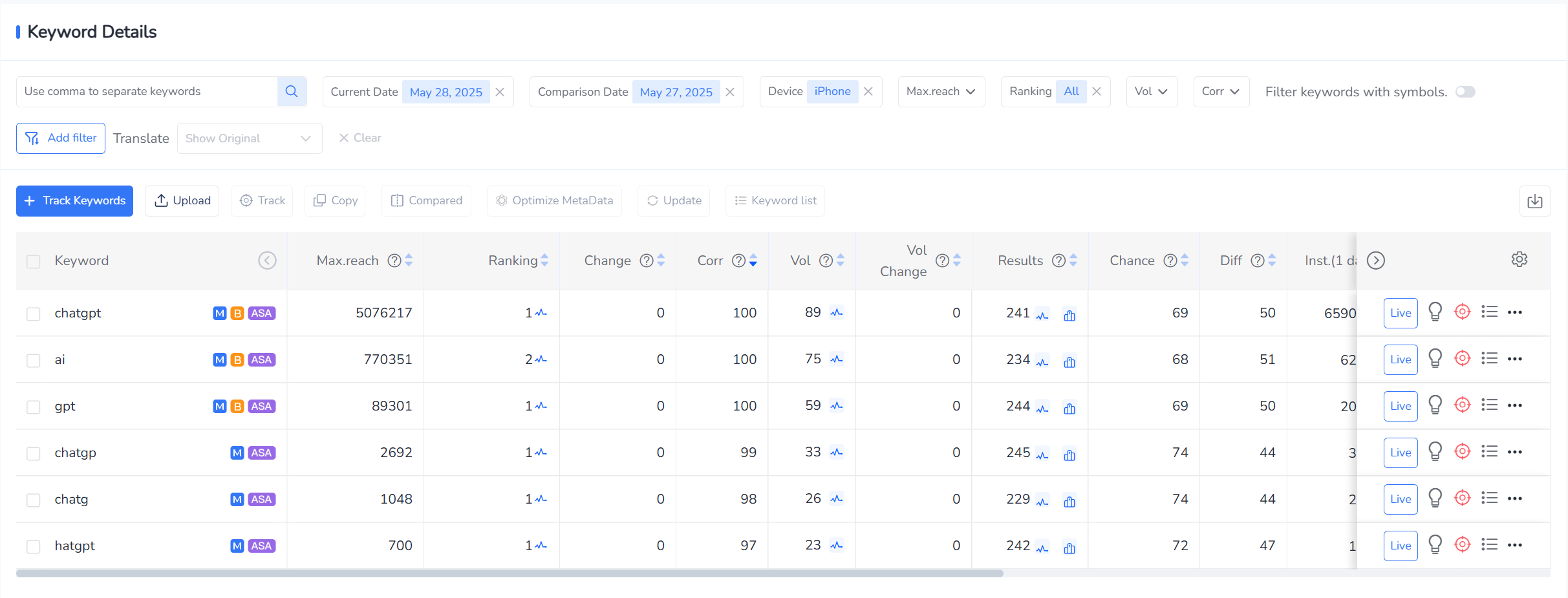
FoxData helps you identify which keywords are real drivers of discovery.
Keyword research is at the heart of ASO. Your goal is to align with what users are actively searching for.
Start by brainstorming terms related to your app’s features, benefits, and use cases. Include long-tail phrases. Use FoxData’s AI Keyword Generator and User Review Mining to source hidden terms directly from your audience.
Finalize a list of 150–200 relevant keywords that span feature-based, intent-driven, and emotional language triggers.
Content will be displayed after page load
FoxData provides Relevance Scores, Search Volume, and Difficulty indicators to help you identify high-opportunity keywords with achievable ranking potential.
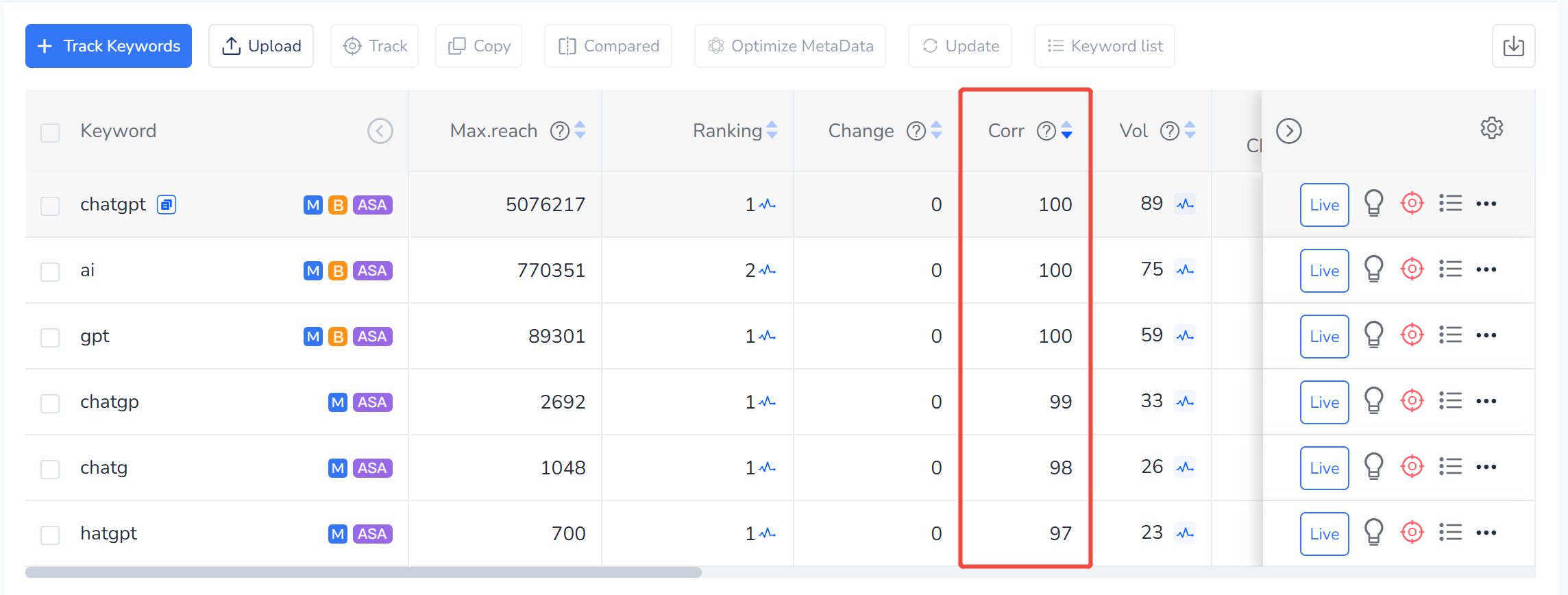
FoxData Relevance Score: 0–100, Measures how well a keyword aligns with your app’s core purpose.
Optimizing your app store listing is crucial — users spend just a few seconds viewing your app page. Make every visual element count.
Use clear, concise language to communicate the core functions of your app. Insert your most valuable keyword early in the title.
On the App Store, use the subtitle strategically; on Google Play, focus on the short description to highlight your unique selling points.
Users typically spend less than 3 seconds on an app store listing — so your icon, screenshots, and videos must immediately capture attention.
On the App Store, descriptions don’t impact search rankings directly but are still essential for persuading and converting users.
Adapting your metadata and visual content to match cultural and linguistic preferences in different regions is critical. Localization increases reach and boosts conversion rates in global markets.
🗺 Example:
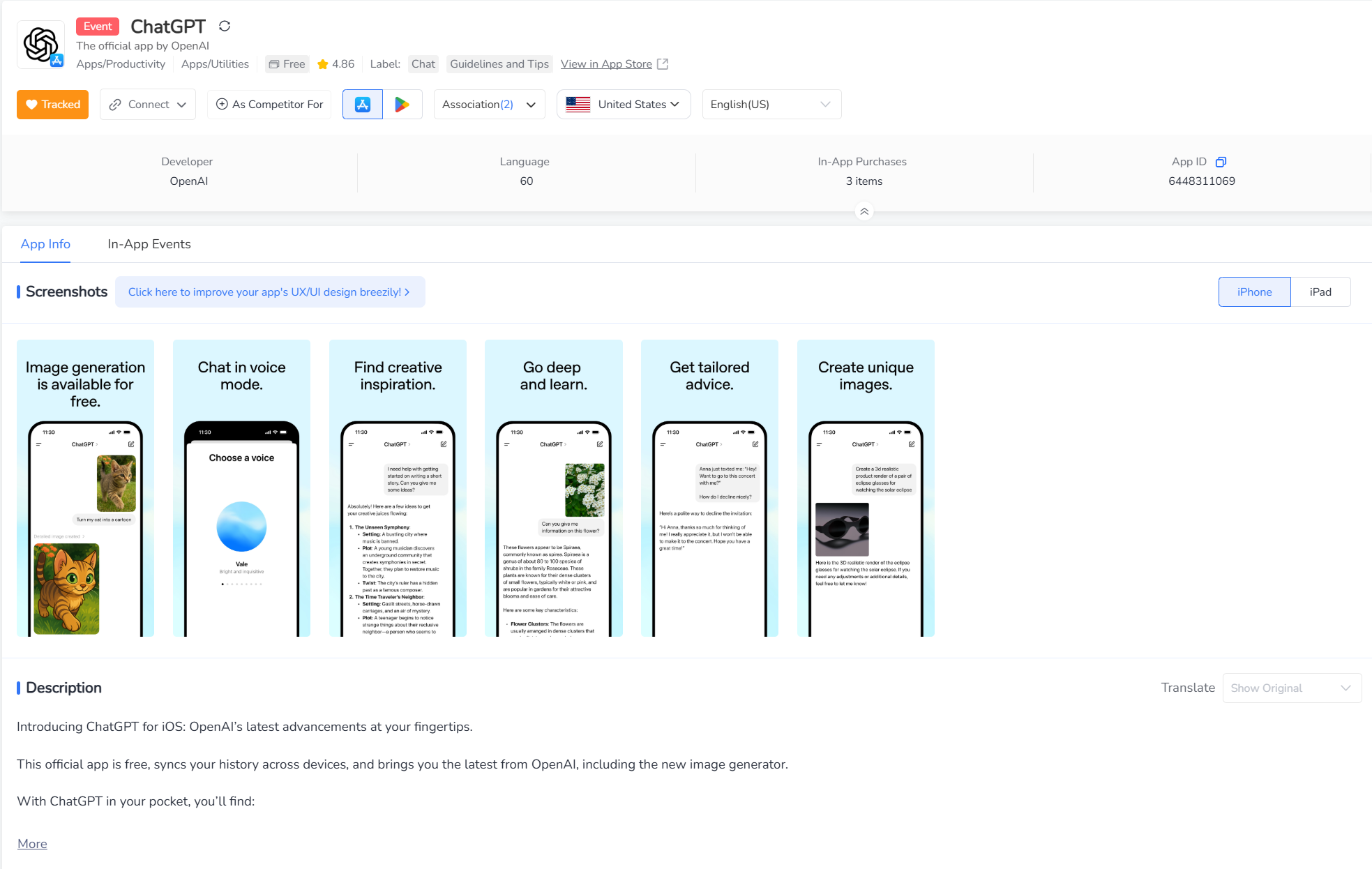
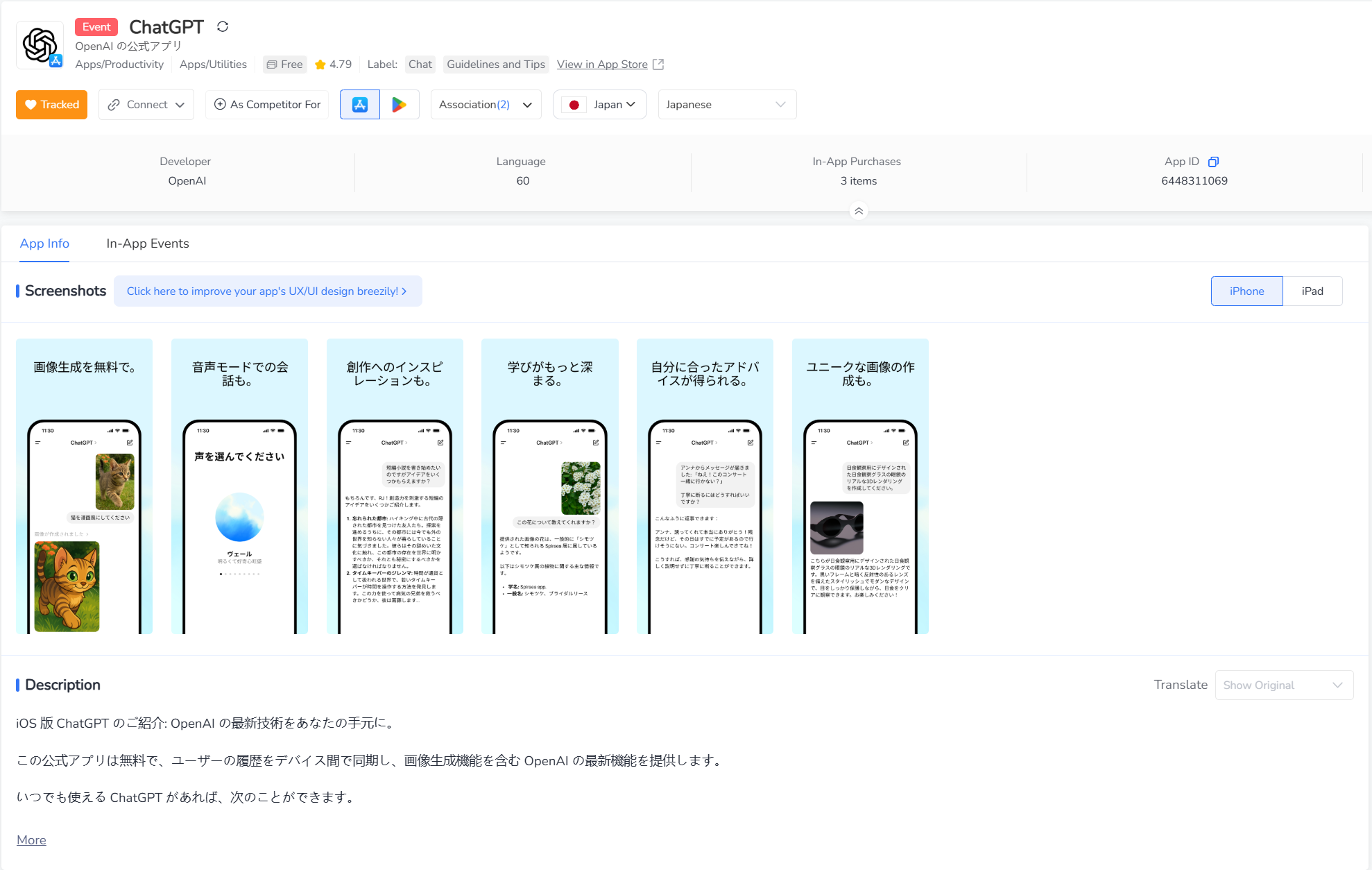
AI application ChatGPT's localization insights within the app profile in the US and Japan. Source: FoxData.
Ratings and reviews significantly influence search ranking and user trust. Aim to maintain an average rating above 4.0 and resolve issues promptly.
Proactively responding to user reviews increases positive sentiment, boosts trust, and signals to platforms that your app is attentive to customer experience.
Use FoxData Review Analytics to extract keyword trends and negative themes from comments to fuel app improvements and messaging clarity.
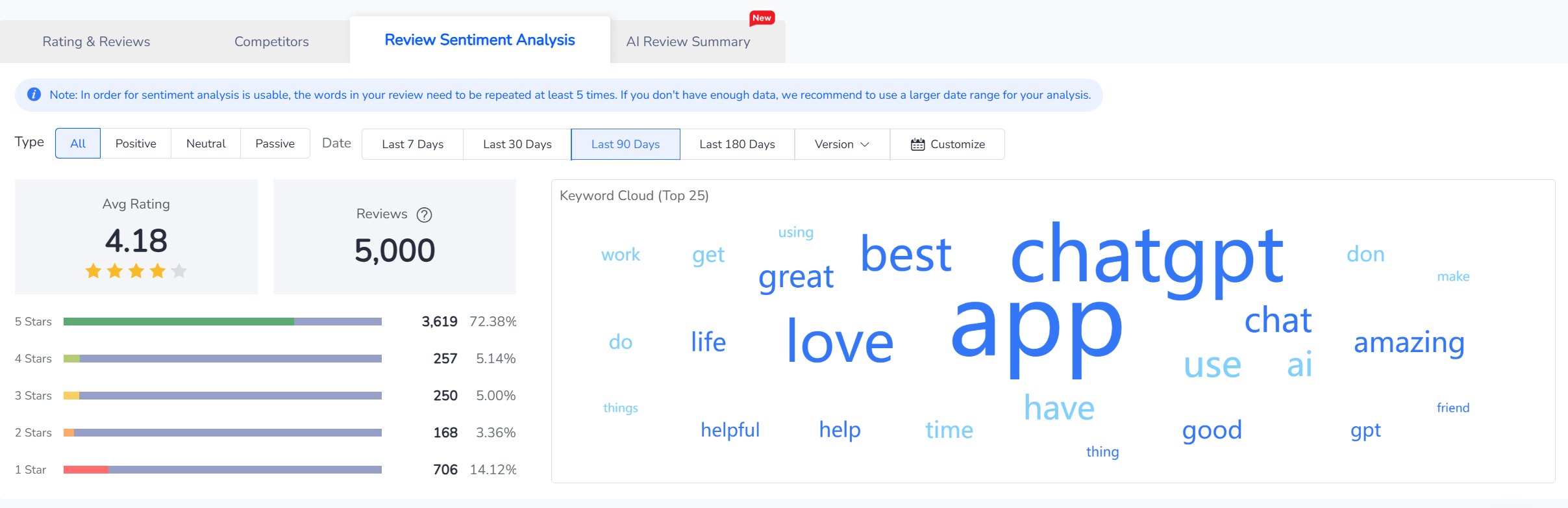
🔍 FoxData Insight:
92% of featured apps on the App Store maintain a rating of 4 stars or higher — ratings directly factor into promotion algorithms.
Getting featured by Apple or Google significantly improves app visibility. To increase the likelihood:
💡 Frequent updates, quality promotions, and timely seasonal campaigns improve your app’s visibility to editorial teams.
App Store Optimization is an ongoing process that necessitates regular monitoring. Key performance indicators to track include keyword rankings, downloads, conversion rates, retention, and user feedback.
Consistent monitoring of app rankings and visibility is crucial. App stores regularly update their algorithms and face continuous competition, while user search behavior evolves over time.
🕒 FoxData Recommendations:
By continuously refining keyword selection, visual appearance, and engagement mechanics — and grounding your decisions in data — you’ll unlock sustained ASO performance and app growth.
As app stores innovate to enhance user discovery and storefront experience, keeping up with trends is essential. The following three developments are shaping the future of ASO:
With voice search gaining popularity, app stores now use Natural Language Processing (NLP) to interpret conversational queries. This means apps must optimize metadata using natural, full-sentence phrasing.
Example: Instead of targeting "budget tracker," consider optimizing for phrases like "How do I track my monthly expenses?" — aligning with how users speak to voice assistants.
Keeping pace with these trends ensures your app stays relevant and continues delivering a high-quality experience.
App Store Optimization (ASO) is a multifaceted, ongoing process that relies on specialized tools. Leveraging robust ASO tools provides critical data insights, enabling the construction of scientific, efficient, and results-oriented optimization strategies to enhance visibility and conversion rates in a competitive market.
Here's a breakdown of essential tool categories for achieving ASO excellence:
Keyword research forms the foundation of ASO, helping you identify the search terms users employ when looking for similar apps. High-performance keyword tools not only uncover high-volume, relevant keywords but also pinpoint opportunities to boost visibility.
Platforms like FoxData also offer multilingual keyword suggestions and global market data tracking, supporting app globalization efforts.
By testing different icon, screenshot, and description layouts, A/B testing helps identify the most appealing versions, thereby improving page conversion rates and downloads. Google Play Console (for Android) and App Store Connect (for iOS) both offer built-in A/B testing features, allowing you to easily optimize visual and textual content to enhance user appeal.
Staying ahead requires close monitoring of industry trends and competitor activities. Market analysis tools provide insights into competitor strategies, identify growth opportunities, and inform optimization directions aligned with market dynamics.
For instance, FoxData offers in-depth data support, including competitor performance analysis and market trend assessment, helping you stay informed and make precise decisions.
By adhering to these strategies and staying informed about the latest trends, you'll ensure your app achieves sustained visibility and growth in 2025. Implementing data-driven and user-centric ASO strategies is key to standing out in a competitive market.
Yes. Whether your app is a game, productivity tool, educational resource, or e-commerce platform, ASO is a crucial strategy for increasing visibility and conversion rates. Different app types may face varying user search behaviors and competitive landscapes, so keyword strategies and page design should be optimized according to target user characteristics.
Even without reviews, you can establish initial exposure by focusing on keyword optimization, visual assets, and localization. I suggest encouraging users to leave ratings through non-intrusive pop-ups after they complete core tasks. Simultaneously, ensure you respond quickly to user feedback to build a positive reputation, thereby creating a virtuous cycle.
© 2020-2026 FoxData. All Rights Reserved.



