




Explore More Possibilities for Your Business
Full-cycle scenario construction to meet your needs from App research, development, and release to operation.
Ready for your soaring growth
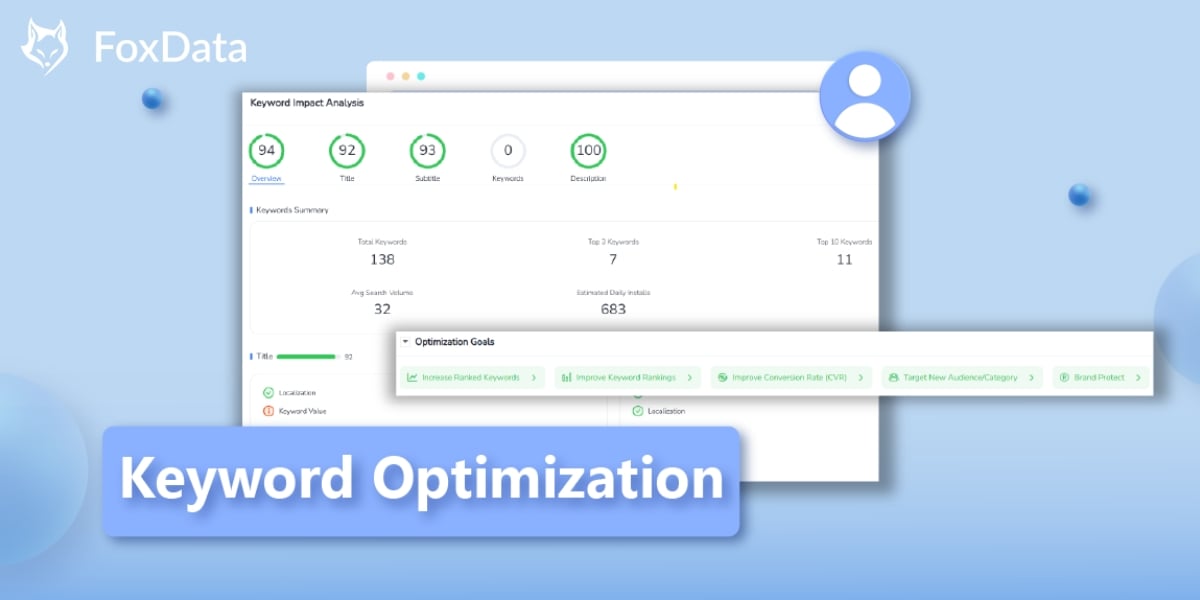
App Store Optimization (ASO) is no longer just about “adding more keywords.” Every character in your metadata—Title, Subtitle, Description, and Keywords—should serve a clear goal: rank higher, expand visibility, improve conversion, or protect your brand.
FoxData’s newly upgraded Keyword Optimization feature was designed for exactly that.
Whether you’re familiar with it or using it for the first time, this guide walks you step by step through how to leverage it—and more importantly, how it can directly boost your app’s visibility and installs.
🔓 Free to use: FoxData offers free access to the Keyword Optimization, letting you explore all keyword possibilities before updating your App Store metadata.
Ranking isn’t about stuffing your Title or repeating high-volume terms in the Description. Apple and Google now prioritize:
This means testing, simulating, and validating your metadata is essential before publishing.
Before editing your metadata, ask yourself one key question: What do you actually want to achieve?
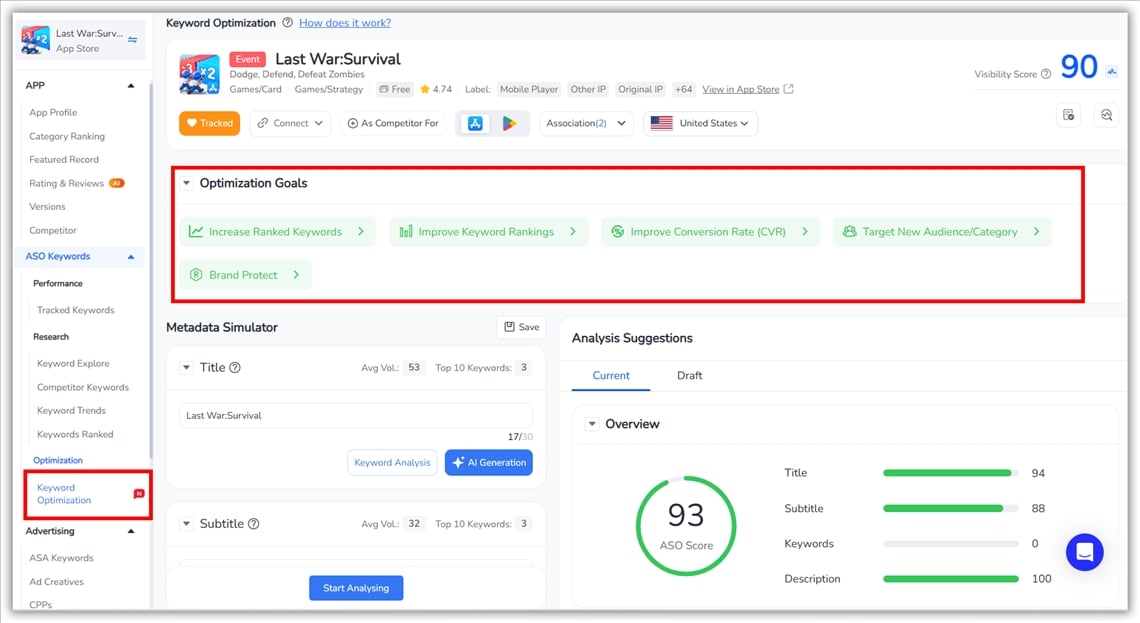
Choose one primary goal:
✅ Increase Ranked Keywords – Expand the total number of keywords your app ranks for.
✅ Improve Keyword Rankings – Boost rankings for keywords your app already covers.
✅ Improve Conversion Rate (CVR) – Align metadata with user intent to increase installs.
✅ Target New Audience/Category – Find keywords that unlock new user segments.
✅ Brand Protect – Secure branded keywords and minimize competitor traffic.
FoxData’s AI then generates goal-driven metadata suggestions tailored to your objective. This is no longer generic keyword editing—it’s ASO strategy simulation.
The Metadata Simulator lets you test changes before publishing. It automatically loads your app’s current Title, Subtitle, Description, and Keywords—so you’re optimizing based on real data.
Above each field, you can see:
This gives a clear snapshot of which areas are underperforming and where improvements matter most.
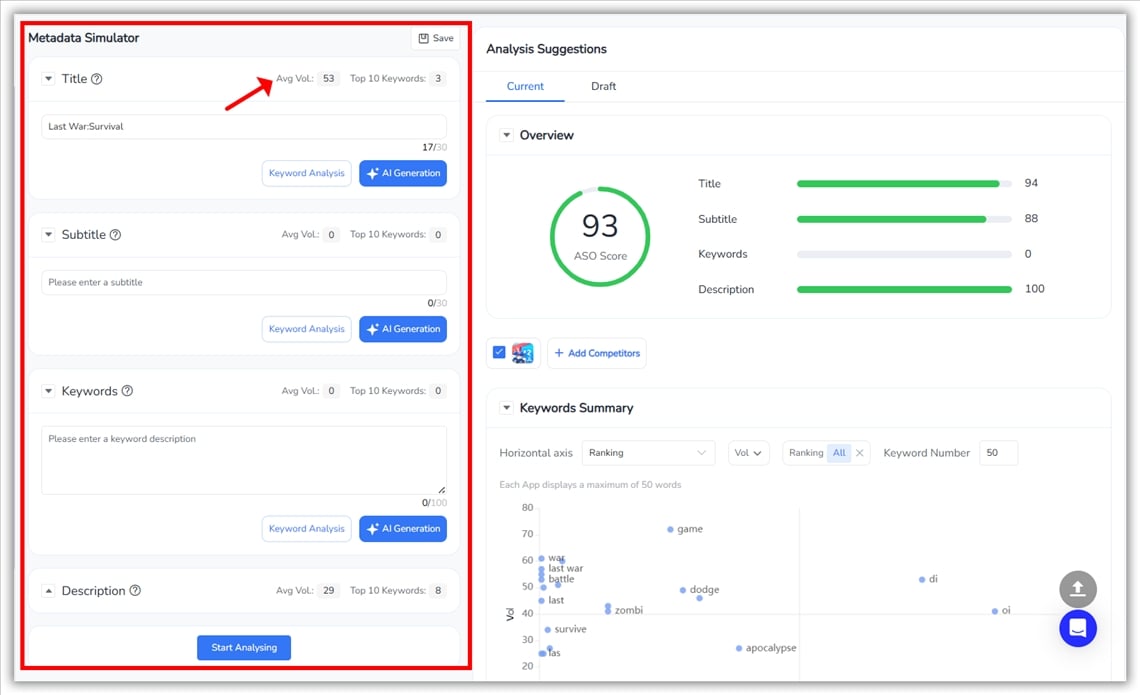
Two core tools turn data into actionable optimization insights:
Clicking “Keyword Analysis” opens a detailed evaluation panel. Here, you’ll see:
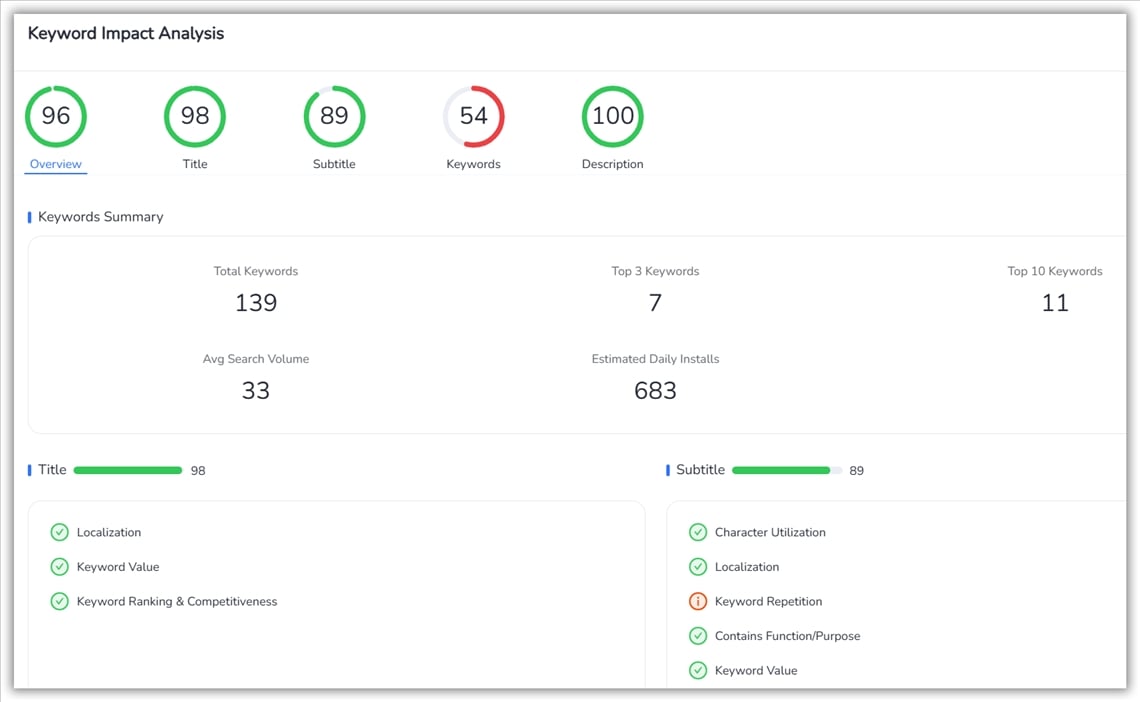
More importantly, each metadata field is evaluated across multiple dimensions:
This detailed breakdown helps you understand why a field underperforms, not just that it does, giving you clear direction for improvement.
Click “AI Generation” to create optimized content for that specific field. Suggestions are based on:
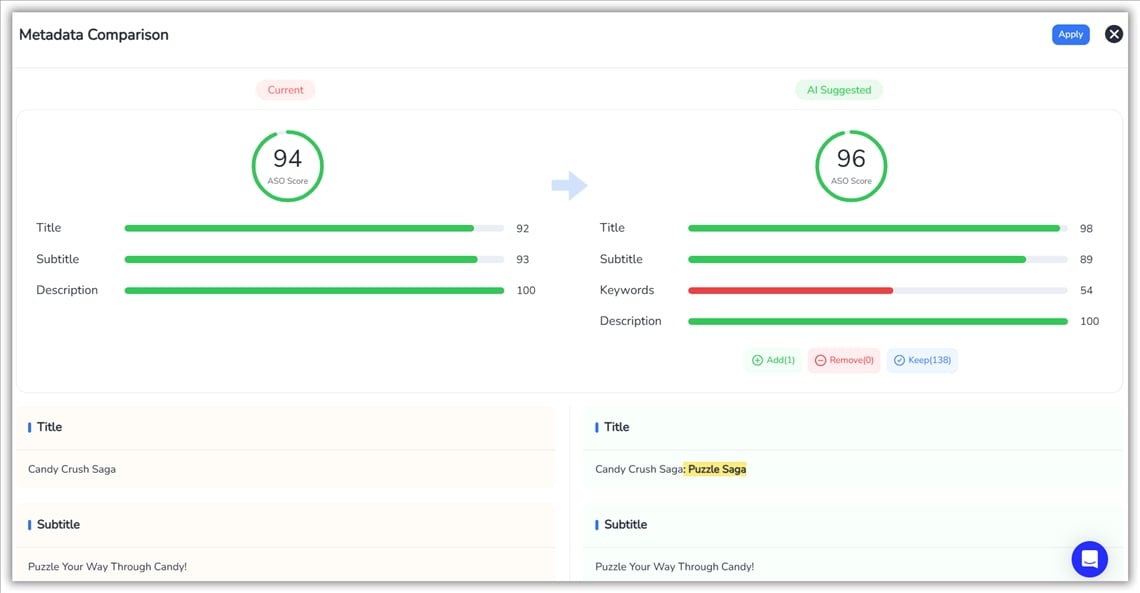
Every suggestion is fully editable. This tool accelerates iteration, it doesn’t replace your strategy.
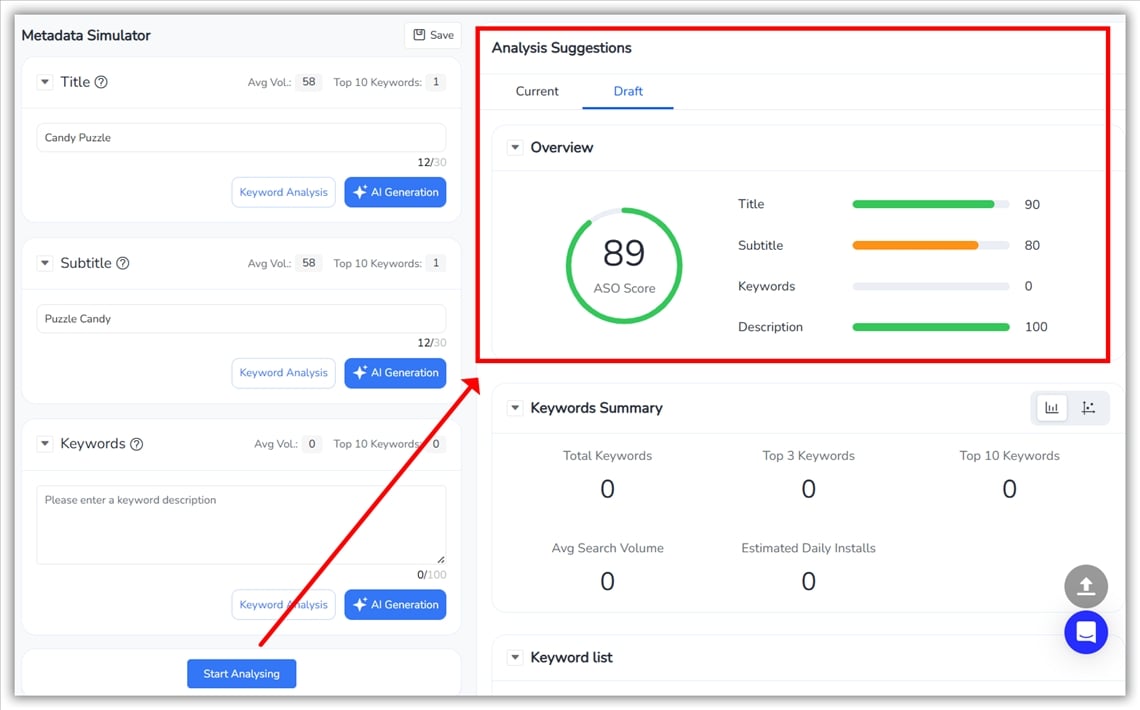
Once you refine one or more fields, click Start Analysing at the bottom of the page.
FoxData evaluates your updated ASO Score and Visibility Score, letting you see instantly whether your changes truly improve discoverability.
FoxData provides a comprehensive keyword table for all metadata keywords, including:
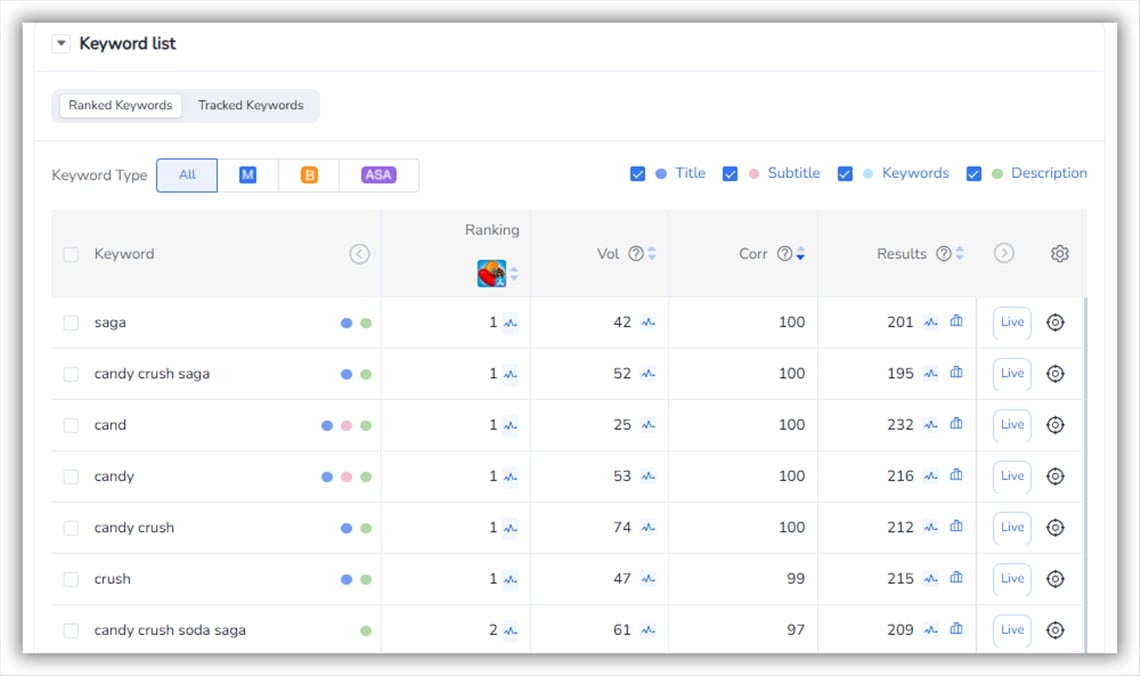
This helps you identify missing high-value keywords, spot overused terms, balance competition with coverage, and improve keyword density without stuffing.
👉 Explore the All-New FoxData ASO/ ASA Module — Smarter ASO, Smoother Workflow
For developers and growth teams, Keyword Optimization delivers:
In short, it turns metadata into a measurable growth lever.
A: Yes—smaller apps benefit most, since every keyword placement matters. You can simulate improvements before investing in paid traffic.
A: No—it enhances them. Keyword Optimization connects research directly with metadata execution.
A: Yes—you can test metadata changes, compare ASO Scores, and check projected visibility before publishing, reducing ranking risk.
A: Yes—you can test metadata changes, compare ASO Scores, and check projected visibility before publishing, reducing ranking risk.
A: Yes, FoxData provides detailed tutorials and guides in the FoxData blogs or Help Center to help you make the most of this feature.
Start using FoxData Keyword Optimization to turn metadata into predictable growth—rankings aren’t accidental; they’re engineered.
© 2020-2026 FoxData. All Rights Reserved.



