

Explore More Possibilities for Your Business
Full-cycle scenario construction to meet your needs from App research, development, and release to operation.
Ready for your soaring growth
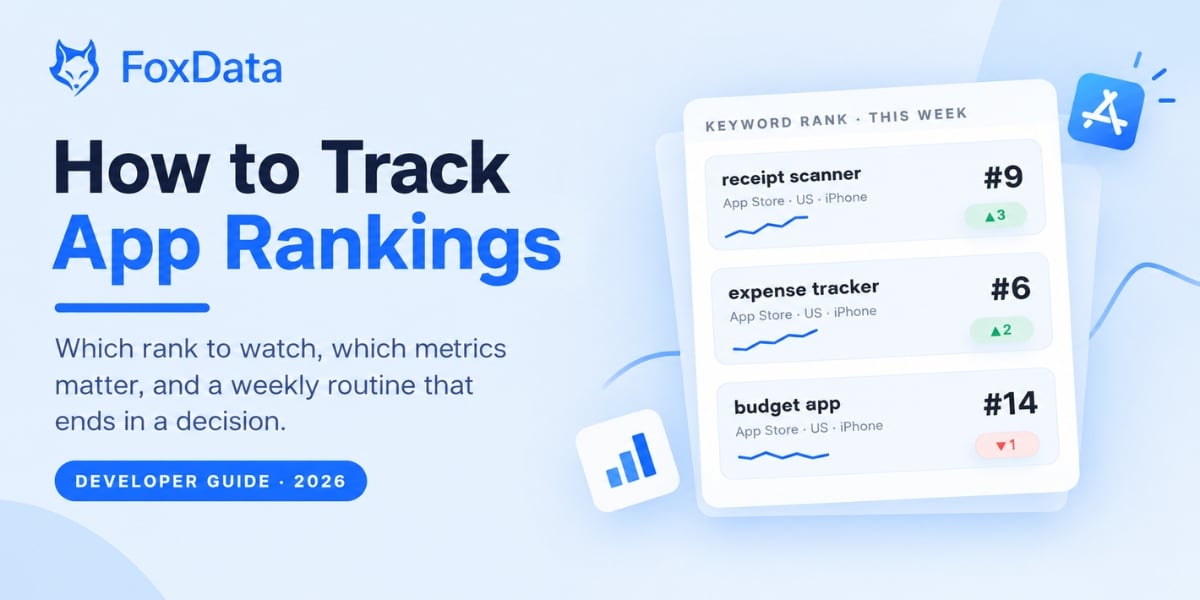
Quick answer: To track app rankings, pick 20 to 50 keywords and two or three storefronts, record your keyword rank and chart rank once a day at the same time, store every snapshot so you build history, and review the changes once a week against what you shipped. Judge results on a 7-day median, not a single day, and always read rank alongside product page conversion.
You shipped a new subtitle on Monday. By Thursday your rank for "receipt scanner" went from #12 to #9. Was it the subtitle, or was it just Thursday? If you can't answer that, you don't have a ranking problem. You have a tracking problem.
App rankings are a lagging, noisy signal, but they're still the cheapest proxy for discoverability you have. Tracked well, they tell you within days whether a new icon, subtitle or release changed anything. Tracked badly, they send you chasing noise for a quarter.
This guide is for indie developers, small studios and mobile game teams. By the end you'll know which "rank" to watch, which eight metrics belong on a dashboard, how to collect the data three different ways (with a working Python script for iOS), and how to run a 45-minute weekly review that ends in a decision. If you read only one section, read the metric definitions: most ranking arguments inside teams are really definition arguments.
📊 Already tracking 50+ keywords across markets?
Skip the setup. Import your keyword list into FoxData's Keywords Ranked and see each keyword's history and Top 5 competing apps in one table. Try it free for 7 days. No sales call.
"Rank" sounds precise. It isn't. In a single ASO standup you'll hear four different numbers called "our ranking," and they move for completely different reasons.
|
What people call it |
The question it answers |
Where it comes from |
How noisy |
|
Keyword rank |
Where do we appear when someone searches "budget app"? |
Store search results, one storefront at a time |
High: changes with metadata, competitors and indexing |
|
Chart rank |
Where are we on Top Free, Top Paid or Top Grossing? |
Recent download or revenue activity (neither store publishes the formula) |
Medium: smoothed, but lags |
|
Category rank |
Where are we among Finance apps, or among Puzzle games? |
Chart position filtered by category or genre |
Medium |
|
Ad position |
Which Apple Ads or Google Ads placement do we win? |
An auction: your bid plus how relevant the store judges your app to be |
Low, but it's paid, not organic |
The distinction matters because the fixes are different. A keyword rank problem is a metadata and relevance problem. A chart rank problem is usually a volume problem: you need more installs this week, not a better subtitle.
There's a 2026 wrinkle too. Since March 2026 Apple Ads has been adding extra ad placements in App Store search results, which pushes organic listings further down the screen. Your organic rank can stay at #3 while the app a user actually sees sits lower on the page. Track organic rank for trends, and check the live results on a real device now and then so you know what searchers are really looking at.
If your dashboard doesn't label which number it's showing, assume it's the wrong one.
Games lean on charts far more than utility apps do, because a lot of game discovery happens in Top Free and Top Grossing rather than in search. That changes what you watch at each stage.
|
Stage |
Rank to watch |
How often |
|
Soft launch (2 to 3 markets) |
Top Free and category rank in each market, plus genre keywords such as "match 3" or "idle rpg" |
Daily |
|
Global launch or a UA burst |
Top Free chart rank, to see the lift and how fast it decays |
Daily, or more often during the burst |
|
Live ops and events |
Top Grossing rank around each event, plus your core genre keywords |
Daily during the event, weekly otherwise |
|
Steady state |
Keyword rank for the 20 to 30 terms that bring organic installs |
Weekly review |
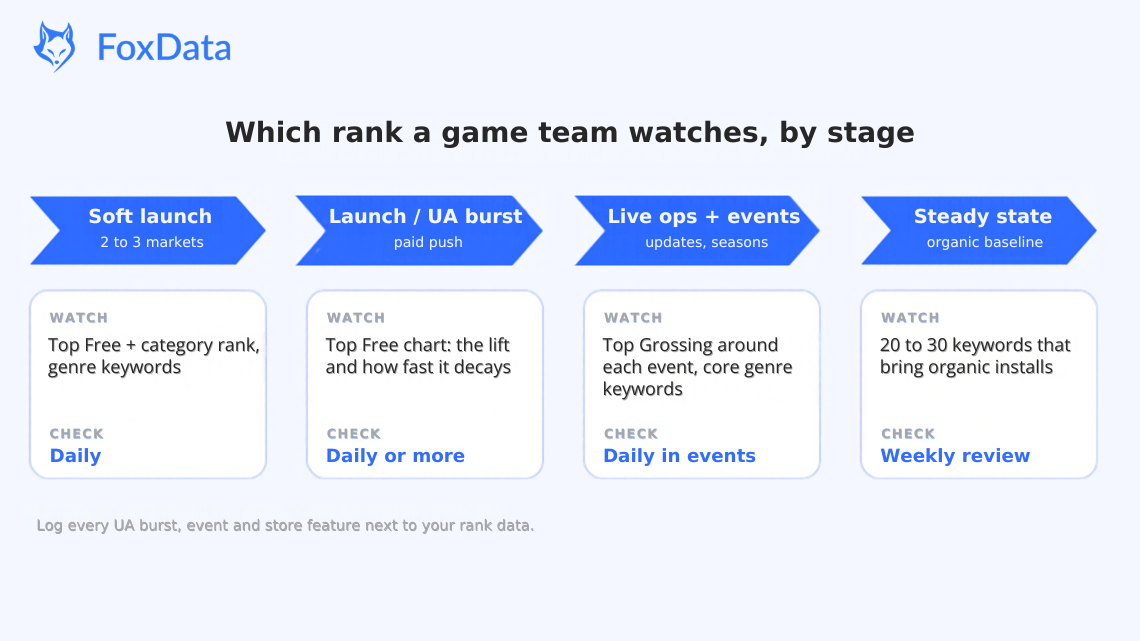
Which rank a mobile game team watches by stage: soft launch, UA burst, live ops and steady state
One habit saves a lot of arguments: keep a log of every paid burst, event and store feature next to your rank data. A chart jump that lines up with a UA push is bought rank. What matters is whether the rank held after the spend stopped, because that is the part you earned.
Scenario: you soft-launch a puzzle game in Canada, Australia and the Philippines. Week one, the game sits at #38 in Canada's Top Free puzzle chart. Without a rank history you can't tell whether #38 is up from #60 after your icon test, or down from #20 after the launch burst faded. With daily tracking and a note on every change, you can.
FoxData's game analytics tools put chart position next to downloads and revenue for the games you follow, so you can read a competitor's launch the same way you read your own. See how game teams use it: mobile game analytics →
Most teams track too many keywords and too few metrics. These eight cover almost every question a product or growth team actually asks.
|
Metric |
Definition |
Why it earns a slot |
|
Keyword rank |
Your position for one query, in one store, in one country |
The atomic unit. Only comparable within the same store, storefront and device type |
|
Top-10 coverage |
Share of tracked keywords where you rank 10 or better |
A better summary than average rank, which hides the cliff after position 10 |
|
Weighted visibility |
Σ (search volume × CTR at that position) ÷ Σ search volume |
Answers "how visible am I for the terms I chose," not "what's my average position" |
|
Share of voice |
Your weighted visibility ÷ total visibility of you plus tracked competitors |
The only ranking metric that's meaningful in a competitive review |
|
Estimated taps |
Search volume × expected CTR for your position |
Stops you celebrating a #1 on a keyword nobody searches |
|
7-day rank change |
Change in rank over 7 days |
The fastest read on whether a release or metadata change did something |
|
Volatility |
Standard deviation of daily rank over 14 days |
Tells you whether a one-day move is signal or noise |
|
Store conversion rate |
Installs ÷ product page views |
Rank gets the visit; conversion gets the install |
Two notes on the formulas. Neither store publishes absolute search volume, so volume in any tool is an estimate or a relative index. And "CTR at that position" is a curve you choose (or your tool chooses); state which one you used so the numbers stay comparable from month to month. The same goes for conversion: App Store Connect calculates it from unique impressions, Google Play Console from store listing visitors. Pick one definition per store and keep it.
Two of these deserve a longer explanation, because they change decisions.
Top-10 coverage is the metric we'd keep if we could only keep one. Average rank is a trap: an app sitting at #3 on ten keywords and #80 on ninety others has a fine average and almost no discoverability. Coverage forces you to count how many queries you can actually compete for.
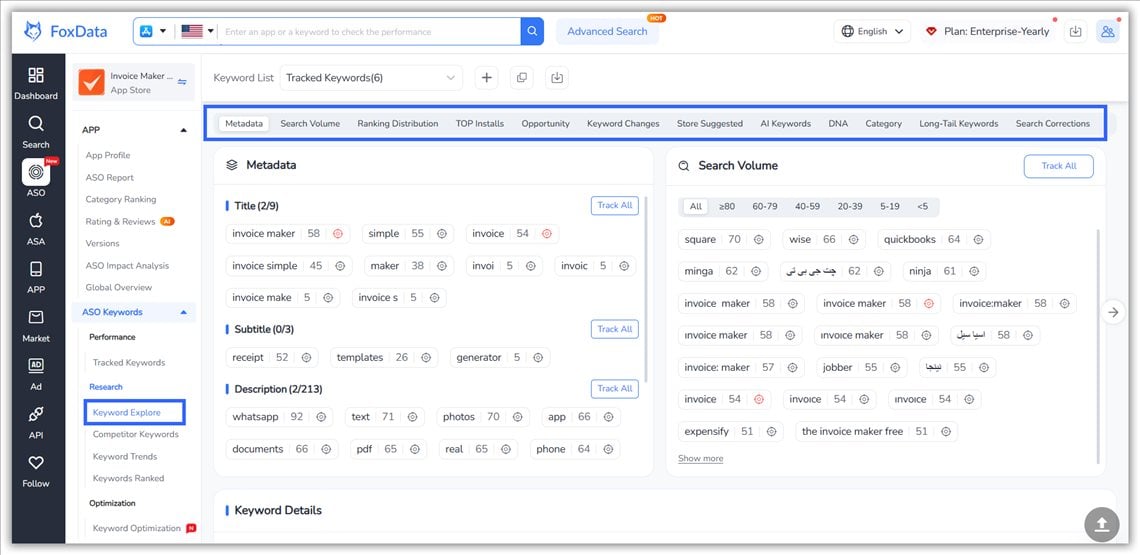
Weighted visibility is what you show leadership. Take two keywords with an assumed tap-through of 30% at #1 and 10% at #3. A #3 on a 40,000-search keyword gives about 4,000 taps a month; a #1 on a 2,000-search keyword gives about 600. Same team, same effort, very different payoff. To get the volume half of that calculation, FoxData's Keyword Explorer shows the search volume for every word in your title, subtitle and description, as in the screenshot below.
🧮 Try it on your own app in five minutes
Search your app in FoxData, open Keywords Ranked, sort by rank and count the keywords sitting at 10 or better. Divide by the total and you have your Top-10 coverage. Do the same for your closest competitor and you have a rough first look at share of voice, before you have written a line of code.
Check your Top-10 coverage free →
Neither Apple nor Google publishes ranking weights. Anyone who hands you a numbered list of "App Store ranking factors" with percentages is guessing, sometimes usefully, often not. What's well established is the category of signals.
|
Signal |
App Store |
Google Play |
|
Title |
30 characters, weighted heavily |
30 characters, weighted heavily |
|
Subtitle / short description |
30-character subtitle, indexed |
80-character short description, indexed |
|
Keyword field |
100 characters, comma-separated, hidden from users |
No keyword field; the long description is indexed |
|
Download velocity |
Strong short-term signal |
Strong short-term signal |
|
Ratings and reviews |
Volume, recency and text all matter |
Volume, recency and text all matter |
|
Engagement and retention |
Widely believed to matter; Apple hasn't confirmed specifics |
Retention and uninstall rate are widely observed signals |
|
Technical quality |
Crashes and slow launches hurt ratings, and ratings feed ranking |
Google says crash and ANR rates above its bad-behaviour thresholds (1.09% and 0.47% overall) can reduce visibility |
|
Localisation |
Per-storefront metadata |
Per-language listings, plus store listing experiments |
|
Editorial |
Today tab, collections, featuring |
Editorial collections and featuring |
Two practical consequences follow.
Search results differ between people and places. Storefront, language, device type and OS version can all change what you see, and Apple hasn't documented how far personalisation goes in organic search. What is documented is that iOS 27 (released 14 September 2026) adds Personalized Collections, which recommend apps to a user before they type anything, starting in US English. No rank tracker can see those. So compare your own numbers over time instead of comparing absolute positions with a competitor's screenshot.
Rank is sampled, not measured. Every tool, including ours, collects from a specific storefront, at a specific time, with a specific method. Consistency beats precision. If you change vendors mid-quarter, expect a step change in your charts that has nothing to do with your app.
Do rankings still matter when people ask ChatGPT, Claude, Gemini or Perplexity for app recommendations? Yes. The store is still where the install happens, and assistants often describe apps using the same words they find on store listings, review sites and articles. A cheap check worth adding: once a month, ask each assistant the same five "best app for X" questions in your category. Log three things in a sheet: whether you are mentioned, where you appear in the answer, and the exact words used to describe you. Keep the prompts identical each month so the log is comparable. It is manual and imperfect, but it shows you something no rank tracker does, and the descriptions you collect are a free source of keyword ideas.
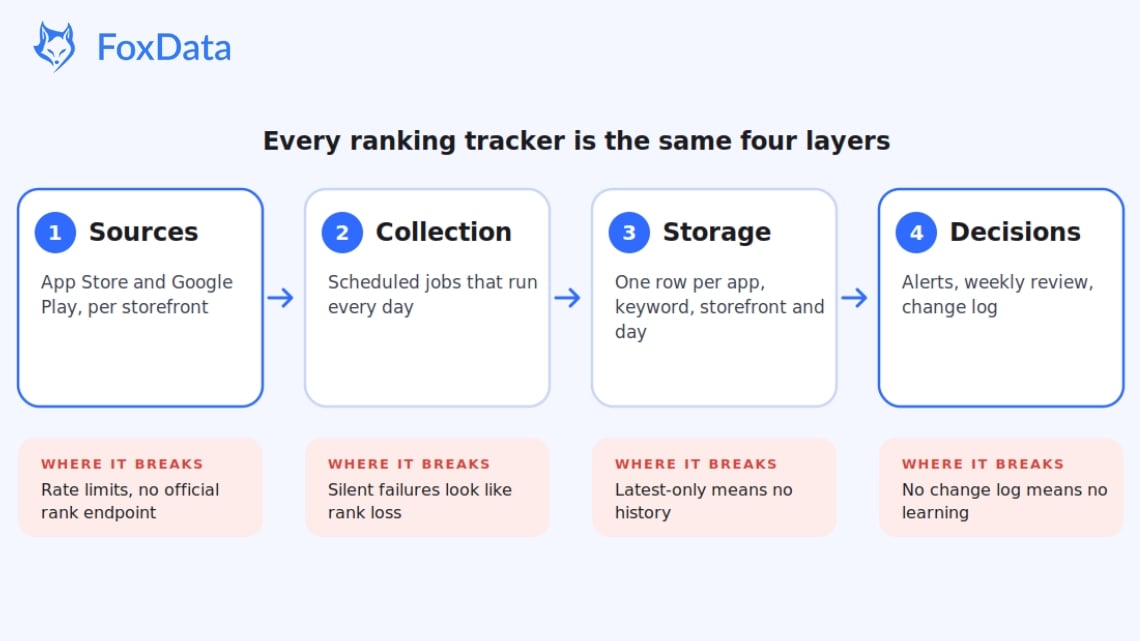
Every ranking tracker, whether it's a spreadsheet fed by a scheduled script or a platform serving a thousand teams, is the same four layers.
🔌 Tracking rankings in a spreadsheet and outgrowing it?
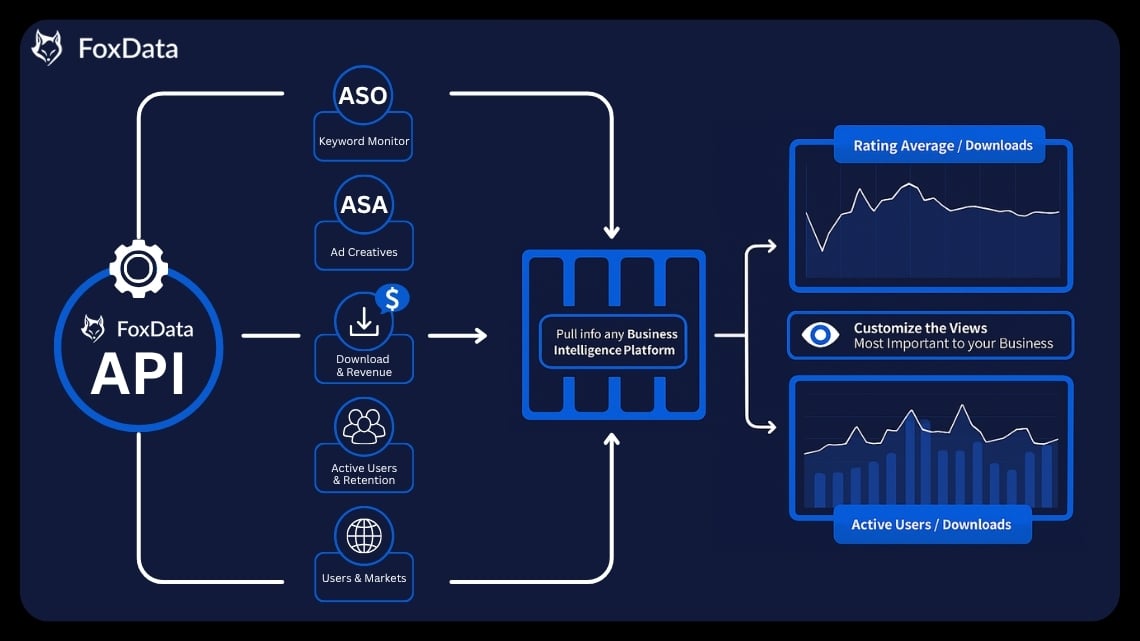
A weekly sheet is a fine start, and the exact point where most tracking efforts stall. It can't give you history from before the sheet, coverage in every storefront you sell in, or a log of failed collection runs. If you want the data in your own warehouse or BI tool instead of a dashboard, the FoxData API serves app performance, ASO metrics and market data programmatically.

Open the store, search the keyword, count the rows. It's free, and it's accurate for what one person sees on one device.
It works when you have under about 20 keywords, one market and one person who owns ASO. It stops working when you add a second country, because now you're comparing a screenshot taken at 9 a.m. in Berlin with one taken at 6 p.m. in San Francisco. Manual checks also can't tell you what happened three Tuesdays ago.
You get full control, your own schema and no per-seat cost. You also own the maintenance: storefront quirks, HTML changes, rate limits, proxy rotation, retry logic, and the slow realisation that historical backfill is impossible, because you can only start collecting from today.
For a developer with one app and a real interest in the data, this is a reasonable weekend project. For a team tracking 300 keywords across eight markets, it's a part-time job that produces worse data than a vendor.
A starter script for iOS. The script below checks your position for each keyword in each storefront using Apple's public Search API, and saves one row per day, storefront and keyword in a local SQLite file, so you build history from the first run. Replace APP_ID, COUNTRIES and KEYWORDS with your own.
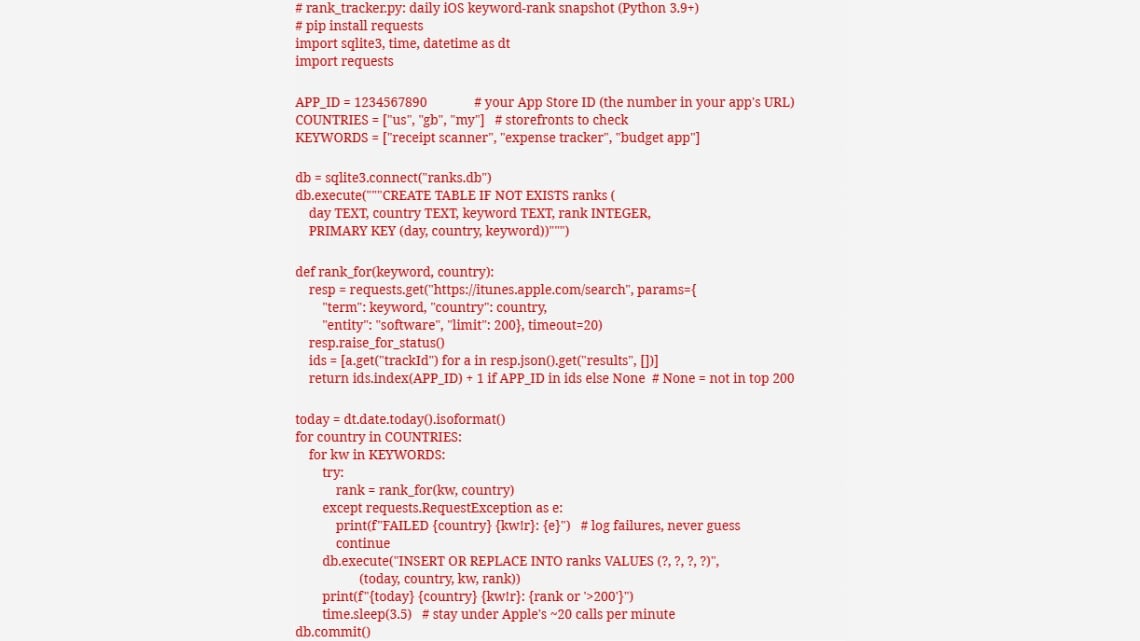
Schedule it once a day at a fixed UTC time (for example with cron: 0 2 * * * python3 rank_tracker.py) so your week-over-week comparisons are fair. Three honest limits: the Search API approximates, but is not identical to, what the App Store app shows on a device; it only covers the top 200 results; and Google Play has no equivalent official endpoint, so Android tracking means scraping or a vendor.
This is the part where we should be upfront: FoxData sells an ASO platform, so treat the criteria below as the things we'd apply to any vendor, including ourselves.
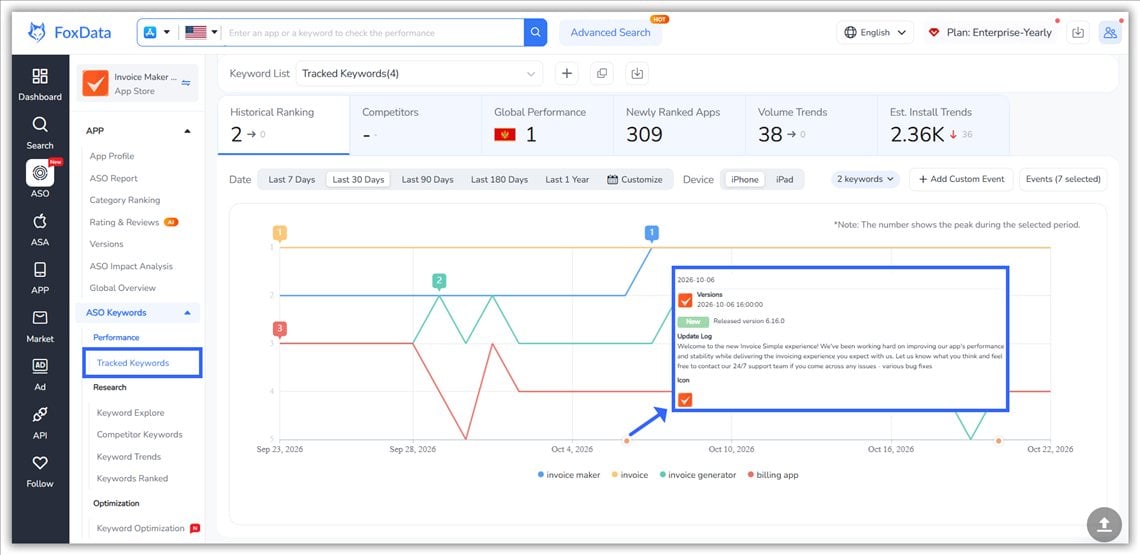
In FoxData, the parts developers tend to live in are Keywords Ranked (every query an app ranks for, with Vol, Diff and Chance, plus the Top 5 apps for each keyword), Tracked Keywords (the keywords you follow, with ranking changes over time), Keyword Trends, and the FoxData API if you'd rather pull the data into your own pipeline than look at ours.
Which route fits you? A solo developer with one app and one market can stay manual. A small studio with two or three apps and a handful of markets is where a tracker starts paying for itself. A game team running soft launches, UA bursts and live events needs daily history and competitor charts, which is hard to build and easy to buy.
|
|
Manual checks |
Own collector |
ASO platform + API |
|
Time to first data |
Minutes |
A weekend, plus ongoing upkeep |
Same day |
|
Marginal cost |
Your time |
Servers, proxies, engineering hours |
Subscription |
|
Storefronts |
Where you can use a VPN |
Whatever you build |
Typically 100+ |
|
History on day one |
No |
No |
Usually yes |
|
Breaks when |
You go on holiday |
A store changes markup |
Rarely; you're paying for that |
|
Best for |
1 app, <20 keywords, 1 market |
One engineer, strong opinions, simple needs |
Teams shipping weekly across markets |
You don't need the perfect setup. You need a baseline you can compare against in four weeks.
You don't need a daily ritual. Ranking data is too noisy for daily decisions and too important for quarterly ones. Once a week, same hour, same storefronts:
That's it. One hour, one owner, a decision at the end. Most ASO programmes fail not from bad data but from never closing this loop.
Comparing across storefronts. "We're #4 in the US and #3 in Germany" is two different markets with two different competitive sets. Only compare like with like.
Celebrating a #1 nobody searches. A top rank on a near-zero-volume keyword is a vanity metric with extra steps. Weight by volume or don't report it.
Reading a single day as a trend. Use a 7-day median for reporting and reserve daily data for incident response. Ranks can move a few positions overnight with nothing changing on your side.
Forgetting the indexing lag. On iOS, title, subtitle and keyword changes go live only with a new app version that Apple approves, then need time to re-index. Allow a few days before judging the result, and don't revert on day one. On Google Play, listing changes don't need a new build, but they still go through review and can take from a few hours to several days to show in search. Either way, judge the result after 7 to 14 days.
Tracking 800 keywords and reviewing none. Coverage feels like rigour. It's usually avoidance. Fifty well-chosen keywords, reviewed weekly, beat a thousand ignored ones.
Daily collection, weekly review. Daily snapshots give you enough data to separate signal from noise, while weekly decisions stop you over-reacting to normal fluctuation. If you're running paid bursts or a launch week, check daily for the length of the campaign only.
No. There is no Apple API for keyword rankings or chart positions. The App Store Connect API covers app management, sales and finance reports, customer reviews and analytics reports. Apple's public Search API returns result order for a query, which is the closest official proxy, but it isn't the same call the App Store app makes, and Apple limits it to roughly 20 calls a minute.
Different storefronts, collection times, device profiles and methods all shift results. One tool may query the US storefront at 02:00 UTC while another queries at 14:00 local time. Compare each tool against itself over time, and treat cross-tool differences as method differences, not errors.
Yes, substantially. Each storefront has its own competitive set, language and search volume. A keyword that's easy in Canada can be brutal in the US. Localised metadata is usually the fastest lever, because relevance is scored per storefront.
As a rule of thumb, thirty to fifty for a single app and two hundred to five hundred for a portfolio. Prioritise keywords with real volume, clear intent and a plausible path into the top 20. Tracking keywords you can never rank for produces charts, not decisions.
Chart rank is a separate number from keyword rank, so track it separately: Top Free, Top Grossing and your genre category, per country, with a note for every UA burst, event and feature. Charts react to recent downloads and revenue, so a jump that lines up with spend is not the same as a jump that holds after the spend stops.
Up to a point. Manually checking twenty keywords in one market costs nothing but an hour a week, and Apple's public Search API is free to query within its limits. Costs start with scale: more storefronts, Android, history, alerting. That's usually where a subscription costs less than the engineering time it replaces.
If you ship in one market and check fewer than twenty keywords, probably not yet; manual checks cover that. It starts paying for itself when you localise into several storefronts, run paid bursts, or have to explain rank movements to someone else. A rough rule: the moment ranking data becomes a weekly meeting topic, the tool costs less than the meetings.
Common causes: a competitor's update or paid push, a seasonal shift in search volume, a ratings dip, a paused acquisition campaign, or normal volatility. Unless you shipped something, give it about 72 hours and check the 7-day trend before changing anything.
On the App Store, metadata changes ship with a new version, so the clock starts when Apple approves the update; re-indexing then usually takes a few days. On Google Play, listing edits go live after review without a new build. In both stores, give a change 7 to 14 days and compare 7-day medians before and after, rather than reacting to the first day.
Four things matter more than the feature list: history from day one, coverage of every storefront you sell in, both stores in one place, and a way to export or pull the data by API. FoxData covers all four, with a 7-day free trial, so you can test it against your own manual checks before paying.
They multiply. Installs from search are roughly searches × tap-through rate × page conversion. A better rank raises the middle term; better screenshots, ratings and copy raise the last one, and they do it for every keyword at once. That's why, once you're in the top 10 for the terms that matter, conversion is usually the cheaper lever.
Yes, but keep it light: use the monthly five-prompt check described in the 2026 section above. There is no ranking to track, but the words assistants use to describe you, and the competitors they name next to you, are worth knowing and often worth borrowing for your store copy.
The fastest way to make ranking data useful is to stop treating it as a scoreboard and start treating it as an experiment log. Pick twenty keywords this week. Record where you are, what you changed and what you expect to happen. In four weeks you'll have something most teams never get: evidence.
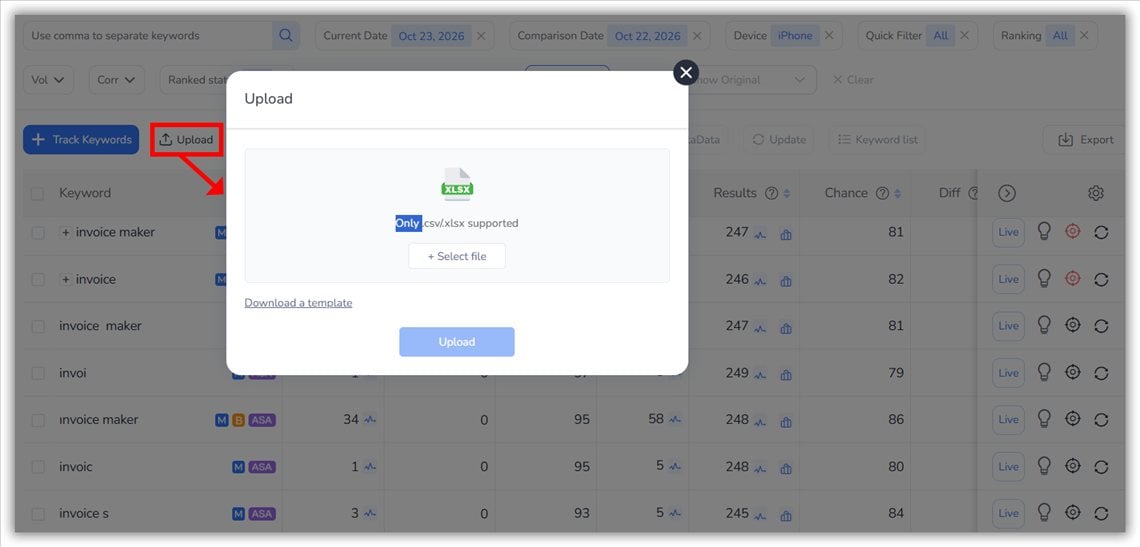
If you'd rather not build the plumbing, here is what the first session looks like in FoxData: search your app, open Keywords Ranked, upload the 20 keywords from your Day 1 list, and add three competitors. You'll see each keyword's history and who sits above you, which is your baseline and your first hypothesis in one screen. It also surfaces the keywords you already rank for but haven't thought to track.
🚀 Track your first 20 keywords this week
Import your list into FoxData and run your first weekly review before the trial ends. Free for 7 days. No sales call.
Start your 7-day free trial → · See pricing and plans →
🔍 Related Articles:
© 2020-2026 FoxData. All Rights Reserved.