




Explore More Possibilities for Your Business
Full-cycle scenario construction to meet your needs from App research, development, and release to operation.
Ready for your soaring growth
Before diving into the challenges of managing Apple Ads (formerly Apple Search Ads- ASA), you can explore real App Store advertising insights using FoxData’s ASA intelligence tools.
With FoxData, you can analyze competitor bidding keywords, keyword popularity and bidding intensity, estimated impression share, organic vs paid keyword overlap, and Custom Product Page (CPP) mappings — all in one place.
👉 Explore ASA Analytics with FoxData
Understanding this data upfront allows you to build campaigns based on real competitive signals, not guesswork.
This guide walks through the most common bottlenecks in Apple Ads management — and how to solve them with a more scalable, data-driven workflow:
1. When the Apple Ads console becomes a bottleneckApple Ads remains one of the highest-intent acquisition channels in mobile marketing. With a large share of App Store downloads coming from search, it offers direct access to users actively looking for apps.
However, scaling Apple Ads in 2026 is no longer straightforward.
As campaigns grow across markets and product portfolios, teams encounter a consistent challenge: the native Apple Ads console is built for setup — not for optimization at scale. Manual workflows, limited visibility, and fragmented reporting make it increasingly difficult to maintain efficiency.
At the same time, Apple continues to expand automation and placements, introducing new complexity rather than reducing it.
This guide breaks down where marketers get stuck — and how FoxData helps bridge those gaps with automation, intelligence, and unified workflows.
You have 12 campaign groups, 200+ keywords across 5 countries, and Apple’s dashboard requires you to click into each campaign individually. A simple bid adjustment cycle takes your team an entire afternoon.
Apple’s native Search Ads console is functional — for small operations. But it was never designed for the workflows that scaling app marketers need. There’s no bulk editing across campaigns, no automated bid rules, and no way to generate new campaign structures from templates. Every action is manual, every change is one-at-a-time.
For agencies managing multiple client accounts or publishers running apps across dozens of markets, this becomes a genuine operational bottleneck. The time spent on execution crowds out time for strategy.
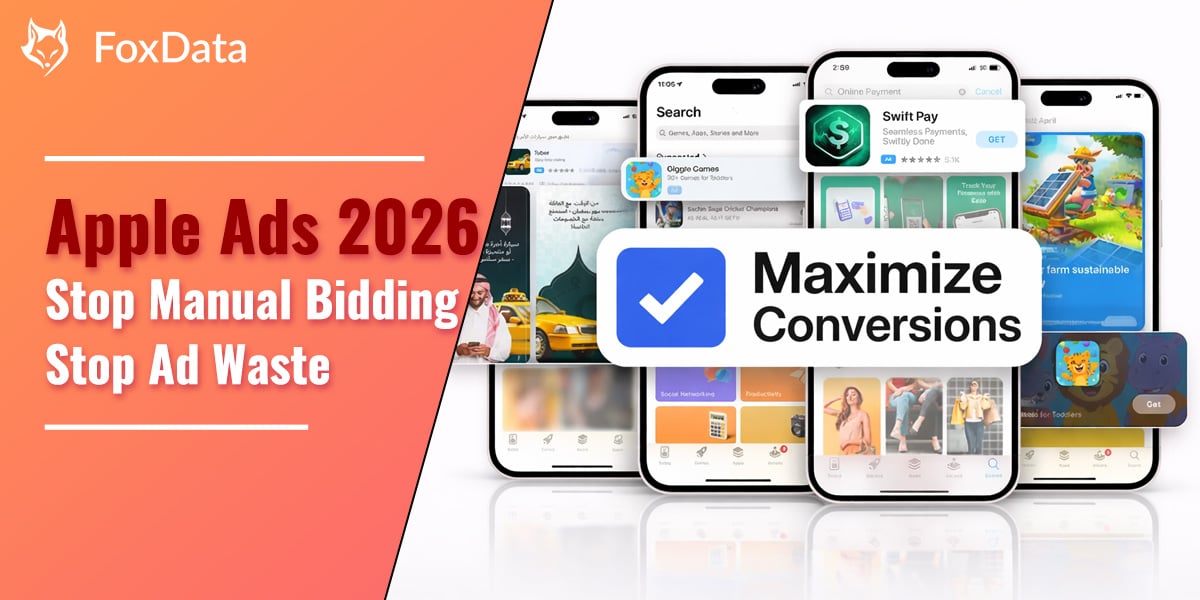
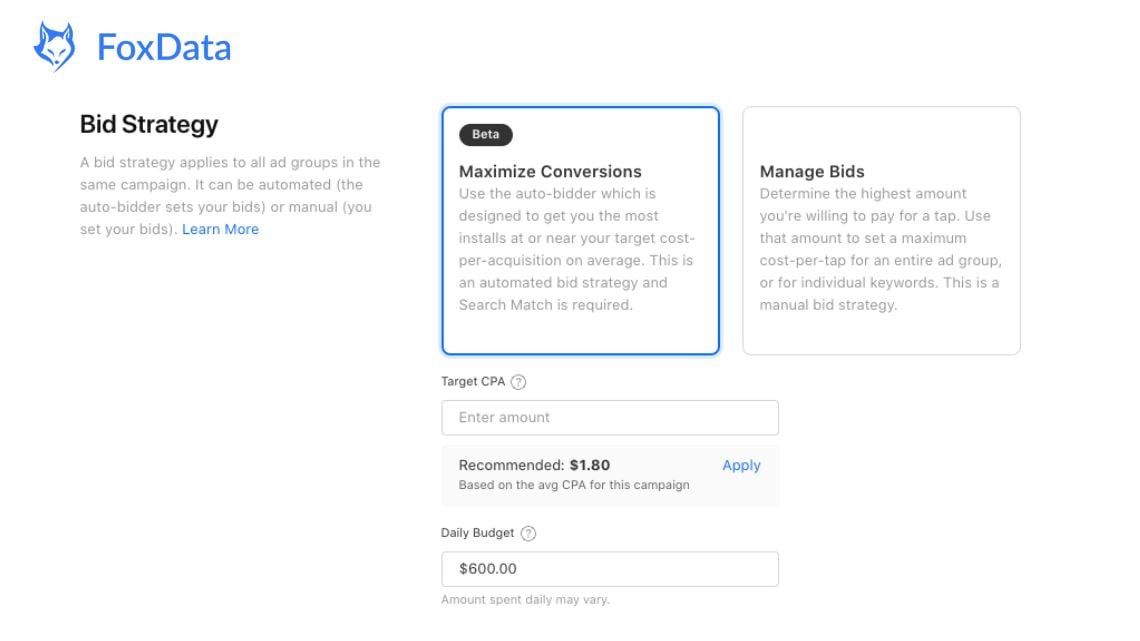
Apple has introduced Maximize Conversions, an automated bidding strategy that sets optimal bids for each search query using real-time signals. It’s Apple’s own answer to the manual bidding problem — but it comes with significant constraints:
Maximize Conversions works for simple, single-app accounts with sufficient conversion volume. But for teams managing multiple apps, markets, or client accounts — where you need keyword-level control, competitive intelligence, and post-install attribution — it’s not enough on its own.
That’s where a platform like FoxData becomes useful. Instead of replacing automation, it adds a layer of visibility and control on top of it. FoxData’s ASA Campaign Manager replaces the manual workflows with a unified, automation-first dashboard:
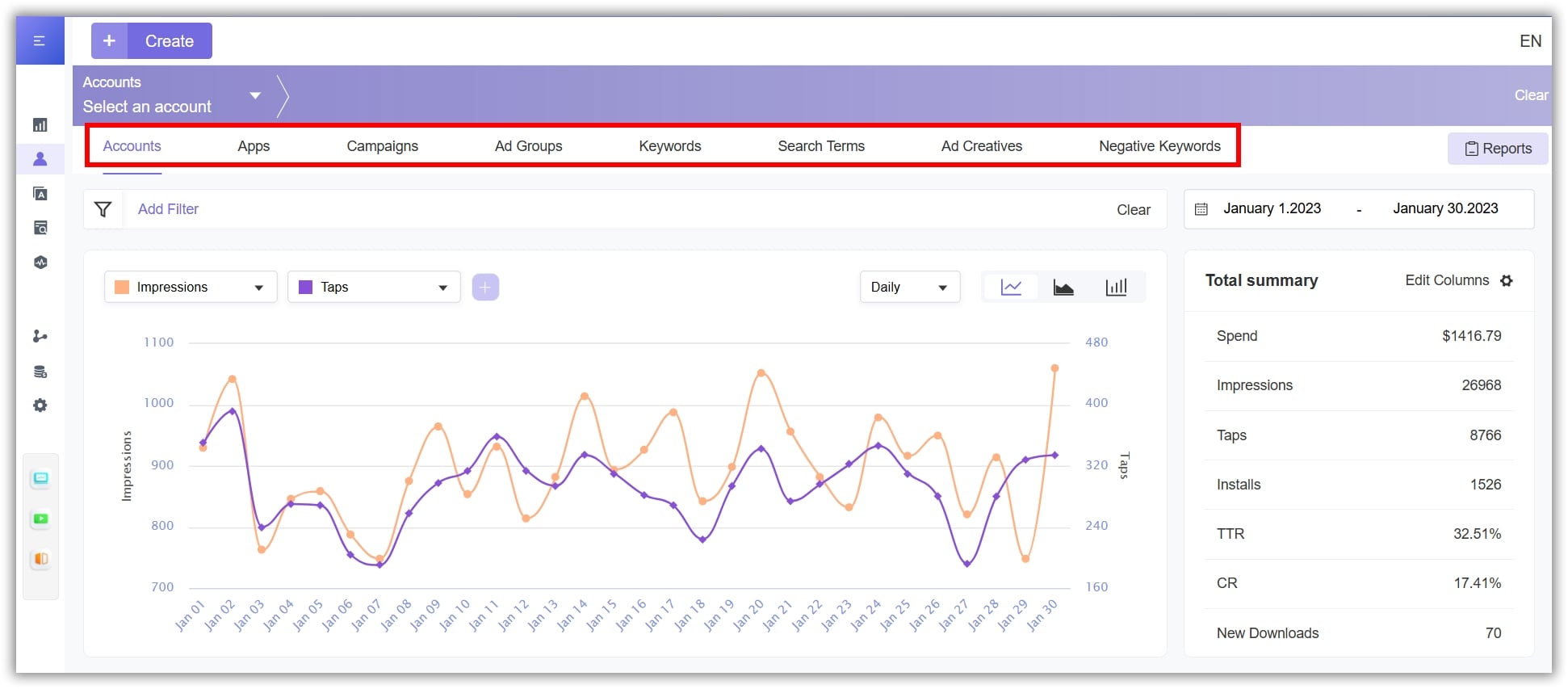
Try It Yourself: See how bulk bid management works with your own campaigns. Connect your ASA account and run your first bulk optimization in under 5 minutes.
👉 Explore Campaign Manager
You notice your CPA on brand terms doubled overnight. After digging through Apple’s limited reporting, you realize a competitor is now aggressively bidding on your brand name — and you have no visibility into their strategy.
Apple Ads is a competitive auction. Unlike organic App Store Optimization where rankings shift gradually, paid placements can be seized instantly by any competitor willing to outbid you.
The problem: Apple’s console gives you zero visibility into who’s bidding on which keywords, what their impression share is, or how their creative strategy differs from yours. Without competitive intelligence, you’re making bidding decisions based on your own data alone — like playing poker without seeing the community cards.
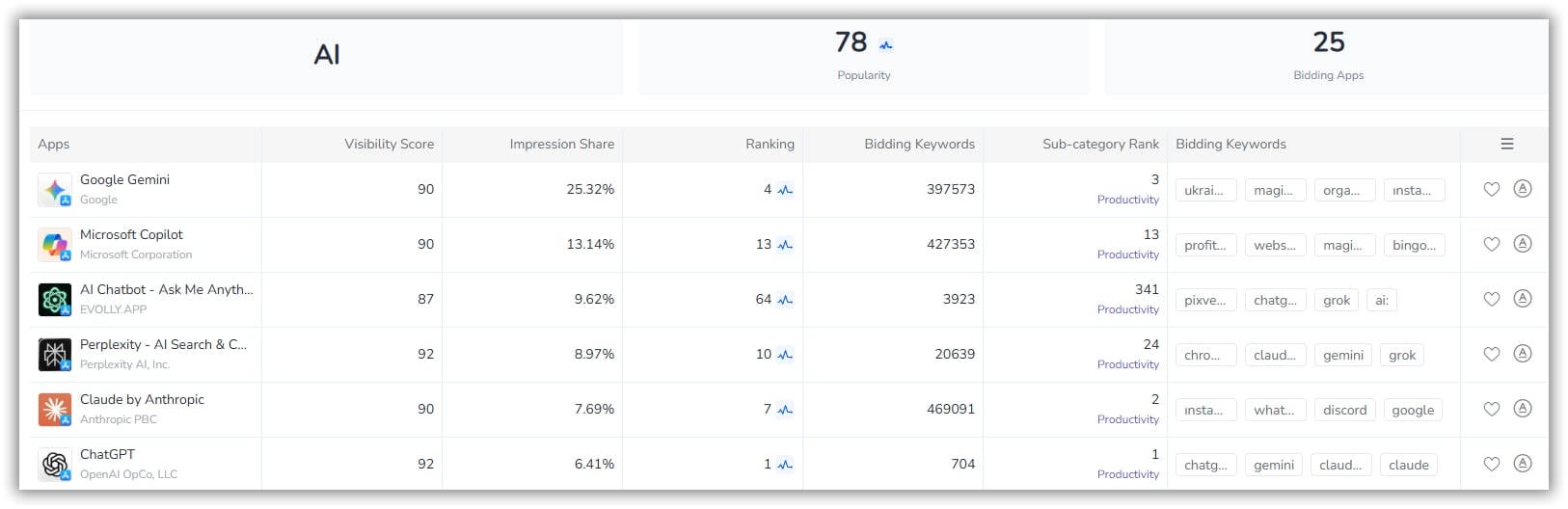
FoxData’s Bidding Keyword Analysis provides a clear view of the Apple Ads competitive landscape. Discover which keywords competing apps are bidding on, compare impression share and visibility scores, and uncover high-value opportunities to improve campaign performance.
👉 Stop guessing what your competitors are doing. Start your free trial today.
Your campaign reports show strong impressions and decent tap-through rates — but your cost-per-acquisition keeps climbing. Somewhere between “someone searched” and “someone became a paying user,” you’re losing the thread.
Not all high-popularity keywords drive quality installs. A keyword might generate thousands of impressions but attract users who churn within 24 hours. Without connecting your ASA data to post-install behavior, you’re optimizing for the wrong metric.
The challenge is compounded by Apple’s limited attribution window and the difficulty of connecting ASA performance to your MMP data in a single view.
At first glance, Apple’s Maximize Conversions bidding strategy seems like the solution. But it optimizes for installs, not user quality.
The algorithm treats your target CPA as a weekly average across search queries. It cannot distinguish between:
As a result, keywords that generate cheap installs from low-value users can appear successful — while your actual ROI declines.
There’s another limitation: Search Match.
Because Maximize Conversions requires Search Match, Apple may match your ads to queries that are related but not commercially relevant. Without detailed keyword-level insight, these low-quality matches are hard to identify and block.
Go beyond Apple’s native metrics with deeper keyword insights. Discover high-potential keywords your competitors haven’t targeted yet, with visibility into popularity, competition density, and organic ranking signals.
Understand how creatives impact performance at the Custom Product Page level. See which screenshots are shown for specific bidding keywords and evaluate creative relevance, traffic distribution, and conversion potential.
Discover how FoxData enhances data protection and security standards to keep your analytics safe and reliable.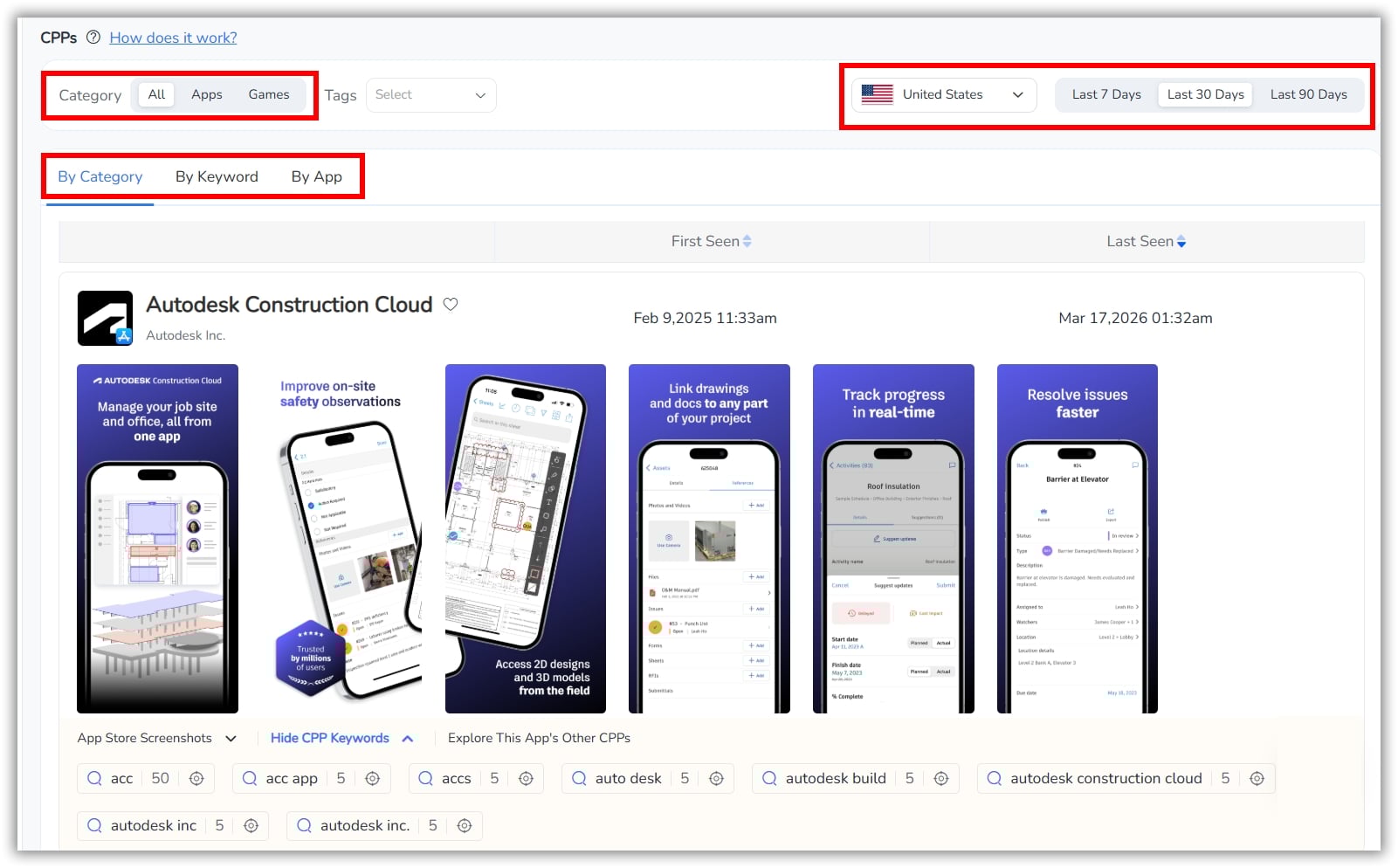
 Your Data, Secured: FoxData Achieves ISO 27001
See How
Your Data, Secured: FoxData Achieves ISO 27001
See How
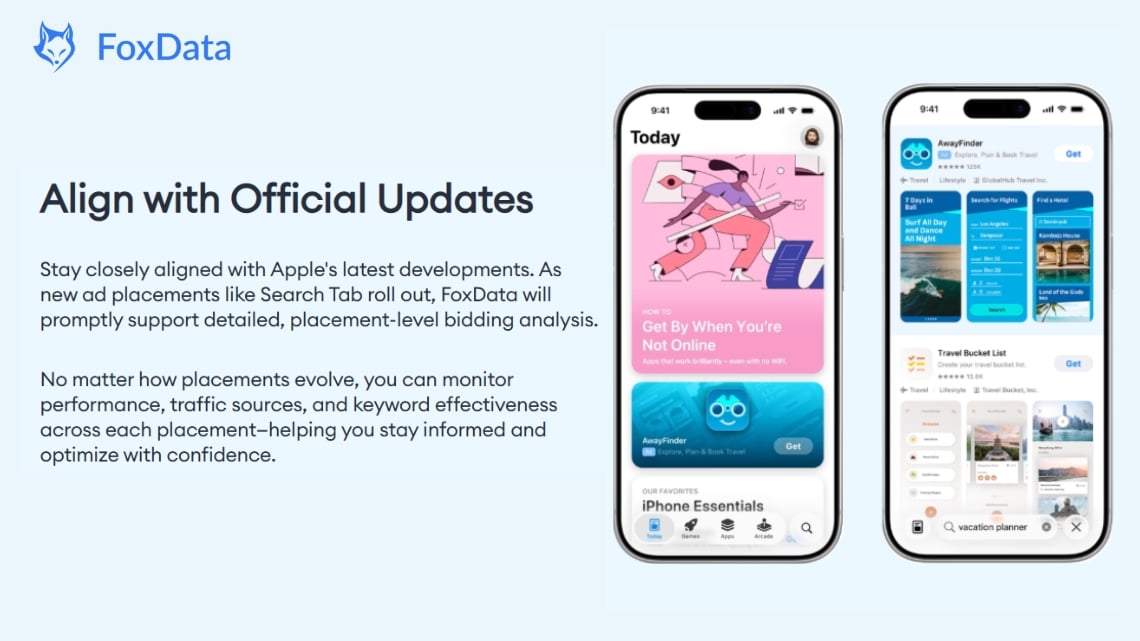
Apple introduces Search Tab ads, Today Tab ads, and product page placements. Your existing tools either don’t support the new placements at all, or lump all placement data together — making it impossible to understand what’s working where.
Apple has been steadily expanding its ad inventory. Beyond the original Search Results placement, marketers can now run ads on the Search Tab, Today Tab, and Product Pages. Each placement has different user intent, different creative requirements, and different performance characteristics.
The challenge: most third-party tools lag behind Apple’s rollouts. When a new placement launches, you’re often stuck with incomplete data or no placement-level breakdown at all. You can’t optimize what you can’t measure.
FoxData’s ASA Analytics Tools stays aligned with the latest updates from Apple and the evolving Apple Ads ecosystem. It provides placement-level insights across Search Results, Search Tab, Today Tab, and Product Pages, with unified metrics to track performance, optimize keywords, and scale installs faster.
Try It Yourself: Compare your performance across every Apple ad placement — see where your budget delivers the highest ROI.
As campaigns scale, reporting often becomes the most time-consuming part of the workflow. Teams export data, clean spreadsheets, build dashboards, and prepare summaries—only to find the insights are already outdated.
As automation plays a bigger role in Apple Ads, this challenge becomes even more critical. When algorithms drive bidding and delivery, marketers need clearer visibility into performance to understand how campaigns are actually behaving.
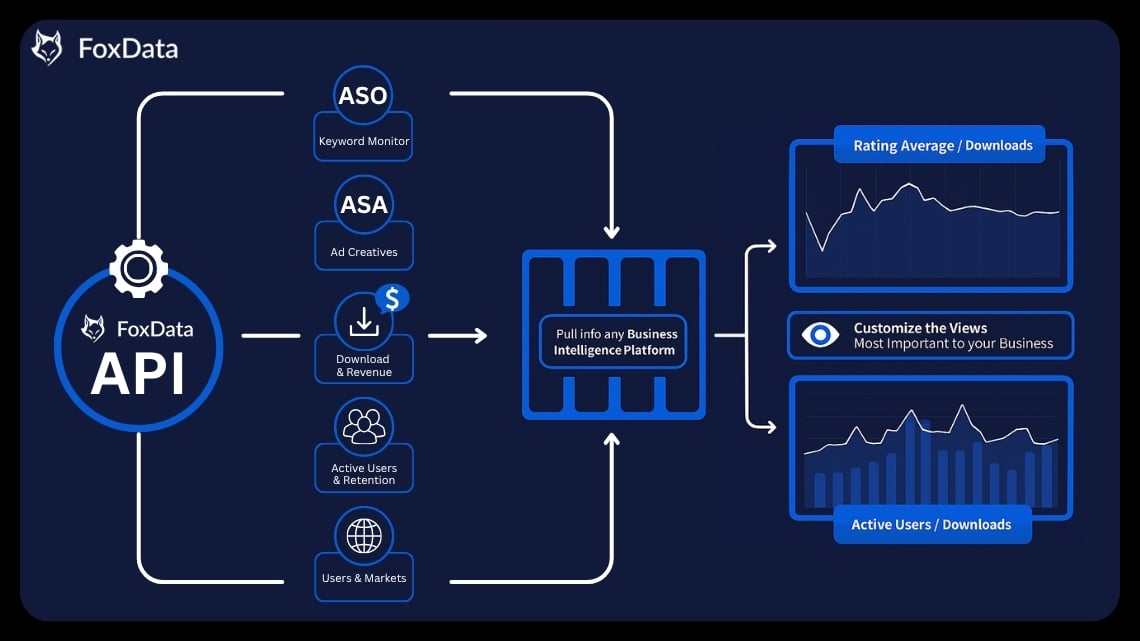
FoxData solves this by centralizing all campaign data into real-time dashboards. Instead of spending hours building reports, teams can focus on analyzing trends and optimizing strategy.
With standardized metrics across campaigns and a scalable API framework—providing bidding share updates (within 20 minutes), keyword traffic insights, and integrations with BI tools—everyone works from the same data, without version conflicts.
Try It Yourself: Connect your data pipeline in 5 minutes — automate your reporting and free your team to focus on optimization.
➤ Explore API & Data Access
Here’s a practical walkthrough for setting up and using the FoxData ASA Analytics Tools. Whether you’re evaluating the tool or onboarding your team, these steps will get you productive quickly.
First, create a FoxData account and sign in. After logging in, navigate to the Intelligent Ad Platform (accessible via "Campaign Manager" in the top navigation bar).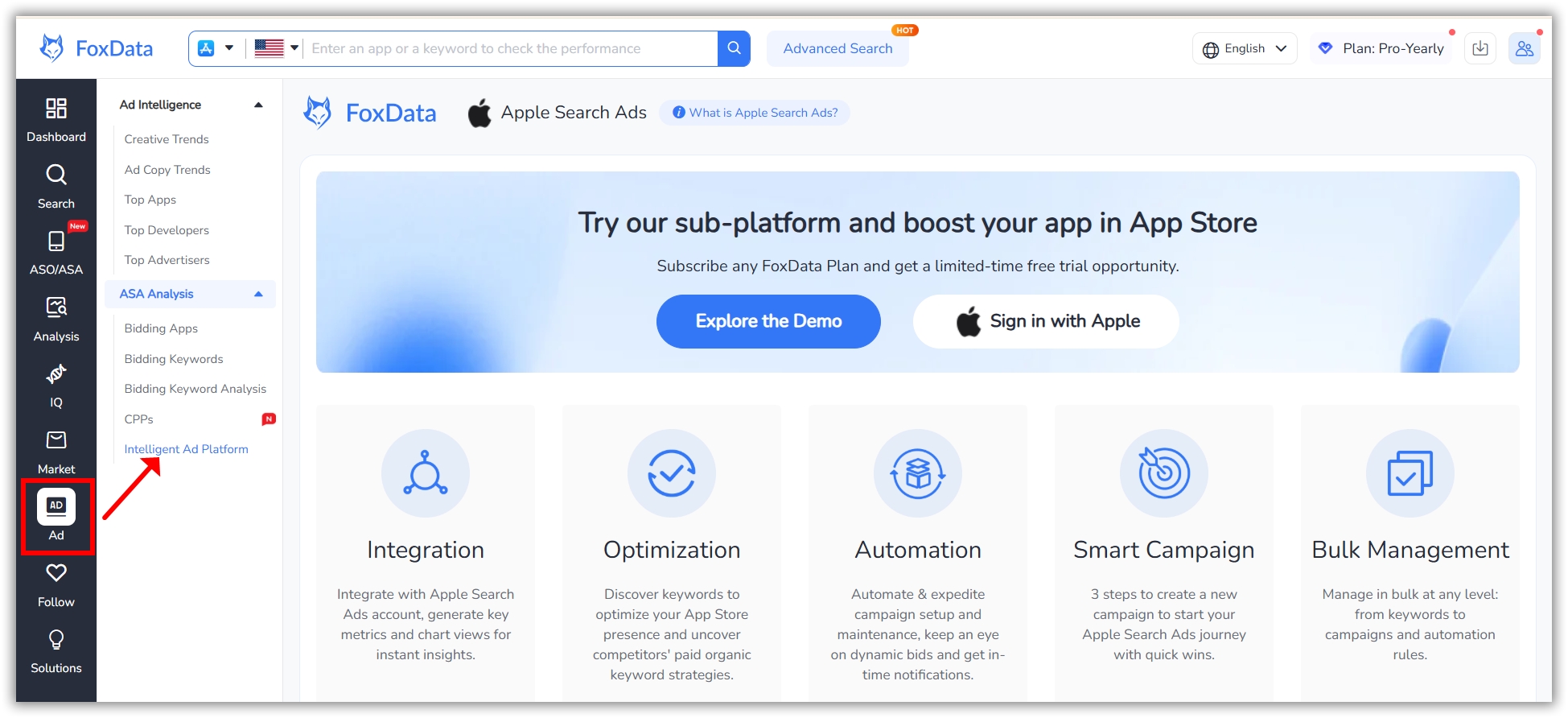
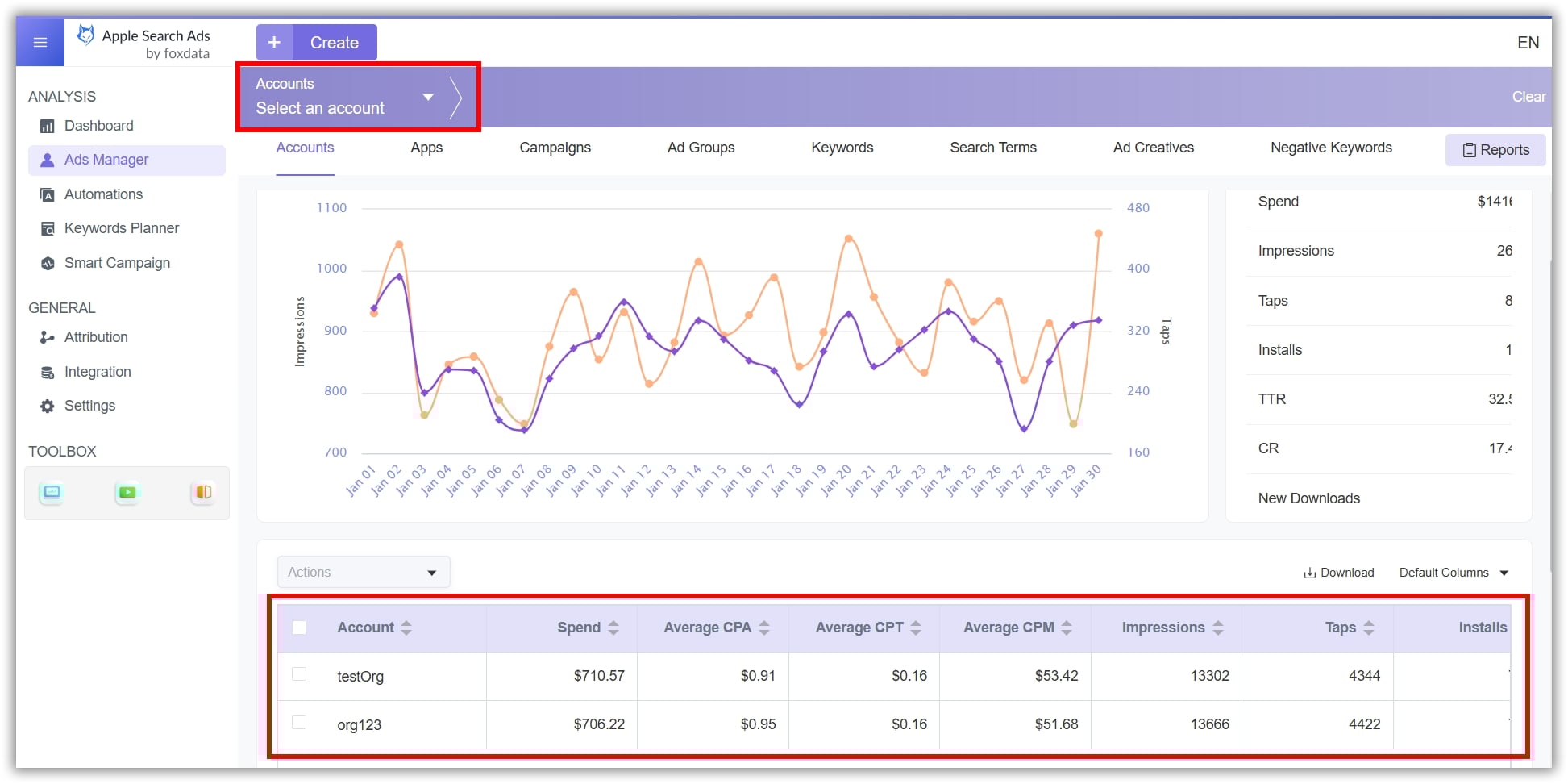
Then connect your Apple Ads account using Apple’s API credentials. FoxData supports multiple account connections — making it especially useful for agencies managing multiple client portfolios.
Pro Tip: FoxData offers a 7-day free trial that include ASA features.
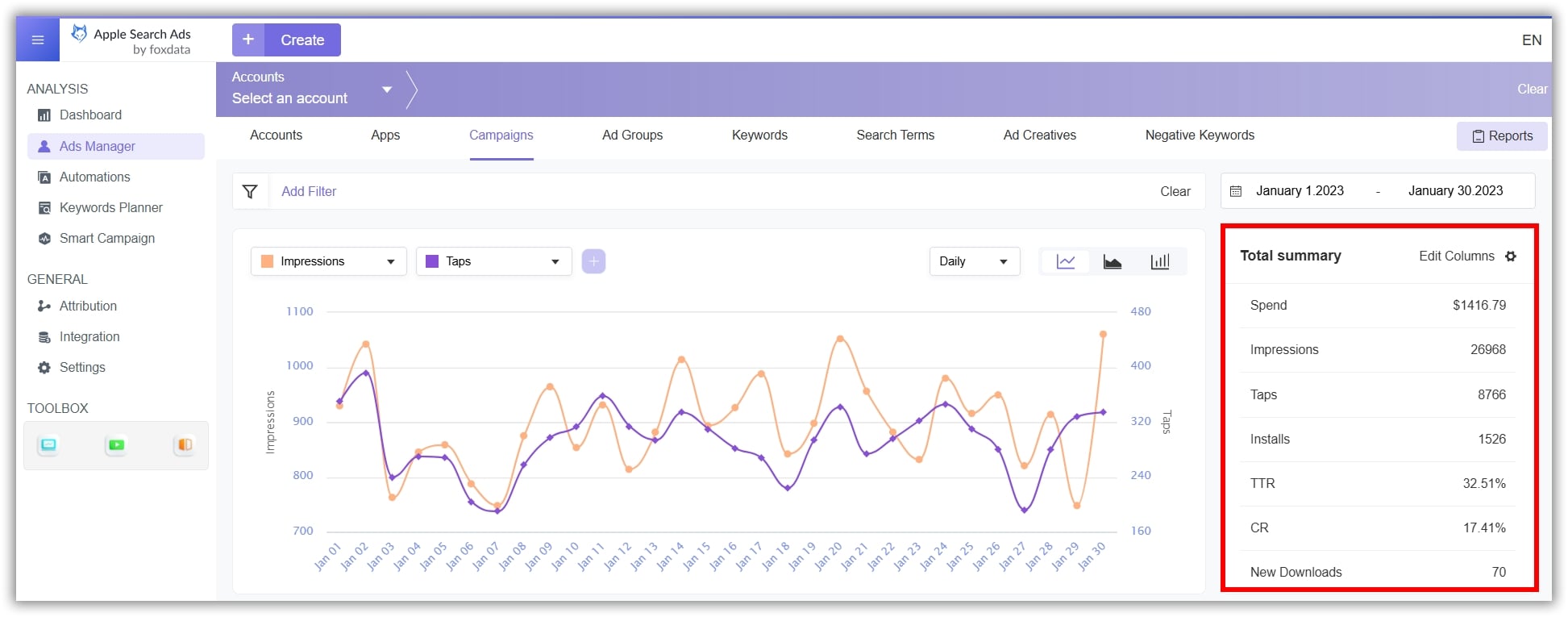
After connecting your account, you’ll see a unified dashboard showing all your campaigns, key metrics (spend, impressions, taps, installs, CPA), and trend charts. This is your daily command center — designed to surface problems before they become expensive.
Navigate to the Keywords Planner section. Here you can see the full breakdown of all keywords in your account — sorted by popularity, impression share, organic rank, and competitive overlap.
Use the filters to identify:
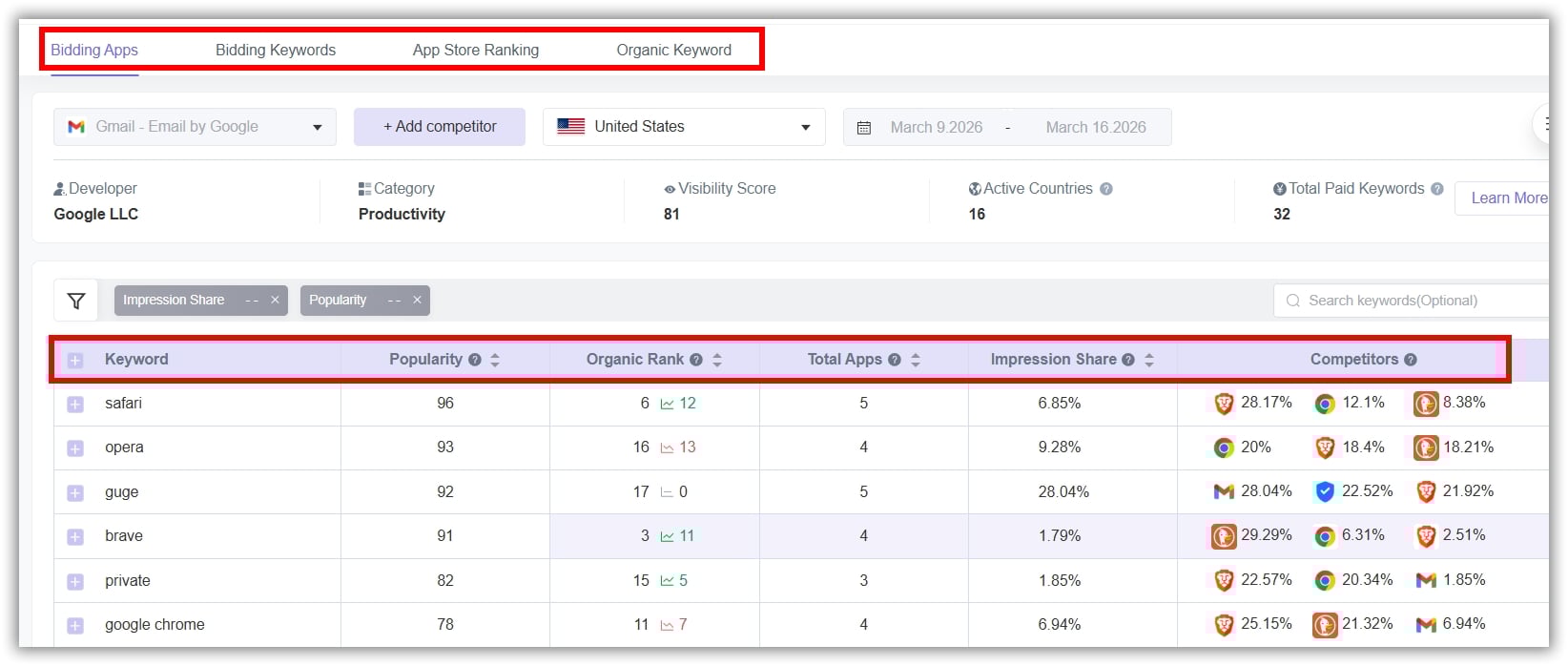
What you’ll get: A complete picture of where your keywords stand versus the competition — most teams discover 5–10 high-potential keywords they weren’t targeting within the first audit.
Go to the Automation section and create rules based on your KPIs. Examples:
These rules run automatically 24/7, eliminating the need for constant manual monitoring.
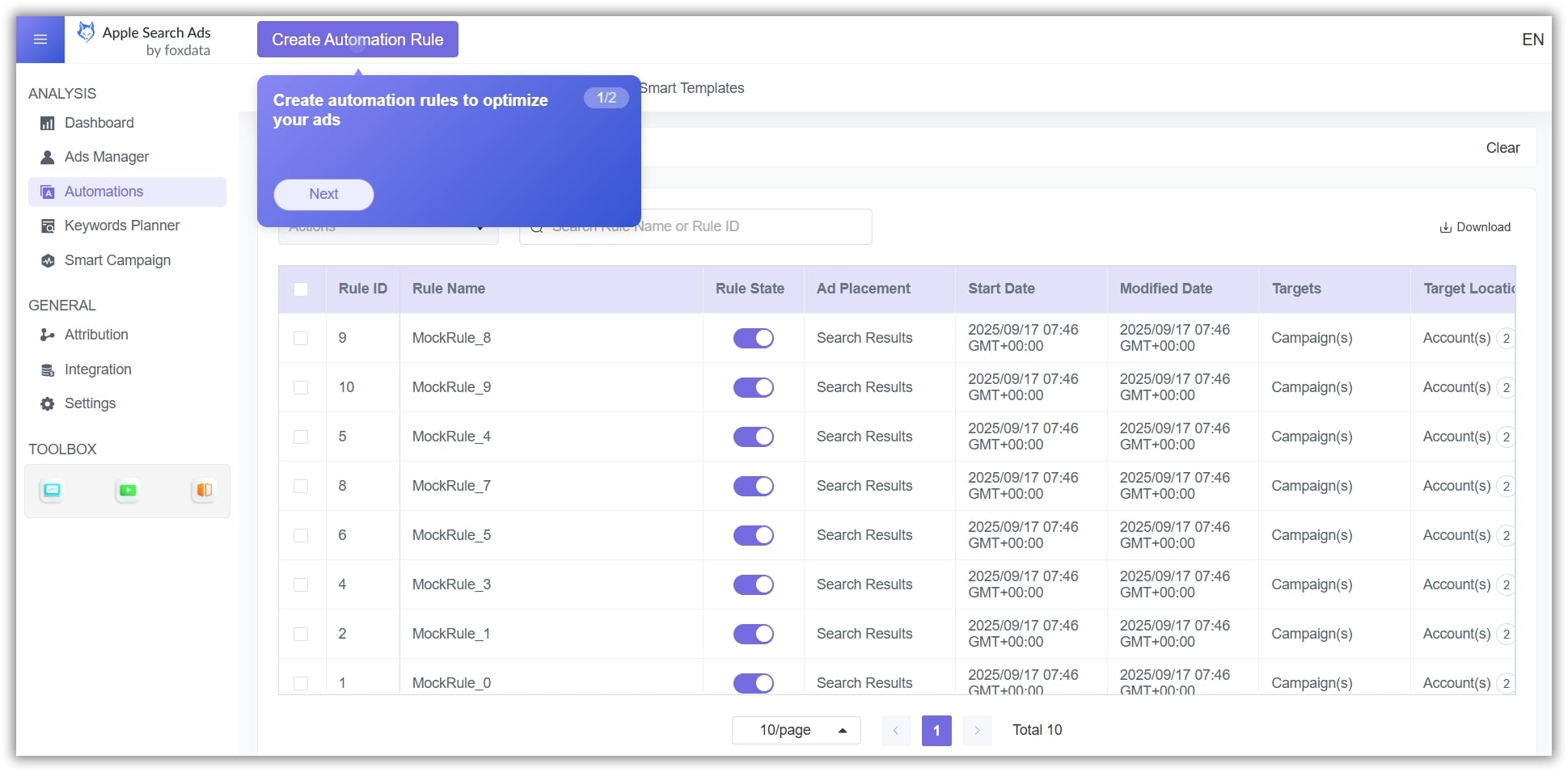
What you’ll get: Most teams see a 20–30% CPA reduction within the first two weeks of activating automation rules.
Check your competitive dashboard every week. Spot changes in competitor keywords, discover high-potential new keywords, and adjust bids and creatives.
The Keyword Discovery module shows insights Apple’s console misses, like impression share, visibility scores, and organic ranking links.
What you’ll get: A continuous stream of keyword opportunities and early warnings about competitive threats.
You’ve signed up. Now what? Here’s exactly what to do in your first 15 minutes to get immediate value from FoxData’s ASA Analytics Tools.
Minutes 0–2: Connect Your ASA Account
Navigate to Campaign Manager, enter your Apple API credentials, and connect your account. FoxData will begin syncing your campaign data immediately.
Minutes 2–7: Run Your First Keyword Audit
Go to Bidding Keyword Analysis. Sort by popularity and impression share. Within minutes, you’ll see:
This single step typically reveals budget optimization opportunities worth 15–25% of current spend.
Minutes 7–12: Set Your First Automation Rule
Go to Automation and create one simple rule:
“IF CPA exceeds [your target] for 3 consecutive days, decrease bid by 15%.”
This one rule alone prevents budget waste on underperforming keywords — 24/7, without manual intervention.
Minutes 12–15: Review Your Competitive Landscape
Check the Competitor Keyword Monitoring dashboard. See who’s bidding on your brand terms and where you have keyword overlap. Flag any immediate threats for review.
By minute 15, you’ll have: a keyword audit with actionable insights, an automation rule protecting your budget, and a competitive intelligence baseline. That’s more optimization progress than most teams achieve in a week of manual work.
➤ Start your free trial and see immediate results
A: Apple Ads is Apple’s official App Store advertising platform. Ads appear in Search Results, the Search Tab, Today Tab, and Product Pages. Marketers use it to reach high-intent users — Apple says 65% of downloads come from search, making ASA highly effective for iOS apps.
A: Apple Ads Basic is a simplified version with automated keyword selection and a pay-per-install model, best suited for indie developers with small budgets. Apple Ads Advanced gives full control over keyword targeting, audience refinement, bid amounts, and creative assets (Custom Product Pages).
A: Maximize Conversions automatically sets bids to hit an average CPA goal. Limits: needs 2–3 week learning, requires Search Match, optimizes installs not revenue.
A: Apple Ads console covers basic campaign setup and reporting but misses bulk operations, automation, competitor insights, post-install attribution, creative analysis, and API access. FoxData fills these gaps, automating workflows and cutting reporting time by up to 80%.
A: FoxData combines ASO and ASA data in one view, gives real-time competitive bidding insights, and offers a flexible API that delivers data within 20 minutes for custom dashboards and automated workflows.
Managing Apple Search Ads in 2026 is no longer just about running campaigns — it’s about understanding how automation, competition, and data interact.
Join the growing number of app marketers and agencies who use FoxData to automate ASA optimization, uncover competitor strategies, and find the keywords that actually convert.
👉 Book a Demo with our team
📣 Don't miss these:
© 2020-2026 FoxData. All Rights Reserved.



