

Explore More Possibilities for Your Business
Full-cycle scenario construction to meet your needs from App research, development, and release to operation.
Ready for your soaring growth
It's Monday morning. Last Thursday your team shipped a new subtitle, everyone agreed the keywords "felt right," and today the install chart looks exactly like last week's. Nobody can say whether the keywords were wrong, the competition moved, or Apple changed something. That feeling, working hard without knowing why, is what a framework is for.
Most ASO teams still run keyword research the old way: brainstorm a list in a spreadsheet, check Apple Ads popularity scores, pick the terms that "feel right," and move on. That worked when search was simpler. It fits 2026 badly, and the cost is real: every wasted character in your 100-character keyword field is a search you will never appear in.
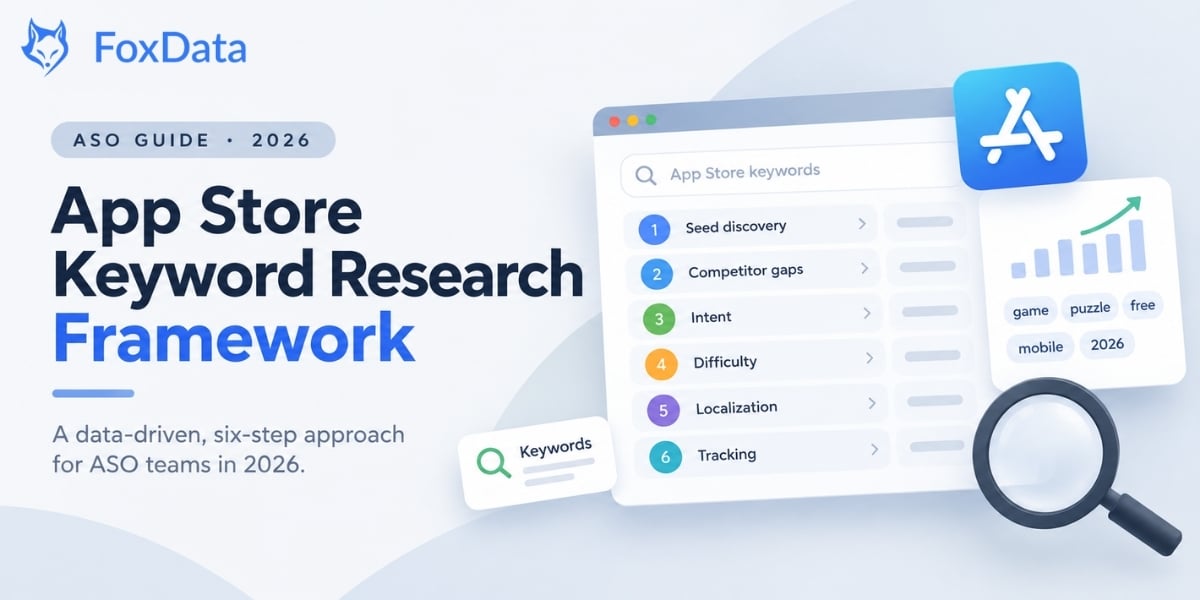
Short answer: An App Store keyword research framework is a repeatable process for deciding which search terms your app should target. This one has six steps: discover seed keywords, analyze competitor gaps, classify intent, score difficulty against opportunity, map keywords by market, then track and iterate. Run it once for a launch, and parts of it every quarter.
This is the process we use at FoxData to help ASO teams move from guesswork to something repeatable. Every number below comes from App Store data pulled through the FoxData platform in the first week of October 2026.
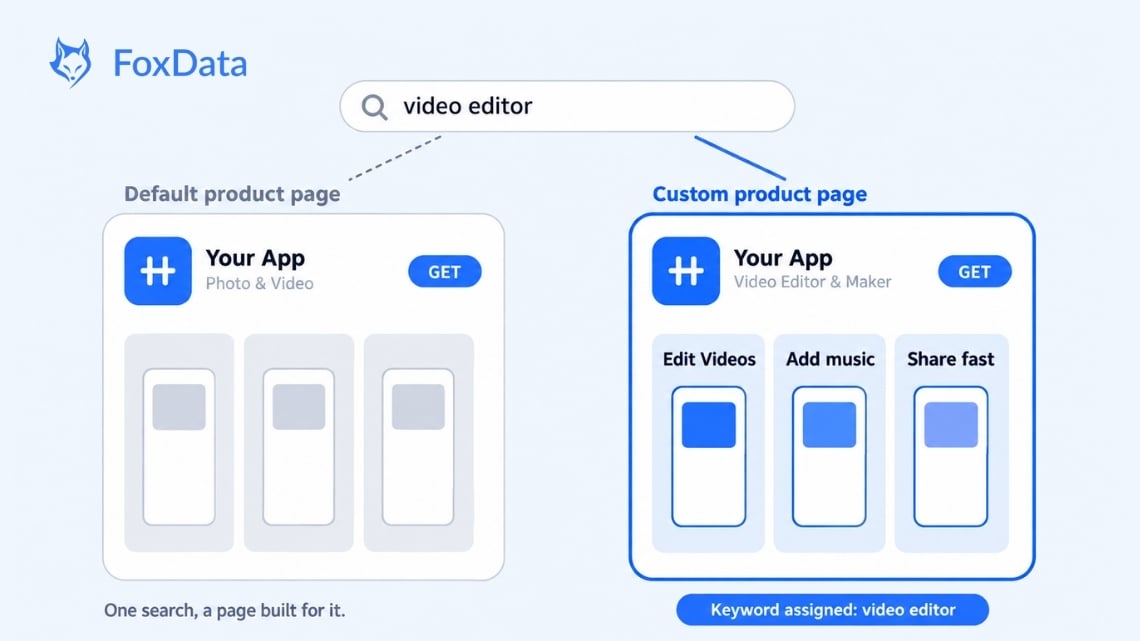
Why this matters for keyword research: the keyword you target now decides more than a ranking. It can also decide which custom page and which creative a searcher sees.
Each step answers one question your strategy needs answered before you touch metadata.
|
Step |
Question it answers |
Rough time |
What you walk away with |
|
1. Seed Discovery |
What is already sending traffic to my category? |
2–3 hours |
A map of head, feature and problem terms |
|
2. Competitor Gap Analysis |
What do competitors rank for that I don't? |
3–4 hours |
A gap list sorted by search index |
|
3. Intent Classification |
Does this keyword describe what my app does? |
1–2 hours |
Keywords grouped by intent and field |
|
4. Difficulty Scoring |
Can I realistically rank for it? |
2–3 hours |
A prioritized shortlist of winnable terms |
|
5. Localization Mapping |
Which keywords matter in each market? |
3–5 hours |
A keyword set per target market |
|
6. Tracking & Iteration |
Is it working? |
Ongoing |
A weekly view of rankings changes |
You don't need all six every time. A new launch calls for the full run; a quarterly refresh might need only steps 2, 4 and 6.
Before you look at competitors, start with the category. What are people actually searching for? In the US App Store, "video editor" has a search index of 65 on FoxData's scale, "photo editor" sits at 70, and "capcut" at 85. Those head terms define the category, so you need to know them before you can find the gaps around them.
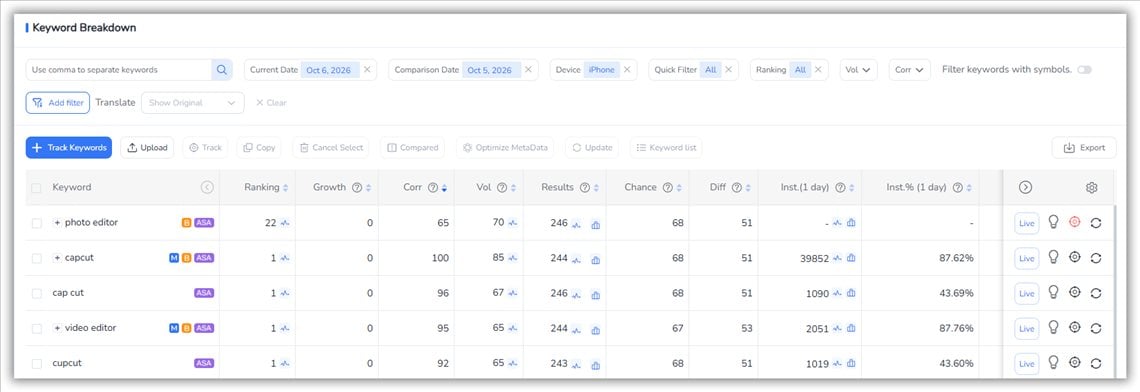
Source: FoxData, Keyword Ranked, US App Store, iPhone, October 6, 2026
Work in three layers.
Layer one: category head terms. For a video app: "video editor," "video maker," "edit video." Write them down, but don't linger. Everyone starts here, which is why everyone competes here.
Layer two: feature-level terms. What do you do that category leaders don't stress? "Keyframe animation editor" and "chroma key video" are more specific, less crowded, and closer to what real users type.
Layer three: problem-level terms. What is the user trying to get done? "Remove background from video," "add music to video free," "speed up video." The intent is crystal clear, so these tend to convert well.
Two places to find real user language: your own reviews, where people describe what they were trying to do when they downloaded; and, if you run Apple Ads, your search term reports, which show the queries that actually produced taps and installs. Apple's own popularity score runs from 5 to 100, so use it as a rough guide next to your own data.
This is where most teams get their biggest wins, and where they burn the most time doing it by hand. Here is real data. CapCut ranks for about 36.2K keywords in the US App Store. Its competitors tell a story about strategy.
|
App |
Ranked keywords (US) |
Strategy signal |
|
CapCut |
36.2K |
Massive coverage, brand plus generic |
|
InShot |
57.6K |
Even broader, long-tail heavy |
|
VivaCut |
14.7K |
Focused on the "AI video editor" niche |
|
Filmora |
15.1K |
Desktop brand leverage, tutorial keywords |
InShot ranks for about 60% more keywords than CapCut, yet CapCut dominates the head terms that drive install volume. Keyword count flatters; keyword quality (search index and relevance) is what moves installs.
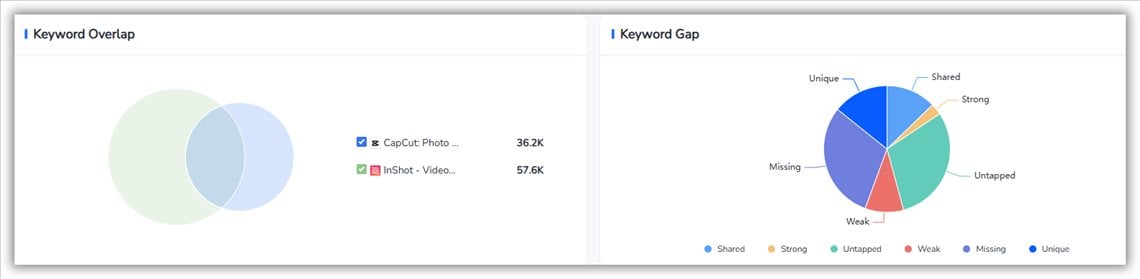
Source: FoxData, Competitor Keywords, US App Store, October 2026
One honest limit: keyword fields are hidden, so what you see for a competitor is where they rank, not what they typed. Treat the list as strong evidence, not a copy-paste.
What this looks like in practice (about 15 minutes): open the competitor in Keywords Ranked, sort by Vol (search index), remove terms you can't honestly serve, and save the rest as your gap list.
Run your own gap analysis in minutes.
Try FoxData's free ASO tools → · See how App Profile works →
Two keywords with the same search volume can be worth very different amounts. The difference is intent. We use four buckets.
Brand keywords are searches for a specific app. "CapCut" has a search index of 85. These convert extremely well for the brand being searched; for everyone else they show which competitors own mindshare. Generic category keywords ("video editor," index 65; "photo editor," index 70) are the battlefield: high volume, lower conversion. Feature keywords ("AI video enhancer," "auto captions") convert better because the user has a task in mind. Problem keywords ("edit TikTok video," "remove watermark from video") match the moment of need and are often the highest-converting.
Where each bucket goes: feature and problem keywords deserve your title, subtitle and keyword field; generic terms get what's left; other brands' names stay out entirely. Apple's App Review Guidelines (2.3.7) prohibit using other apps' names or trademarked terms in your metadata.
A real example from FoxData's Store Suggested tab, which lists the keywords the store itself recommends around an app. For CapCut, "capcut" scores 85 and "capcut 2026" scores 39. After that the numbers collapse: variants like "capcut vpn," "capcut pro2026" and "capcut-video editor 2026" all sit at 5.
What that tells you: volume falls off a cliff once you leave the head term, so a low score isn't a reason to skip a keyword, but it is a reason to ask two questions first. Is the intent exact (someone who types "capcut-video editor 2026" knows what they want)? And is the competition thin enough that a 5 can turn into real installs? If both answers are yes, it's a good target even at low volume. If you're chasing a score of 85 against apps with a decade of brand strength, it usually isn't.
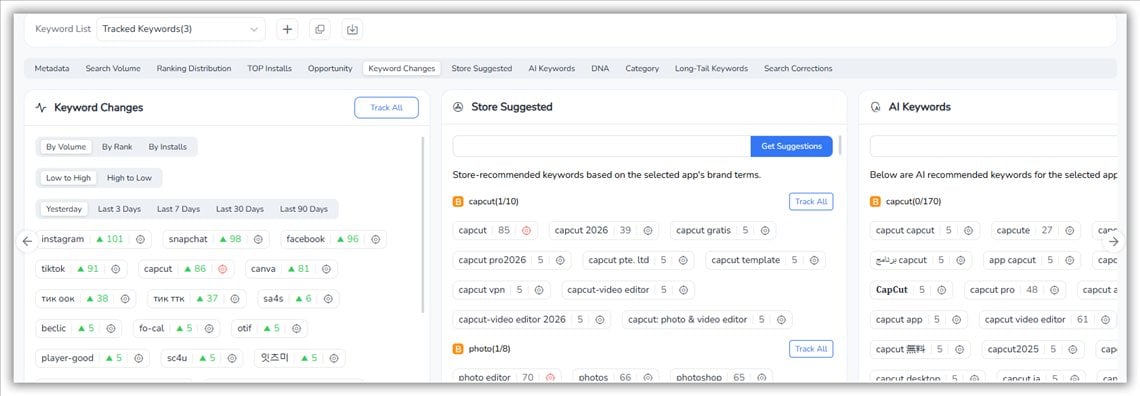
Source: FoxData, Keyword Explore, US App Store, October 2026
Don't forget the 2026 twist: a keyword you can't win on your default page may be winnable with a custom product page built around that exact search. And since Creative Assets can appear in organic search results, ask what a searcher for that term should see, not just whether you rank.
The App Store spans 175 countries and regions, and keyword behavior varies widely. A term with thousands of daily searches in the US may have a handful in Japan, while a culturally specific one has thousands. CapCut's listing is localized into many languages and its keyword strategy in the US ("video editor," "video maker with music") doesn't carry straight into Japan.
Localization isn't translation. It means researching what people in each market type. FoxData lets you pull keyword coverage by region, so you can compare the US against Japan, Korea or Brazil for the same app.
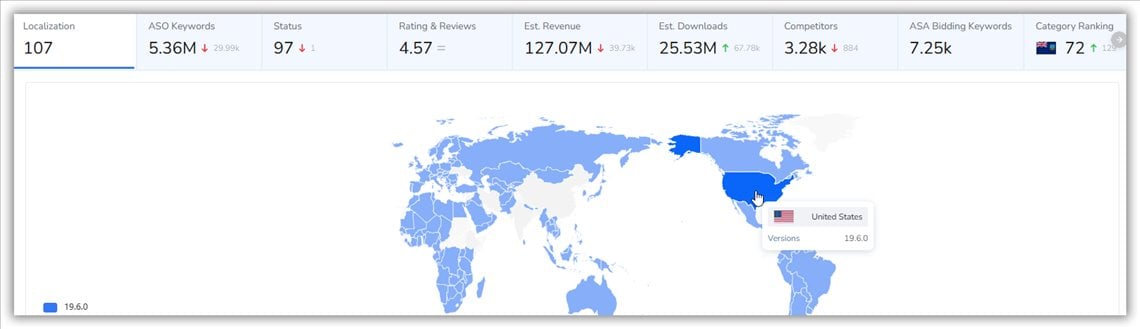
Source: FoxData's Global Overview
The practical rule: start with your top 3–5 markets by revenue, research each independently, and only expand when the process works at that scale. Bad localization is worse than none, because it spends keyword-field characters on terms nobody searches.
One iOS detail that changes your cadence: title, subtitle and keyword-field changes go live only with a new app version approved by Apple, so batch your edits and plan them around releases.
To judge whether a change worked, compare rankings with impressions and conversion in App Store Connect and note the date of every change, so you know which edit moved what.
FoxData's Tracked Keywords monitors your rankings and shows how they change over time, for your app and your competitors'.
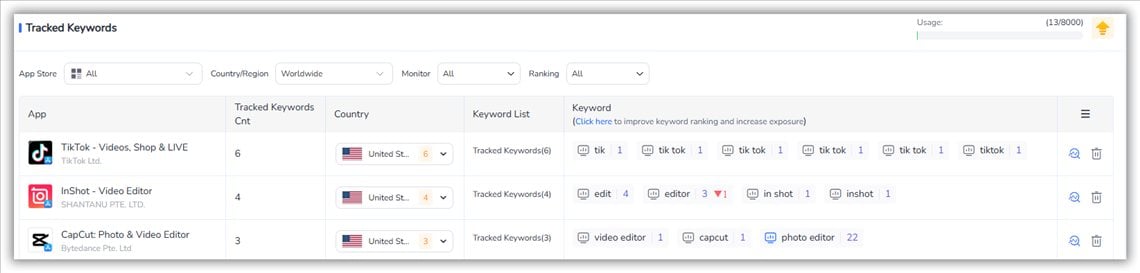
Source: FoxData, Tracked Keywords, US App Store, October 2026
Rather not check rankings by hand every Monday?
Start a 7-day free trial → · Compare plans, including the Starter Plan →

In the first week of October 2026, across the US App Store:
The AI keyword wave is real, but fragmenting. "AI photo enhancer" has dozens of apps competing. The winners aren't simply the ones with "AI" in the title; they're the ones whose title, subtitle and keyword field contain specific, feature-level AI terms users actually search.
Brand search dominance continues. TikTok ranks for 168.7K keywords, Instagram 87.1K, Pinterest 75.9K.Their brand authority carries them into terms they never targeted, so generic head terms are tougher than they look.
Long-tail keywords are where mid-size apps win. InShot's 57.6K keywords include thousands of long-tail phrases like "tik tok video downloader" and "slow motion video editor." Individually small, collectively large, and far less contested.
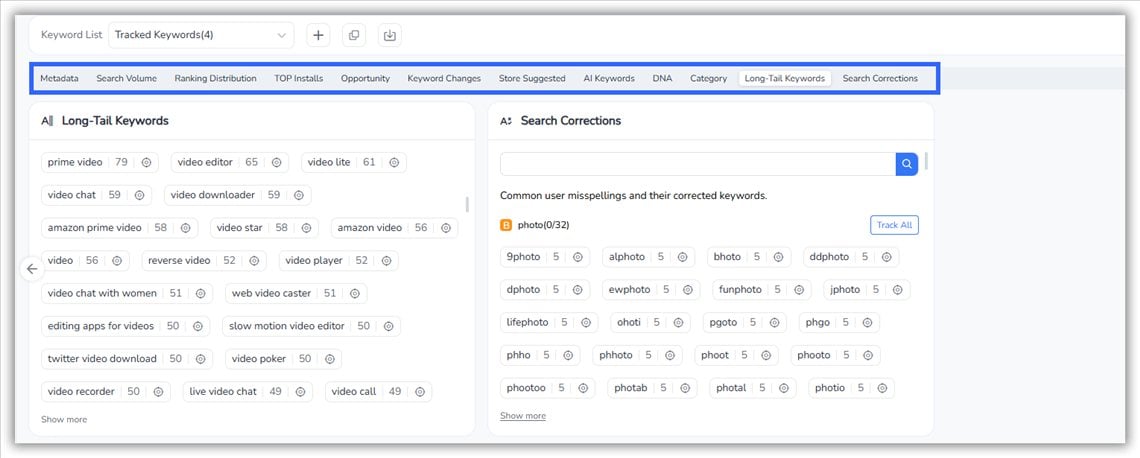
Source: FoxData's Keyword Research Tools
So if you're not TikTok or Instagram, lean on specific, intent-rich keywords you can win. Leave the head terms to the giants. App Profile shows an app's keyword portfolio, ranking history, download estimates and competitor overlap; most teams start there.
It's the process of finding the search terms your target users type, then deciding which of them your app can credibly rank for and where to place them in your metadata.
Review rankings weekly and revisit your keyword set monthly. Update the live metadata when the data says so, typically every 4 to 8 weeks, and at least quarterly. Competitive categories like photo/video and games lean toward the shorter end.
Apple Ads' Search Popularity is a relative score from 5 to 100 available for terms in Apple Ads. FoxData's search index is derived from App Store search data across keywords and regions. They measure similar things with different coverage.
No. Apple's App Review Guidelines (2.3.7) don't allow it, and even if you rank briefly, users searching "CapCut" want CapCut.
Aim for depth on a small core, not breadth. The number that matters is your top 20–30 keywords by volume and conversion, since they drive most organic installs.
Yes. Google Play indexes your full description, so natural language there matters. The App Store primarily uses title, subtitle and the 100-character keyword field (plus newer signals such as custom product page keywords). The framework works for both; implementation differs.
If you've been running keyword research on intuition and spreadsheets, don't overhaul everything at once. Pick Step 2 this week. Pull your top three competitors, find where they rank and you don't, and sort by search index. By the end of the day you'll have a list you can defend in a meeting instead of a list that "feels right."
After one full pass you'll have: a shortlist of keywords ranked by opportunity, a metadata plan by field, a keyword set per market, and a weekly view that tells you when to act.
FoxData gives you the data for each step: Keyword Explore, Keywords Ranked and Keyword Trends for search index and competition data, Competitor Keywords for gap analysis, and Tracked Keywords for rank tracking. Before you publish metadata, check it in FoxData's Metadata Simulator. Teams that want it in their own dashboards can use the FoxData API.
Start with a 7-day free trial and explore your app's keyword landscape.
Start your 7-day free trial → · Or try the free ASO tools first →
© 2020-2026 FoxData. All Rights Reserved.