

Explore More Possibilities for Your Business
Full-cycle scenario construction to meet your needs from App research, development, and release to operation.
Ready for your soaring growth
WWDC 2026 was not a typical developer conference. For user acquisition managers and ASO teams, it was a signal — clear and loud — that the App Store is becoming a fundamentally more visual, more personalized, and more competitive surface.
Here's what changed structurally: Apple expanded where creative assets can appear (product page headers, search results), centralized asset management through a new Asset Library, deepened the connection between Custom Product Pages and Apple Ads campaigns, and introduced Personalized Collections that make metadata precision matter more than ever.
That sounds like good news. And it is — if you move fast.
The harder truth is this: as Apple gives developers more tools to control how their apps are presented, the gap between teams that understand what their competitors are doing and teams that don't is going to widen significantly. UA costs on the App Store have already been climbing — ASO and ASA promotional costs jumped roughly 35% year-over-year as top apps increasingly dominate user spend. WWDC 2026 adds more surfaces to compete on, more creative decisions to make, and more placement-level variables to track.
Without competitive intelligence on how rivals are deploying CPPs and where they're winning on ad placements, you're essentially flying blind through the most complex App Store environment in years.
That's the problem this article addresses. We'll walk through what WWDC 2026 actually changed, why CPP and ad placement intelligence is now table stakes, and how to build an execution strategy around it.
🔍 Apple Ads CPP & Placement Intelligence: FoxData's New Tools for ASA Growth in 2026
Let's cut through the noise and focus on the updates that directly affect visibility, conversion, and paid strategy.
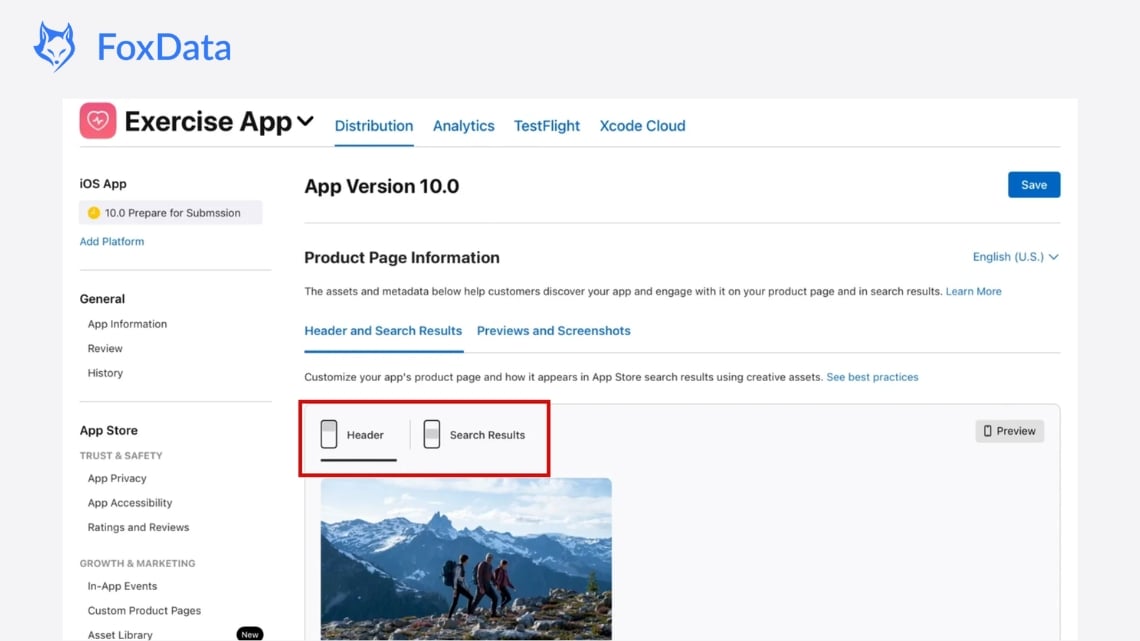
Apple is expanding where developers can deploy marketing images and videos — beyond traditional screenshots and app previews. These assets (images or videos) can now appear in:
Critically: these assets can be submitted for App Review independently of an app version update. Your creative refresh cycle is no longer tied to your release schedule.
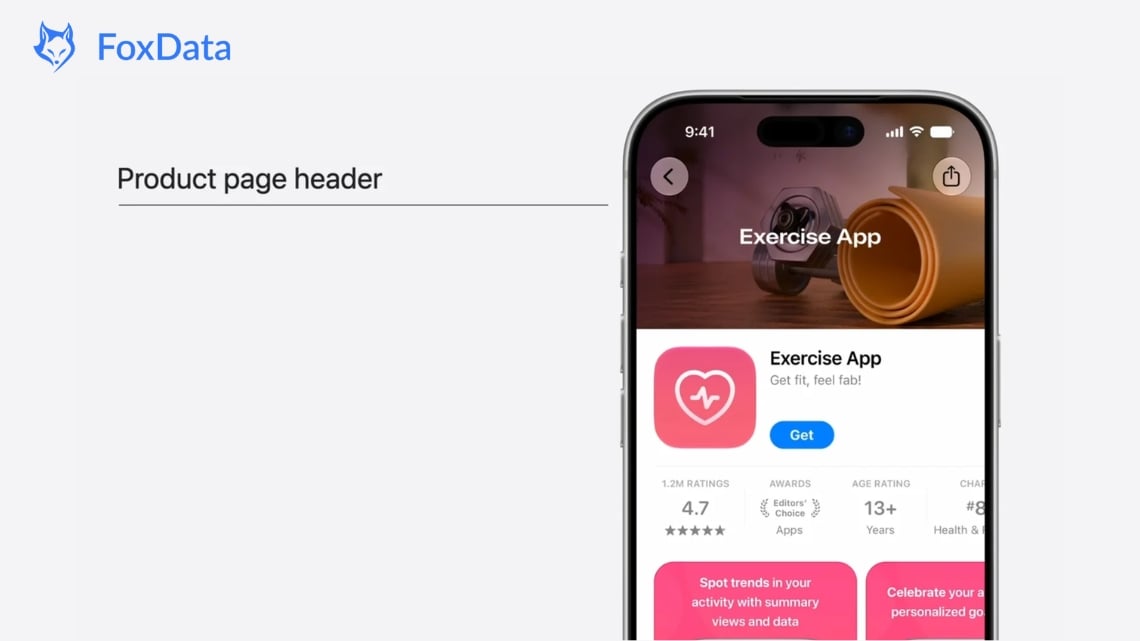
What this means for marketers: The visual gap in search results between organic listings and Apple Ads placements is about to widen. Apps that deploy strong header creatives will draw more taps; apps that don't will look dated by comparison. Design these assets at brand level — they're closer to a landing page hero than a UI screenshot.
Apple is introducing a centralized Asset Library inside App Store Connect for managing all visual elements — creative assets, app previews, screenshots, In-App Event media. Once approved, assets can be reused across Custom Product Pages, In-App Events, and creative placements without re-uploading or re-submitting.
What this means for marketers: Seasonal campaigns, localized creatives, and multi-market deployments just got operationally much simpler. Build a creative calendar mapped to your marketing windows and submit assets 4–6 weeks ahead of each campaign period to absorb any review buffer.
The same assets managed in Asset Library can now be used for Today Tab ads, Search Results campaigns, and Custom Product Pages. Apple's WWDC session showed a fitness app running the same hero visual from its web campaign on the CPP header, then deep-linking post-download directly into the relevant in-app content.
What this means for marketers: You can now build a fully consistent visual journey: web ad → App Store product page → first in-app session. One asset, one message, every surface. If you're not matching your CPP creative to the campaign that drives traffic to it, you're losing conversion in the handoff.
Apple is rolling out Personalized Collections — curated app groupings tailored to individual user behavior — across the Apps, Games, and Search tabs. Each recommendation can surface with an App Note explaining why that app was suggested.
What this means for marketers: Generic metadata no longer flies. The personalization engine needs specific, intent-anchored metadata to associate your app with the right users. Vague descriptions that could describe any app in your category give the algorithm nothing to differentiate on.
Three new subscription features debuted:
What this means for marketers: Apple has introduced a new pricing option between monthly and annual plans. The 12-month commitment plan could become a strong default choice for subscribers. Meanwhile, the upcoming Retention Messaging feature helps reduce churn by encouraging users to stay subscribed—often much cheaper than winning them back through paid acquisition later.
WWDC 2026 doesn't just add features. It changes the strategic calculus in three important ways.
Custom Product Pages have been available since iOS 15, but WWDC 2026 ties them directly into the new creative asset ecosystem. One app can now run different CPPs for different keyword clusters, different Apple Ads placements, and different audience segments — each with its own visual identity and deep-link destination.
For UA teams, this creates a CPP management challenge. Which pages are performing? Which creatives are driving downstream retention rather than just installs? The surface area for optimization has expanded significantly, and without proper tracking, CPP fragmentation becomes a liability rather than an advantage.
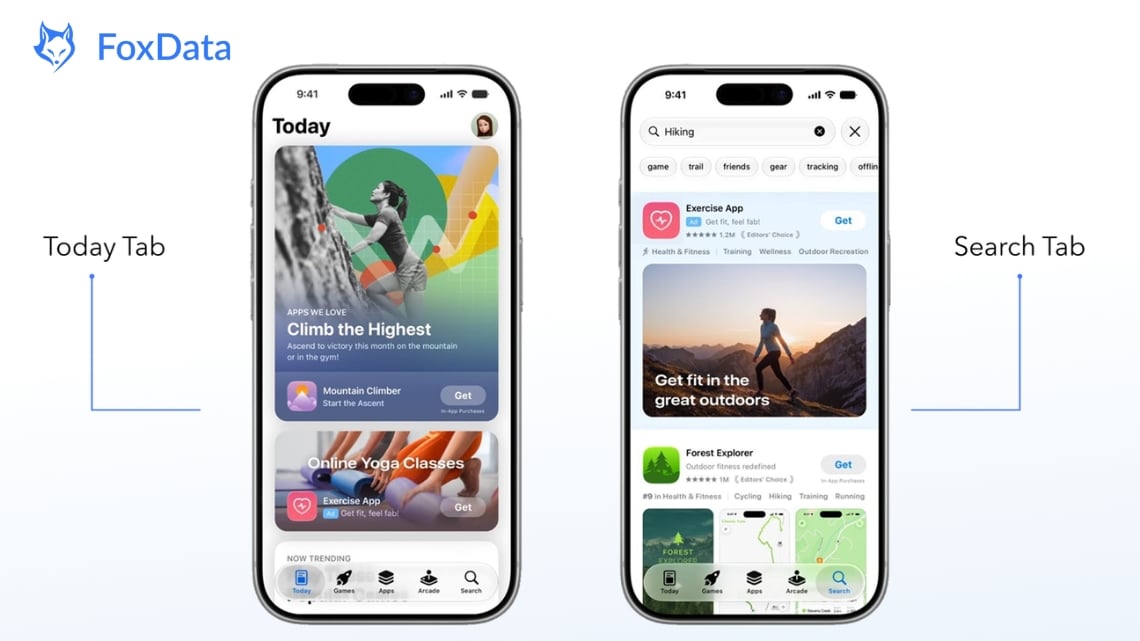
Apple Ads now spans four distinct placements:
Each placement has different user intent, different competitive dynamics, and now, different creative requirements. A strategy that treats all four as interchangeable will waste budget. A strategy that optimizes each independently requires knowing what's working in each — including what competitors are running.
More creative flexibility means more decisions. Product page header or no header? Static image or video? Which CPP to show for which keyword? How does the search result asset affect TTR compared to the screenshot strip?
These questions require systematic testing. But testing in isolation from competitive context is slow and expensive. If you don't know what your top three competitors are doing on each placement, you're calibrating off a partial picture.
Apple's built-in tools, like App Store Connect and Apple Ads, only show your own campaign data. They don't reveal what your competitors are doing.
Here's what you can't see:
This matters because strong CPPs are often built around high-intent keywords. Competitors with keyword-specific pages, matching creatives, and relevant deep links are more likely to convert users.
The same is true for ad placements. Heavy spending on Today Tab usually signals a brand awareness strategy, while a focus on Search Results suggests they're competing for high-intent keywords. Without competitor visibility, you're making decisions with only half the picture.
Ready to see what your competitors are actually running? Start your free trial with FoxData and get immediate access to CPP and placement intelligence.
This is precisely where FoxData's CPP Intelligence and Ad Placement Intelligence features come in. They're built for the post-WWDC 2026 environment, where the data you need to compete is no longer available through Apple's native tools alone.
FoxData's CPP gives you visibility into how competitors are deploying Custom Product Pages — across both organic and paid contexts.
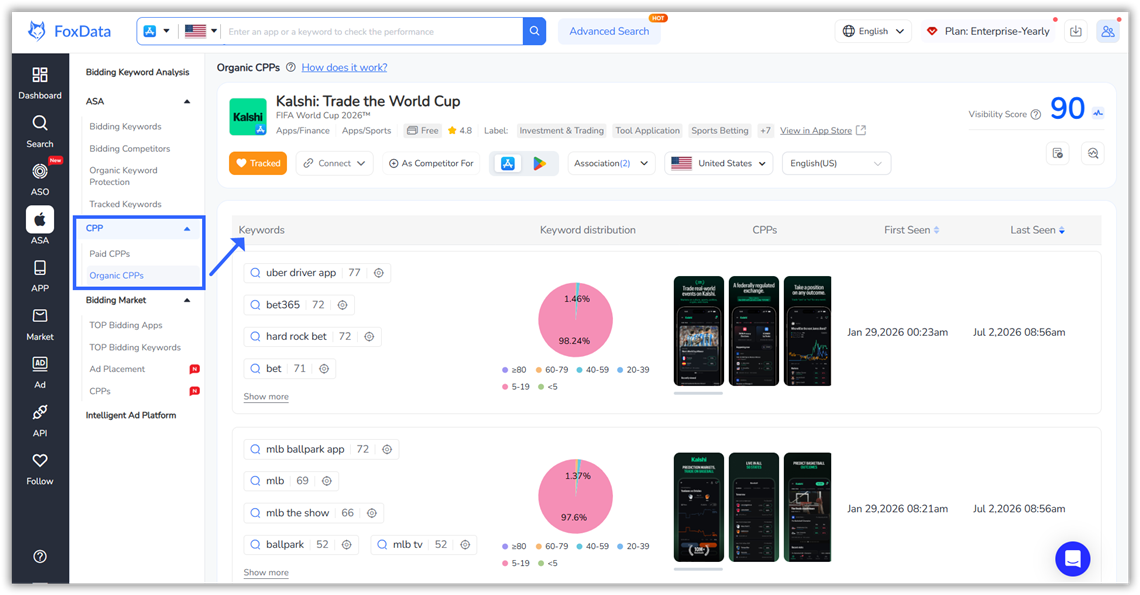
What you can do:
FoxData shows where competitors are running Apple Ads and what creatives they're using.
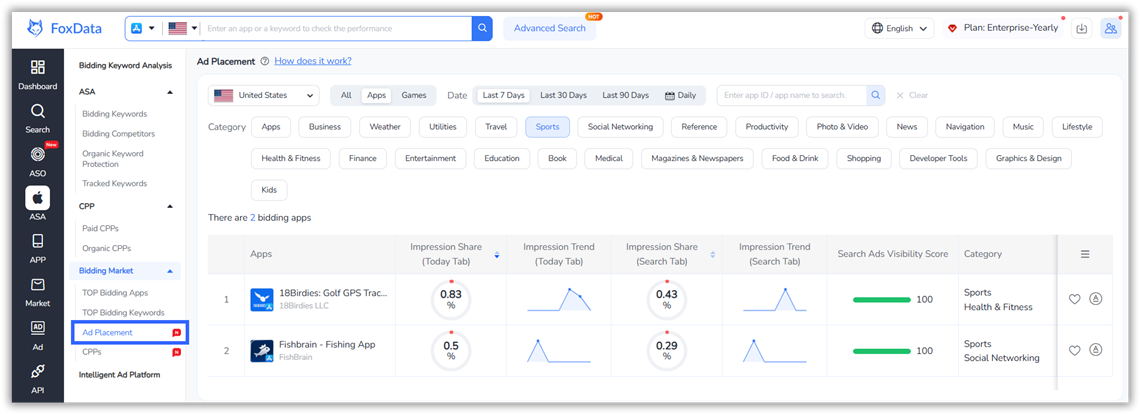
Today Tab
Insight: Heavy Today Tab activity usually signals a strong brand awareness strategy.
Search Tab
Insight: Search Tab targets users before they enter a search, making it ideal for discovery-focused campaigns.
|
Capability |
Apple Native Tools |
FoxData |
|
Your own CPP performance data |
✅ |
✅ |
|
Competitor CPP visibility |
❌ |
✅ |
|
Paid vs. organic CPP differentiation |
❌ |
✅ |
|
CPP-to-keyword mapping (competitors) |
❌ |
✅ |
|
Today Tab competitor creative tracking |
❌ |
✅ |
|
Search Tab placement intelligence |
❌ |
✅ |
|
Creative change tracking over time |
❌ |
✅ |
|
Placement-level competitive intensity |
❌ |
✅ |
|
Actionable keyword + CPP correlation |
Limited |
Advanced |
|
ASA + ASO integrated view |
❌ |
✅ |
A Custom Product Page (CPP) is a customized version of your App Store product page with different screenshots, videos, and promotional text. You can create up to 70 CPPs per app. In Apple Ads, CPPs let you send users to a page that matches their search or the ad they clicked, helping improve conversion rates.
WWDC 2026 introduced reusable creative assets, a new Asset Library in App Store Connect, better deep linking from CPPs to in-app content, and expanded organic placements. These updates make it easier to create consistent experiences across Apple Ads and the App Store.
Create CPPs that match user intent. Use brand-focused visuals for branded searches and feature-focused creatives for category keywords. Make use of the new header assets, deep link users to relevant in-app content, and test different creatives before scaling.
Each placement serves a different stage of the user journey.
Apple doesn't provide competitor ad data. Tools like FoxData let you track competitors' ad placements, creatives, CPP usage, keyword targeting, and strategy changes over time, helping you benchmark and improve your campaigns.
No. CPPs also support organic growth. With WWDC 2026 updates, Apple can show different product pages based on user context, making CPPs valuable for both paid campaigns and organic discovery.
WWDC 2026 is one of the most operationally significant years for app marketers since Custom Product Pages launched. The teams that benefit most won't be the ones who have the biggest budgets — they'll be the ones who move fastest, test most systematically, and understand their competitive environment most clearly.
The new placement surfaces are coming this fall. The teams preparing now — building CPP strategies, mapping creative assets to keyword clusters, understanding where competitors are concentrated — will have a meaningful head start when the full ecosystem goes live.
The question isn't whether to update your Apple Ads and CPP strategy for the post-WWDC 2026 environment. The question is whether you have the competitive intelligence to do it well.
👉 Start your free trial with FoxData — unlock competitor CPP strategies, placement intelligence, and ASO keyword data in one platform.
👉 See what your competitors are running today — CPP creatives, placement activity, keyword bidding patterns, and more.
🔍 Related Articles:
© 2020-2026 FoxData. All Rights Reserved.