







Explore More Possibilities for Your Business
Full-cycle scenario construction to meet your needs from App research, development, and release to operation.
Ready for your soaring growth
You built something real. Months of late nights, countless design revisions, and a product you genuinely believe in. You hit publish. And then silence.
A few dozen downloads. A trickle of installs. No reviews. Your app is live, but nobody can find it.
This is not a rare experience. It is the default outcome for most indie apps. The Apple App Store now hosts over 1.8 million apps. Google Play carries more than 2.5 million. According to Sensor Tower's State of Mobile 2024 report, the top 1% of apps capture more than 90% of all downloads across both platforms.
For indie developers without a dedicated marketing team or a six-figure UA budget, that number is sobering.
The instinct is to blame the product. But in most cases, the product is not the problem. The problem is invisibility. And invisibility is a strategy failure, not a quality failure.
What separates growing indie apps from stagnant ones is almost never the feature set. It is the presence of a data-informed, consistently executed App Store strategy. Most indie teams skip this entirely, not because they do not care, but because they do not know where to start and cannot afford to waste time or money finding out.
Discover how FoxData enhances data protection and security standards to keep your analytics safe and reliable.
Data does not just describe what is happening. It tells you why, and what to do next.
When an indie app underperforms, the usual suspects are invisible without the right tools. A keyword strategy built on guesses rather than search volume data. A product page that looks good but does not convert. A ratings profile quietly dragged down by a handful of unanswered negative reviews.
Here is what the research says. A 2023 study by AppFollow found that developers who respond to user reviews consistently see up to a 0.7-star increase in their average rating over time. That might sound small. But Apptentive's Mobile Consumer Report found that moving from a 3-star to a 4-star rating can increase App Store conversion rates by as much as 89 percent.
These are not marginal gains. They are the difference between an app that grows organically and one that flatlines.
The good news: indie developers do not need an enterprise data stack to act on this. They need focused, relevant signals: keyword rankings, conversion benchmarks, competitor positioning, and review trends. The challenge is finding all of those signals in one place, without spending hours each week pulling data from five different tools.
Your keyword visibility score reflects how many searches your app appears in and where it ranks. The most common mistake indie developers make here is targeting keywords that are either too broad (too competitive to crack) or too niche (too little search volume to matter).
The opportunity sits in the middle: mid-volume, lower-competition terms where you can realistically rank in the top 10. Track keyword movement weekly and build your metadata strategy around terms with upward momentum.
 Example of search volume for keyword "shooting games" | Source: FoxData
This is the percentage of users who download your app after viewing your store listing. Industry benchmarks put a healthy conversion rate between 25 and 35 percent for top-performing apps. If yours is below that, the issue is almost certainly your screenshots, icon, or description copy.
A/B testing your store creative is one of the highest-ROI activities a small team can run, and it costs nothing except time.
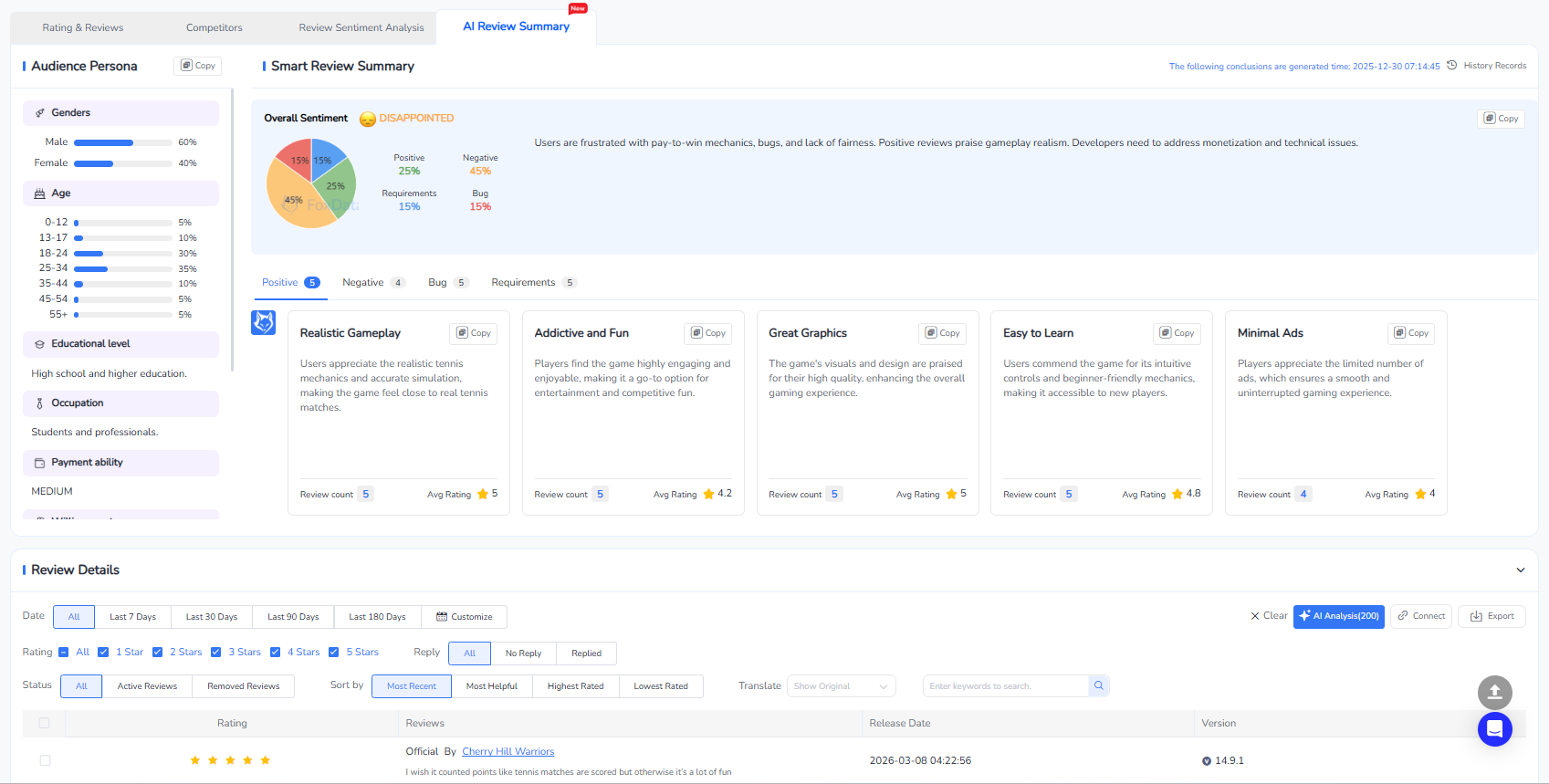
A sub-4.0 rating is a conversion obstacle. But beyond the star rating, the content of your reviews contains specific, actionable intelligence: recurring feature requests, crash reports, UX frustrations that never made it into your bug tracker.
A structured app reviews management tool lets you monitor, respond to, and learn from reviews consistently, which matters especially when one person is doing the job of five.
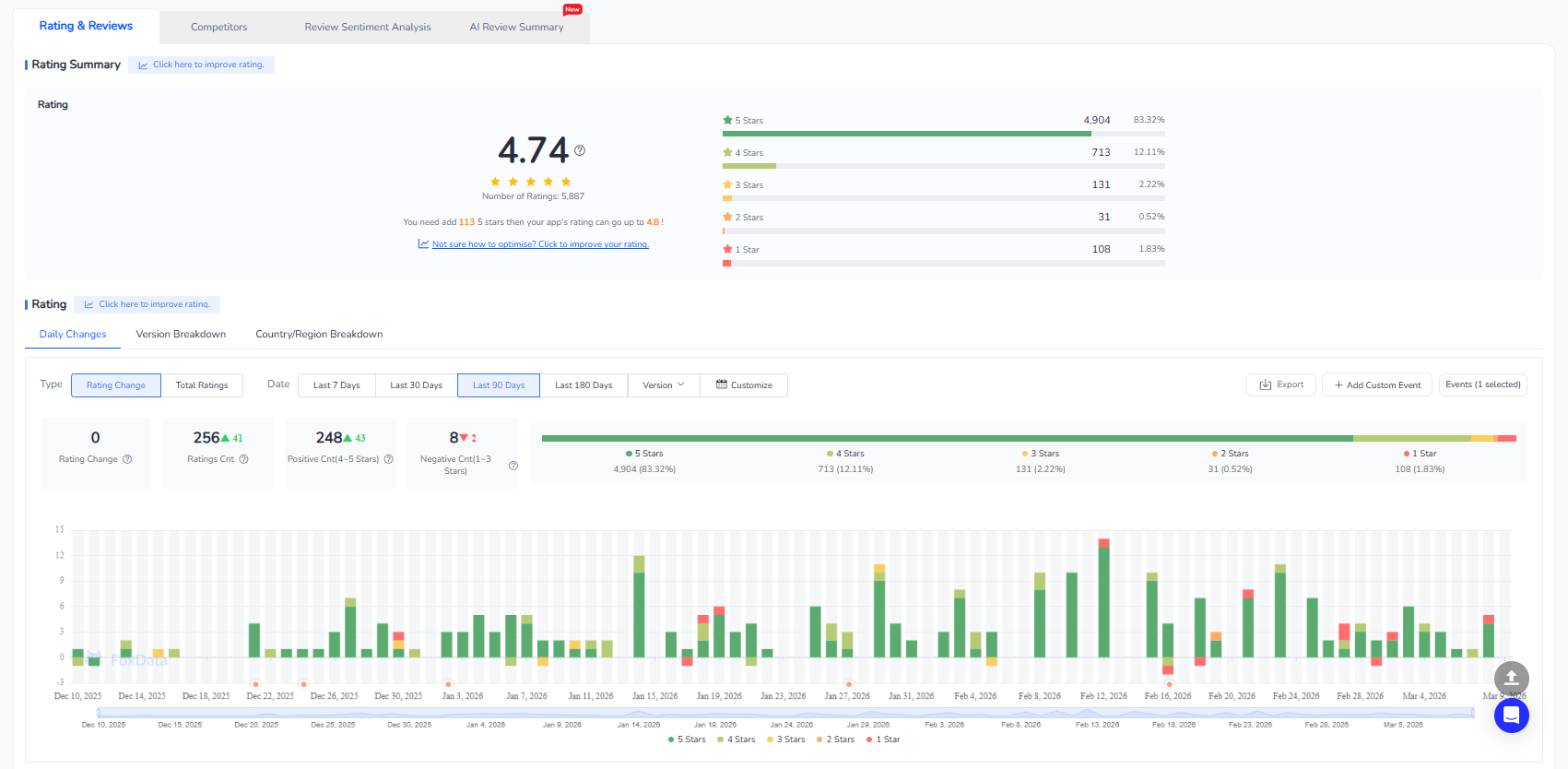
App reviews management tool can help you see the rating and review breakdown | Source: FoxData
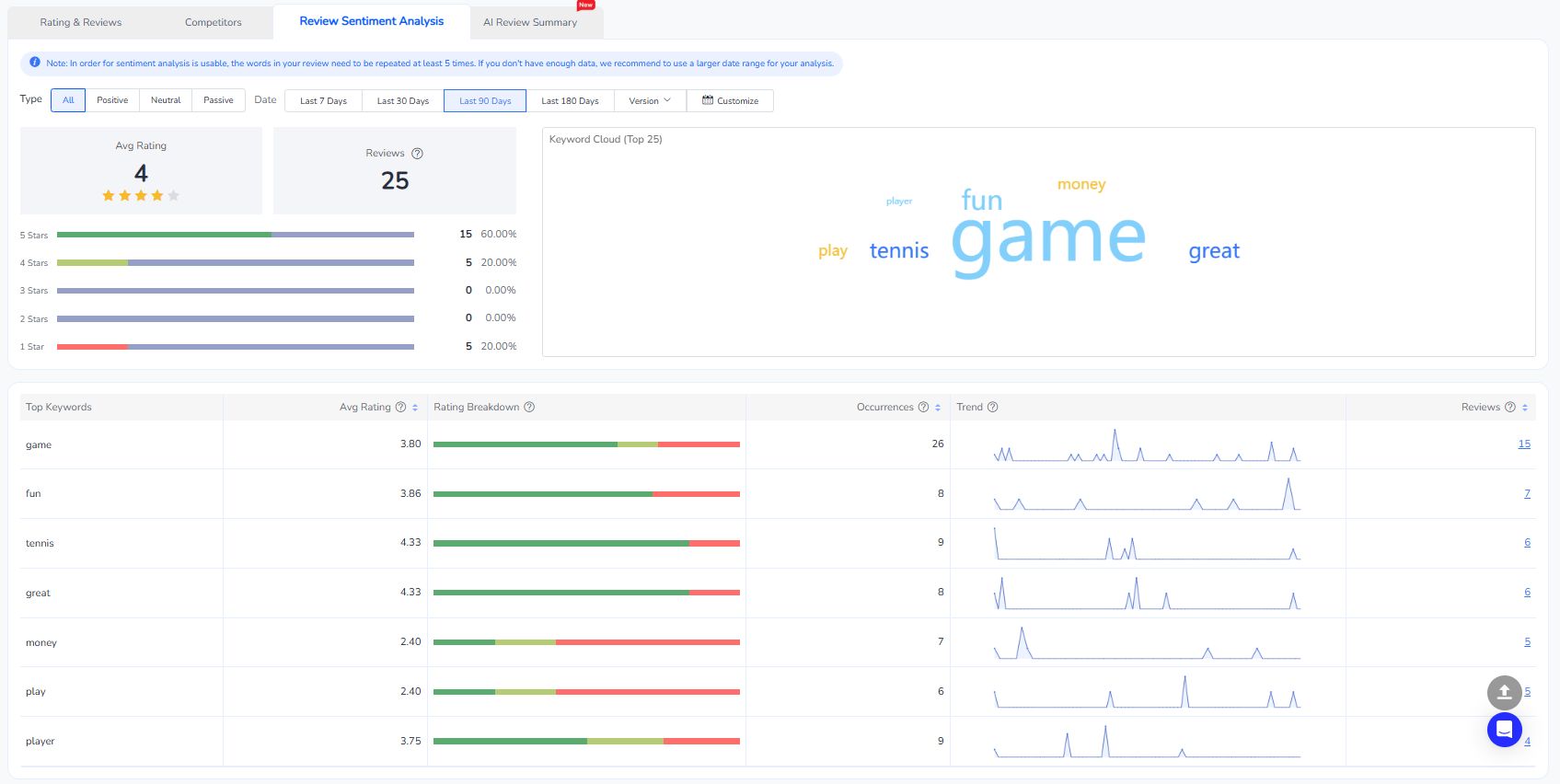
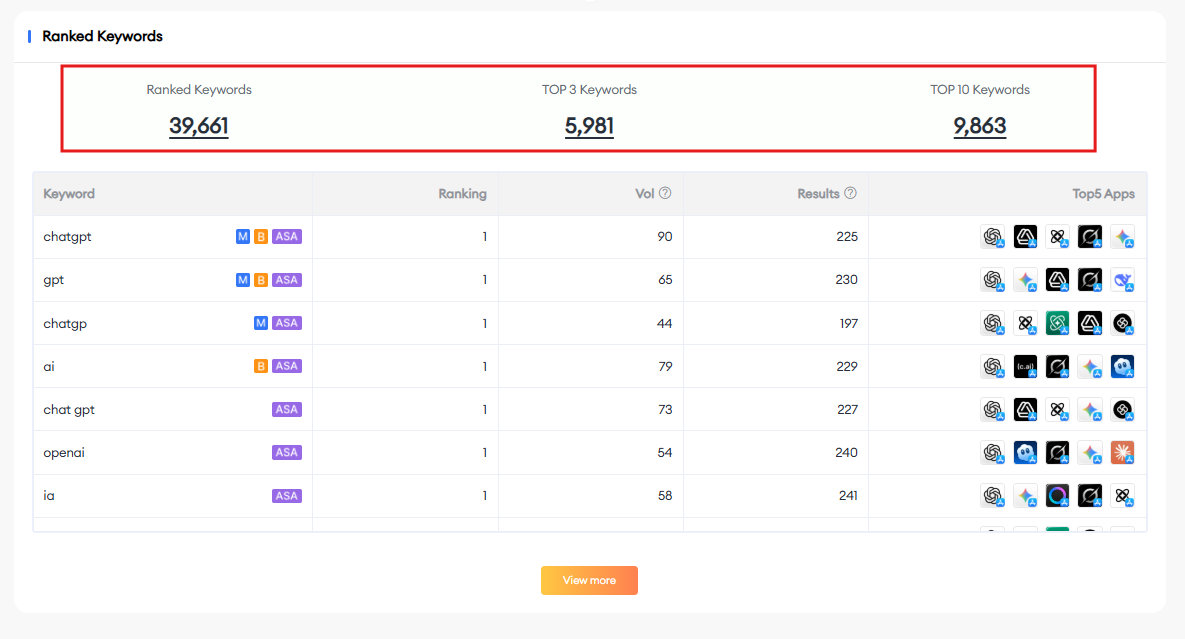
Identify which keywords your top three to five competitors rank for that you do not. These gaps represent ranking opportunities you are currently leaving on the table. Prioritize terms where competitors rank between positions 11 and 30. Close enough to compete, but not so dominant that entry is impractical.
Use tool like App Keyword Analytics to check the ranked keywords:
Both App Store and Google Play algorithms weight recent download velocity heavily in their ranking calculations. Understanding the relationship between your ranking movement and install spikes helps you time campaigns more strategically.
Running paid installs on specific keywords to trigger organic ranking improvements, rather than simply boosting total install numbers, is a far more efficient use of a limited budget.
Many indie developers track acquisition obsessively and ignore retention entirely. But stores increasingly incorporate engagement signals into ranking algorithms. Low retention reduces the chance your app gets featured or surfaced in recommendations.
Benchmark your retention against category averages and treat D1 retention as both a product health signal and a growth lever.
This is exactly where app analytics built specifically for indie developers makes a measurable difference. Rather than stitching together free tools that each show a fragment of the picture, a purpose-built platform lets you move from insight to action faster, with less context-switching and less noise.
Here is a practical workflow you can implement starting this week:

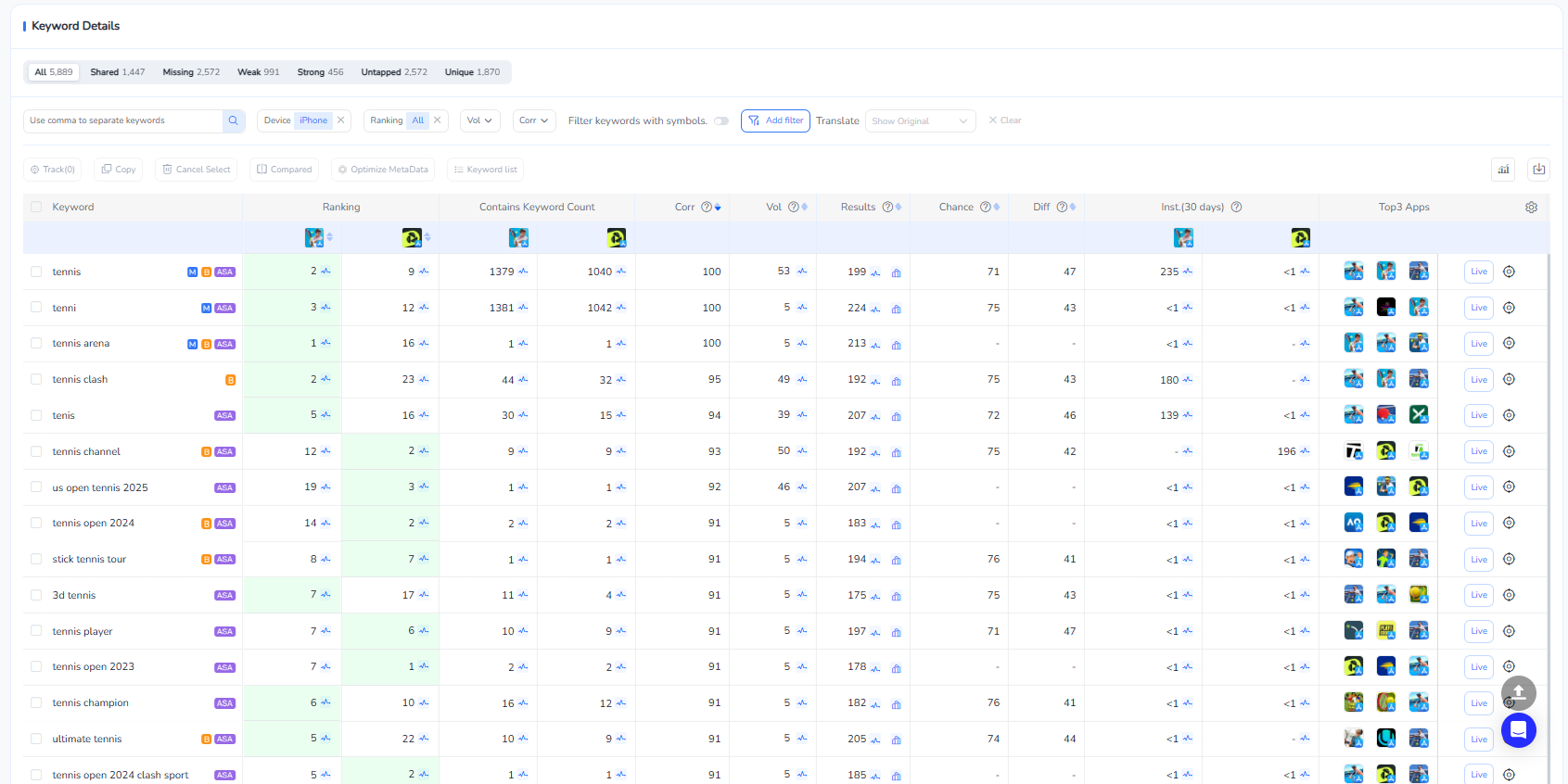
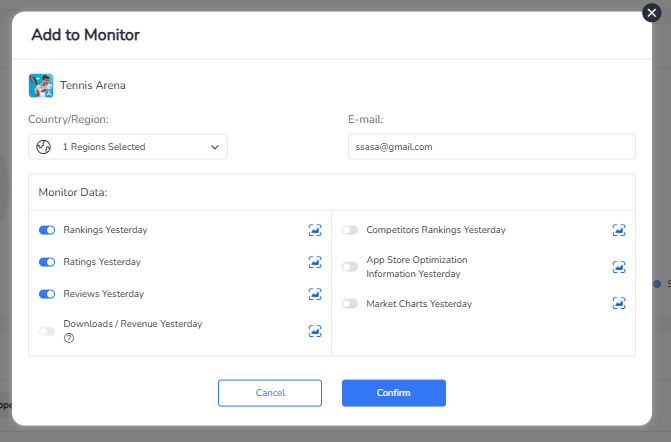
Platforms like FoxData's dedicated ASO and analytics tools for indie developers are designed to support exactly this kind of systematic, budget-conscious approach. They give you the visibility of an enterprise-grade platform without the enterprise price tag or the learning curve.
The App Store is not a level playing field. But it is not an impossible one either.
Indie developers who approach it systematically, who treat their store listing as a product in its own right, who monitor their reviews, track their keyword rankings, and benchmark against competitors, consistently outperform teams that build great products and hope for the best.
The gap between an app that nobody finds and an app that grows is almost always a data gap. Close it with the right metrics, the right tools, and a commitment to iteration over assumption.
Ready to stop flying blind in the App Store? Explore FoxData's ASO tools and app analytics platform built for indie developers and start building an App Store growth strategy powered by real data, not guesswork.
Most indie developers can run an effective ASO program for between 30 and 150 dollars per month using a dedicated platform. That is a fraction of what a single paid install campaign costs, and organic ASO compounds over time. Unlike paid UA, which delivers installs only while the budget is live, a well-optimized store listing generates downloads continuously.
Keyword ranking improvements are typically visible within two to four weeks of a metadata update. Conversion rate lifts from creative testing can appear faster, sometimes within seven to 14 days. Sustained organic growth, however, is a three to six month process that requires consistent iteration rather than a single optimization sprint.
Yes, and the impact is well-documented. Responding to negative reviews reduces the lasting damage of low ratings and signals developer responsiveness to prospective users reading your listing. More importantly, active review monitoring helps you identify and fix the product issues generating negative sentiment, which is the most durable path to a higher rating.
Scaling paid acquisition before the store listing is optimized. If your conversion rate is low, every dollar you spend on paid installs is being partially wasted on traffic that will not convert. Optimize the listing first. Establish a baseline conversion rate above 25 percent. Then invest in paid channels to amplify organic performance rather than compensate for a weak product page.
Ready to make your app shine? Optimize your app's visibility with FoxData! Maximize downloads and rankings by leveraging our powerful insights today.
App Growth & ASO Tools by FoxData
FoxData supports every stage of app growth with specialized ASO and app analytics tools, helping teams improve keyword visibility, user acquisition, and retention through reliable data.
🔍 Store Keyword Research Tools
Research high-intent keywords, search volume, and competition to strengthen your app store optimization strategy.
📈 App Store Keyword Tools
Analyze keyword rankings and performance across the Apple App Store and Google Play to refine ASO execution.
📊 ASO Monitoring Tools
Monitor keyword ranking changes, visibility trends, and ASO impact over time with continuous performance tracking.
👥 User Activity Monitoring Tools
Understand in-app user behavior, engagement, and retention with real-time user activity analytics.
Together, these tools form FoxData’s ASO analytics and app intelligence ecosystem, designed to help developers, marketers, and growth teams make data-driven decisions and scale sustainably.
Explore it today!
👉 Learn more about FoxData here | 👉 Book a demo with FoxData team today!
© 2020-2026 FoxData. All Rights Reserved.



