




Explore More Possibilities for Your Business
Full-cycle scenario construction to meet your needs from App research, development, and release to operation.
Ready for your soaring growth
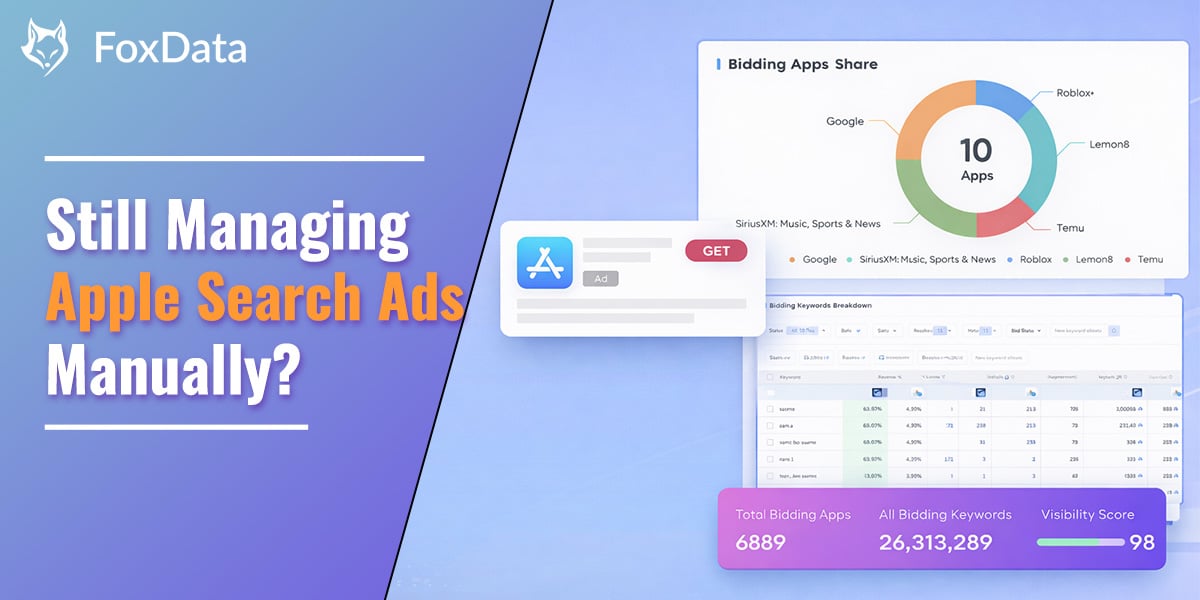
Apple Search Ads automation helps marketers scale campaigns by automatically adjusting bids, budgets, and keyword strategies based on performance data. Instead of manually monitoring hundreds of keywords and campaign metrics, automation tools optimize bidding, discover new keyword opportunities, and track competitor strategies in near real time.
By combining automation with competitive intelligence, marketers can improve install performance, reduce cost per acquisition, and manage large-scale campaigns without increasing manual workload.
You’re about to launch an Apple Ads (formerly Apple Search Ads) campaign for your app. You have a list of keywords that seem relevant, a budget you’re not sure is enough, and no idea what your competitors are doing
So you launch. Two weeks later, your cost per install is higher than expected, your impression share is low on the keywords that matter, and a competitor you’ve never heard of keeps outranking you.
This scenario plays out every day for app marketers who lack competitive intelligence. The information asymmetry is the real problem — not the budget, not the keywords, not the creative. You’re making decisions in the dark while competitors who have visibility are making better ones.
Consider the scale: according to Apple, over 850 million people visit the App Store every week, and 70% of those visitors use search to discover apps (Apple Ads). With nearly 65% of downloads happening directly after a search, the keywords you bid on — and the bids you set — directly determine how many users find your app.
This is where Apple Search Ads intelligence tools make the difference. They reveal the data your competitors rely on and help you make smarter campaign decisions.
Apple Search Ads (ASA) intelligence refers to third-party analytics that reveal how apps are using Apple's paid search advertising platform. Apple's own interface only shows your own campaign data. ASA intelligence tools show you everyone else's.
This includes which keywords competitors bid on, how their bidding strategies change over time, what ad creatives they run across platform, and how they design custom product pages (CPPs) for different campaigns.
Several tools serve this market — including SearchAds.com by MobileAction, SplitMetrics, and AppTweak — each offering different strengths in campaign management, automation, and competitive analysis.
FoxData's ASA Data Analytics Tools provide this intelligence through three integrated modules: Keyword Bidding Analysis, Ad Creatives Analysis and CPP Creative tracking. What differentiates FoxData is real-time bidding share data, cross-placement analysis, and an API-first architecture designed for agencies at scale. All modules are accessible from the ASO/ASA section of the FoxData platform.
Before diving deeper, identify your starting point. This article focuses on real problems app teams face rather than just listing product features.
|
Role |
Your Challenge |
Start Here |
|
Growth Marketer |
Competitors outbid me on core keywords and I only find out after CPI spikes |
Bidding analysis + competitive insights |
|
ASO/ ASA Agency |
I manually pull keyword data for 20+ clie accounts every week |
API data pipeline + unified data source |
|
Indie Developer |
My budget is small and I have no idea which keywords are worth bidding on |
Keyword intelligence + CPP analysis |
|
UA Manager |
Apple releases new placements but my tools do not support them yet |
Aligned with official Apple updates |
|
Product Manager |
I want to understand how our CPPs convert compared to competitors |
CPP creative analysis |
This is the most common starting point. You have a general idea of relevant terms, but you don’t know which keywords actually drive installs in your category, which ones are too competitive for your budget, or which ones your competitors have already validated through their own spending.
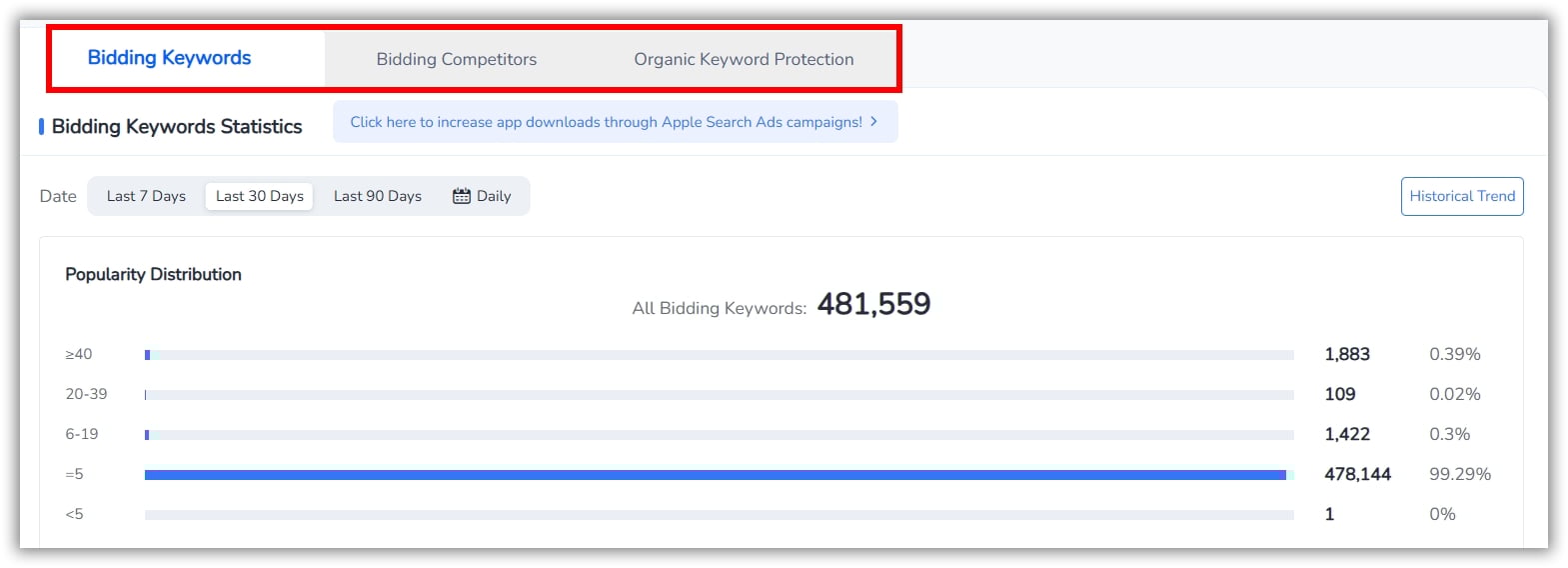
FoxData's Keyword Bidding Analysis lets you search any app and see every keyword they're bidding on in Apple Search Ads. The data is broken down by popularity score, giving you a clear picture of each keyword's traffic potential:
|
Popularity |
Traffic Level |
Strategic Implication |
|
≥40 |
High volume, high competition |
Only bid if your budget can sustain the competition. Consider exact match. |
|
20—39 |
Medium volume, moderate competition |
Often the best ROI zone. Proven demand, lower CPA than top-tier terms. |
|
6—19 |
Niche, lower competition |
Great for specific use cases. Very affordable bids. |
|
≤5 |
Minimal traffic |
Only worthwhile for branded terms or extremely targeted long-tail queries. |
📌 Real-world example: A productivity app with 500K+ MAU analyzed five competitors using FoxData and discovered 47 mid-volume keywords (popularity 20–39) that none of them were targeting. After adding these keywords with exact-match bids, their average CPA dropped by 28% within the first month.
Beyond individual keyword lists, the Bidding Competitors analysis shows which apps are competing for the same keywords as you. This reveals:
Yes. If your app ranks #1 organically for a keyword, a competitor can still place an ad above you in search results. According to Apple’s ad placement documentation, ads appear at the top of search results before organic listings. The Organic Keyword Protection feature in FoxData flags these vulnerable keywords so you can defend them with targeted bids before competitors erode your organic traffic.
👉 Search any competitor’s ASA keywords now — start free trial
You are getting impressions. Users are tapping your ad. But they are not installing. The problem usually is not your bid or your keyword — it is your creative. Specifically, your Custom Product Page.
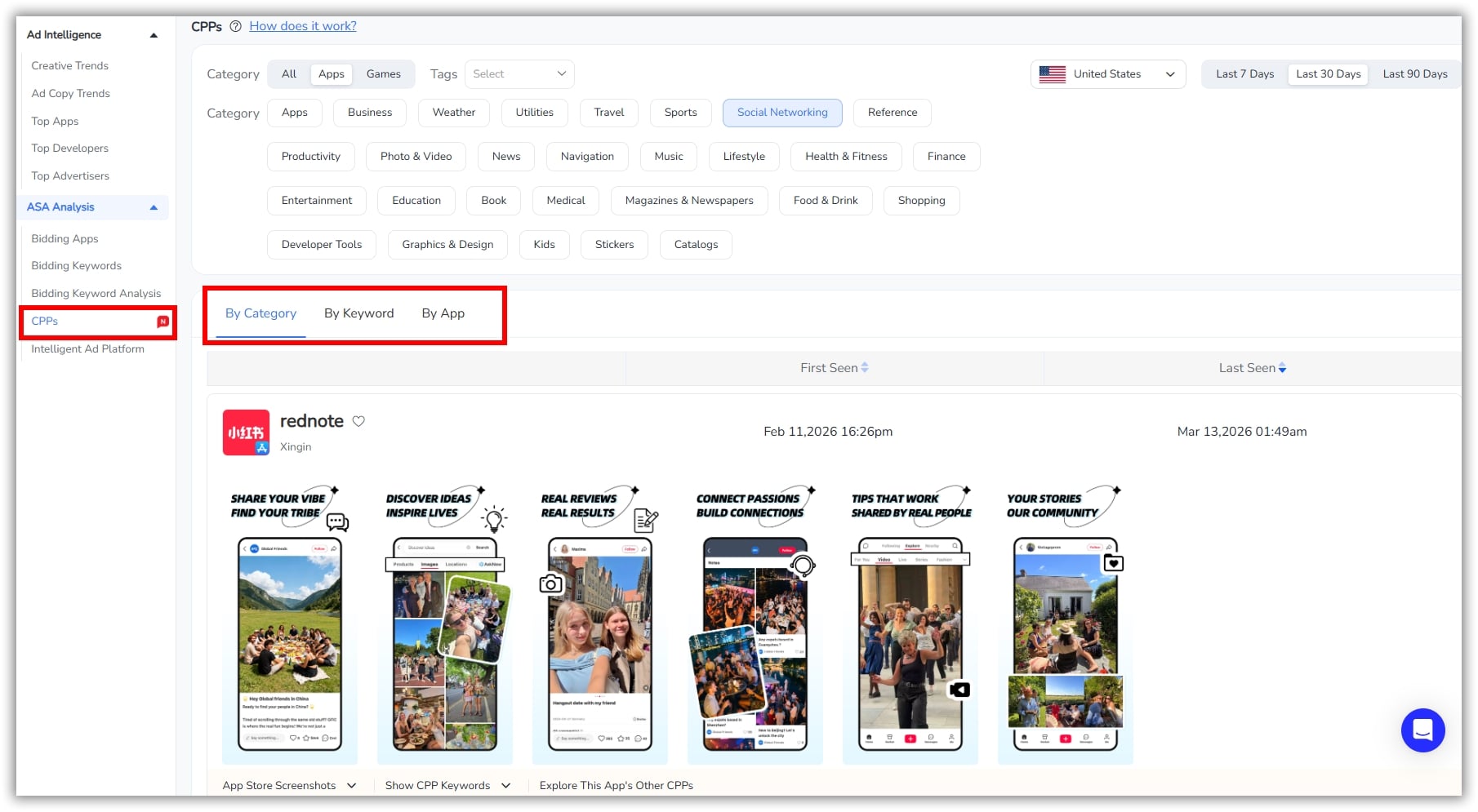
Apple lets you create up to 70 CPPs per app, each with different screenshots, preview videos, and promotional text. But you have no way to see what competitors are using, which CPPs they associate with which keywords, or how your creative approach compares to the market.
FoxData’s CPP analysis shows you:
This intelligence helps you design CPPs that match proven creative patterns in your category, rather than guessing which screenshots will resonate with which search queries.
➡️ See competitor CPPs and associated keywords now
Discover how FoxData enhances data protection and security standards to keep your analytics safe and reliable.
 Your Data, Secured: FoxData Achieves ISO 27001
See How
Your Data, Secured: FoxData Achieves ISO 27001
See How
If you are an agency or large team managing multiple apps, you know the pain: logging into Apple’s console, exporting CSVs, copying numbers into spreadsheets, and building reports. By the time data reaches a decision-maker, it is already stale. Manual workflows do not scale.
FoxData replaces manual data extraction with a fully automated pipeline:
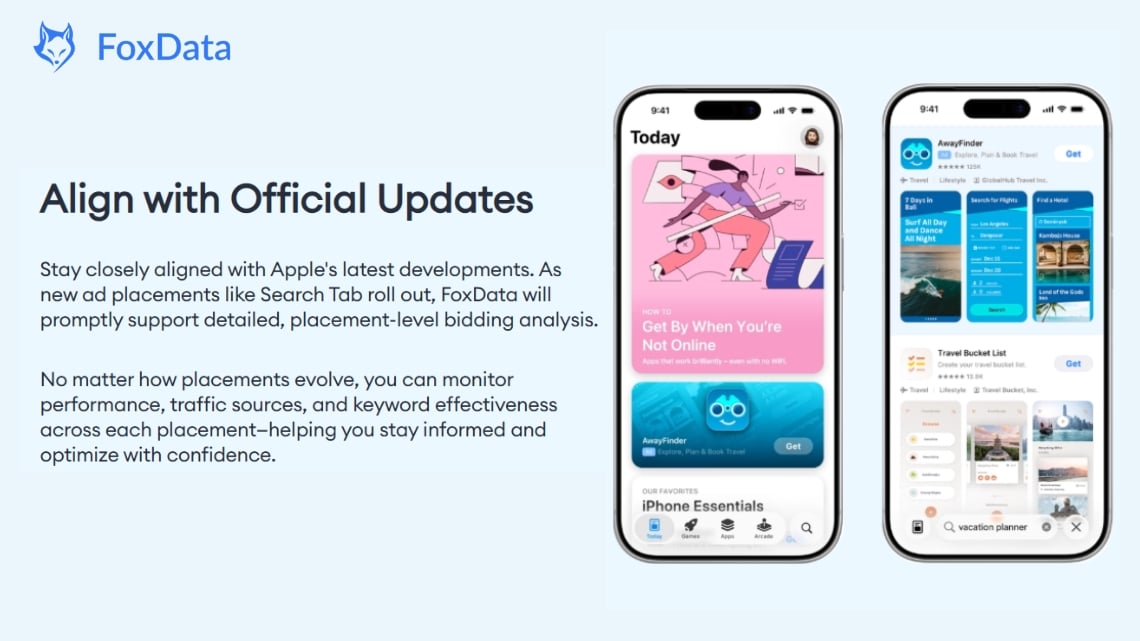
Apple continues to expand the ASA ecosystem: Search Tab ads, Today Tab ads, and Product Page ads each reach users at different intent stages with unique bidding dynamics.
Apple reports that search results ads deliver over 60% average conversion rate (Apple Ads). Case studies show results like Rakuten’s 669% increase in first-time buyers and HelloFresh’s 42% higher tap-through rate with ad variations.
If your tools do not keep pace, you end up managing new placements manually while the rest of your campaign runs elsewhere. The workflow becomes fragmented.
When Apple rebranded to “Apple Ads” in April 2025, FoxData updated within the same quarter. As new placements roll out, FoxData supports placement-level bidding analysis, letting you:
Data is only valuable if you can act on it. FoxData’s ASA tools go beyond analytics to include campaign management:
Manage multiple campaigns in a unified dashboard with bulk operations. Automatically generate campaign structures based on your budget and bidding strategy — no more building campaigns one keyword at a time.
Set rules that continuously execute bid adjustments and optimization strategies across campaign and keyword levels. Transform manual workflows into systematic, always-on execution while reducing operational costs.
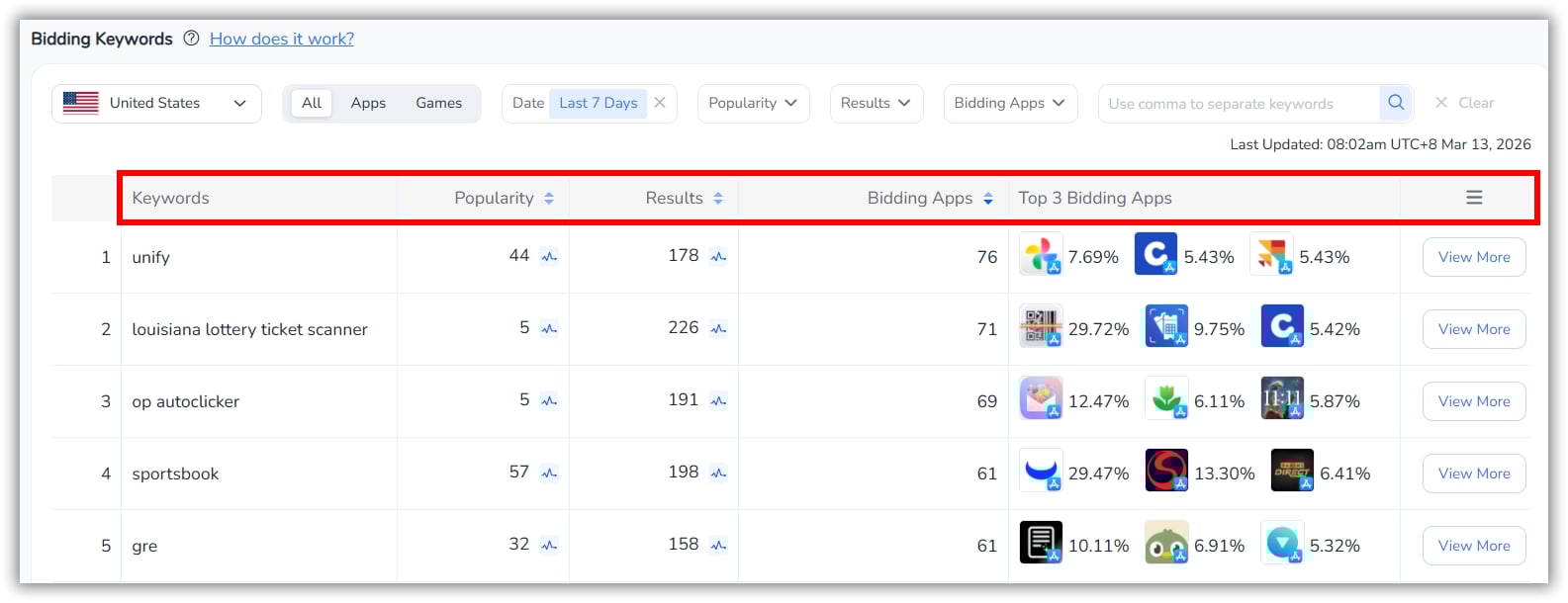
Access a full-spectrum view of keyword performance, powered by advanced keyword discovery and third-party attribution support. Evaluate traffic sources and campaign effectiveness with data the official console cannot provide.
Here is a practical workflow to start using FoxData ASA tools effectively from day one:
|
Step |
Action |
Details |
|
1 |
Audit Your Keyword Coverage |
Enter your app in FoxData. Review your current bidding keywords and compare against organic rankings to find unprotected terms. |
|
2 |
Scout Competitor Bids |
Select 3–5 direct competitors. Analyze their bidding keyword portfolios, popularity distributions, and impression share. |
|
3 |
Analyze CPP Creatives |
Review competitor CPPs to see which screenshots and messages they pair with which keywords. Identify creative gaps in your own approach. |
|
4 |
Build Your Strategy |
Use competitive and organic insights to prioritize keyword additions, defensive bids, and CPP restructuring. |
|
5 |
Connect Your Data Pipeline |
Set up the FoxData API to feed ASA data into your existing BI tools or reporting systems. Eliminate manual exports. |
|
6 |
Monitor & Iterate Weekly |
Review bidding landscape changes weekly. FoxData’s real-time data means you see shifts as they happen, not after the damage is done. |
➡ Ready to start Step 1? Enter your app in FoxData — free trial
A: You define rules based on performance conditions -- for example, "increase bid by 10% if impression share drops below 30%" or "pause keyword if CPA exceeds $5 with zero conversions." FoxData's automation engine executes these rules continuously, making adjustments in near real-time without manual intervention.
A: Yes. FoxData tracks bidding keywords across the App Store. For any app, you can view the full list of active bidding keywords, popularity scores, bidding intensity signals, and impression share. You can also compare your keyword portfolio directly against competitor portfolios.
A: CPP (Custom Product Page) analysis reveals how competitors design product page creatives tied to specific keywords. Since CPPs affect tap-to-install conversion rates, analyzing competitors helps improve creative strategy.
A: Growth marketers, UA managers, ASO/ASA agencies, indie developers, and product managers use FoxData. The platform serves anyone who runs or analyzes Apple Search Ads campaigns and needs competitive intelligence beyond what the official console provides.
A: Each ASA tool has its strengths. SearchAds.com (by MobileAction) focuses on campaign automation and smart bidding. SplitMetrics emphasizes AI-powered bid optimization and A/B testing. FoxData stands out with deeper competitive intelligence, including real-time bidding share data, CPP-level keyword analysis, and an API setup for agencies managing large portfolios. Many ASA teams use multiple tools depending on their needs.
👉 See how FoxData works for your app — start now
Manual ASA management does not scale. The time your team spends on bid adjustments, data exports, and campaign setup is time taken away from the strategic work that drives growth.
FoxData's ASA Data Analytics Tool gives you the automation, unified data, and intelligent tools to manage Apple Search Ads at scale — whether you run a single app or manage campaigns across an agency portfolio. Start your free trial and see what you have been missing.
👉 Start your free trial and see your competitors’ ASA strategies today.
🔎 Further Reading:
© 2020-2026 FoxData. All Rights Reserved.



