





Explore More Possibilities for Your Business
Full-cycle scenario construction to meet your needs from App research, development, and release to operation.
Ready for your soaring growth
1. Google Play ASO drives visibility, installs, and retention by optimizing keywords, metadata, and user experience to align with Google’s ranking and recommendation signals.
2. Well-structured metadata—Title, Short Description, and Full Description—should balance keyword relevance with clear messaging to improve both ranking and conversions.
3. Strong creatives (icons, screenshots, videos) are critical to boosting tap-through and conversion rates; continuous testing is essential.
4. Ratings, reviews, and retention metrics (like session frequency and uninstall rate) directly impact store ranking and user trust—optimize them proactively.
5. Effective ASO is ongoing: use platforms like FoxData to track performance, benchmark competitors, and adapt to trends like localization and promotional content.
Since its launch in September 2008, the Google Play Store has evolved significantly. Google has continuously optimized the platform—especially in ways that improve app discoverability for users. Borrowing principles from SEO (Search Engine Optimization), which was originally intended for websites, Google gradually adapted these ideas for app ecosystems. This gave rise to ASO (App Store Optimization), a parallel yet distinct discipline from traditional SEO.
When users search for certain features or keywords in Google Play, how does the algorithm decide which apps to show first? The answer lies in Google’s ranking algorithm, which evaluates multiple elements of your Play Store listing to determine how well your app matches user intent. The better the keyword relevance, the higher the chances your app will rank—leading to greater visibility and more organic installs.
Keyword relevance is one of the cornerstones of Google Play ASO. To help developers improve app performance, Google has released features such as Promotional Content, Store Listing Experiments (A/B Testing), and Pre-registration, giving teams more control and flexibility over their app marketing initiatives.
Ultimately, the main goals of Google Play ASO are to:
Although Google Play Store optimization may seem challenging at first, you can systematically adjust your optimization strategy to effectively improve your app's organic exposure and download performance in the store once you have clarified the key elements that the Google ranking algorithm focuses on.
The following are the main factors that affect your organic ranking and visibility in Google Play:
Google matches apps with users' search requests based on the content of the app's metadata, and the keywords contained directly affect the ranking in the search results. For example, if a user searches for "cooking recipes" and your app title or description happens to contain this keyword phrase, the probability of being recognized and recommended by the algorithm will be greatly increased.
As shown by the app "Cookpad Recipes, Homemade Cuisine", it has comprehensively laid out the word "cooking recipes" in its metadata, so it ranks at the top of the list for this keyword in Google Play in the United States.
💬 FoxData Tips:
It is not only keyword matching that can affect the ranking, but also the interaction behavior of users with the app is equally important. Google tracks these behavioral patterns and judges the relevance and user experience quality of the app accordingly.
For example, when a user clicks and installs your app after searching for a keyword, and if he continues to be active in the next 30 days, this will be regarded as a strong positive signal, which will help improve the ranking under that keyword. Conversely, if the user uninstalls shortly after installation, the algorithm will determine that the app has not met the user's expectations, which will affect the ranking performance.
Just as we tend to check the product ratings when we shop online, Google also regards ratings and reviews as an important indicator of app quality. In the store details page, the rating and review information will be directly presented, affecting the user's decision to click and download.
In addition, if the app rating is below 3 stars (i.e., below 60 points on a 5-point scale), it may lose the opportunity to be displayed in the "Explore" section of Google Play. Therefore, maintaining positive reviews and responding to user feedback in a timely manner is critical to improving conversion rates and exposure.
Google uses the Android Vitals monitoring system to identify the stability and technical performance of apps. High crash rates, serious lag, or other performance issues will trigger algorithm penalties, resulting in reduced exposure.
Fortunately, developers can view the app's operational data and health through Android Vitals in the Google Play Console to identify problems early and optimize performance to improve overall ranking competitiveness.
The algorithm also particularly favors apps with high activity and frequent updates. Google encourages developers to maintain connections with users and improve platform recommendation willingness by regularly releasing updates and "Promotional Content".
Frequent updates not only mean bug fixes and feature optimizations, but also indicate to Google that the app is "fresh and relevant", which in turn leads to higher store recommendation priority.
🔍 In FoxData, you can analyze other apps' promotional content on Google Play, providing inspiration for your own Play Store optimization.
App metadata is the first and strongest signal to Google about how your app relates to a user's search query. You must optimize it precisely:
✅ Use keyword coverage analysis to preview traffic potential and competition for keywords in your title, and compare against industry standards.
Keyword optimization is the foundation of organic visibility.
✅ Use the “Keyword Explore” feature to identify actual ranking keywords and optimize layout structure—and analyze which terms help competitors outrank you.
⬆️ With FoxData, you can analyze competitors’ keyword strategies to improve your own.
Visual elements influence conversion rates and enhance tap-through rate (CTR).
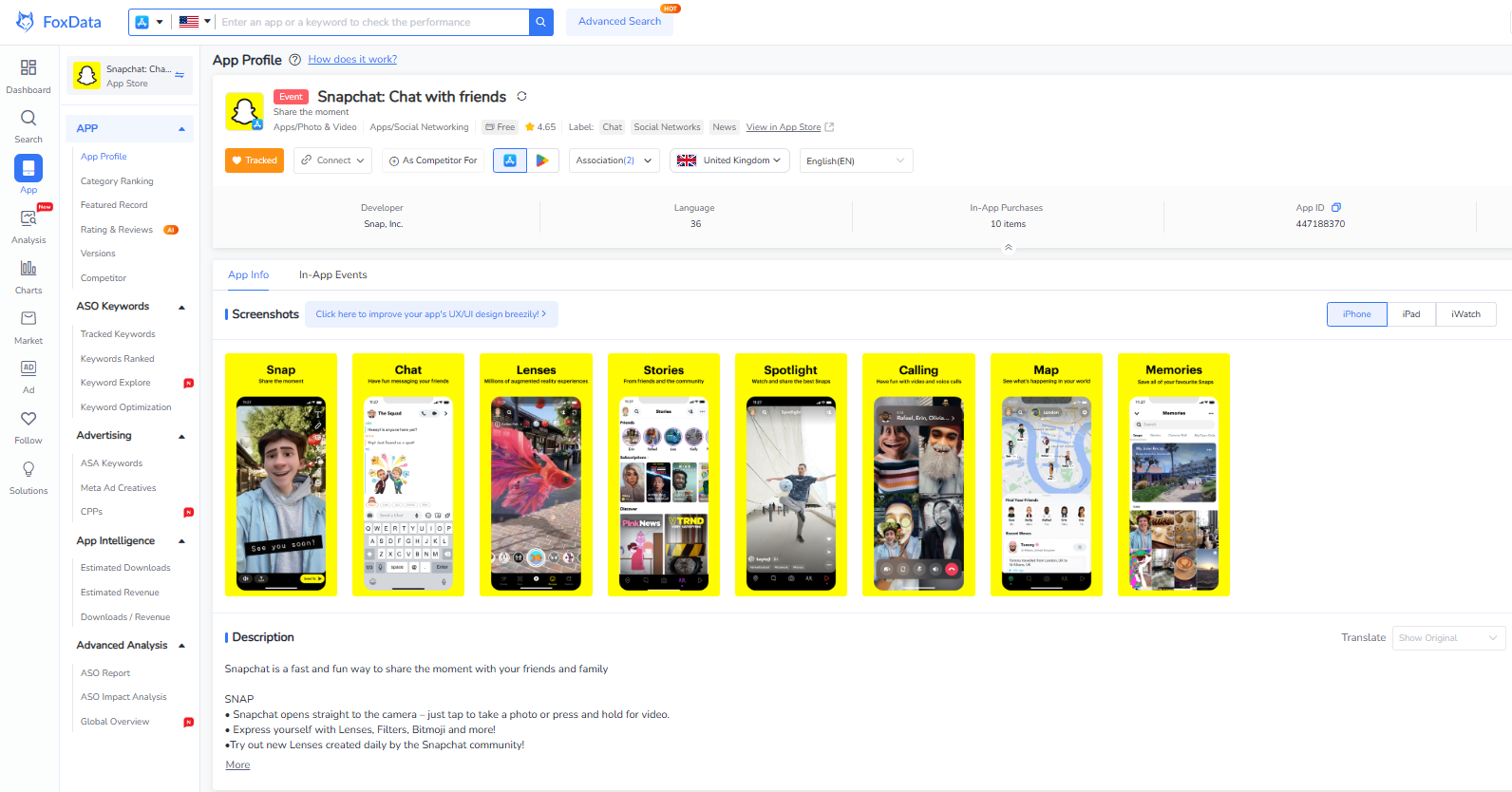
✅ FoxData offers competitive intelligence on App profile displays across various app stores, assisting in visual optimization for your own product.
Ratings and reviews influence both Google’s ranking algorithm and user trust:
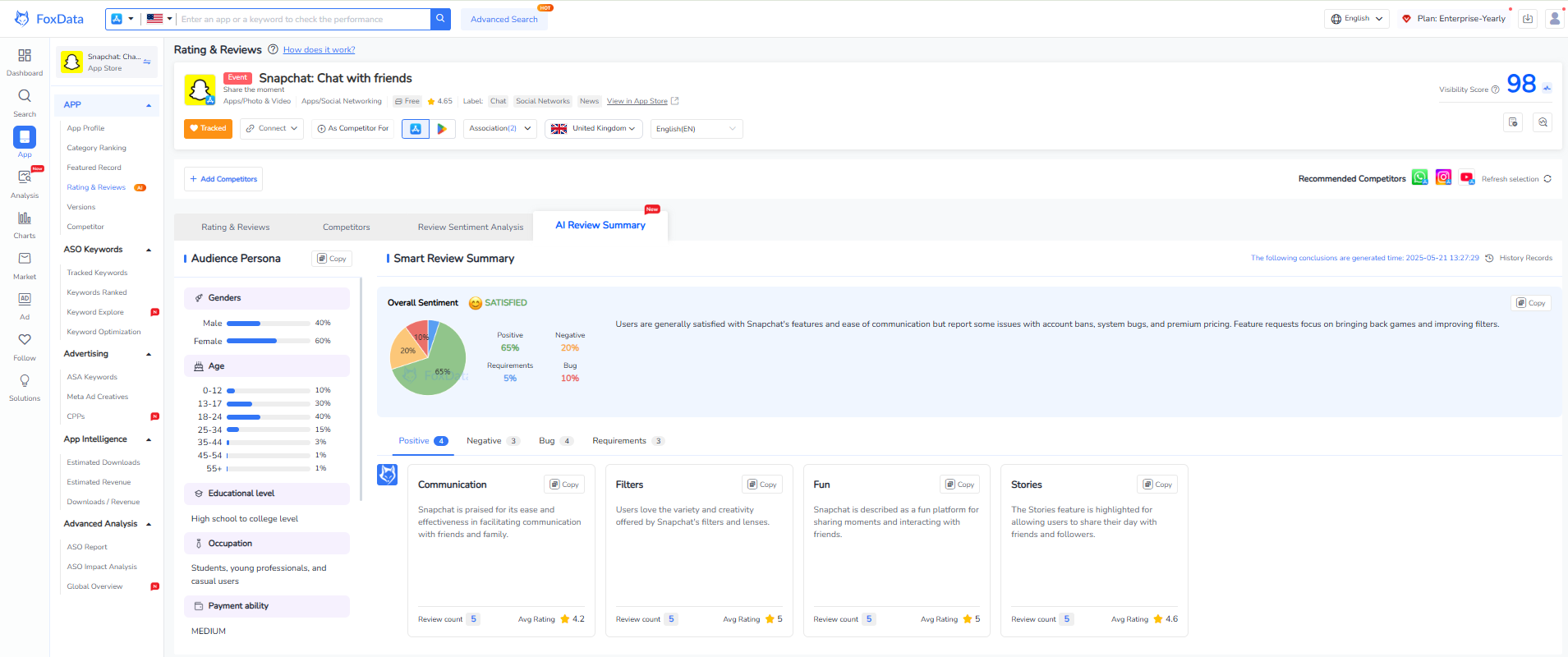
📌 Use FoxData’s AI Review Summary to extract themes and analyze sentiment faster.
Localization is one of the most sustainable growth channels for ASO when expanding into new markets. However, simple translation is not enough; keyword research and content localization are the truly effective methods.
First, assess which markets have already shown potential. Review your app's existing downloads, revenue, and even search volume in different countries/regions to evaluate its awareness and momentum.
Explore how competitors in your category present themselves locally. AppTweak's ASO Creatives Explorer can help you scan local store listings, discover creative trends, and identify visual or cultural cues that can be applied to your own screenshots.
Enter the design phase and create wireframes that reflect your research findings. Once completed, have a native speaker review your visuals and captions to ensure that nothing is missed during translation and that all content aligns with local culture.
To measure the success of localization, track key metrics for each market, such as the best-performing keywords, conversion rates, average ratings, retention rates, and uninstall rates. This helps you determine which regions are responding best and which ones need further optimization.
Key Localization Points:
- English: login/log in
- China Mainland: 登录
- Taiwan: 登入
- Japan: ログイン
- Korea: 로그인
Localized keywords must appear in Title, Short Description & Full Description.
ASO is not a set-it-and-forget-it task—it thrives on continuous testing and validation.
Key Metrics for A/B Testing:
✅ Use FoxData’s KPI tracking dashboard to monitor performance across dimensions, compare against past performance, and quickly identify divergences.
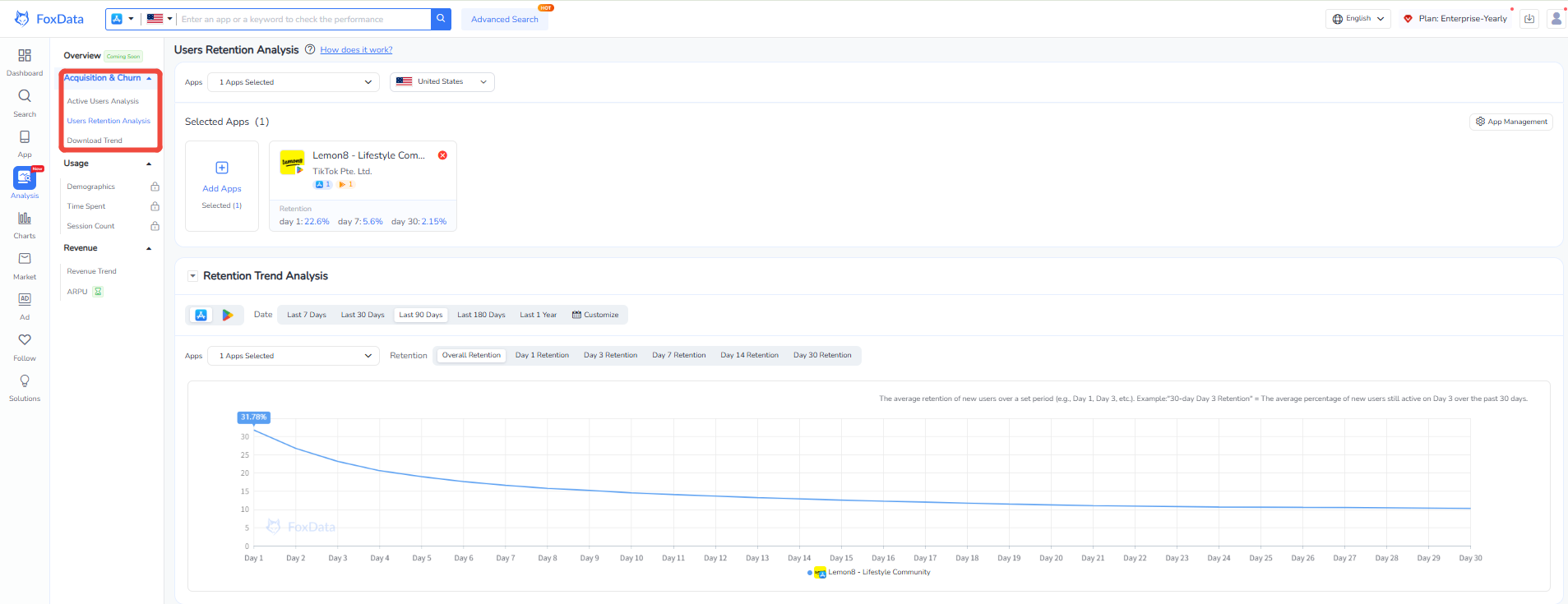
FoxData Users Retention Analysis
To succeed with Google Play Store optimization, it's crucial to employ the right strategies and avoid common pitfalls. Here are some key areas where developers often overlook or misuse tactics during implementation:
Similar to SEO, excessive keyword stuffing won't boost rankings and could backfire. While strategically repeating target keywords can enhance relevance, it can also hurt user experience and conversions if it disrupts text flow and readability.
It's worth noting that Google's algorithms are sophisticated enough to recognize keywords and assess the overall coherence and clarity of your text. Therefore, when writing content, balance keyword optimization with content quality, adhering to the principle of "natural integration and smooth phrasing."
For apps that are newly launched or have a small user base, constantly waiting for A/B test results can be inefficient. We often hear developers say, "The test ran for months, and the feedback was still very limited." In such cases, we recommend a more practical optimization process: skip A/B testing, directly release updates, and evaluate their impact two weeks after launch. If the data doesn't meet expectations, revert to the original version. This approach saves significant time when traffic is low while still effectively driving store page optimization.
For games and event-driven apps, a lack of a consistent promotional content strategy often means missing out on additional exposure from Google.
Google Play strongly encourages developers to use the "Promotional Content" mechanism to periodically showcase limited-time events or significant updates within the app/game. This not only helps improve user retention but also potentially earns additional featured placements. We recommend publishing promotional content every seven days and maintaining a display cycle of about seven days to continuously maintain visibility in the "Hot Events" section.
Want to know if your ASO strategy is working? Focus on the data.
Google Play not only focuses on downloads but also on recommending apps that retain users in the long term. Retention rate is a strong indicator of app quality, and the algorithm takes this into account when deciding which apps to highlight in the Play Store.
To ensure your ASO efforts are fruitful, monitor key retention metrics such as average session duration, usage frequency (daily, weekly, or monthly opens), and uninstall rate. These metrics help Google determine if your app has lasting value and is worth promoting.
💡 FoxData's Time Spent and Session Count features
📌 With third-party ASO platforms like FoxData, you can more easily track keyword coverage, conversion data trends, changes in user feedback, and other core dimensions, helping you identify problems and make quick adjustments.
Today, Google Play Store Optimization has evolved beyond simply "adding a few keywords and updating an icon." It's transforming into a comprehensive, data-driven, user-experience-focused growth methodology that spans the entire user lifecycle.
Crucially, ASO should not be viewed as a checklist of tasks to be performed periodically, but rather as a continuous optimization process. It requires ongoing experimentation, data analysis, and strategic iteration to maintain a competitive edge in the rapidly changing app market.
We believe that a truly successful app optimization strategy should encompass three core dimensions: technical performance stability, continuous enhancement of user value, and differentiated creative content dissemination.
❗ Interested in how FoxData can help scale your ASO efforts globally? Try our platform for free.
Google Play ASO is evolving. Here’s where it’s heading:
While keywords remain fundamental, Google is becoming increasingly adept at understanding semantic context. Instead of simply stuffing keywords, it's more effective to build a semantic structure centered around "keyword clusters" to better align with user search intent. This also demands stronger overall logic and lexical diversity in the content.
Google currently allows developers to link their YouTube channels to store pages. This opens up new ways to showcase visual content, helping to convey core values through more immersive media, enhancing the user experience and conversion efficiency.
Especially for game apps, Google is continuously strengthening the exposure mechanism for "time-sensitive content," including holiday events, limited-time challenges, and character unlocks. Regularly updating promotional content on app store pages not only helps increase user engagement but also aligns with Google's strategy of creating a contextual content consumption experience.
🔗 Click here for more ASO strategy output
Q1: Do all keywords need to be in the Title and Descriptions?
A: Not necessarily. Prioritize high-traffic, highly relevant ones in the Title first, then Short Description. Keep language natural and user-friendly—it's not about volume but clarity.
Q2: Do icons and screenshots impact installs significantly?
A: Absolutely. Your icon, screenshots, and preview greatly influence whether a user taps to download. A/B test them and stay ahead of creative benchmarks in your niche.
Q3: Should I start ASO even if my app just launched?
A: Yes! Early-stage ASO sets the foundation for visibility. Plan your keyword strategy, design creatives, and establish your rating pipeline from Day 1.
Q4: What’s the difference between “Explore Traffic” and “Search Traffic”?
A: Search Traffic stems from user queries. Explore Traffic results from recommendations, rankings, categories, or similar app placements. Strong ASO can boost both.
Q5: Should non-gaming apps use Promotional Content too?
A: Absolutely. Even for non-gaming use cases, use Promotional Content to highlight new features, time-sensitive deals, or important updates. It boosts engagement and surfaces your app in “featured” areas.
Q6: How do I measure app performance across markets?
A: Google Play Console offers baseline insights, but FoxData lets you analyze keyword performance, ranking, and competitor strength region by region for strategic localization.
Q7: Can I succeed without getting featured?
A: Yes. Editor Picks or Feature placements help, but aren’t the only traffic source. Solid metadata, reviews, and content strategy can secure plenty of organic downloads.
ASO isn't a one-time checklist—it's a continuous, long-term growth engine tied to your product's lifecycle. Done right, it connects:
User Feedback → Data Insights → Creative Iteration
With tools like FoxData, you can reduce trial-and-error, track competitors, and iterate creatives efficiently. Whether you’re scaling in one market or globally, the combination of performance metrics, creative excellence, and keyword expansion is your path to success.
🎯 Sign up for a free FoxData account now and instantly access your app's keyword coverage performance across global markets!
© 2020-2026 FoxData. All Rights Reserved.



