






Explore More Possibilities for Your Business
Full-cycle scenario construction to meet your needs from App research, development, and release to operation.
Ready for your soaring growth
📢 FoxData has officially achieved ISO 27001 certification, reinforcing our commitment to global data security and enterprise-grade standards.
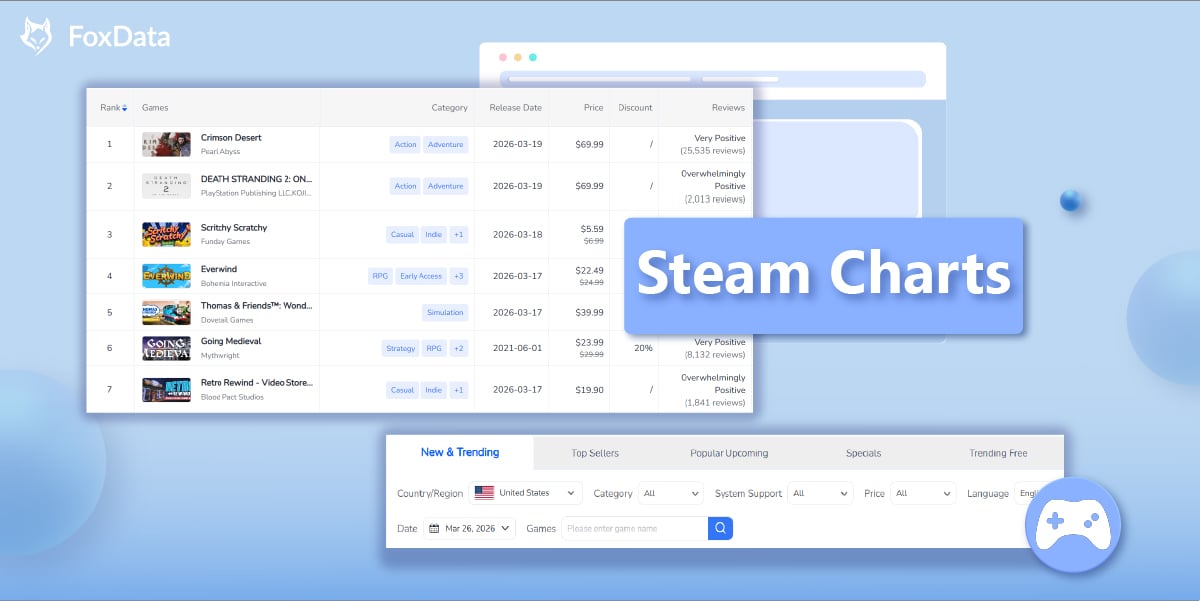
FoxData has launched Steam Charts, a powerful analytics module that enables game developers, publishers, and marketers to track the Steam marketplace in real time.
With five core chart categories — New & Trending, Top Sellers, Popular Upcoming, Specials, and Trending Free — plus advanced filters (region, category, price, language, system support, and date), you can instantly analyze player behavior, pricing strategies, and market trends.
👉 Start analyzing Steam market data in minutes
If you’ve ever tried to analyze the Steam marketplace directly, you’ve likely run into these problems:
FoxData Steam Charts solves this by transforming raw storefront data into structured, filterable, and export-ready intelligence — so you can make faster, data-driven decisions.
FoxData Steam Charts is a newly launched feature within the FoxData analytics platform that provides comprehensive, real-time data on Steam’s marketplace performance. Located under the “Top Charts” section in the FoxData dashboard (Market > Top Charts > Steam Charts), this tool aggregates and visualizes critical game performance metrics from Steam — including rankings, pricing, discount information, user reviews, current player counts, 30-day peak players, 24-hour player trends, and system compatibility.
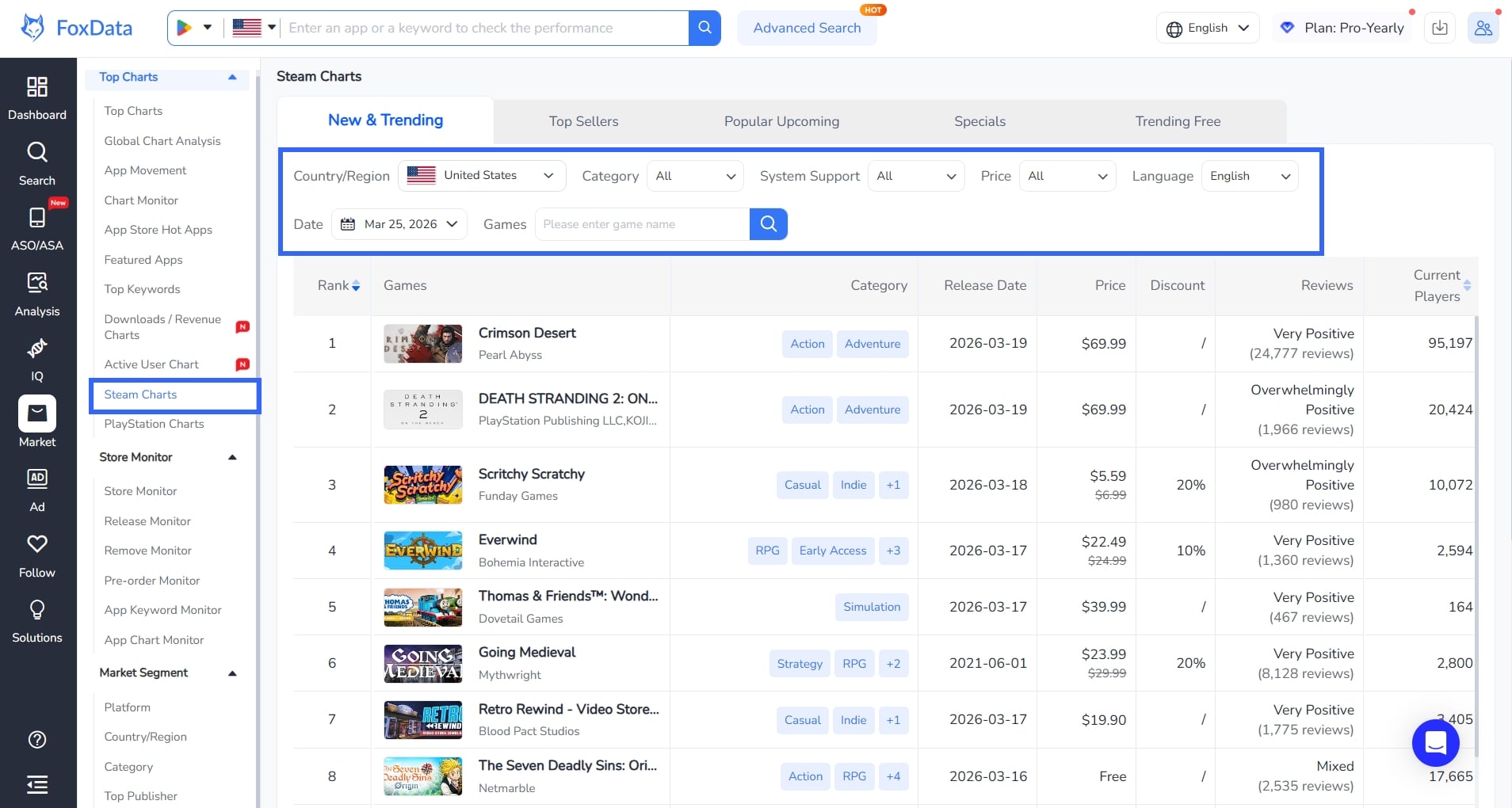
Unlike browsing Steam’s storefront directly, FoxData Steam Charts adds an analytical layer: you can filter by Country/ Region, Game Category, System Support (Windows, Mac, Linux), Price Range, Language, and Specific Dates. This makes it a purpose-built intelligence tool for anyone who needs to understand what’s happening on Steam at a granular level.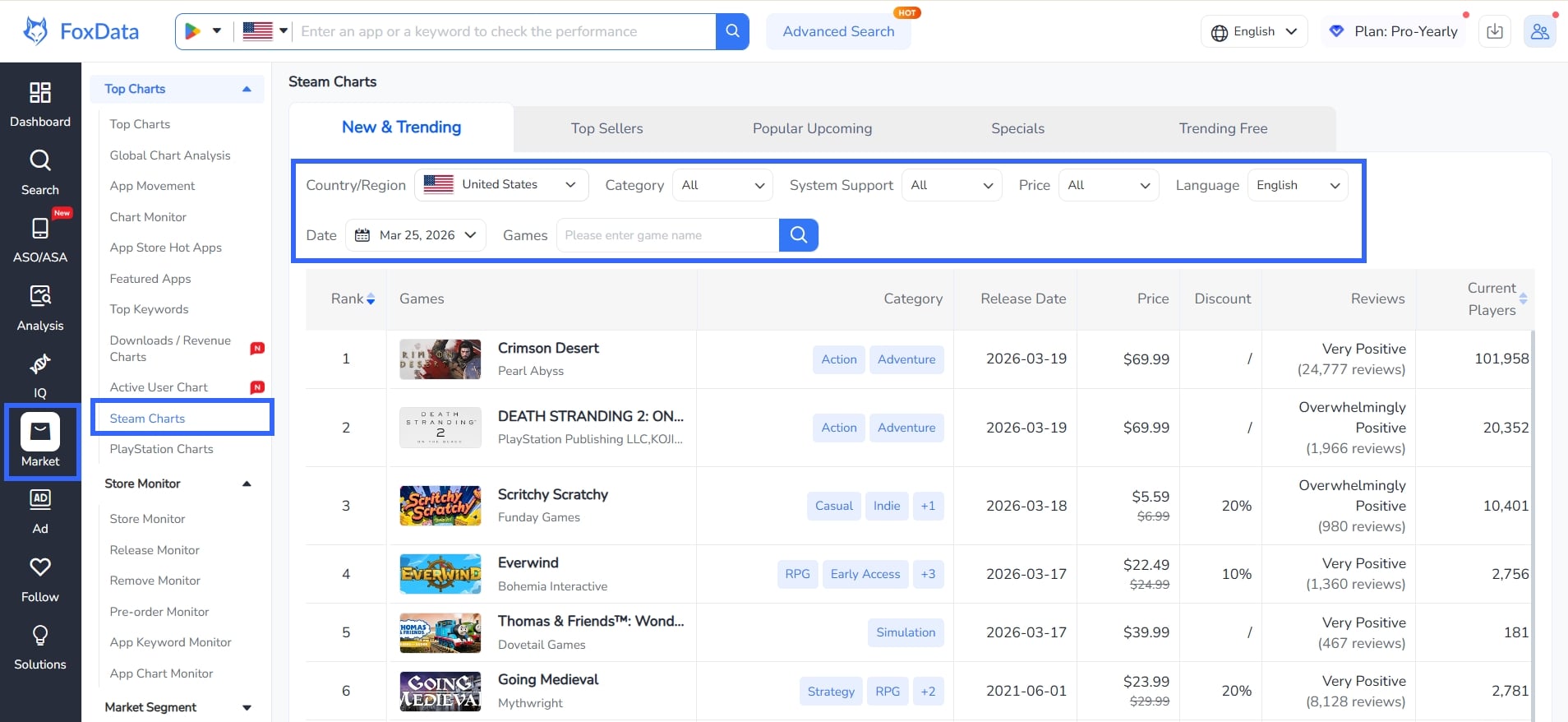
Whether you’re an indie developer or part of a AAA studio, understanding the competitive landscape on Steam is critical. Steam Charts helps you benchmark your game’s performance against trending titles, identify pricing sweet spots, and understand which categories are gaining traction.
Publishers need market intelligence to time their launches, plan promotions, and allocate marketing budgets. The Specials tab alone provides invaluable data on how competitors structure their discount campaigns — including discount percentages, start/end dates, and the resulting player count impact.
If you cover the gaming industry, Steam Charts provides structured, filterable data that’s far more useful than manually browsing the Steam store. Export-ready views and historical date filtering make it ideal for trend reports and market sizing.
Streamers, YouTubers, and gaming journalists can use the Trending Free and New & Trending tabs to discover what games are gaining momentum — perfect for deciding what to cover next.
Discover keyword opportunities, monitor competitors, and improve campaign performance using FoxData’s ASA analytics tools.
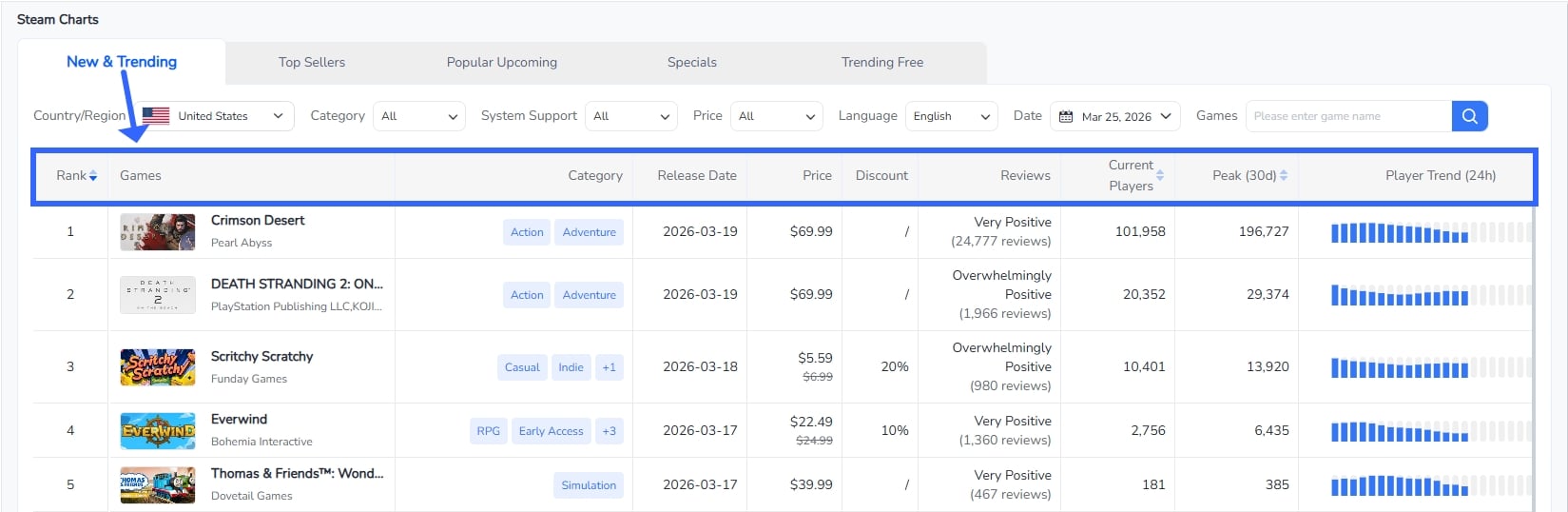
FoxData Steam Charts - New & Trending
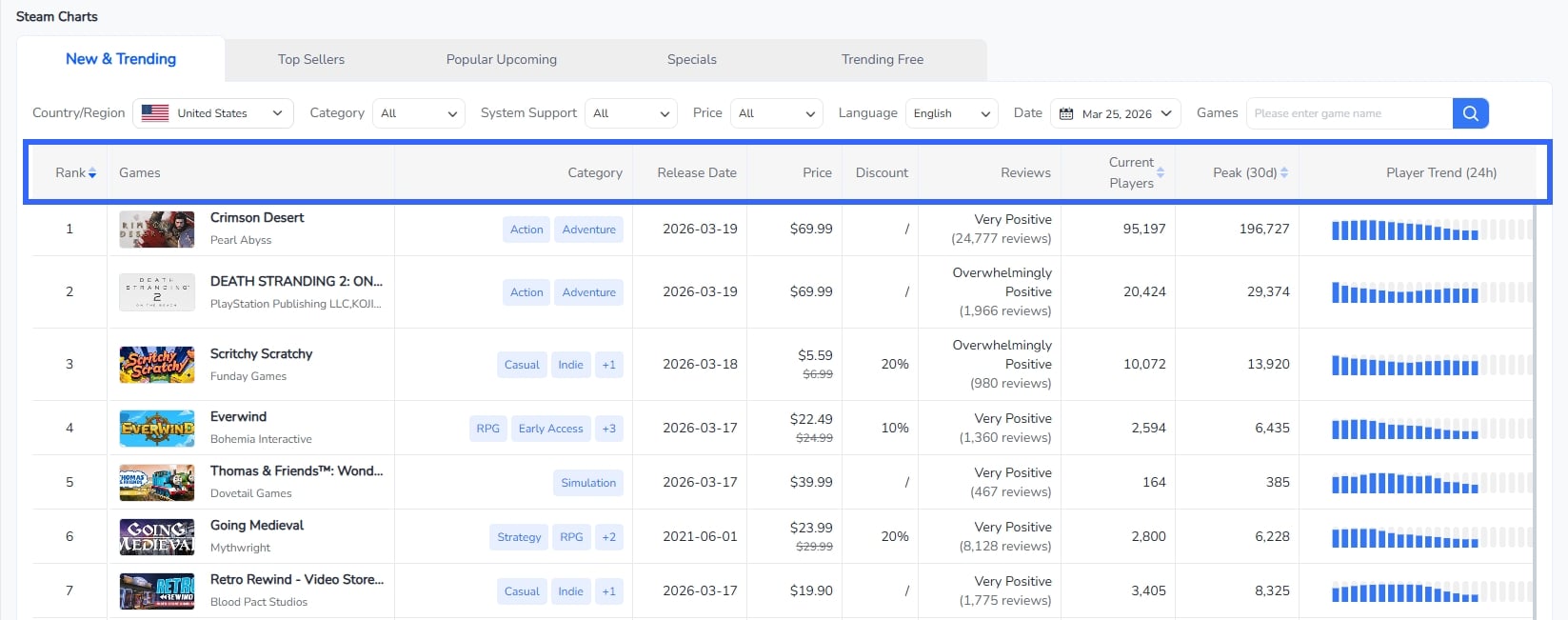
The New & Trending tab showcases recently released games that are gaining momentum on Steam. This is the go-to view for understanding what’s hot right now. Each entry displays the game’s rank, title, publisher, category tags (e.g., Action, Adventure, RPG, Indie), release date, price, discount percentage, review sentiment (e.g., “Very Positive,” “Overwhelmingly Positive”), current player count, 30-day peak players, a 24-hour player trend bar chart, and system support icons.
📌 Key use case: Validate whether your newly launched title is trending, and benchmark it against other recent releases in the same window.
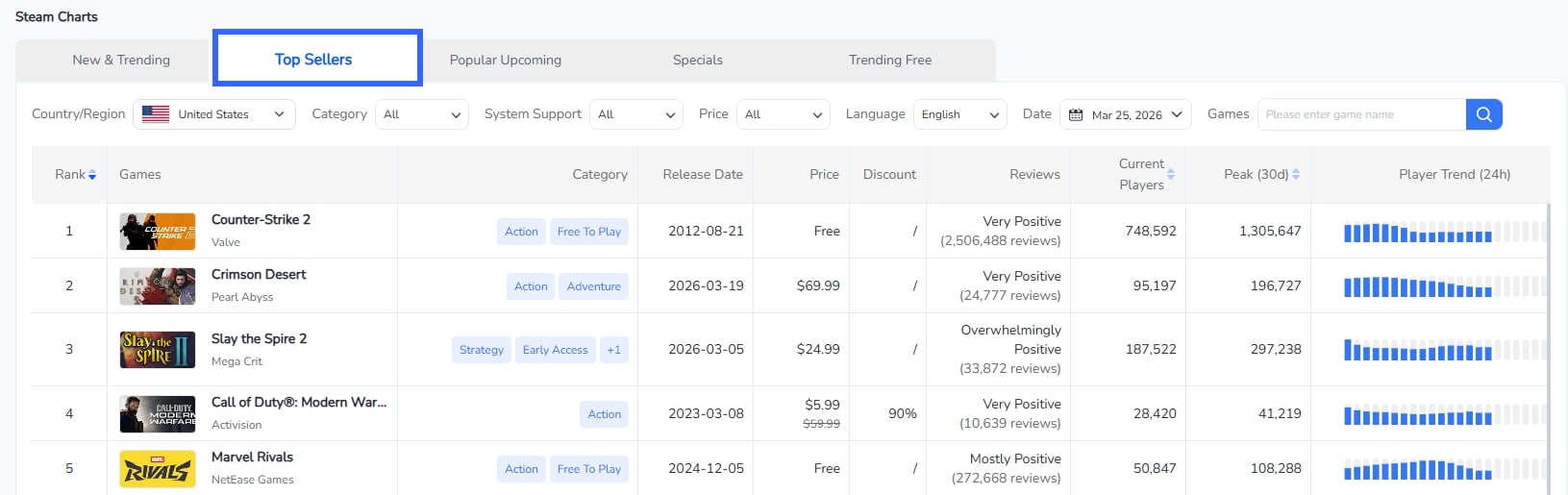
FoxData Steam Charts - Top Sellers
The Top Sellers tab ranks games by revenue performance, combining both new and established titles. This view is essential for understanding which games are generating the most commercial success on Steam, regardless of when they were released.
This tab reveals important patterns: free-to-play giants like Counter-Strike 2 (748,592 current players) dominate the top, while newer premium titles like Crimson Desert ($69.99) and Slay the Spire 2 ($24.99, Early Access) compete on strong player engagement. You’ll also see heavily discounted legacy titles like Call of Duty: Modern Warfare (90% off) climbing the charts.
📌 Key use case: Understand revenue dynamics — which pricing models and discount strategies drive the best commercial performance.
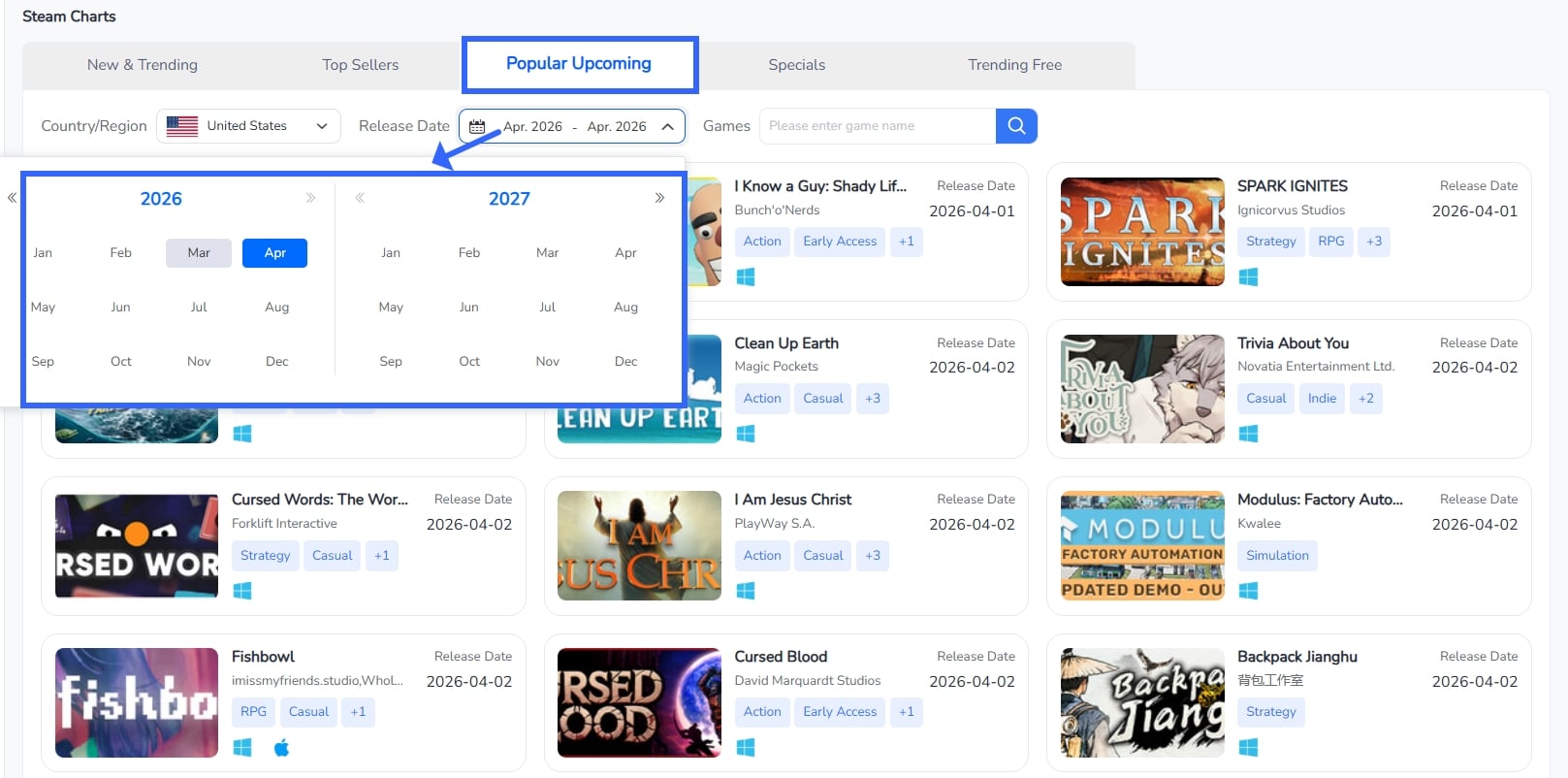
FoxData Steam Charts - Popular Upcoming
The Popular Upcoming tab is unique — it displays games that haven’t been released yet but are generating significant wishlist activity and community buzz. The layout shifts from a table format to a card-based grid view, showing game artwork, title, developer, category tags, expected release date, and system support.
This is a forward-looking intelligence tool, letting you see what the Steam community is excited about before launch day. The filters allow you to narrow by release date range, region, and game name.
📌 Key use case: Plan ahead. If you’re launching a game in a specific window, check this tab to see what else is competing for attention. Publishers can also use this to identify potential partnership or cross-promotion opportunities.
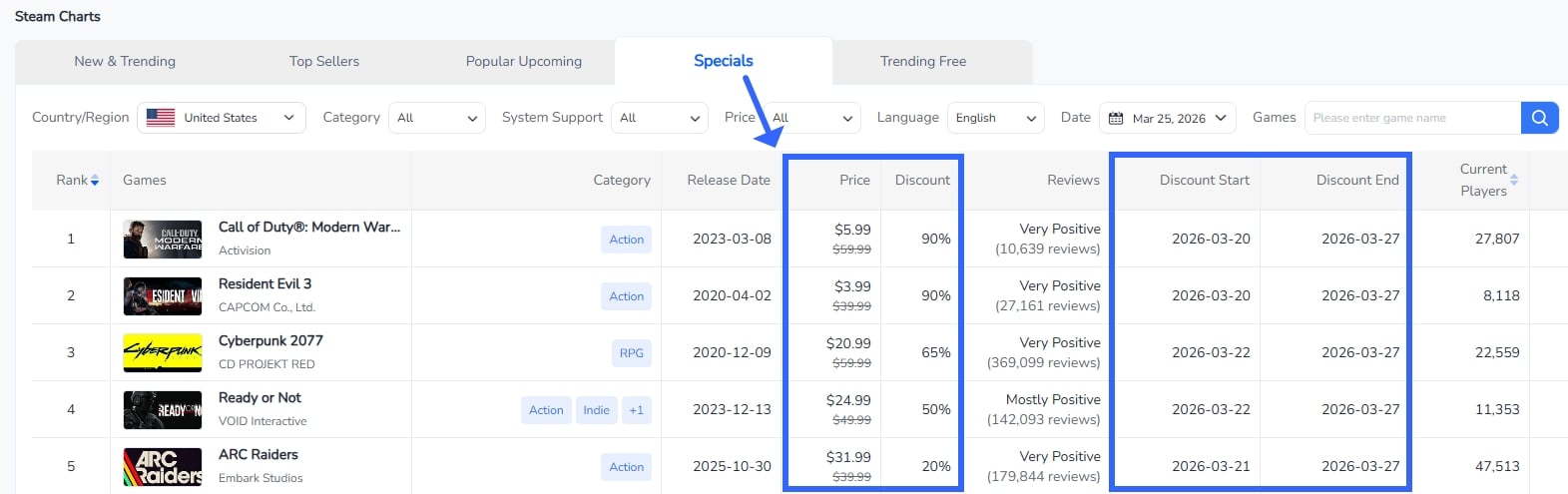
FoxData Steam Charts - Specials
The Specials tab is a goldmine for pricing strategy research. It lists all currently discounted games on Steam, complete with original price, discounted price, discount percentage, review sentiment, current players, and — critically — the discount start and end dates.
For example, Call of Duty: Modern Warfare III leads with a 90% discount (down to $5.99 from $59.99), followed by Resident Evil 3 at 90% off and Fallout 76 at 75% off. The inclusion of discount start/end dates is a feature you won’t find on Steam’s own storefront, making this tab uniquely valuable for competitive pricing intelligence.
📌 Key use case: Benchmark your discount campaigns against competitors. Understand how deep discounts correlate with player count surges and review volume changes.
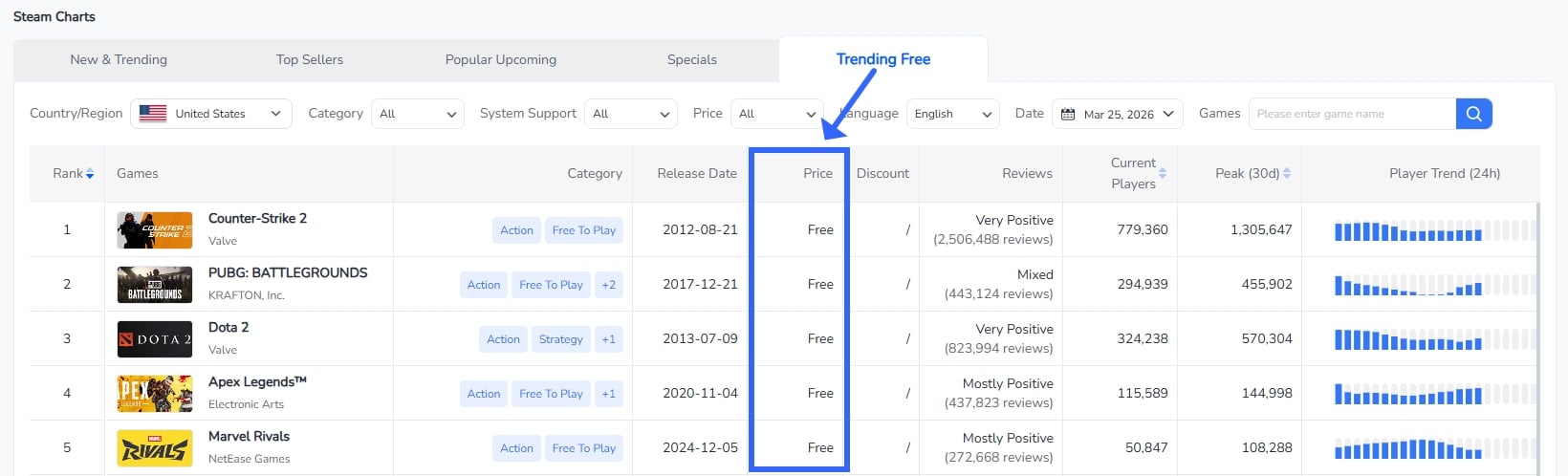
FoxData Steam Charts - Trending Free
The Trending Free tab focuses exclusively on free-to-play games, ranked by current popularity. This section is crucial for understanding the F2P competitive landscape, which has its own distinct dynamics driven by in-game monetization rather than upfront pricing.
📌 Key use case: If you’re developing or publishing a F2P title, this tab provides the competitive benchmark. Track how your game’s daily active players compare to category leaders.
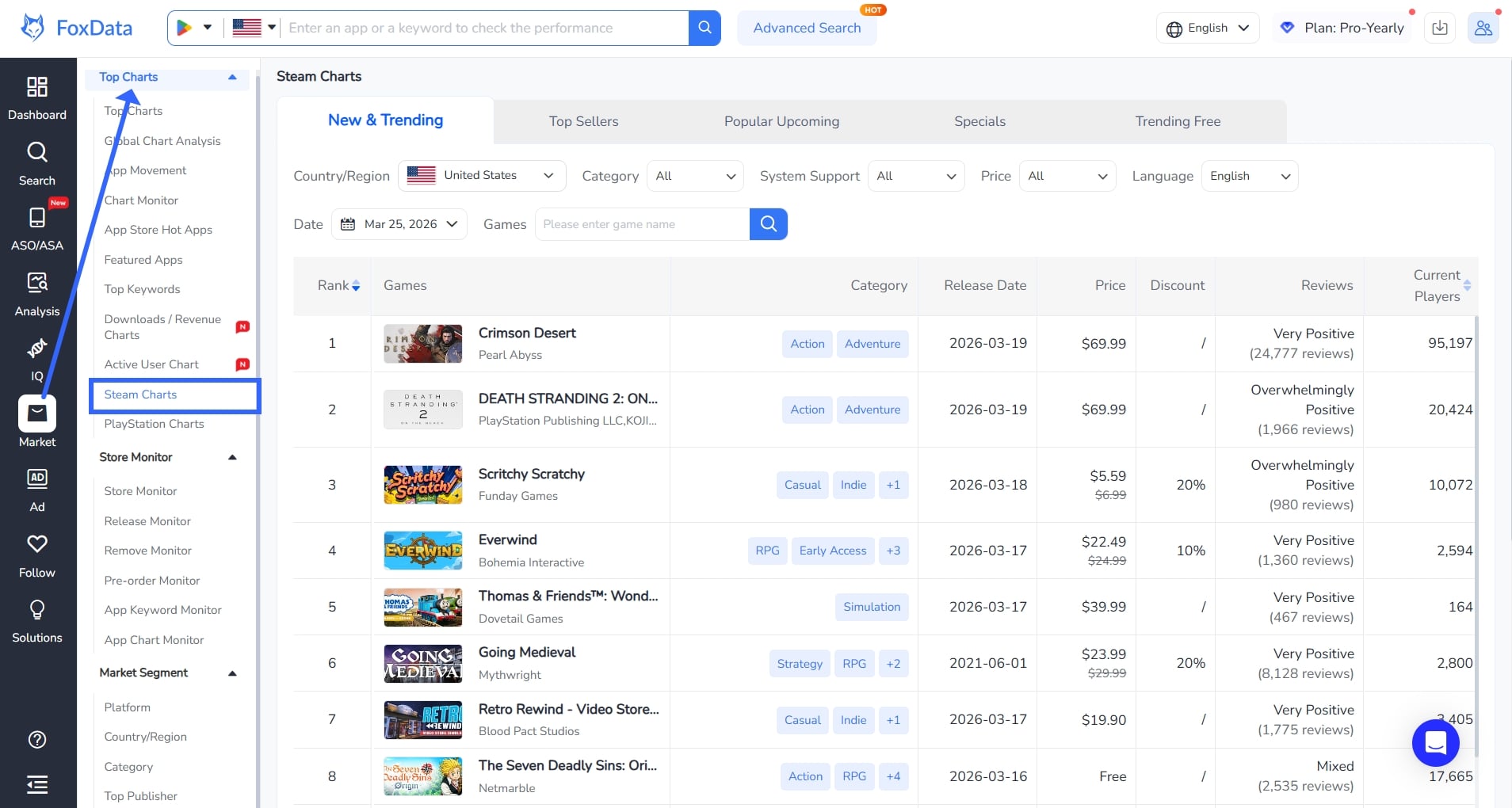
Log in to your FoxData account. Navigate to Market > Top Charts > Steam Charts in the left sidebar.
Don’t have an account? Register for free
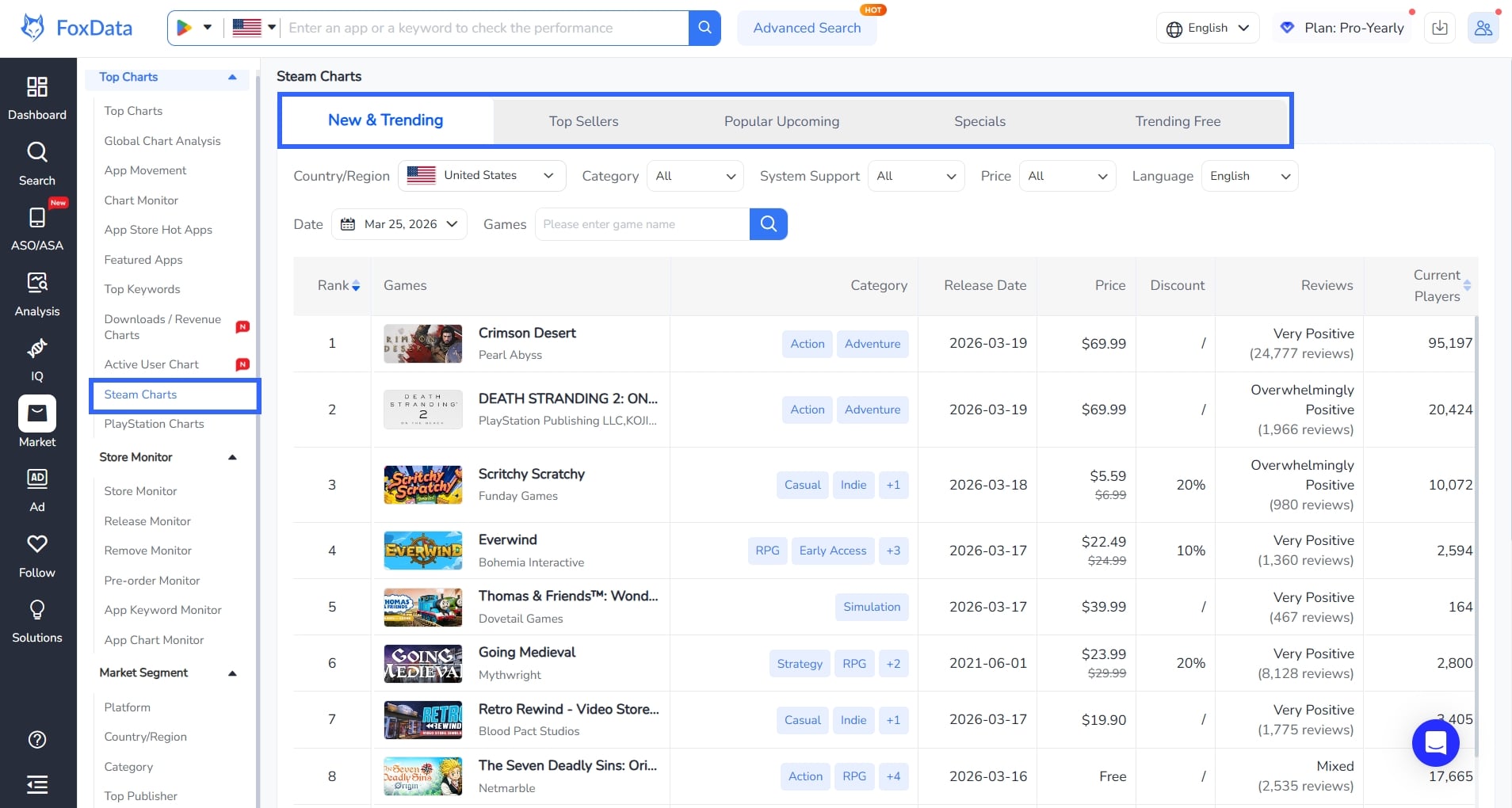
Choose from the five tabs at the top: "New & Trending", "Top Sellers", "Popular Upcoming", "Specials", or "Trending Free".
Use the filter bar to narrow results by:
Review the table columns: Rank, Games, Category, Release Date, Price, Discount, Reviews, Current Players, Peak (30d), Player Trend (24h), and System Support. Click column headers to sort by different metrics.
Use the insights to inform your game launch timing, pricing strategy, marketing campaigns, or market research reports.
A: FoxData Steam Charts is a market intelligence feature within the FoxData analytics platform that tracks and analyzes Steam game performance across five categories: New & Trending, Top Sellers, Popular Upcoming, Specials, and Trending Free.
A: FoxData offers a free tier with basic features. Full access—including historical data, advanced filters, and exports—requires a membership. Choose your plan.
A: Yes. FoxData Steam Charts supports region-based filtering, allowing you to view charts specific to markets like the United States, Japan, Germany, and many more.
A: Each game entry includes: Rank, Game Name, Publisher, Category, Release Date, Price, Discount, Review Sentiment, Current Players, 30-Day Peak Players, 24-Hour Player Trend, and System Support.
A: Log in at the FoxData platform and navigate to Market > Top Charts > Steam Charts. Get started here.
FoxData Steam Charts is now available. Whether you're a game developer analyzing competitors, a publisher planning your next promotion, or an analyst building market insights, this tool delivers structured data and analytical depth far beyond Steam’s native storefront.
Upgrade to a FoxData membership to unlock the full power of Steam Charts—including historical data, advanced filtering, and seamless integration with FoxData’s complete analytics suite.
👉 Ready to get started? Schedule a demo with our team
📣 In Case You Missed It (ICYMI):
© 2020-2026 FoxData. All Rights Reserved.



