




Explore More Possibilities for Your Business
Full-cycle scenario construction to meet your needs from App research, development, and release to operation.
Ready for your soaring growth
Apple Search Ads (ASA) is now the primary growth engine — and most teams are flying blind.
Something shifted at WWDC2026 that many growth teams haven't fully processed yet.
Apple didn’t just release new features. It restructured the entire competitive surface of the App Store — expanding Apple Search Ads inventory, unlocking more placements, and introducing new creative opportunities.
The result is a new reality:
Teams that understand ASA placement strategy and CPP intelligence will scale. Everyone else will see rising CPI and declining efficiency.
This is no longer just traffic acquisition. It's intent capture — across placements, creatives, and timing.
ASA is now the primary growth engine. Not a supplement to ASO. Not a secondary channel. The primary lever. And the gap between operators who have competitive visibility into how that engine works — and those who are guessing — is widening every week.
That's why FoxData has launched two new capabilities that change how growth teams execute ASA campaigns:
New to FoxData's ASA Intelligence tools?
Explore FoxData's full Apple Search Ads analytics capabilities →
Before we get tactical, let's establish the foundation — because these two concepts are deeply interconnected, and confusing them is one of the most expensive mistakes you can make in Apple Search Ads.
A Custom Product Page (CPP) is an alternate version of your App Store product page — distinct from your default page — that you can build with different screenshots, app preview videos, and promotional text.
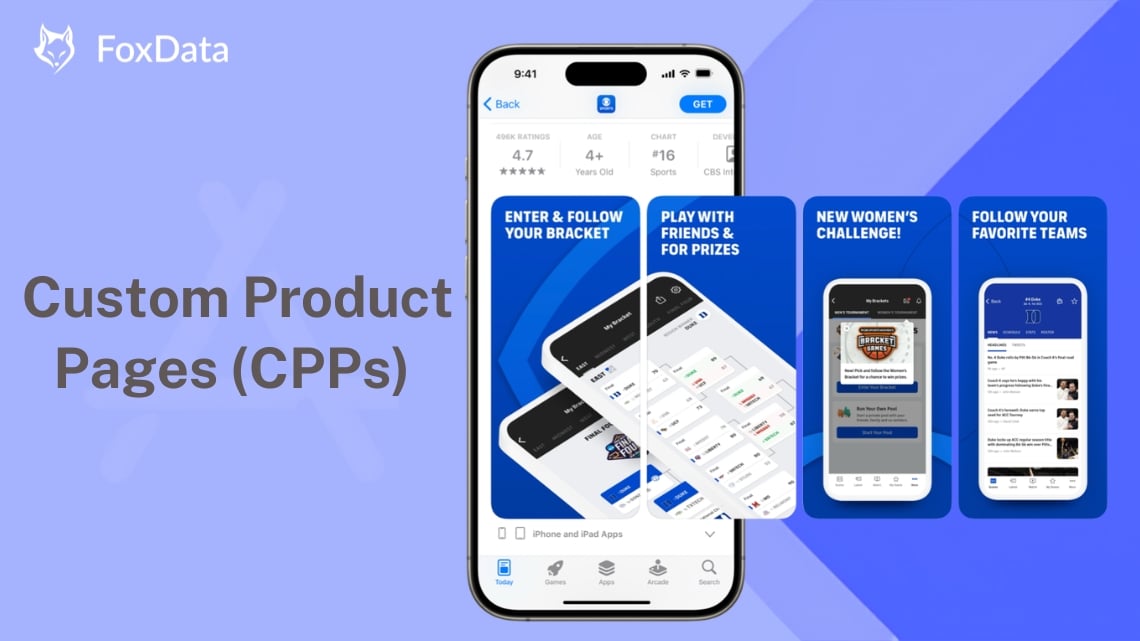
Apple now allows up to 70 CPPs per app (doubled from the previous limit of 35). Each CPP has its own unique URL and can be linked to specific Apple Search Ads campaigns, external campaigns, or organic channels. You can also assign a deep link to each CPP, directing users to a specific in-app destination — supported on iOS 18 and iPadOS 18 or later.
|
|
Paid CPPs |
Organic CPPs |
|
Trigger |
Linked to Apple Search Ads campaigns |
Accessible via a shareable URL (no ASA required) |
|
Primary Use |
Match ad creative to campaign intent |
Seasonal promotions, influencer links, web-to-app |
|
Audience |
Users who clicked an ASA ad |
Users arriving from non-paid sources |
|
Optimization Goal |
Increase tap-through rate + install from ad |
Improve conversion from external traffic |
|
Strategic Role |
Core ASA conversion lever |
Supplements paid strategy; trackable via third-party tools |
Both matter strategically. Paid CPPs are what determine whether your ASA campaigns convert. Organic CPPs reveal how competitors are positioning themselves beyond paid — and that intelligence has real value when you're building your own messaging strategy.
FoxData's CPP covers both.
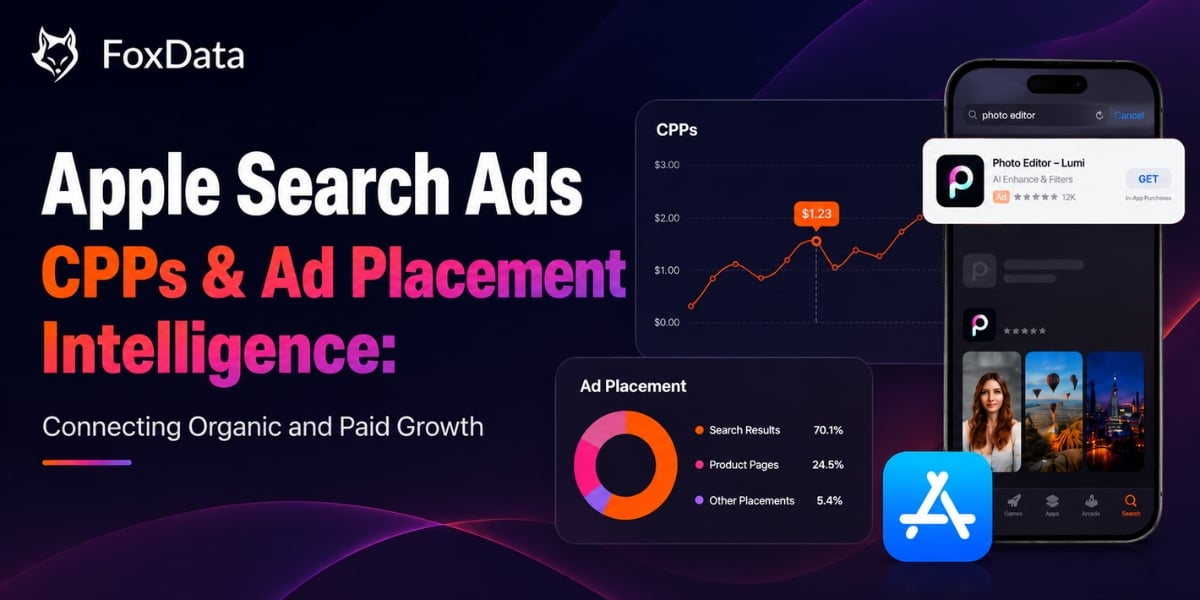
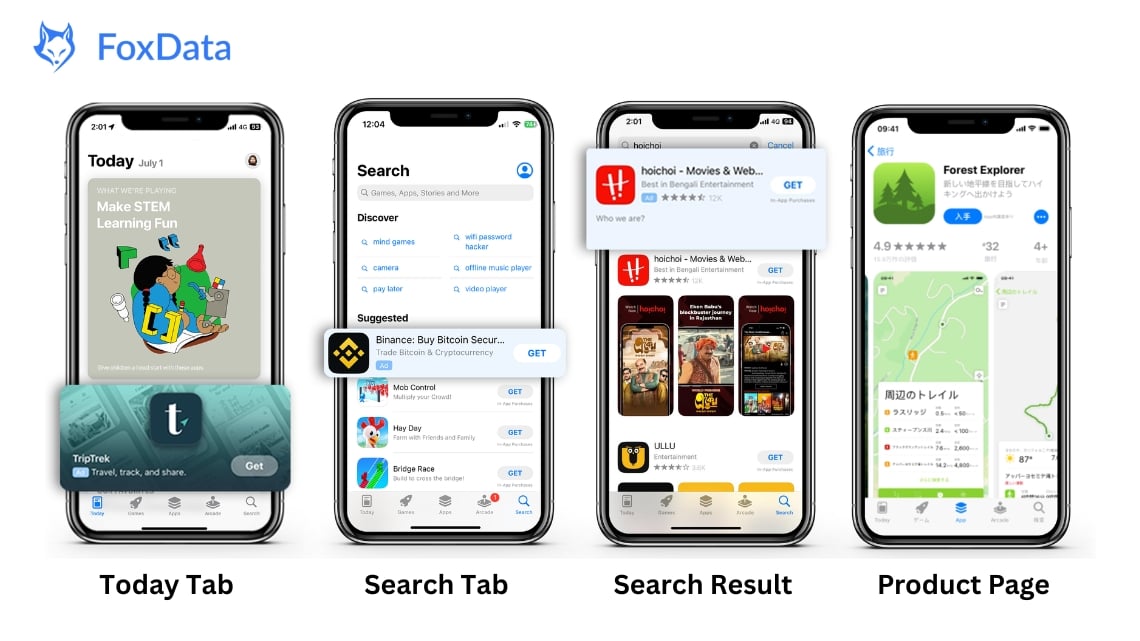
Apple Search Ads Advanced offers four distinct placements. Each one captures a fundamentally different user state — which means each one requires a different CPP strategy, creative approach, and bidding logic.
🔵 Today Tab — Reaches users on the App Store front page before any intent is formed
🟡 Search Tab — Reaches users at the top of the Search page before they type anything
🟢 Search Results — Reaches users actively searching with explicit intent
🔴 Product Page Ads — Reaches users browsing and evaluating apps in the "You Might Also Like" section
The core insight: Each placement is a distinct traffic type with its own audience psychology. Budget allocated without placement-level intelligence is budget allocated by guessing.
🔍 Find Out More: Promote Your App with Apple Search Ads 2026: Today Tab, Search Tab, Search Results & Product Pages
This is what running ASA looks like without the right intelligence.
You launch campaigns, set your budget, and run your default product page—or a few CPPs based on instinct. Then you check the results. CPI is high. Impression share is unclear. You don't know if your budget is reaching the right placements or if competitors are taking visibility on your most valuable searches.
So you optimize. Build another CPP. Test new creatives. Shift budget. The numbers change—but you still don't know whether your optimizations made the difference.
The result? The wrong CPP matched to the wrong placement—multiplied across your entire campaign budget. It's not a creative problem or a bidding problem. It's an intelligence gap.
And now, it's solvable.
"You can't scale with traffic alone anymore."
Volume without conversion architecture is just expensive noise.
Winning in Apple Search Ads (ASA) requires more than great creatives—it requires competitive intelligence. That's why FoxData built CPP and Ad Placement Intelligence, giving you the visibility to optimize campaigns with confidence.
FoxData's CPP lets you analyze competitors' Custom Product Pages (CPPs) across the App Store, covering both Paid CPPs and Organic CPPs.
See the CPP competitors use in Apple Search Ads, including:
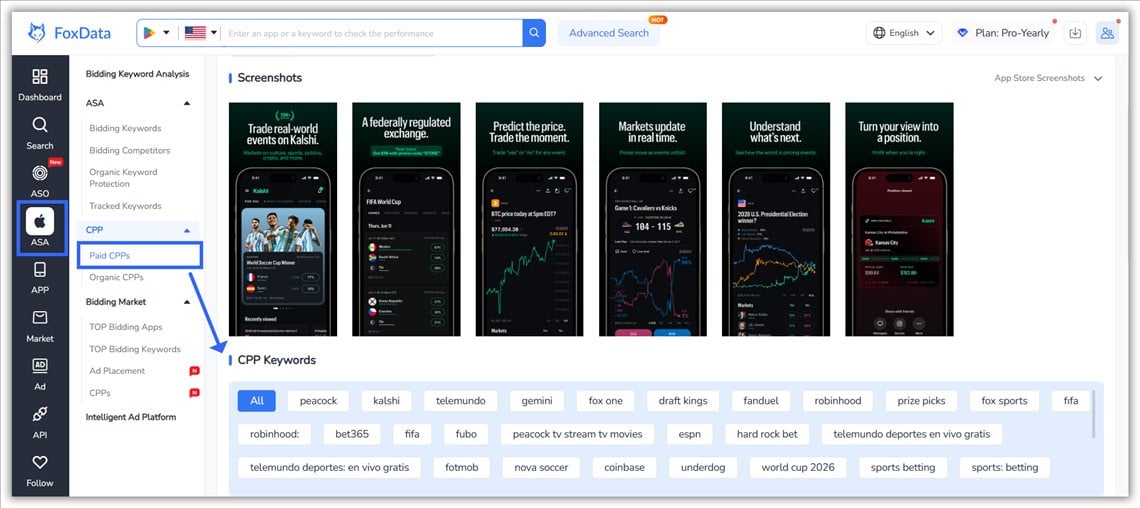
Understand which creatives competitors use, which keywords they target, and how their paid strategy evolves over time.
Compare competitors' Organic CPPs to see:
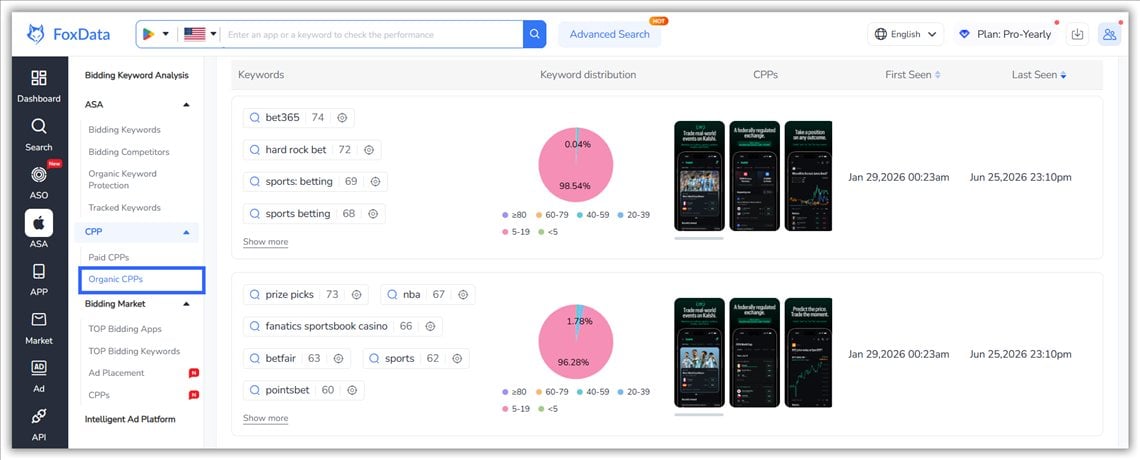
The result: Build better CPPs using competitive insights instead of guesswork.
Ad Placement gives you a real-time view of competitor performance across Apple Search Ads placements.
Track key metrics including:
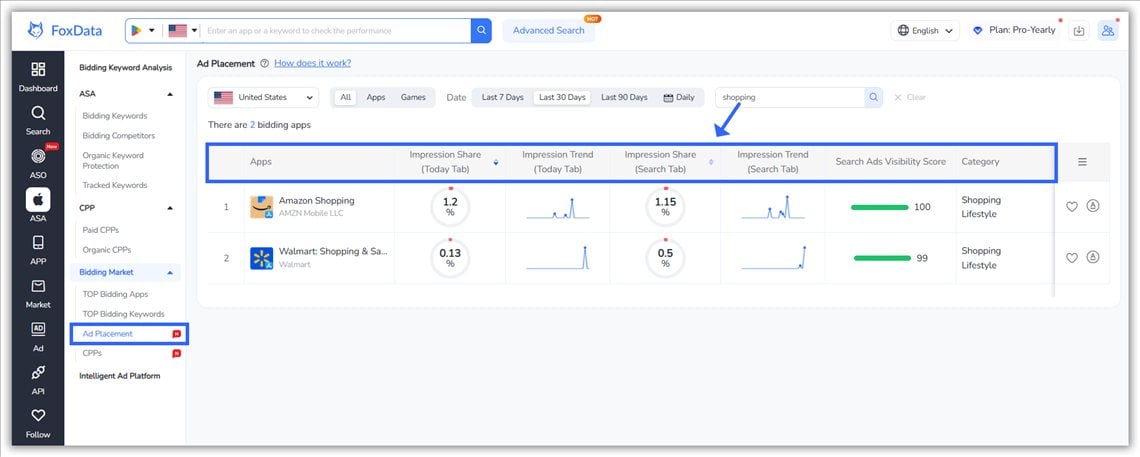
With these insights, you can:
Instead of relying on assumptions, you can allocate budget and optimize campaigns using real competitive data.
This is how you turn ASA strategy into execution using FoxData's CPP and Ad Placement.
Start with FoxData's Ad Placement dashboard. Filter by your category, country and time range. Identify 3–5 apps that are directly competing for the same placements and user segments.
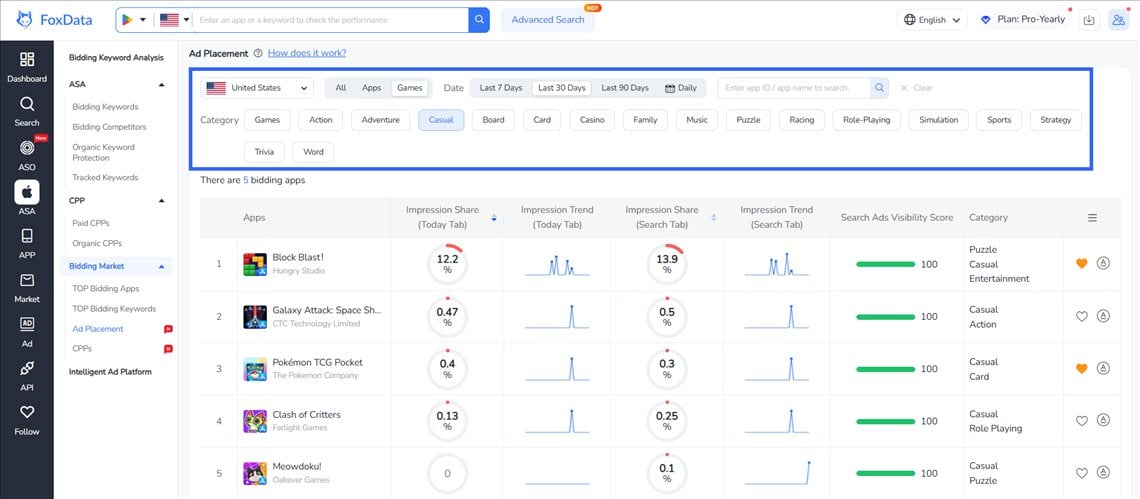
Don't just look at market share or review counts. Look at Search Ads Visibility Score — apps scoring 95–100 are the ones you need to understand most urgently. They're already capturing the attention you're competing for.
Compare Today Tab and Search Tab impression share to see where competitors concentrate spend.
This reveals:
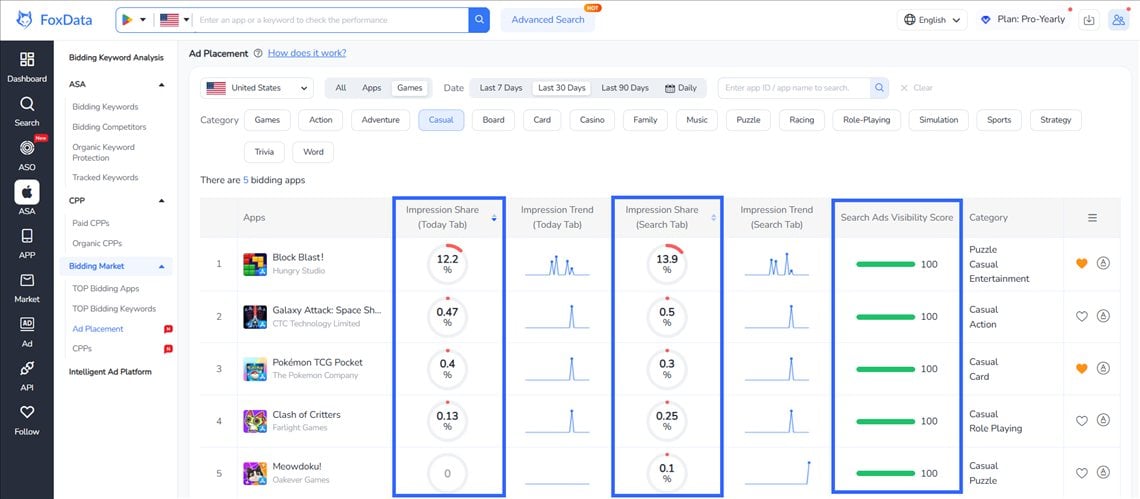
Impression share numbers tell you where competitors are. Impression Trend charts tell you where they're heading.
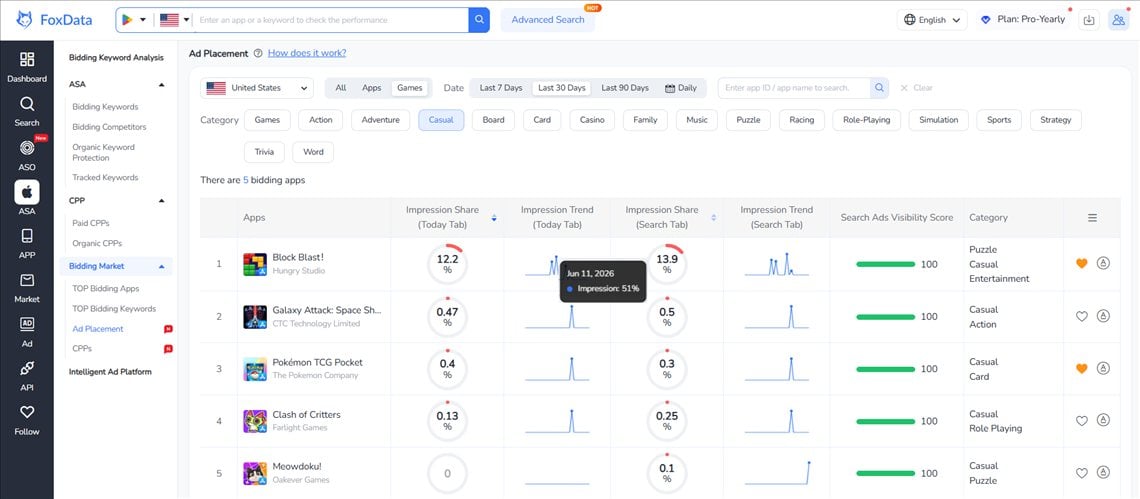
Look for:
Trend data turns a static competitive snapshot into a forward-looking signal.
Switch to FoxData's CPP. Pull the Paid CPPs each competitor is running. For each CPP, review:
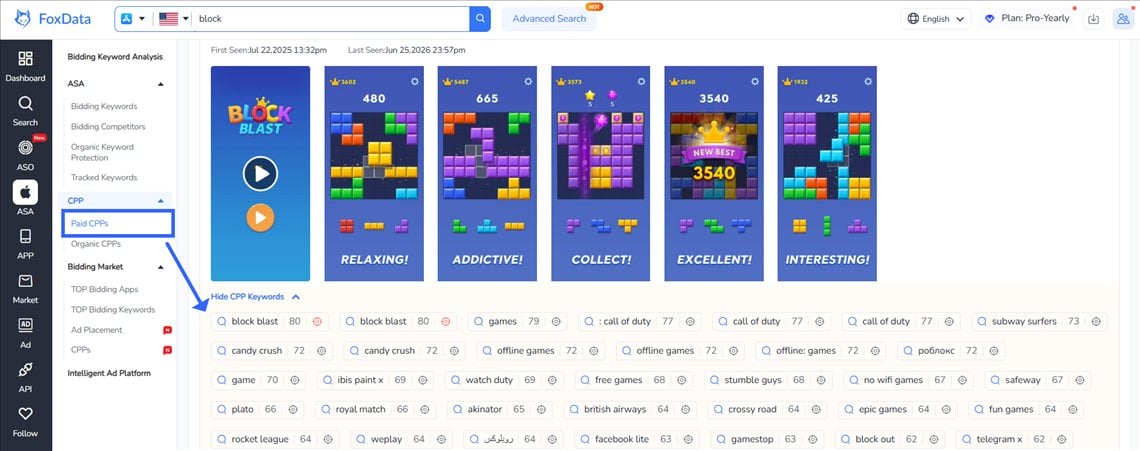
A CPP running consistently over time usually indicates a validated, high-performing creative strategy.
Check Organic CPP to see how competitors position themselves outside paid ads.
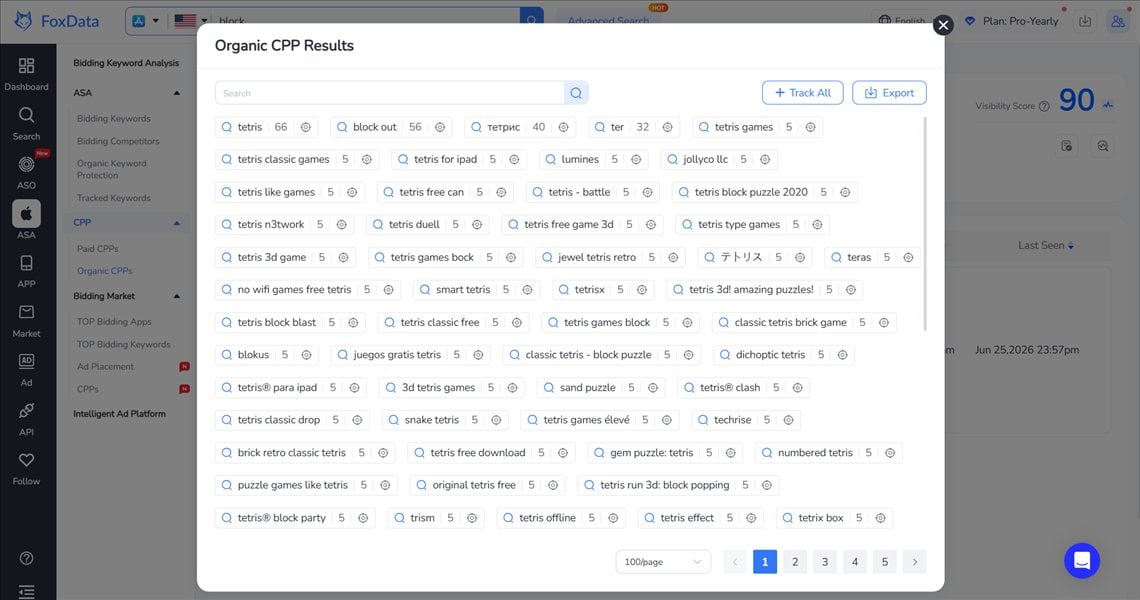
Look for:
The gap between paid and organic often reveals future direction.
Cross-reference placement and CPP insights:
These are your highest-priority opportunities.
With up to 70 CPPs per app, precision matters.
Match message to intent—not just placement.
Structure campaigns around placement + CPP pairings, then monitor continuously:
Sustained growth comes from iteration, not setup.
The four ad placements reach different users. Today Tab drives discovery, Search Tab captures emerging intent, Search Results converts high-intent searches, and Product Page Ads reach users comparing similar apps.
Treating every placement the same means missing opportunities. Each deserves its own bidding strategy and CPP.
A CPP isn't just a different set of screenshots—it's a landing page built for a specific audience and intent. With up to 70 CPPs per app, you can match the right message to the right user and improve conversion rates.
Success in ASA depends on visibility. Knowing which placements competitors dominate, which CPPs they use, and where impression share is shifting helps you invest budget more effectively. FoxData's CPP and Ad Placement Intelligence provide the insights needed to stay ahead.
ASO builds long-term organic visibility. ASA accelerates user acquisition. The strongest growth strategies combine both, using placement intelligence and CPP optimization to reach the right users at the right time.
Traffic gets users to your page. CPPs convert them. Competitive intelligence tells you where to invest.
A: A Custom Product Page (CPP) is a customized version of your App Store product page for different audiences, keywords, or campaigns. In Apple Search Ads (ASA), you can assign a specific CPP to each campaign so users land on the most relevant page instead of your default listing. CPPs help match the right message to the right user, increasing conversion rates and improving ASA performance.
A: Paid CPPs are used in ASA and assigned to specific campaigns or keywords to improve paid conversion. Organic CPPs are shared through promotional links or optimized for App Store search to improve organic acquisition. The best strategy uses Organic CPPs to identify winning creatives, then scales them with Paid CPPs in Apple Search Ads.
A: Search Results typically delivers the highest conversion rates because users are actively searching with clear intent. Each ads placement serves a different goal:
The strongest ASA strategies use all four placements with placement-specific CPPs and tailored bidding strategies.
A: To reduce CPI in Apple Search Ads, improve your Custom Product Pages (CPPs) so they match user intent and drive higher conversion rates, then allocate more budget to the placements that perform best. Combine this with better keyword targeting and ongoing optimization to lower acquisition costs without simply increasing bids.
A: Apple doesn't reveal competitor bids or budgets. Instead, track ASA performance through competitor CPPs, impression share, visibility across ad placements, and trend changes over time. FoxData's CPP and Ad Placement Intelligence provide these insights, helping you understand competitor strategies and uncover new growth opportunities.
A: Impression Share is the percentage of available ad impressions your app captures in ASA. It shows how visible your app is compared with competitors—not just how many impressions you receive. FoxData's Ad Placement tracks impression share by placement, helping you benchmark competitors, identify visibility gaps, and uncover new growth opportunities.
A: Yes. Apple Search Ads (ASA) remains a strong growth channel for smaller teams. While large advertisers focus heavily on Search Results, newer placements like Search Tab, Today Tab, and Product Page Ads can offer lower competition and better cost efficiency. With the right CPPs and placement strategy, smaller teams can compete effectively without the largest budgets.
The App Store has fundamentally changed. That's no longer a prediction—it's today's reality after WWDC 2026.
ASO isn't dead, but it's no longer enough on its own. Organic optimization is now the foundation, not the entire growth strategy. The fastest-growing apps are combining ASO with Apple Search Ads, powered by smarter placement and CPP strategies.
The new growth equation is simple:
Right Placement × Right CPP × Right Intent = Scalable User Acquisition
Executing that consistently requires competitive intelligence. You need to know where competitors are investing, which CPPs they're using, and how visible your app is across every Apple Search Ads placement.
That's why FoxData built CPP and Ad Placement Intelligence. Instead of guessing, you get:
✅ Competitor CPP creative strategies
✅ Placement-level impression share across all ASA surfaces
✅ A Search Ads Visibility Score to benchmark your performance
✅ Daily trend tracking to spot market shifts early
📚 Related Resources:
© 2020-2026 FoxData. All Rights Reserved.



